
Tapwright
Real iPhone control for AI agents: QA, research and mobile workflows. From Windows, Linux or macOS.
Tapwright gives an agent (Claude, Codex, anything that speaks MCP) eyes and hands on your iPhone: it sees the screen as a list of elements plus a screenshot, and taps, types, scrolls, swipes, answers permission prompts and opens deep links. It works with any app on the phone: your TestFlight builds, development builds, the App Store version. Nothing is added to your app, and no Mac or Xcode is needed.
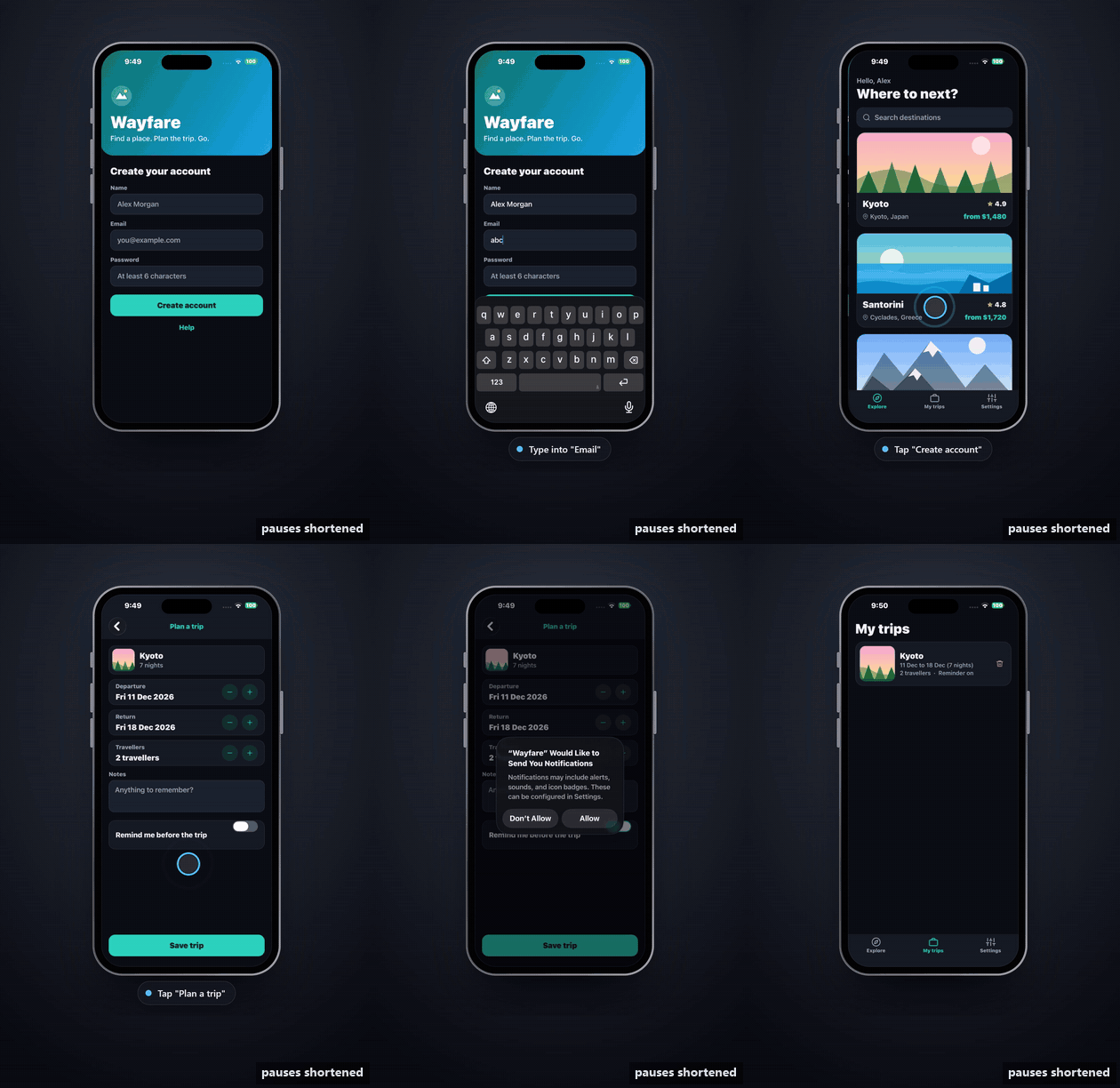
A Claude agent given one sentence ("test sign-up and a first trip the way a new user would") on a real iPhone, through Tapwright. It finds the planted bug (the app accepts "abc" as an email) and answers iOS's own permission prompt. Real time, with the agent's thinking pauses shortened; with the live view around it.
How it works
 your computer                                              your iPhone
 ┌───────────────────────────┐   developer tunnel           ┌──────────────────────────┐
 │ agent ── MCP ── tapwright │  (USB, Wi-Fi, or any address │ WebDriverAgent           │
 │                           │   that reaches the phone)    │ (Apple's UI automation)  │
 │   pymobiledevice3 ────────┼─────────────────────────────▶│   taps, types, reads the │
 └───────────────────────────┘                              │   screen of any app      │
                                                            └──────────────────────────┘
Apple's UI-testing framework (XCTest) can drive any app on a phone in Developer Mode, as long as a computer holds a developer connection to it. Tapwright runs WebDriverAgent (the XCTest runner behind Appium) on your phone, signed with your developer identity, and talks to it through pymobiledevice3's tunnel. That tunnel needs no admin rights and works on any OS.
Tapwright drives the whole phone from the outside (any app, system alerts, the home screen). Its sibling project Tapline drives your own React Native app from the inside, through a small SDK in the app.
You need
- An iPhone on iOS 17 or later, and a USB cable for the one-time setup.
- A computer with Python 3.10+. On Windows, install Apple Devices from the Microsoft
Store (it provides the USB connection); on Linux,
usbmuxd. - An Apple Developer Program membership, for an App Store Connect API key (setup then creates the certificate and profile itself). Or bring your own Apple Development certificate (.p12) and a development profile for a wildcard App ID that includes the phone.
Quick start
pip install tapwright
One-time setup, phone plugged in and unlocked:
tapwright setup --asc-key-id KEY_ID --asc-issuer-id ISSUER_ID --asc-key-file AuthKey_KEY_ID.p8 \
               --bundle-prefix com.yourname.tapwright
It pairs with the phone (tap Trust), checks Developer Mode, creates a development certificate and profile through the API (the private key stays on your computer), signs and installs WebDriverAgent, and pairs for network use. Details and the manual option: docs/setup.md.
Try it on one of your apps:
tapwright smoke --app com.yourcompany.yourapp
It opens the app, prints its first screen as elements, saves a screenshot, and closes it.
Run setup again any time: it skips what is done and ends with the next two commands. To keep
it working, tapwright doctor warns 30 days before the signing runs out, and
tapwright doctor --fix (phone on USB) repairs what it can.
Give it to your agent. One command registers the MCP server and installs its guidance:
tapwright install --client claude # or codex / cursor
For a manual Claude Code registration:
claude mcp add tapwright -- tapwright mcp
Tapwright 1.7.5 provides whole-phone control by default. Apps, Home, Settings, system alerts and cross-app workflows are available. Permission judgment belongs to the agent and the user's instructions. Existing --apps, --dedicated, --policy and --no-policy options are compatibility inputs, not access restrictions. See the 1.7.5 migration contract.
Other MCP clients: register tapwright mcp (stdio). Then ask, for example: "Open MyApp
on my phone, sign up with a test email, and tell me if anything looks broken."
AGENTS.md is the agent's guide; point your agent at it.
docs/quickstart.md walks through a first test.
The skill (install already did this; the command is for the skill alone). It teaches an agent how to test with Tapwright: the loop, how
to read an answer, what to do on each error, how to report, and the mistakes agents make.
tapwright skill install               # for you: ~/.claude/skills and ~/.agents/skills
tapwright skill install --project .   # for one project
Starter routes for the phone's own apps (Notes today; Reminders, Calendar, Mail and Messages follow). tapwright starters install [--maps DIR] adds them to your maps for drive {"route": ...}; a route or place of yours is never overwritten, and the answer names the routes it kept.
Claude Code reads .claude/skills; Codex and other agents read .agents/skills. The skill
is skills/tapwright, in the open
Agent Skills format, so skill installers can take it from this
repository too.
Tools
| Tool | What it does |
|---|---|
apps, open_app, close_app |
the apps you installed (TestFlight and development builds included); open one by bundle id or name, or close it; open_app can open it in another language, region or text_size (for that launch only, nothing in Settings changes); with those arguments the app is closed first, so a launch that fails leaves it closed |
look |
the screen: every visible element (role, text, id, position in points, what you can do with it) and a screenshot; ocr: true also reads the text in the picture that no element carries (games, canvases, web views), as refs o1, o2 a touch can take (pip install "tapwright[ocr]", about 300 MB, runs on the computer's CPU, about 1.5 s) |
tap, long_press, toggle |
by element {id} (testID/accessibility identifier), {label}, {text}, {ref} from the last list, or {x, y} |
type_text |
into a field (clearing it first by default, or pressing return after) |
scroll, swipe, back |
lists and pages, to the start, the end, or straight to an element; drags between points; up one screen (an open sheet closes first) |
wait, wait_for |
a fixed delay, or until some text, id or label shows up or goes |
alert |
accept, dismiss or read permitted alerts; action: "cancel" explicitly presses a verified Cancel button to recover from a system obstruction when the owner requests it, without showing private alert content |
press_button |
home, volume |
rotate |
turn the phone to portrait or either landscape side, to test an app's landscape layout |
network |
make the whole phone's network offline, 3g or lossy (Apple's developer network conditions) to see an app's errors and loading states, or normal to restore it; every answer says the condition while it is on, and it ends with the session (or after 10 minutes without a call from the agent that set it, or 30 minutes at most). Over Wi-Fi only 3g and normal (the other two would cut Tapwright's own link) |
open_url |
deep links |
viewer |
opens the live view in a browser on this computer, for you (the agent never gets the link: its key could approve a held-back touch) |
run |
several steps in one call, each with an optional check ("expect": {"text": "Saved"}); stops at the first that fails and answers once. A step may carry if (run it only when that is on screen) and optional (skip it when its own target isn't there), so one call covers a flow with a maybe-screen in it |
record, replay |
save what the agent does as a script, and run it again; tapwright replay FILE runs it in CI with no agent (exit code, --junit). record with route: "<name>" saves a route for drive instead: it starts from a named place, and a type_text with as is saved as a variable |
logs, crash |
the app's own log (level, grep, since) and its crash reports, read from the phone; a failed run step adds the log lines from that step, and a call the app crashed in ends with a note |
audit |
an accessibility check of the screen, by Apple's own XCTest audit: low contrast, tap targets under 44x44 pt, missing labels, clipped text, text that doesn't scale, wrong traits, duplicate ids; each issue names the element and the fix |
performance |
memory, CPU and frame rate of the app's own process while it waits, around a tap, or from a cold start to the first settled screen (launch); run and scripts can hold it to limits with expect.under |
ux_check |
one screen against the usability basics, as measured facts first (each names its element and its basis): too many competing choices, no one clear main action, the main action out of thumb reach, icon-only buttons with no label, cut-off text, low contrast and small targets (from audit), the same action named differently on screens you saw earlier, an error or empty state that doesn't say what to do next. Your house rules (tapwright mcp --ux-rules FILE: text rules you judge, {"max_taps_to_goal": 4} and {"way_back": true} the tool checks) are included |
media |
puts test pictures (jpeg, png, heic, up to 20 MB each) and videos (mp4, mov, m4v, up to 200 MB each, 400 MB and 5 a call; runner route version 7, tapwright setup --force installs it) in the phone's photo library for an app's photo picker: add with their paths (confirm is a compatibility argument); remove: true deletes only what it added. Needs the runner with the photo routes (iOS asks you once to let it add photos, and once more, with a confirmation for each delete, to remove them) |
session_report |
where this session's calls went (the same from the shell: tapwright report [--since TIME] [--client ID]): calls per tool, failures by code, and waste to cut, each with its call numbers: looks right after an answer that had the changes, retries after not_found, scroll hunts, runs of actions that could have been one run; and the seconds, not only the calls: the agent's thinking time between calls, the tool's own time, by tool, and a line when calls came one process each (load the MCP server once) |
drive |
go to a place the map knows (to), or run a saved route (route), at the tool's own speed: a link when the place has one, else the shortest chain of proven roads, each move through the same execution queue as a single call. with fills a link's params, then adds run steps after arriving, by is any, taps or link, dry_run says the way, account names a test account (--accounts FILE: the tool types its username and password, the agent never sees them). One answer: Arrived at language by 3 taps in 1.9 s (settings > general > language). A road whose target is missing is repaired by another name or the only closest match, then planned again from a known place (twice at most), else off_route: nothing more is touched |
map |
the app's map, learned as you drive: the places Tapwright recognised, the roads (moves) between them, saved routes and reflexes, one line each, and where the app is now; to shows the shortest known way to a place and whether each road is proven on this build, name names the current place, link adds the link that reaches a place, reflex / forget_reflex and forget edit it. The file is ~/.tapwright/maps/<bundle id>/map.json (--maps DIR on serve, mcp and call keeps it with a project); list-row text, typed text and secure values are never in it, and a navigation title only as a hash |
compare_screen |
visual regression: the first call saves the screen as a reference picture, later calls answer Matches or Differs with where it changed and a picture with the changes in red; threshold and ignore (a clock, an ad) tune it, and the status bar is never compared |
filmstrip |
several frames from the live stream in one numbered picture, for animations and loading states; tap first taps and films what it sets off |
unlock |
unlocks a locked phone with the passcode saved for it (--accounts FILE, phone.passcode): the agent never sees or sends it, the tool types it only on iOS's lock screen (never the XCTest prompt), at most twice an hour and 3 times a day, and stops after a refusal. With none saved it answers locked: ask the user |
notifications |
notifications from the whole phone's Notification Center, newest first, at most 20; open: n opens one. Notification Center is on the phone's screen for about a second while it is read; one-time codes are hidden |
journey |
test a feature as a real user would: start: true with a goal (and a persona, conditions) shows the screen in a user's eyes (no ids, nothing off screen, no jump-scrolling), measures taps, time, wrong turns and hesitations, and stress tries leaving the app, a bad network, a double tap, rotating and relaunching; stop: true with reached writes a report folder under ~/.tapwright/reports/ (Markdown, HTML, screenshots, filmstrip, a GIF) and export puts it in a GitHub PR or issue through gh, only when you ask |
explore |
search the app you are driving for what breaks, with no model: a deterministic breadth-first walk of its screens that saves the places and roads it finds to the map and writes a report folder under ~/.tapwright/explore/<app id>/<time>/ (report.json, report.md, a picture and a script per finding). It answers a summary, not the screen. minutes (10), steps (500), depth (8), from and focus (place names), fill (none, test-data, or fixture:<name>.<field>: it types only into fields whose id ends -test-safe, never a password or card, never submits), continue past a crash. It never signs in again after a reset (sign the app in with a test account before it; account isn't offered in 1.8.0). It never touches what the skip floor holds (Delete, Send, Post, Pay, Sign out, Block, account, privacy and security settings, the share sheet), flips a toggle and sets it back, never allows a permission prompt, asks nobody, ignores grants, stays in one app, and stops when a person touches the phone (busy), pauses it (paused) or the phone locks (locked: explore never unlocks it) after writing its report. The floor is checked as each move goes out, on the element it really lands on; a --policy file's words and its explore.skip list only add to it (serve --policy, mcp --policy, tapwright explore --policy, or a tapwright call explore --policy, which waits its minutes + 6 min). Not a step of run or a script, and refused in a journey. tapwright explore [--minutes N] [--steps N] [--depth N] [--from PLACE] [--focus PLACE] [--fill test-data] [--continue] [--apps APP] [--policy FILE] [--maps DIR] [--accounts FILE] runs the same search from the command line (exit 0: nothing found; 1: findings; 2: could not start, or a person or a pause stopped it) |
bug_report |
one page for whoever fixes a bug, with nothing private in it: a folder under ~/.tapwright/bugs/<app id>/<bug id>/ (report.md, report.html, repro.json, finding.json; a private picture only with with_picture: true). From an explore finding (finding and run, default the newest report), from the last failed check of run or replay (from: "failure"), or from what you saw while driving (from: "now" with a one-line note and expected: the last 10 touches become the steps, never a typed value). Vault values, one-time codes and every value typed in the session are redacted at every file, before any cut, and each file is grepped before it is written. The same bug found again (same kind, place key, normalized text and, for a crash, exception type and top app frame) is one bug with a count and its builds. verify replays the bug's steps on the phone (relaunch, data kept) through the same skip floor as explore, asking nobody and stopping before any step that needs a person, and says 3 of 3 runs, flaky or not reproduced. export writes a .zip next to the folder (no network) or opens a GitHub issue with your gh when your user asked (confirm: true; public: true for a public repository), each grepped again for private values and written to the audit log. tapwright bug <report folder> <finding id>, bug list and bug export work with no phone; bug verify <bug id> checks on the phone |
Every action answers with what changed on the screen, not the whole list, and says how long the
screen took to settle. Add screenshot: true for a picture. tapwright mcp --screenshots DIR
saves the pictures as files instead of sending them. Errors are Error <code>: <message>; for
not_actionable the first word says why (disabled, off_screen, covered, under_tab_bar,
behind_alert, no_action). The tools and their errors are the same as Tapline's:
docs/AGENT-TOOLS.md.
From an agent's session to a test you keep. An agent that knows a flow runs it as one run, each
step with the check that proves it worked:
{"steps": [
  {"tool": "type_text", "target": {"id": "email"}, "text": "test@example.com"},
  {"tool": "tap", "target": {"id": "signup"}, "expect": {"id": "explore-greeting"}}
]}
With record, actions are saved in the same format. tapwright replay sign-up.json --junit out.xml runs the file again without an agent. Review scripts before executing them: app and policy flags do not limit their device access.
Scripts that repair themselves. When the app's screens moved, replay with repair: "suggest" (or tapwright replay FILE --apps ID --repair suggest) replays the script as usual and adds the likely fix after the failed step; it tries no
candidate (the script's own steps still run). repair: "apply" repairs a
renamed or moved target, a new screen in the way, or a target now behind a scroll, as the run goes, and keeps a repair only
when its own check holds (the step's expect, else the next step's target resolves to one element) and the whole script then
runs to its end; at most 3 candidates a step and 5 repairs a script. Every move of a repair (each trial and the way back after a
rejected one) passes the same skip floor as explore's moves; in the check below only the repaired and inserted steps (and the
step an inserted road or scroll leads to) do, while the script's own unchanged steps (its Sign out, say) run as a plain replay
runs them. apply then replays the repaired file itself
from the script's fresh start (so it takes about twice as long as a plain replay; the client waits up to 8 minutes) and refuses a
script that can't start fresh ("fresh": false, or no app). It writes FILE.repaired.json and FILE.repair.md beside
the script, never over it, and nothing at all when the run or that replay fails (a file that can't be written fails the
run too). A failing expect is a finding, never repaired, and so is a
step that types, a policy word, a native Back or a draftsOnly route. Every trial is a line of kind repair in the audit log.
--repair apply --adopt (the command line, a person's choice; no tool call can adopt) replaces the script with the repaired one
after that same run passed, keeping the original once as FILE.orig.json. The score only orders the candidates: Tapwright's
weights are role 0.15, id_stem 0.35, words 0.35, position 0.10, component 0.05. record now saves each step's place and the
seen facts of its element (role, position bucket, class, id stem; never text) so a repair can tell what moved.
Checks of how it looks, too. "expect": {"matches": "trip-saved"} on a step (or a compare_screen
step) holds when the screen matches the reference picture of that name. record keeps the pictures next to the
script, in sign-up.references/, so they travel together. After an intended design change, tapwright replay sign-up.json --update-references saves the new look; a failed check writes its picture
with the changes in red to sign-up.diff/. Reference pictures and those two folders are written whole or not at
all, and never through a link; on Windows that narrows, but can't close, the window for a folder that another process
of the same user swaps at that very moment. With --screenshots DIR, filmstrips and the difference picture an agent
gets back are saved to that folder by the ordinary screenshot writer, outside this guarantee.
Driving fast. Tapwright learns an app as an agent uses it: each screen it recognises is a place, each
move between places a road, kept in one map file per app (~/.tapwright/maps, or --maps DIR to keep it with
your project, shared with Tapline). On ground the map knows, drive goes to a place in one call and no model is
asked anything. On new ground, tapwright install also writes a driver agent, phone-driver: a subagent on your
agent's fastest small model (Claude Code: .claude/agents/phone-driver.md on Haiku; Codex:
.codex/agents/phone-driver.toml; --driver-model NAME changes it) that sends several moves in one call and saves
what it learns. No model runs inside Tapwright and no API key is asked for. Test accounts stay on your computer
(--accounts FILE): the agent says tester2, the tool types the password, and no answer, log or map holds it.
brief: true (or tapwright mcp --brief) shortens answers; tapwright call look makes a call without an
MCP connection, to the running tapwright serve (whole-phone control by default); and a
person's OK can be given in your chat, through the host's dialog, as well as in the live view (--no-dialog turns
that off).
Live view
tapwright serve is a small background process that owns the connection to the phone.
Agent tools, the live view in your browser and any other client go through it, so you and
an agent can share one phone. Agent tools start it by themselves. To watch:
tapwright view # opens the live view in your browser
To keep real-time footage of the live view: tapwright record-video --out demo.mp4 [--seconds N] [--fps N] writes an
H.264 MP4 (pip install "tapwright[video]") and demo.frames.json, each frame's capture time on the action log's
clock. A recording shows whatever is on the phone's screen, so record test data
(docs/setup.md).
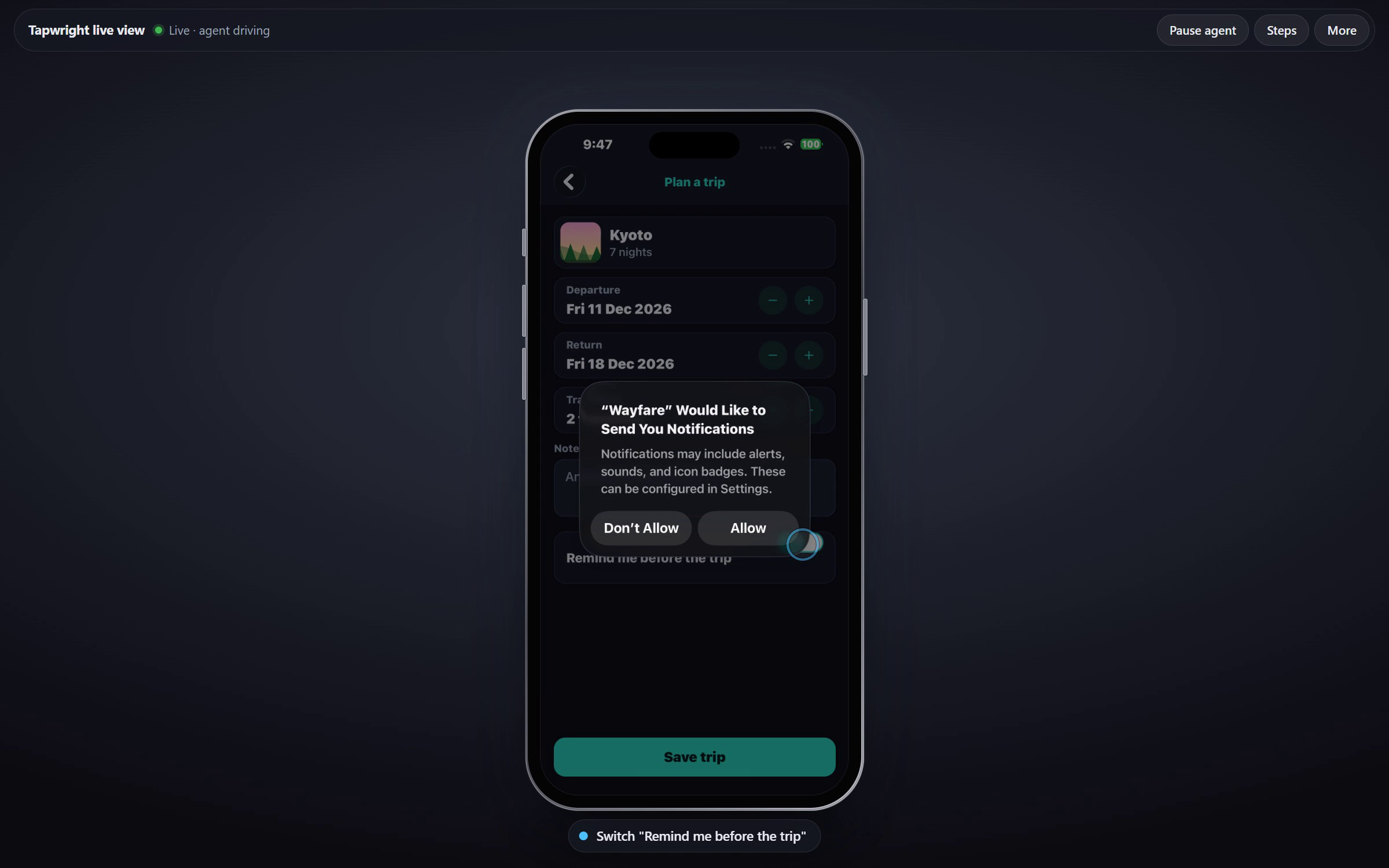
You see the phone's screen live and can drive it: click to tap, hold to long-press, drag to
swipe, use the mouse wheel to scroll, and type into the focused field. Each step, the
agent's or yours, shows in plain words under the phone (Tap "Save trip"), and Steps
lists them. A step that couldn't be done shows in red with the reason (Tap "Save" – covered). The bar has Pause agent; More holds Home, volume, the picture quality and
Details (the element names and boxes, for when you're debugging). Your input goes first:
the agent waits while you drive. The live view is reachable from this computer only, with an
access token in the link.
- Drags play on the phone after you let go: WebDriverAgent can't follow a finger live.
- The picture is a stream of JPEG frames, about 28 a second while the screen changes and 5 while it is still.
tapwright serve --videoplays the phone's own video instead, 60 frames a second, with nothing installed on the phone. The phone and the computer must be on the same Wi-Fi, and the computer needs an AirPlay receiver: see docs/setup.md.- The volume buttons press the phone's real buttons.
Other tools can use the same daemon: the agent tools over HTTP (POST /api/<tool>), and the
live view protocol in docs/VIEWER-PROTOCOL.md.
Without the cable
After setup, unplug: on the same Wi-Fi, Tapwright finds the phone by itself, or give its
address with tapwright serve --address 192.168.x.y. Over Wi-Fi every step is slower than
over USB (see Status); for long unattended runs, keep the cable in.
Reaching the phone from another network (a VPN such as Tailscale, or cellular) is not part
of version 1. tapwright probe --host <address> --watch exists to try it; treat it as
experimental.
Agent judgment and user control
Tapwright provides device capabilities without app allowlists, label-based confirmations or grants. The agent follows your task and existing authorization. It should clarify consequential work outside that scope, without asking permission for each item in an authorized bulk operation. QA, competitor research, mobile social workflows and personal cleanup use the same tools.
Authentication and host checks protect the local control service. Keep its key private. Pause in the live view stops agent input; human input takes priority. Fresh targets, clear errors, dry-run and result verification remain part of reliable automation. dry_run: true on supported actions sends no input.
A delivered tap is not proof the app completed the intended action. Read the response and inspect the screen when needed. On timeout, check whether it happened before repeating it.
Actions are logged in ~/.tapwright/log/actions-<date>.jsonl. Typed text is not logged; stored credentials remain redacted from routine text logs and recorded script text. tapwright serve --no-log disables the action log.
Screenshots, live view, video and saved --screenshots images show actual screen pixels; Tapwright does not mask them. A password typed into a nonsecure field or revealed by the app can appear in those images. Keep credential images private and omit them from shared reports.
Limits
- Apple's automation sees what accessibility sees. Give important views accessibility
identifiers (
testIDin React Native) and labels. Games and custom-drawn screens show little beyond their screenshot;lookwithocr: truereads their text from the picture. - Face ID and Touch ID require the person. With the phone's passcode saved (
--accounts FILE,phone.passcode) an agent unlocks a locked phone withunlock, andtapwright serve --phonedoes it by itself at a new call; genuine XCTest passcode prompts still require the person. - Before it lets a UI test start, iOS may ask for the passcode ("Enable UI Automation"). Tapwright waits and tells the agent. Turn on Settings > Developer > Enable UI Automation on a test device, or an unattended run stops there.
- Whole-phone access does not override Apple's signing, pairing, trust or XCTest passcode requirements.
- System UI may be missing from accessibility. Use a fresh screenshot and coordinates when needed; verify the result.
Status
| Works on our phone | setup from Windows; USB and Wi-Fi; every tool; the live view as JPEG frames and as video; app navigation; landscape, on both sides |
| Measured over USB | a tap, with its answer: 0.65 s; a look: 0.14 s; a toggle 0.66 s; typing 0.73 s; a scroll 1.46 s; a person's tap in the live view shows after 0.23 s; the reliability suite with no misses |
| Measured over Wi-Fi | slower: a tap 1.0 s, a look 0.4 s, typing 1.3 s; the reliability suite with no misses |
| Agents | a first-time agent with the skill tested the whole lab charter in 44 calls (40 with Tapline connected too) |
| Not done | over Wi-Fi, a tap (1.03 s) and typing (1.33 s) within Wi-Fi's own bar of 1.0 s (the toggle meets it), and a scroll within 1.5 s; a second phone or an iPad; a run by anyone but the authors |
Every number, how it was measured and how to run it yourself: docs/benchmarks.md. The bar they are held against: docs/QUALITY-BAR.md.
License
MIT. WebDriverAgent (BSD) and rcodesign (MPL-2.0) are downloaded at setup, not included. The runner is
Tapwright's build of Appium's WebDriverAgent 16.15.3 with a faster tap and drag (bo5amis/WebDriverAgent,
built by GitHub Actions, checked by its SHA-256); TAPWRIGHT_WDA=appium tapwright setup --force installs Appium's own.
Tapwright is not affiliated with Microsoft's Playwright or with Apple.
1 maintainer

Metadata
1 maintainer
Release files for tapwright 1.9.1
For a detailed explanation of source distributions (sdists) and built distributions (wheels), please see the package formats documentation.
Source distribution (sdist)
| File | Size | Uploaded | Provenance | Actions |
|---|---|---|---|---|
| tapwright-1.9.1.tar.gz | 1.6 MB | With provenance | Details for tapwright-1.9.1.tar.gz |
Built distribution (wheel)
| File | Interpreter | ABI | Platform | Actions Reset |
|---|---|---|---|---|
| tapwright-1.9.1-py3-none-any.whl | Python 3 | none | any | Details for tapwright-1.9.1-py3-none-any.whl |
Total release size: 2.4 MB
Release files / tapwright-1.9.1.tar.gz
| Download URL | tapwright-1.9.1.tar.gz |
|---|---|
| Size | 1.6 MB |
| Tags | Source |
|
SHA-256 checksum How to use checksums |
ff4773eadd3a58120b3156c65d3c40629498c0ba37ccb10f1c936e0a62a9150e
|
|
BLAKE2b-256 checksum How to use checksums |
77b0e46675eb4b0cc0311eca53ddacad96cefddc82b6e8e009b37fdd3fc9250f
|
| Upload date | |
|
Uploaded using Trusted Publishing? What is trusted publishing? |
Yes |
| Uploaded via |
twine/7.0.0 CPython/3.13.16
|
Provenance
Provenance describes where a file came from. On PyPI, provenance is shared via attestations, which provide a verifiable record of the build or publishing details. View details, limitations and caveats.


PyPI Publish Attestation
PyPI verified that this artifact, at this checksum, originated from the publisher listed below.
Signed by GitHub Actions, verified by PyPI on Nov 19, 2026.
Transparency logRelease files / tapwright-1.9.1-py3-none-any.whl
| Download URL | tapwright-1.9.1-py3-none-any.whl |
|---|---|
| Size | 889.0 kB |
| Tags | Python 3 |
|
SHA-256 checksum How to use checksums |
ee17e743d69a24bafb09c81010d9d17cb9c4da862585e8caa1fa50af022b422a
|
|
BLAKE2b-256 checksum How to use checksums |
afead1eb374ed3b081dacd9a2d57ef4a86f085bd8564f12b126e8dcded67211e
|
| Upload date | |
|
Uploaded using Trusted Publishing? What is trusted publishing? |
Yes |
| Uploaded via |
twine/7.0.0 CPython/3.13.16
|
Provenance
Provenance describes where a file came from. On PyPI, provenance is shared via attestations, which provide a verifiable record of the build or publishing details. View details, limitations and caveats.
PyPI Publish Attestation
PyPI verified that this artifact, at this checksum, originated from the publisher listed below.
Signed by GitHub Actions, verified by PyPI on Nov 19, 2026.
Transparency logSecurity for tapwright 1.9.1
Provenance
Provenance describes where a file came from. On PyPI, provenance is shared via attestations, which provide a verifiable record of the build or publishing details. View details, limitations and caveats.
Full provenance
Both files in this release have been uploaded with provenance metadata.
Attestation for tapwright-1.9.1.tar.gz
PyPI Publish Attestation
PyPI verified that this artifact, at this checksum, originated from the publisher listed below.
Signed by GitHub Actions, verified by PyPI on Nov 19, 2026.
Transparency logA note on package security
PyPI is a repository for distributing packages, not a service for auditing them. While third-party security researchers and our staff do their best to detect and remove malicious packages, PyPI cannot guarantee the quality, security or suitability of any given package.
To learn more about protecting yourself from malicious actors, visit our package security documentation.














