
Taskfile-Help





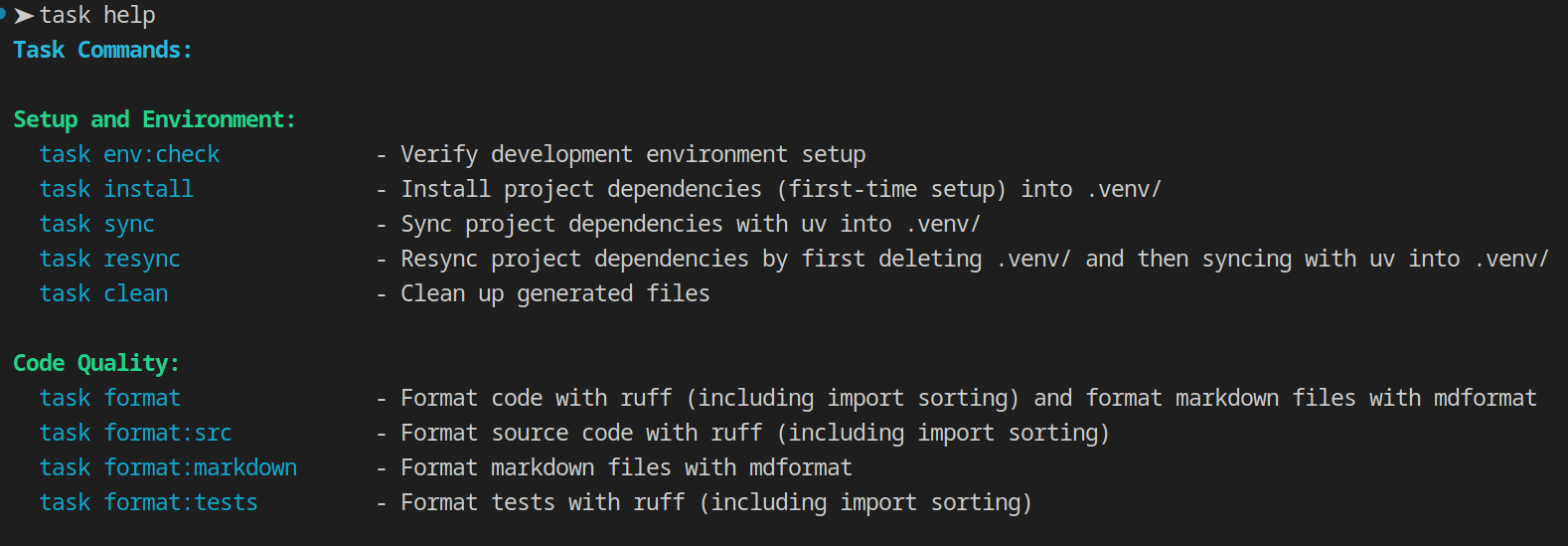
A dynamic Taskfile help generator that parses Taskfile YAML files and outputs organized, colored help text
similar to task --list, but with automatic grouping, namespace, and search support.
Features
- Group Organization: Automatic task grouping using comment markers
- Namespace Support: Organize tasks across multiple Taskfiles
- Smart Search: Search across namespaces, groups, task names, and descriptions with multi-pattern AND logic
- Multi-Pattern Search: Filter tasks with multiple patterns and regexes (all must match)
- JSON Output: Export task information in JSON format
- Colored Output: Automatic color support with TTY detection
- Internal Tasks: Hide implementation details with
internal: true - Fast: Simple line-by-line parsing without full YAML overhead
What is a Group?
In lieu of a task tag, a group is a set of tasks organized under a group comment marker. Group comments follow a known pattern like the default
pattern: # === <group name> === and all tasks following the comment belong to that group until the next group comment or end of file.
Links:
Installation
Installs from PyPI using pipx:
pipx install taskfile-help
Integration with Taskfiles
Designed to be called from Taskfile help tasks. Here's how to integrate it into your workflow:
Basic Setup
Add a help task to your main Taskfile:
version: '3'

tasks:
  # === Main Tasks ===
  build:
    desc: Build the project
    cmds: [...]

  # === Help ===
  help:
    desc: Show available tasks from this Taskfile
    cmd: taskfile-help main
    silent: true  # Suppress task command echo
Now you can run:
task help # Show available tasks from your main Taskfile nicely grouped and formatted
Multi-Taskfile Setup
The real advantage comes when you have multiple Taskfiles with namespaces.
Start by adding a wildcard help task (help:*): to your main Taskfile:
version: '3'

tasks:
  # ... main tasks ...

  # === Help ===
  help:
    desc: Show available tasks from a namespace (defaults to main)
    summary: Displays tasks from the given namespace (defaults to main)
    cmd: taskfile-help namespace {{.CLI_ARGS}}
    silent: true  # Suppress task command echo

  help:*:
    desc: Show available tasks for "all" or the given namespace or for "?" list available namespaces
    summary: |
      Displays tasks for "all" or the given namespace or list available namespaces if "?" is specified
      help:<namespace>    - Displays tasks from the given namespace
      help:all            - Displays tasks from all Taskfiles
      help:?              - Lists available namespaces
    vars:
      NAMESPACE: '{{index .MATCH 0}}'
    cmd: taskfile-help namespace {{.NAMESPACE}}
    silent: true  # Suppress task command echo
Now you can run:
task help       # Main tasks only
task help:all   # All tasks from all namespaces (Main + Dev + ...)
task help:<namespace>   # Tasks from the given namespace
task help -- <namespace> <namespace> ...   # Tasks from the given namespace(s)
task help:"<namespace> <namespace> ..."   # Tasks from the given namespace(s)
task help:?     # List all namespaces (Dev, Test, ...)
Search Integration
You can also add a search wrapper task for convenient searching:
  # === Search ===
  search:
    desc: Search for tasks
    summary: Search for tasks in all Taskfiles
    cmd: taskfile-help search {{.CLI_ARGS}}
    silent: true  # Suppress task command echo

  search:*:
    desc: Search for tasks
    summary: Search for tasks in all Taskfiles
    vars:
      PATTERN: '{{index .MATCH 0}}'
    cmd: taskfile-help search {{.PATTERN}}
    silent: true  # Suppress task command echo
Now you can search using the task command:
task search:python              # Search for "python"
task search -- python           # Search for "python"
task search:"version minor"     # Search for both "version" AND "minor"
task search -- version minor   # Search for "test" AND "minor"
task search -- --regex "m\S+or"     # Search for "minor", "major", "import", "mdformat"
task search -- --regex "m.*or" --regex "b\S+p"   # Search for "minor" or "major" AND "bump"
task search -- --regex "m.*or" bump   # Search for "minor" or "major" AND "bump"
task search:"bump --regex m\S+or"  # Search for "bump" AND "minor" or "major"
Example Output
Usage
Namespace Command
Display tasks from a specific namespace or all namespaces:
# Show help for main Taskfile
taskfile-help namespace
taskfile-help namespace main

# Show help for a specific namespace
taskfile-help namespace dev
taskfile-help namespace rag

# Show help for all Taskfiles
taskfile-help namespace all

# List available namespaces
taskfile-help namespace ?

# With global options (can appear after subcommand)
taskfile-help namespace dev --no-color --verbose
taskfile-help namespace all --json
taskfile-help namespace --search-dirs /path/to/project
Search Command
Search for tasks across namespaces, groups, task names, and descriptions:
# Search by single pattern (case-insensitive substring)
taskfile-help search test
taskfile-help search build

# Search with multiple patterns (AND logic - all must match)
taskfile-help search version bump
taskfile-help search minor version
taskfile-help search test coverage

# Search with regex filter
taskfile-help search --regex "^test"
taskfile-help search --regex ".*fix$"

# Search with multiple regexes (AND logic - all must match)
taskfile-help search --regex "test" --regex "unit"

# Combine patterns and regexes (all must match)
taskfile-help search version --regex "bump"
taskfile-help search test unit --regex "coverage"

# With global options
taskfile-help search build --no-color
taskfile-help search deploy --regex "^deploy" --json --verbose
Search Behavior
- Pattern matching: Case-insensitive substring search
- Regex matching: Full regular expression support
- Multiple patterns: All patterns must match (AND logic)
- Multiple regexes: All regexes must match (AND logic)
- Combined matching: All patterns AND all regexes must match somewhere in the task's combined text
- Search scope: Searches across namespace names, group names, task names, AND descriptions
- At least one filter required: Must provide at least one pattern or regex
- Results: Shows tasks where all search criteria match in any combination of fields
Global Options
Global options can be placed before or after any subcommand:
--no-color- Disable colored output-s, --search-dirs DIRS- Colon-separated list of directories to search for taskfiles-v, --verbose- Show verbose output including search directories--json- Output tasks in JSON format--completion SHELL- Generate completion script for specified shell (bash, zsh, fish, tcsh, ksh)--install-completion [SHELL]- Install completion script (auto-detects shell if not specified)-h, --help- Show help message
Examples:
# Global options before subcommand
taskfile-help --no-color namespace dev
taskfile-help --json search test
taskfile-help -v --search-dirs /path namespace all

# Global options after subcommand
taskfile-help namespace dev --no-color
taskfile-help search test --json
taskfile-help namespace all -v --search-dirs /path

# Mixed positions
taskfile-help --json namespace dev --verbose
Shell Completion
taskfile-help supports tab completion for namespaces, task names, and command-line flags in multiple shells.
Quick Install
# Auto-detect shell and install
taskfile-help --install-completion

# Or specify shell explicitly
taskfile-help --install-completion bash
What Gets Completed
- Namespaces:
taskfile-help <TAB>shows all available namespaces - Task names:
taskfile-help test:<TAB>shows tasks in the test namespace - Flags:
taskfile-help --<TAB>shows all command-line options
Completions are dynamic and automatically update when you add or remove Taskfiles.
For detailed installation instructions and troubleshooting, see the Shell Completion Documentation.
Configuration
taskfile-help supports multiple configuration methods with a clear priority order.
Configuration Files
taskfile-help supports two configuration file formats:
taskfile_help.yml- Dedicated YAML configuration file (takes precedence)pyproject.toml- Python project configuration file (fallback)
If both files exist, taskfile_help.yml takes precedence.
Configuration Matrix
| Option | CLI Flag | Environment Variable(s) | Config File | .env File | Default |
|---|---|---|---|---|---|
| search-dirs | --search-dirs, -s |
TASKFILE_HELP_SEARCH_DIRS |
search-dirs |
✓ | Current directory |
| no-color | --no-color |
NO_COLOR, TASKFILE_HELP_NO_COLOR |
no-color |
✓ | Auto-detect TTY |
| group-pattern | --group-pattern |
TASKFILE_HELP_GROUP_PATTERN |
group-pattern |
✓ | \s*#\s*===\s*(.+?)\s*=== |
| verbose | --verbose, -v |
- | - | - | false |
| json | --json |
- | - | - | false |
Priority Order: Command-line > Environment Variables > Config File (taskfile_help.yml or pyproject.toml) > Defaults
Configuration Examples
# Using command-line arguments
taskfile-help --no-color --search-dirs /path/to/project

# Using environment variables
export TASKFILE_HELP_SEARCH_DIRS=.:../shared
export NO_COLOR=1
taskfile-help

# Using .env file
cat > .env << EOF
TASKFILE_HELP_SEARCH_DIRS=.:../shared
NO_COLOR=1
EOF
taskfile-help

# Using taskfile_help.yml (recommended)
cat > taskfile_help.yml << EOF
search-dirs:
  - "."
  - "../shared"
no-color: false
group-pattern: "\\\\s*#\\\\s*===\\\\s*(.+?)\\\\s*==="
EOF
taskfile-help

# Using pyproject.toml (alternative)
[tool.taskfile-help]
search-dirs = [".", "../shared"]
no-color = true
group-pattern = "\\\\s*##\\\\s*(.+?)\\\\s*##"
For detailed configuration options, see the Configuration Documentation.
File Naming Conventions
Main Taskfile
Supported names (matches regex [Tt]askfile\.ya?ml):
Taskfile.yml,Taskfile.yaml(preferred)taskfile.yml,taskfile.yaml
Namespace Taskfiles
Namespaces are defined in the includes: section of the main Taskfile:
version: '3'

includes:
  git:
    taskfile: ./taskfiles/Taskfile-git.yml
    dir: .
  version:
    taskfile: ./taskfiles/Taskfile-version.yml
    dir: .
Nested Includes: Included taskfiles can themselves have includes, creating hierarchical namespaces:
# Main Taskfile.yml
includes:
  foo:
    taskfile: ./foo/Taskfile.yml
    dir: .

# foo/Taskfile.yml
includes:
  bar:
    taskfile: ../bar/Taskfile.yml
    dir: .

# bar/Taskfile.yml
tasks:
  charlie:
    desc: A task in the bar namespace
This creates the namespace foo:bar with task foo:bar:charlie. Paths are resolved relative to each taskfile's directory, and circular references are automatically detected and prevented.
Note: Namespaces must be explicitly defined in the main Taskfile's includes: section. taskfile-help does not automatically discover namespace taskfiles based on filename patterns.
Taskfile Discovery
- By default, searches for taskfiles in the current working directory
- Use --search-dirs (or -s) to search in one or more directories (first match wins)
- Paths can be absolute (/path/to/dir) or relative (../dir, ./subdir)
- Relative paths are resolved from the current working directory
- Taskfiles can be located anywhere in the search path(s)
Task Organization
Tasks are automatically grouped using comment markers in the Taskfile:
# === Group Name ===
task-name:
  desc: Task description
  cmds: [...]

task2-name:
  desc: Task2 description
  cmds: [...]

# === Group2 Name ===
Example groups: "Service Management", "Testing", "Build and Release"
The output preserves the order of groups and tasks as they appear in the file.
Task Visibility
- Public tasks: Have a 'desc' field and no 'internal: true' flag
- Internal tasks: Marked with 'internal: true' (excluded from help)
- Tasks without descriptions are excluded from help output
Taskfile Validation
taskfile-help automatically validates Taskfiles to ensure they conform to Task version 3 specification. Validation runs on every parse and produces helpful warnings for issues, but processing continues (non-fatal).
What is Validated
- Version field: Must exist and equal
'3'(string, not number) - Tasks section: Must exist and be a dictionary
- Task structure: Each task must be a dictionary
- Field types: Validates types for common fields:
desc: must be a stringinternal: must be a booleancmds: must be a list or stringdeps: must be a list
Example Warnings
$ taskfile-help
Warning: Invalid version '2', expected '3'
Warning: Task 'build': 'desc' must be a string, got int
Warning: Task 'test': 'internal' must be a boolean, got str

# Tasks are still shown despite warnings
MAIN Task Commands:

Build:
  task build            - 123
Validation Behavior
- Always enabled: No opt-in flag required
- Non-fatal: Warnings are displayed but processing continues
- Helpful: Clear messages explain what's wrong and where
- Fast: Minimal performance impact (~1-2ms per file)
All warnings are written to stderr, so they won't interfere with JSON output or piped commands.
Output Behavior
- Colors enabled: When output is to a terminal (TTY) and --no-color is not specified
- Colors disabled: When output is piped, redirected, captured, or --no-color is used
- Matches the behavior of 'task --list'
1 maintainer

Metadata
1 maintainer
Release files for taskfile-help 0.4.2
For a detailed explanation of source distributions (sdists) and built distributions (wheels), please see the package formats documentation.
Source distribution (sdist)
| File | Size | Uploaded | |
|---|---|---|---|
| taskfile_help-0.4.2.tar.gz | 306.2 kB | Details |
Built distribution (wheel)
| File | Interpreter | ABI | Platform | Reset |
|---|---|---|---|---|
| taskfile_help-0.4.2-py3-none-any.whl | Python 3 | none | any | Details |
Total release size: 337.7 kB
Release files / taskfile_help-0.4.2.tar.gz
| Download URL | taskfile_help-0.4.2.tar.gz |
|---|---|
| Size | 306.2 kB |
| Tags | Source |
|
SHA-256 checksum How to use checksums |
d84a48918ededcdf71105e10c714ea60769486422e28b023c609092c9eb42f2b
|
|
BLAKE2b-256 checksum How to use checksums |
dce9bd8fa9f03047a139a6849714b17f8b72122a245bdbe33aad24e036983729
|
| Upload date | |
|
Uploaded using Trusted Publishing? What is trusted publishing? |
Yes |
| Uploaded via |
twine/6.1.0 CPython/3.13.7
|
Provenance
Provenance describes where a file came from. On PyPI, provenance is shared via attestations, which provide a verifiable record of the build or publishing details. View details, limitations and caveats.


PyPI Publish Attestation
PyPI verified that this artifact, at this checksum, originated from the publisher listed below.
Signed by GitHub Actions, verified by PyPI on Nov 6, 2025.
Transparency logRelease files / taskfile_help-0.4.2-py3-none-any.whl
| Download URL | taskfile_help-0.4.2-py3-none-any.whl |
|---|---|
| Size | 31.5 kB |
| Tags | Python 3 |
|
SHA-256 checksum How to use checksums |
dae7d649c7c3f574b7ed9829ea23c8c0bd622c8d35b0c5ad5201c20b94286fcd
|
|
BLAKE2b-256 checksum How to use checksums |
12936687e2024b9f4ccf68496b6e4dbf2220355d3ab1bd5ddd8413267a725d0c
|
| Upload date | |
|
Uploaded using Trusted Publishing? What is trusted publishing? |
Yes |
| Uploaded via |
twine/6.1.0 CPython/3.13.7
|
Provenance
Provenance describes where a file came from. On PyPI, provenance is shared via attestations, which provide a verifiable record of the build or publishing details. View details, limitations and caveats.
PyPI Publish Attestation
PyPI verified that this artifact, at this checksum, originated from the publisher listed below.
Signed by GitHub Actions, verified by PyPI on Nov 6, 2025.
Transparency log













