
Dynamic Taskfile help generator with automatic grouping and namespace support

Project description
taskfile_help





Dynamic Taskfile help generator.
Parses Taskfile YAML files and outputs organized, colored help text similar to
task --list, but with automatic grouping and namespace support.
Links:
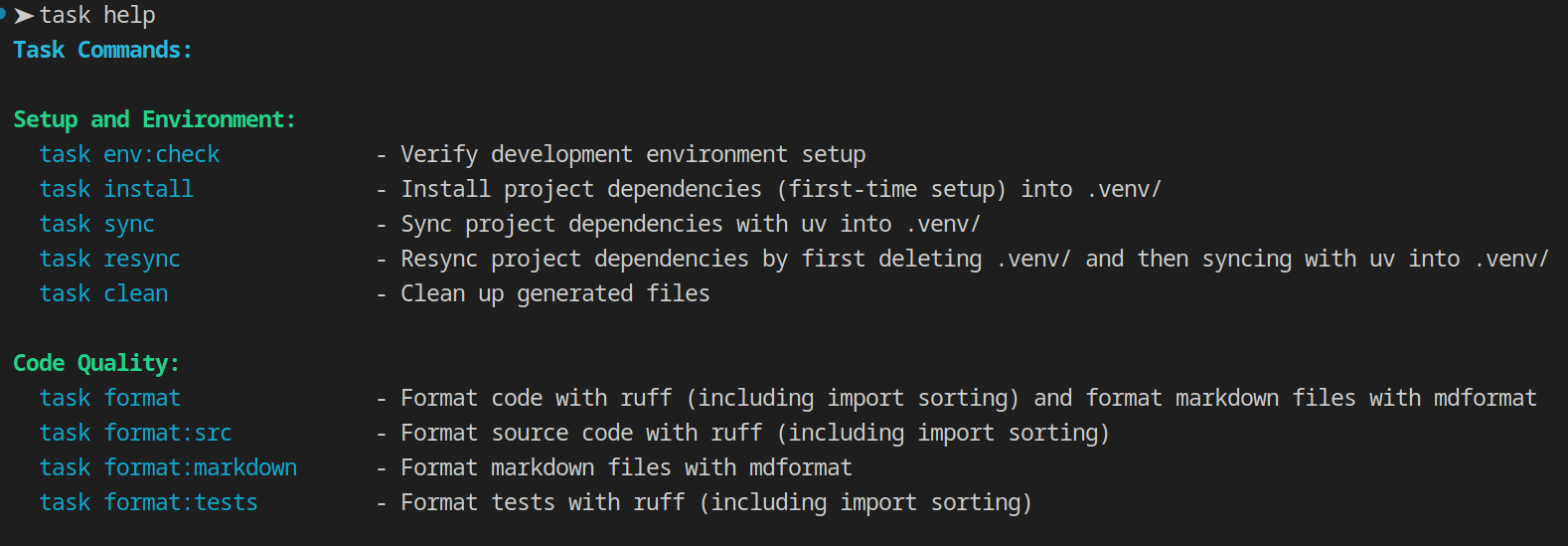
Why Taskfile Help?
The built-in task --list command is useful, but has limitations:
- No automatic grouping of related tasks
- No namespace support for multiple Taskfiles
- Limited customization options
taskfile-help solves these problems by providing:
- Automatic task grouping using comment markers
- Support for multiple Taskfiles with namespaces
- Flexible search paths and configuration
- JSON output for integration with other tools
- Consistent color handling (respects TTY detection)
Integration with Taskfiles
Designed to be called from Taskfile help tasks. Here's how to integrate it into your workflow:
Basic Setup
Add a help task to your main Taskfile:
version: '3'

tasks:
  # === Main Tasks ===
  build:
    desc: Build the project
    cmds: [...]

  # === Help ===
  help:
    desc: Show available tasks from this Taskfile
    cmd: taskfile-help
    silent: true  # Suppress task command echo
Now you can run:
task help # Show available tasks nicely grouped and formatted
Multi-Taskfile Setup
The real advantage comes when you have multiple Taskfiles with namespaces.
Start by adding a help:all task to your main Taskfile:
version: '3'

tasks:
  # ... main tasks ...

  help:all:
    desc: Show all available tasks from all Taskfiles
    cmd: taskfile-help all --search-dirs .:./tasks
    silent: true
Then in your namespace Taskfiles (e.g., Taskfile-dev.yml, Taskfile_test.yaml, or taskfile-rag.yml):
version: '3'

tasks:
  # === Development Tasks ===
  lint:
    desc: Run linters
    cmds: [...]

  test:
    desc: Run tests
    cmds: [...]

  # === Help ===
  help:
    desc: Show development tasks
    cmd: taskfile-help dev
    silent: true
Now you can run:
task help       # Main tasks only
task help:all   # All tasks from all namespaces (Main + Dev + ...)
task dev:help   # Development tasks only
Example Output
Usage
# Show help for main Taskfile in current directory
taskfile_help.py
taskfile_help.py main

# Show help for a specific namespace
taskfile_help.py <namespace>
taskfile_help.py rag
taskfile_help.py dev

# Show help for all Taskfiles
taskfile_help.py all

# Disable colored output
taskfile_help.py --no-color
taskfile_help.py rag --no-color

# Search in a specific directory (absolute path)
taskfile_help.py --search-dirs /path/to/project
taskfile_help.py rag -s /path/to/project

# Search in a specific directory (relative path)
taskfile_help.py --search-dirs ../other-project
taskfile_help.py -s ./subdir

# Search multiple directories for taskfiles
taskfile_help.py --search-dirs /path1:/path2:/path3
taskfile_help.py -s ~/projects/main:~/projects/shared
taskfile_help.py --search-dirs ../project1:./local:~/shared

# Show verbose output (search directories)
taskfile_help.py --verbose
taskfile_help.py -v rag

# Output in JSON format
taskfile_help.py --json
taskfile_help.py rag --json
Options
namespace- Optional namespace to show help for (e.g., 'rag', 'dev', 'main', 'all')- Use 'all' to show help for all taskfiles
--no-color- Disable colored output-s, --search-dirs DIRS- Colon-separated list of directories to search for taskfiles. Paths may be absolute or relative to current working directory. (default: current working directory)-v, --verbose- Show verbose output including search directories--json- Output tasks in JSON format--completion SHELL- Generate completion script for specified shell (bash, zsh, fish, tcsh, ksh)--install-completion [SHELL]- Install completion script (auto-detects shell if not specified)-h, --help- Show this help message and exit
Shell Completion
taskfile-help supports tab completion for namespaces, task names, and command-line flags in multiple shells.
Quick Install
# Auto-detect shell and install
taskfile-help --install-completion

# Or specify shell explicitly
taskfile-help --install-completion bash
What Gets Completed
- Namespaces:
taskfile-help <TAB>shows all available namespaces - Task names:
taskfile-help test:<TAB>shows tasks in the test namespace - Flags:
taskfile-help --<TAB>shows all command-line options
Completions are dynamic and automatically update when you add or remove Taskfiles.
For detailed installation instructions and troubleshooting, see the Shell Completion Documentation.
Configuration
Settings can be configured in pyproject.toml under [tool.taskfile-help]:
[tool.taskfile-help]
search-dirs = [".", "../shared"]  # List of directories to search
Command-line arguments take precedence over pyproject.toml settings.
File Naming Conventions
Main Taskfile
Supported names (matches regex [Tt]askfile\.ya?ml):
Taskfile.yml,Taskfile.yaml(preferred)taskfile.yml,taskfile.yaml
Namespace Taskfiles
Supported patterns (matches regex [Tt]askfile[-_](?P<namespace>\w+)\.ya?ml):
Taskfile-<namespace>.yml,Taskfile-<namespace>.yaml(preferred)Taskfile_<namespace>.yml,Taskfile_<namespace>.yamltaskfile-<namespace>.yml,taskfile-<namespace>.yamltaskfile_<namespace>.yml,taskfile_<namespace>.yaml
Examples: Taskfile-dev.yml, Taskfile_test.yaml, taskfile-rag.yml
Search Behavior
- By default, searches for taskfiles in the current working directory
- Use --search-dirs (or -s) to search in one or more directories (first match wins)
- Paths can be absolute (/path/to/dir) or relative (../dir, ./subdir)
- Relative paths are resolved from the current working directory
- Taskfiles can be located anywhere in the search path(s)
Task Organization
Tasks are automatically grouped using comment markers in the Taskfile:
# === Group Name ===
task-name:
  desc: Task description
  cmds: [...]

task2-name:
  desc: Task2 description
  cmds: [...]

# === Group2 Name ===
Example groups: "Service Management", "Testing", "Build and Release"
The output preserves the order of groups and tasks as they appear in the file.
Task Visibility
- Public tasks: Have a 'desc' field and no 'internal: true' flag
- Internal tasks: Marked with 'internal: true' (excluded from help)
- Tasks without descriptions are excluded from help output
Taskfile Validation
taskfile-help automatically validates Taskfiles to ensure they conform to Task version 3 specification. Validation runs on every parse and produces helpful warnings for issues, but processing continues (non-fatal).
What is Validated
- Version field: Must exist and equal
'3'(string, not number) - Tasks section: Must exist and be a dictionary
- Task structure: Each task must be a dictionary
- Field types: Validates types for common fields:
desc: must be a stringinternal: must be a booleancmds: must be a list or stringdeps: must be a list
Example Warnings
$ taskfile-help
Warning: Invalid version '2', expected '3'
Warning: Task 'build': 'desc' must be a string, got int
Warning: Task 'test': 'internal' must be a boolean, got str

# Tasks are still shown despite warnings
MAIN Task Commands:

Build:
  task build            - 123
Validation Behavior
- Always enabled: No opt-in flag required
- Non-fatal: Warnings are displayed but processing continues
- Helpful: Clear messages explain what's wrong and where
- Fast: Minimal performance impact (~1-2ms per file)
All warnings are written to stderr, so they won't interfere with JSON output or piped commands.
Output Behavior
- Colors enabled: When output is to a terminal (TTY) and --no-color is not specified
- Colors disabled: When output is piped, redirected, captured, or --no-color is used
- Matches the behavior of 'task --list'
Release history Release notifications | RSS feed


Download files
Download the file for your platform. If you're not sure which to choose, learn more about installing packages.
Source Distribution
Built Distribution
Filter files by name, interpreter, ABI, and platform.
If you're not sure about the file name format, learn more about wheel file names.
Copy a direct link to the current filters
File details
Details for the file taskfile_help-0.2.5.tar.gz.
File metadata
- Download URL: taskfile_help-0.2.5.tar.gz
- Upload date:
- Size: 256.8 kB
- Tags: Source
- Uploaded using Trusted Publishing? No
- Uploaded via: twine/6.2.0 CPython/3.13.9
File hashes
| Algorithm | Hash digest | |
|---|---|---|
| SHA256 |
02f80fde4bd57814cfa62c96ea5e23d6b1aa75b05cb46906249c5b1762fa0f62
|
|
| MD5 |
fed9a85a917f1657e858374aba6f1e07
|
|
| BLAKE2b-256 |
3f6c489e71f06a1bad390f4ae6f5c8413b1b4d498bf99dde3488a88bdf3babab
|
File details
Details for the file taskfile_help-0.2.5-py3-none-any.whl.
File metadata
- Download URL: taskfile_help-0.2.5-py3-none-any.whl
- Upload date:
- Size: 18.9 kB
- Tags: Python 3
- Uploaded using Trusted Publishing? No
- Uploaded via: twine/6.2.0 CPython/3.13.9
File hashes
| Algorithm | Hash digest | |
|---|---|---|
| SHA256 |
6659322a94b5d644a36cc94824a8e94e6e023c436a63600cba5ab93648cc6648
|
|
| MD5 |
a82fed6464370f168cd35504358aa06c
|
|
| BLAKE2b-256 |
de56ad9cff2a1305446d6c3b4eb93df398e837a30377dc92ee30aaf4d68e052d
|






