





🥔 TATERS: Takes All Things, Extracts Relevant Stuff
Taters is a Python toolkit and CLI for getting from raw media to an answer. Point it at video, audio, text, or a spreadsheet you already have: it pulls WAV out of video, transcribes it (with or without diarization), measures the language a dozen ways, runs the statistics, and trains or applies models — leaving tidy datasets, figures and a plain-English report behind.
- 🥔 Documentation: https://www.taters.wiki
- 🥔 Status: early but usable. APIs will probably evolve; pin a version if you need stability.
What Taters is (and is not)
- Is: A library + CLI with small, composable functions and an optional YAML pipeline runner. Predictable I/O, friendly defaults, and “do not overwrite unless asked.”
- Is not: A single black-box pipeline. You keep control of each step and can run pieces à la carte or all at once.
- Is not: Edible.
Never written Python? Start here
pip install taters
taters
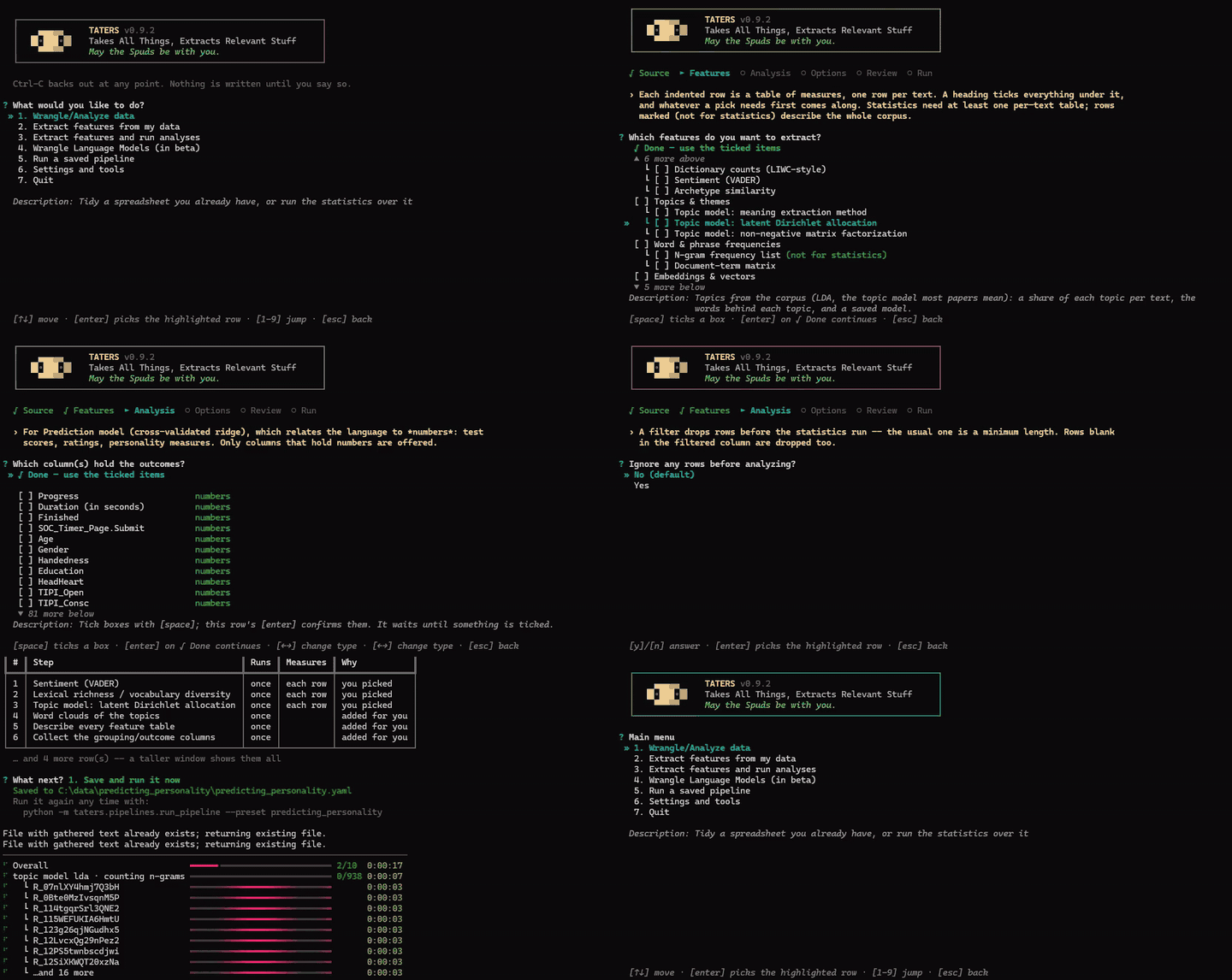
taters opens the app. It asks what you want out of your data, works out which
steps that takes, and offers to run them. Each
pipeline gets a folder of its own holding the pipeline file, its results and a
record of what ran — so you can re-run it, edit it, or send the whole thing to
a colleague.
See the app guide.
The menu is a list of verbs: tidy up a messy spreadsheet, extract features, extract features and run the statistics, run the statistics on numbers you already have, train a model, or re-run something you built before.
It works on audio and video — and on text you already have. Point it at a
folder of .txt files or a spreadsheet with a column of text and it skips
transcription entirely: no ffmpeg, no models, no GPU.
Installing from a clone instead of PyPI? Same command at the end:
git clone https://github.com/ryanboyd/taters.git
cd taters
pip install -e .
taters
There is a setup.py for habit's sake, but use pip rather than
python setup.py install — a fresh venv on Python 3.12+ has no setuptools in
it, so setup.py fails on its first line, while pip install -e . fetches
what it needs on its own. The
install guide covers extras, GPU
wheels and FFmpeg.
A short example
Python
from taters import Taters
t = Taters()

# Pull audio from video
wavs = t.audio.extract_wavs_from_video(input_path="input.mp4")

# Transcribe (CSV/SRT/TXT). Swap in diarize_with_thirdparty for multi-speaker
# recordings — it returns the same shape, so nothing below changes.
asr = t.audio.transcribe_with_whisper(audio_path=wavs[0], device="auto")
transcript = asr.raw_files["csv"]    # also: asr.raw_files["srt"] / ["txt"]

# Features (defaults write under ./features/<kind>/)
t.audio.extract_whisper_embeddings(source_wav=wavs[0], transcript_csv=transcript)
t.text.analyze_with_dictionaries(csv_path=transcript, dict_paths=["dictionaries/liwc"])
t.text.analyze_with_archetypes(csv_path=transcript, archetype_csvs=["archetypes/Resilience.csv"])
CLI
# Transcribe a single-speaker recording
python -m taters.audio.transcribe_with_whisper \
  --audio_path audio/lecture.wav --whisper_model small.en

# Whisper embeddings over non-silent spans, then mean-pool
python -m taters.audio.extract_whisper_embeddings \
  --source_wav audio/session.wav --strategy nonsilent --aggregate mean
For more examples, including per-speaker splits, sentence embeddings, and end-to-end pipelines, see the Guides in the documentation.
Installation
Install into a fresh virtual environment. Two constraints are worth knowing before you pick one, because both fail in ways that point somewhere else:
- Python 3.10+ for everything except diarization and training word vectors, which need 3.10–3.13. No NeMo release installs on 3.14, and gensim has no 3.14 wheels yet. Taters does not request either, so the install succeeds and those two steps are simply absent.
- If you want the GPU, install PyTorch on
cu128, not the newest CUDA your driver allows. Transcription runs on CTranslate2, which needs CUDA 12's libraries; acu13xbuild leaves it on the CPU while PyTorch keeps using the card.
Check my setup in the app reports both, with the exact command to run. The
install guide covers CPU and CUDA setups, FFmpeg, and the optional diarization
extras:
https://www.taters.wiki/install-guide
Pipelines
To batch a whole dataset, use the YAML runner to chain steps and control concurrency:
python -m taters.pipelines.run_pipeline \
  --root_dir videos --file_type video \
  --preset conversation_video \
  --workers 8 --var device=cuda
Details, presets, and how to write your own:
https://www.taters.wiki/guides/pipelines/
Contributing
Contributions are more than welcome. If you are using Taters on real projects, feedback is definitely helpful, especially if you run into any issues or odd behavior.
If you want to make a contribution: create a fork and a pull request:
- Fork the repository and branch off
main. - Make the change, and add a test that fails without it. The suite should be
green before you open the request (
pytest, from the repository root). - Open a pull request that explains, in plain words, what the change does, why it is needed, and how you know that it actually works.
Please write the explanation for somebody who cannot read minds and is only a half-competent coder (i.e., me). Say why a thing is done the way it is, not only what it does — in the pull request, and in comments where the reason is not obvious from the code.
One rule above the others: if I can't figure out what your code does, I will not merge it. That is not a judgment on you or on the idea. It is that I'm responsible for everything merged here, and I will not take on code I can't debug (or understand).
License
MIT. See LICENSE for details. Two bundled components are under their own terms and are listed in THIRD_PARTY_LICENSES.md: the tokenizer behind the n-gram, document-term-matrix and parts-of-speech features (Potts / Schwartz, CC BY-NC-SA 3.0, so those features carry a NonCommercial restriction), and the vendored whisper-diarization scripts (Mahmoud Ashraf, BSD 2-Clause).
Generative AI (genAI) Declaration
Does the author use genAI for development? You betcha he does. However, this is not a vibe-coded scientific application. GenAI is used primarily for:
- Cleaning up my atrociously bad documentation;
- Test development, as I've never been that good at writing tests to break my own code;
- Tidying up formatting. Have you seen my old codebases? Nobody wants more of that.
I've been writing software for a long time now — long enough that much of my back catalog is monochromatic. Yikes, I'm getting old. What I've found is that genAI is most helpful for making a codebase readable to someone who isn't me, and for iterating and catching bugs, so those are the primary use-cases. I'm still in here manually testing and reviewing my own code and its iterations, comparing the outputs against older codebases of mine, fumbling around with writing performant-but-still-readable code, and hand-rolling stupid easter eggs that will amuse no more than about three people (myself included).
If you do wish to contribute (see above), I have no major objections to genAI being a part of how you get there. The golden rule just still applies: if I can't figure out what your code does, I won't merge it. However clever the thing that wrote it, human or otherwise, I can only evaluate what I can understand.
1 maintainer

Release files for taters 0.9.2
For a detailed explanation of source distributions (sdists) and built distributions (wheels), please see the package formats documentation.
Source distribution (sdist)
| File | Size | Uploaded | |
|---|---|---|---|
| taters-0.9.2.tar.gz | 3.3 MB | Details |
Built distribution (wheel)
| File | Interpreter | ABI | Platform | Reset |
|---|---|---|---|---|
| taters-0.9.2-py3-none-any.whl | Python 3 | none | any | Details |
Total release size: 6.2 MB
Release files / taters-0.9.2.tar.gz
| Download URL | taters-0.9.2.tar.gz |
|---|---|
| Size | 3.3 MB |
| Tags | Source |
|
SHA-256 checksum How to use checksums |
5ca6c9eb1d8666cc42df7cc3ebe300b5f8bb22aa8a895888b192cb32ed6459e2
|
|
BLAKE2b-256 checksum How to use checksums |
f3158391f2df457ecdef266e27804b9c92962971945105b30cc2c496eeff84d2
|
| Upload date | |
|
Uploaded using Trusted Publishing? What is trusted publishing? |
No |
| Uploaded via |
twine/7.0.0 CPython/3.13.15
|
Release files / taters-0.9.2-py3-none-any.whl
| Download URL | taters-0.9.2-py3-none-any.whl |
|---|---|
| Size | 2.9 MB |
| Tags | Python 3 |
|
SHA-256 checksum How to use checksums |
148814a37f1222aca65db9c0993e1456ebae180b47f0a8638fae5f72fd55be5e
|
|
BLAKE2b-256 checksum How to use checksums |
2c3664d5c96d3b2807c7d455d6f69c6388fc664e37b47020e791ceba72bbbbb3
|
| Upload date | |
|
Uploaded using Trusted Publishing? What is trusted publishing? |
No |
| Uploaded via |
twine/7.0.0 CPython/3.13.15
|














