
English · 简体中文




Download · Get started · What you can edit · Publication checks
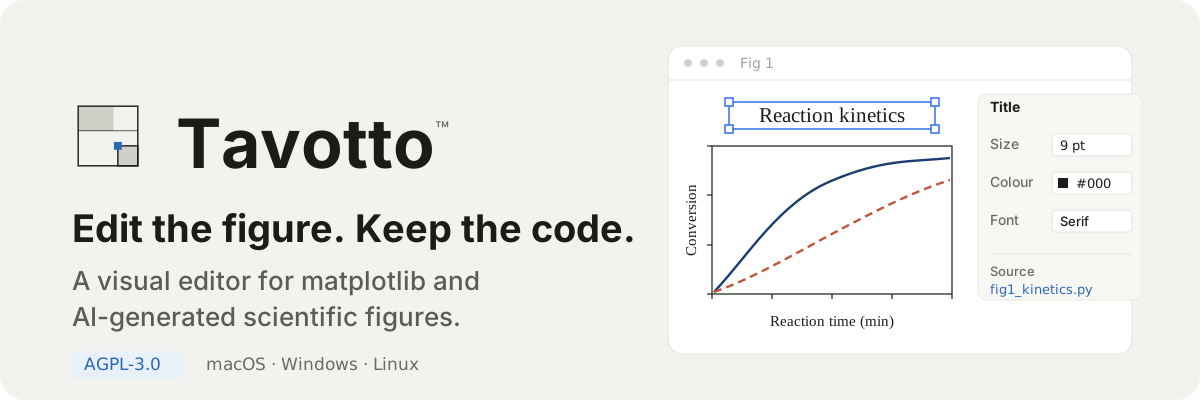
Your plots are finished. Turning them into Figure 1 is not. Tavotto™ opens the figures matplotlib already produced and lets you click the title, the legend, a curve — and change it, right there.
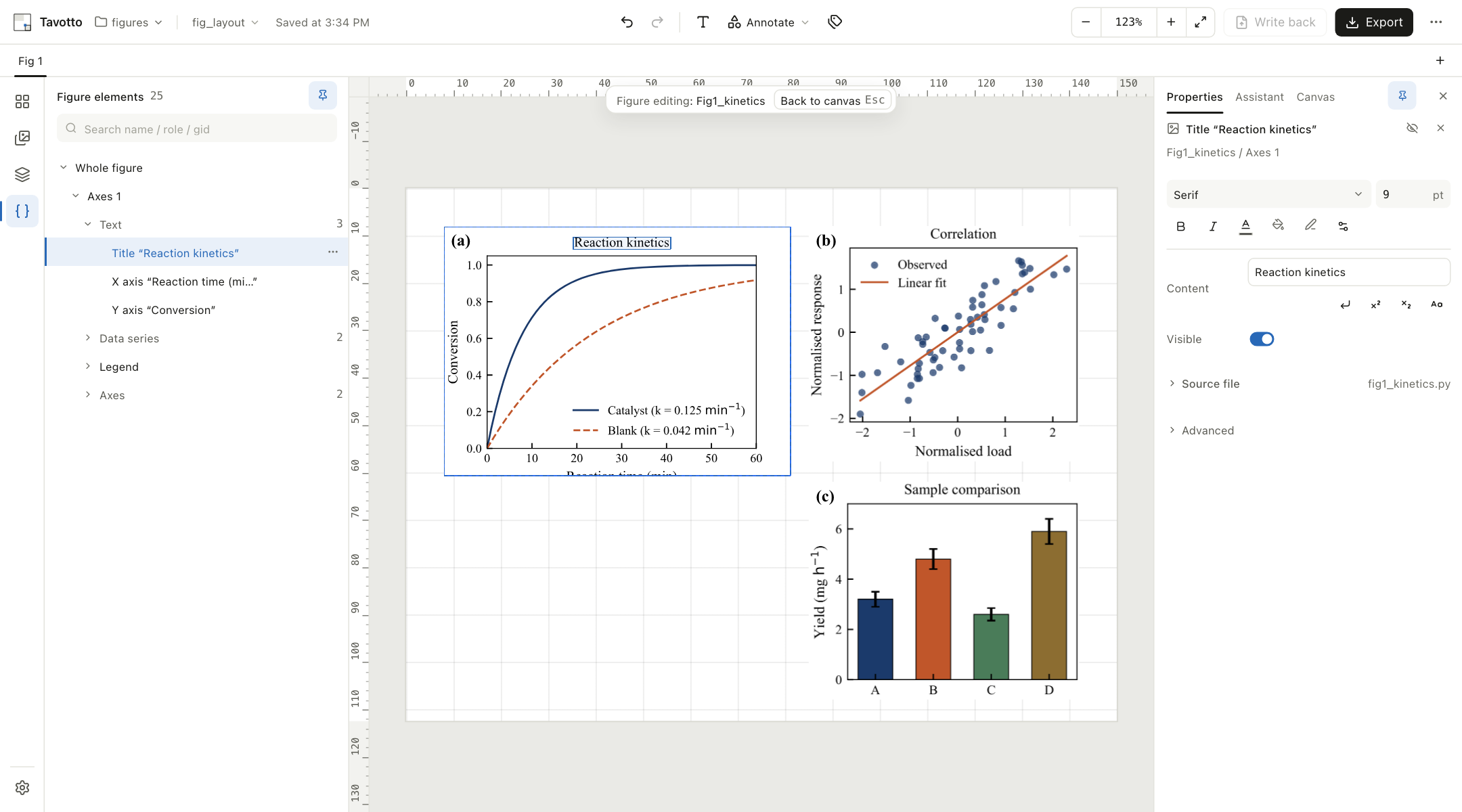
The title of panel (a) is selected. Its font and size are on the right — and so is the script that drew it, fig1_kinetics.py, still untouched.
Using Tavotto with Codex for the first time
Regular users: do not clone or build this repository. Installing from source is only for people working on Tavotto itself.
Pick what you need first:
| What you want to do | What to install |
|---|---|
| Codex draws the figure; you keep dragging and tweaking it in the Tavotto desktop window | The Tavotto desktop app + the Codex plugin (no Python engine needed) |
| Use Tavotto's canvas, preflight, editing and export tools directly inside Codex | The Codex plugin + the Tavotto Python engine |
| Change Tavotto itself | See "Contributors: developing from source" below |
The full Codex integration
Run these in a terminal, one at a time:
codex plugin marketplace add Tavotto/Tavotto --sparse .agents/plugins
codex plugin add tavotto@tavotto
pipx install "tavotto[worker]"
Then close your current Codex session and start a new one. The plugin's skill and MCP tools do not hot-reload into a session that is already open.
If you installed the engine with pip/pipx, one command does the two
codex plugin steps for you, and tells you what it skipped:
tavotto codex install     # idempotent: fixes only what is missing
tavotto codex doctor      # diagnose only, changes nothing
It never installs or upgrades the Codex CLI itself, and it never reinstalls a
component that is already healthy. tavotto codex uninstall removes the plugin and
the marketplace entry (it leaves the engine alone).
On Windows, run tavotto codex install as well (macOS and Linux do not need it).
The plugin manifest pins python3 as the command Codex uses to start the MCP server.
On Windows that name usually points at a Microsoft Store App Execution Alias: the
command exists, but starting it yields exit code 9009 and nothing else, so the
server never starts and the plugin shows up enabled with no tools at all.
tavotto codex install actually runs the command to see whether it starts the
launcher, and pins a verified interpreter into the installed copy if it does not
(tavotto codex doctor reports the same without changing anything). Run it again
after upgrading the plugin — an upgrade replaces the whole plugin directory.
Desktop-app-only users: the desktop installer deliberately does not touch your PATH,
so a bare tavotto is not available — run the two codex plugin commands above
instead. (A settings-page button that runs the same installer is tracked in
#170.)
In the new session you can say:
Draw this figure with Tavotto. Run the Tavotto health check first; only draw once it is healthy, and open the result in Tavotto at the end. Do not install or upgrade any component that is already working.
When Codex later edits, adds or renames a plotting script, it calls the plugin's
tavotto_refresh_project tool: Tavotto re-reads the project (static analysis only, no
script is run) and the open Tavotto window updates by itself — you never refresh or
restart it by hand. The tool reports which figures are now editable, which still need
a trial run you trigger in Tavotto, and which have a source conflict for you to settle.
When a figure already exists and only needs a new width, font, or font-size floor, just
say "make this figure 8 cm wide, Times New Roman, no text below 8 pt": Codex calls
tavotto_normalize_figure, which changes only what you named and leaves content,
colours, data and subplot structure alone. If text no longer fits after shrinking it
makes bounded margin adjustments first, then verifies the delivered file itself (PDF
page size and embedded fonts, PNG pixels and dpi). When the request cannot be met —
nothing fits, the font is not installed, the structure would have to change — it stops
and tells you which constraint to relax instead of lowering the bar or leaving behind a
file that only looks finished.
The first time a project-directory approval appears, what you are confirming is the local figure directory Tavotto may access. Figures, scripts and data are still processed on your machine.
The plugin installs into your local ~/.codex configuration, so it loads only in
Codex surfaces that read local plugins — the Codex CLI in a terminal and the Codex
desktop app. A surface that does not load local plugins (a purely cloud-hosted
session, an IDE integration that ignores ~/.codex/plugins) will never show the
Tavotto tools; verify in a terminal codex session first instead of debugging there.
Handing off to the desktop app only
Install the desktop app plus the plugin (the two codex plugin commands above — the
pipx line is not needed on this route). When you ask Codex to "open it in Tavotto",
the plugin's skill hands the figure over with its own handoff script, which locates
the CLI bundled inside the desktop app by itself:
python3 <plugin-dir>/skills/tavotto-figure/scripts/handoff.py path/to/figure.py
Do not tell Codex to run a bare tavotto open on this route: the desktop installers
deliberately leave your PATH untouched, so that command only exists after a PyPI
install. This path does not require the MCP canvas or the Python engine inside
Codex. Keep the script and its output in the same directory, and prefer vector PDF
for the output.
Let Codex do the install
Send Codex this message, in full:
Follow the "Using Tavotto with Codex for the first time" section of the README exactly, as a regular-user install. Do not clone or build the source; do not run pnpm, npm, cargo, Tauri, tests, or an editable install. Install only the Codex plugin and the Tavotto engine it needs, then run the health check; when a new session is required, tell me so explicitly and stop.
Stop re-running a script to move a legend
The last stretch before submission usually goes: change a line, re-run, look, change it again. Twenty times, for things you can see but not easily say — the legend three millimetres to the left, the tick labels one point smaller, panel (b) aligned to panel (a).
The other way out is to drag the PDFs into Illustrator, finish them by hand, and accept that the figure and the code that made it have parted company.
Tavotto is the third option. Open the figure, change what you can see, export. The script stays where it was, and every change can be undone.
Edit inside the figure
Double-click a panel and Tavotto runs your script once, keeping the matplotlib
Figure in memory. From then on you are editing that figure directly: pick the
title, an axis label, a tick, a curve, the legend, an arrow your script drew — from
the tree or by clicking it on the canvas — and change its size, colour, weight, dash
pattern, or just drag it somewhere else.
Dragging and dialling are instant. The figure follows the cursor frame by frame; matplotlib runs once, when you let go, to make the change official. Hit-testing follows the drawn geometry rather than bounding boxes, so clicking a curve selects the curve and not the empty rectangle around it.
Build the page
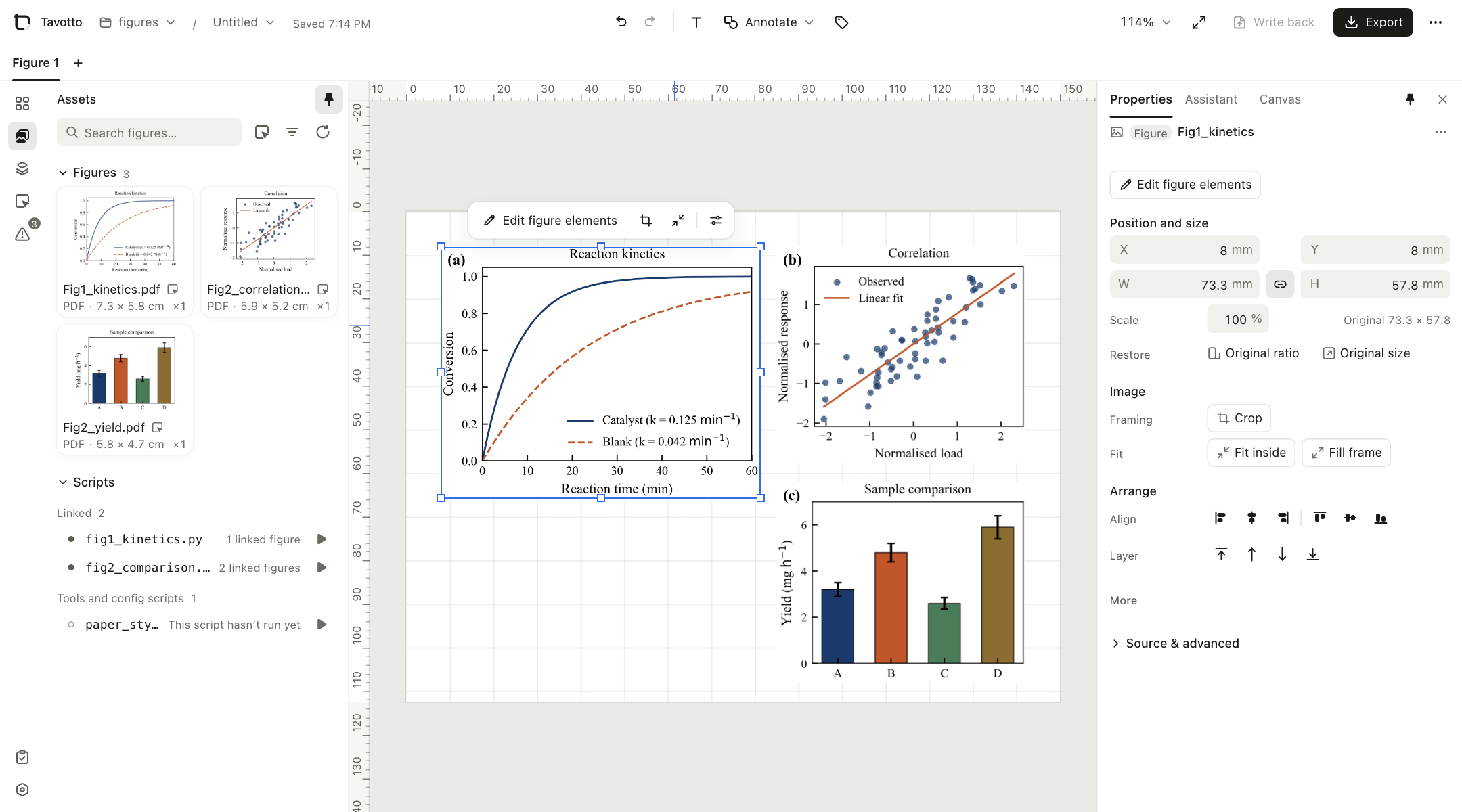
Panels land on a page measured in millimetres, at the size their script drew them. Drag them, snap them to each other, align and distribute a selection, group what belongs together, or bind panels into a row, column or grid that reflows when a size changes. Panel labels (a)(b)(c) come from one command. Annotations — text, arrows, shapes, at any angle — sit on top, with presets for the usual research furniture: reversible-reaction arrows, scale bars, zoom boxes.
Your script is still the source
Editing a figure never touches your .py file. Every change is stored as an override
beside the document and replayed onto a fresh run of your script whenever the figure is
opened again — which is also why undo, version history and re-rendering at export
quality all work on the same footing. (The one exception is the optional assistant
below, which you have to ask for by name.)
If you do want a change baked into the figure file on disk, "write back to the original file" is an explicit action: it re-runs your script from scratch to prove the result matches what you were looking at, and it can be locked off per project.
Export for publication
PDF export embeds each original vector panel as it was drawn, so the text stays real, selectable, searchable text. PNG and TIFF (lossless, Deflate-compressed, with the DPI written into the file) are rasterised from that same PDF, so they can never disagree with it. Two deliberate exceptions: a panel with opacity below 1, or with a flip applied, is embedded as a bitmap at your export DPI — PDF vector content supports neither. EPS is written by matplotlib itself, so it is available when you export a single figure that has a script, at its original size; the canvas composition and script-less figures cannot produce EPS, and Tavotto says so instead of wrapping a bitmap in PostScript.
Before anything is written, Tavotto checks the figure against a publication profile and tells you what a reviewer would have told you three weeks later:
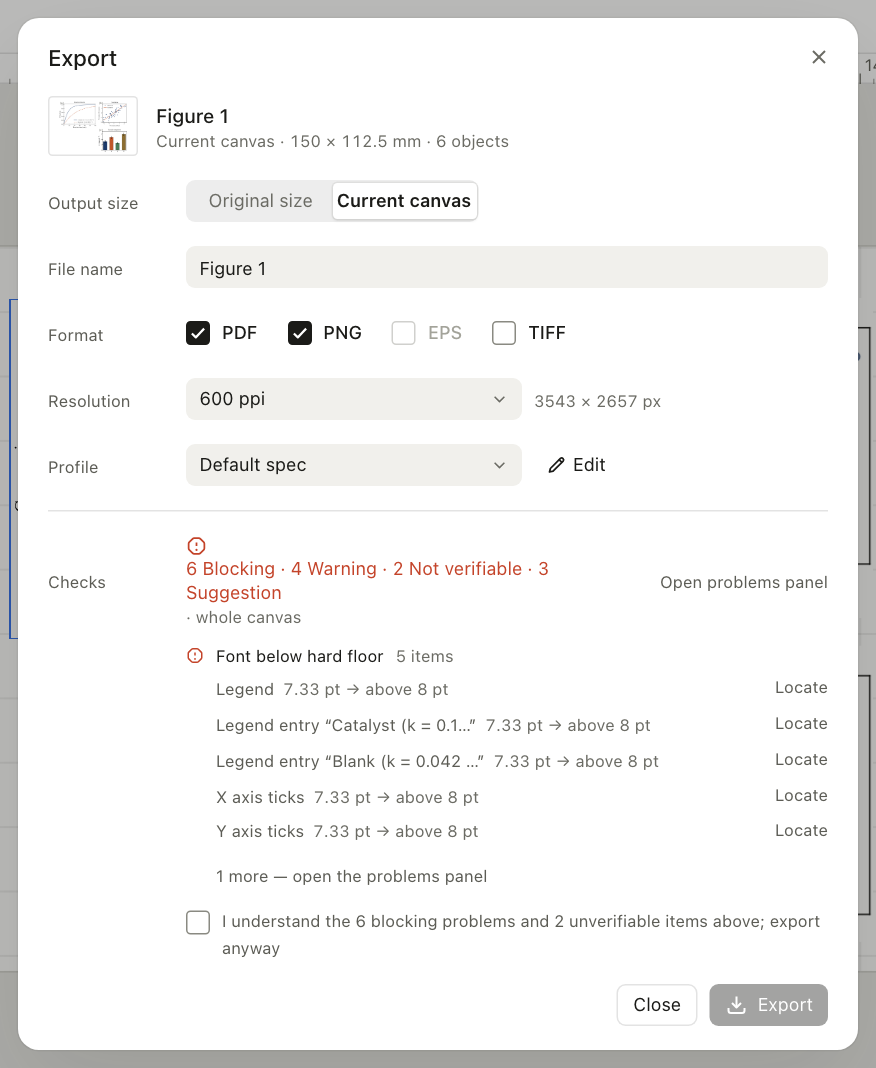
Font sizes are judged at their final physical size — a panel placed at 60% is
checked against fontsize × 0.6, not against what the script asked for. Findings come
in four levels. Blocking stops the export until you confirm in writing.
Warning is always shown. Not verifiable is what genuinely cannot be checked —
text inside an imported bitmap — and needs a human. Suggestion never decides
anything for you. All of it, your confirmation included, goes into an optional proof
report written next to the exported files.
Finish figures an AI wrote
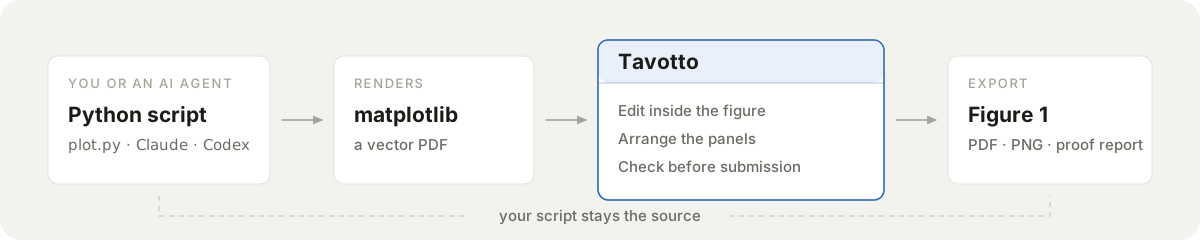
Coding agents write good first-pass matplotlib. What is left over is visual — the legend two lines too tall, the panel that wants to be a little smaller, the label overlapping a data point. Describing that in a prompt is slower than doing it.
Hand a figure over with one command, from a terminal or from an agent:
tavotto open figures/Fig1_kinetics.pdf   # the output file
tavotto open figures/fig1_kinetics.py    # or the script — the output name is resolved for you
tavotto open figures/                    # or the whole figure library
It opens that figure's library as a project, registers anything missing, and hands the figure to the desktop app — into the window that is already open, if there is one. Without the desktop app it falls back to browser mode.
Codex users can install the plugin, which teaches Codex the shape a Tavotto-editable figure has to have (script beside its output, vector PDF, an output name that resolves statically) and puts the editor inside Codex itself — the install commands and what to say in the first session are in Using Tavotto with Codex for the first time above.
It ships a skill, a local MCP server with six tools — open a figure, apply overrides,
run the preflight, export true-vector PDF/SVG/EPS or PNG/TIFF at an explicit DPI, verify a
replay, close a session, all usable in hosts with no interface at all — and an
embedded canvas built from the same frontend code the desktop app runs, so dragging,
snapping and undo have no second implementation. See
codex-plugin/README.md, including which parts are not
yet verified inside a real Codex Desktop.
A path suggested by the model is never treated as permission. On a zero-config first open, a capable Codex host shows the canonical local directory for you to approve; that approval lasts only for the current Tavotto MCP connection.
Bring an existing project · tavotto run (Beta)
tavotto open assumes the shape Tavotto likes: a script beside its output, inside a
figure library. Real papers often look different — a conda environment, a package,
command-line arguments:
conda activate paper
python -m figures.fig3 --dataset run7
For those, put tavotto run -- in front of the command you already use:
tavotto run -- python figure.py
tavotto run -- python figure.py --sample A --temperature 800
tavotto run -- /path/to/paper/.venv/bin/python figure.py
tavotto run -- python -m paper.figures.xps --sample A
Tavotto uses the Python command you provide and attaches to Matplotlib figures created
in that Python process. Your interpreter, your working directory, your arguments, your
environment, your stdout/stdin — none of them are rebuilt or intercepted. savefig
still writes the files it always wrote. Ctrl+C still interrupts your script, and
tavotto run returns your script's own exit code.
Editing in Tavotto does not change what your script sees:
ax.set_title("Script")
plt.show()                          # you rename the title in Tavotto
assert ax.get_title() == "Script"   # passes — your code is the authority
Before the script starts, the desktop app asks once, showing the interpreter path, the working directory and the target. Nothing runs until you confirm.
This mode is not a sandbox. The script has exactly the permissions it has when you run it yourself. Only run code you trust.
Beta, with explicit edges: Python script or -m module only, figures created in that
one process, no arbitrary shell wrappers, no Jupyter, no writing back to your source
or to your script's own output files, and the desktop app is required. Full contract,
error codes and troubleshooting:
docs/compatibility/tavotto-run.md.
Everything runs on your machine
Rendering, composition and export are local processes. Tavotto does not upload your figures, scripts, project files or data anywhere, and unpublished results do not leave the building. It makes exactly two requests on its own:
- A once-a-day check of GitHub Releases for a new version. Turn it off under
Settings → Check for updates (or set
TAVOTTO_NO_UPDATE_CHECK=1). - Anonymous usage statistics — off until you say yes. You are asked once, on first
run. If you opt in, Tavotto sends broad feature events (app started, figure opened,
edit committed, export succeeded, project refreshed, readiness view opened, a
tutorial step completed, a multi-selection arrange button used, how a save or a
package operation ended) plus version, OS family and architecture, tagged with a
random UUID generated on your machine. Every value is a fixed enumeration or a
bucketed count. Never your figures, scripts, filenames, paths, data, figure text,
package names or assistant prompts — the event schema cannot represent them. When
the list of events grows, the consent version is raised and you are asked again.
Turn it off under Settings → Privacy, diagnostics & About (or set
TAVOTTO_NO_TELEMETRY=1).
Project analysis is local too: the project watcher only reads file metadata and Python sources for static analysis, readiness is computed on your machine, tutorial progress is stored in your browser's local storage, and a script is only ever executed when you ask for a trial run.
The two switches are independent; neither covers the other. Details in the privacy policy and the event contract.
Get started
Desktop
Download from the latest release:
a .dmg for macOS (Apple Silicon) or an .exe for Windows (x64; Windows on ARM is neither
built nor verified). Install it, double-click, done — Tavotto opens in its own window and
updates itself from then on.
You do not need to install Python. Both installers carry a private Python runtime with the usual scientific stack already in it — numpy, matplotlib, pandas, scipy, seaborn, Pillow — pinned to the same versions on both platforms, so the same script draws the same figure. Rendering works the moment the installer finishes: offline, without Homebrew, Conda or Xcode, and without touching a Python you already have.
That runtime is also why the installers are large: 195 MB to download on macOS, 89 MB on Windows, around half a gigabyte once installed. Paid once, and offline.
macOS builds are Apple Silicon (arm64) only. Intel Macs are neither built nor tested — use the PyPI install below. There is no Linux installer; Linux runs from PyPI (browser mode, beta). On Windows, each release page states whether its installer is code signed; an unsigned installer makes Windows show a SmartScreen prompt on first run (choose More info → Run anyway, or verify the download against
SHA256SUMS.txton the release page first). The single source of truth for what is supported, beta, and unsupported — per platform and per Python version — isdocs/support-matrix.json; release pages, the website and in-app copy must match it (a test enforces the facts it can check).
PyPI
Same command on all three platforms:
pipx install "tavotto[worker]"
tavotto
Your browser opens at http://127.0.0.1:5089. --figures <dir> opens a figure
directory straight away, --port changes the port, --no-browser skips opening a
browser.
Try it in 30 seconds
pipx install "tavotto[worker]"
git clone --depth 1 https://github.com/Tavotto/Tavotto.git
tavotto --figures Tavotto/examples/figures
Three panels appear in the asset library. Drag one onto the page, double-click it,
click the title in the element tree, change 9 pt to 11, export. examples/figures/
holds two perfectly ordinary matplotlib scripts — Tavotto does not ask you to write
them in any particular way.
Advanced installation and Python environments
pip, into the current environment:
pip install "tavotto[worker]"
tavotto
Reuse the environment your figures were made in. Drop the [worker] extra and
point Tavotto at your own interpreter, so figures render against exactly the
dependencies they were written for. (This installs the lightweight CLI only: without
[worker] there is no bundled rendering stack, so rendering — including the Codex
MCP integration — depends entirely on the interpreter you point it at.)
pipx install tavotto
export TAVOTTO_WORKER_PYTHON=/path/to/your/env/bin/python   # Windows: setx TAVOTTO_WORKER_PYTHON "..."
tavotto
Contributors: developing from source. This path is for changing Tavotto itself, never a fallback for a failed regular install (needs node + pnpm to build the interface):
git clone https://github.com/Tavotto/Tavotto.git && cd Tavotto
python -m venv .venv && .venv/bin/pip install -e ".[worker,dev]"
python scripts/build_frontend.py
.venv/bin/tavotto
Which interpreter renders your figures. Tavotto picks in this order:
TAVOTTO_WORKER_PYTHON → the one you chose in Settings → the bundled runtime → its
own interpreter → a Python or Conda it finds on the machine. Whatever you choose
explicitly always wins, and Tavotto only launches the environment you point it at:
it never installs anything into it and never modifies an existing Python or Conda. The
bundled runtime is likewise never written to — bytecode and the matplotlib font cache
go to Tavotto's own data folder, so the installed app stays byte-identical (on macOS,
writing into it would break the code signature).
The bundled runtime covers the common scientific stack. It is not a promise to cover whatever your scripts import. If a script needs something it does not have (rdkit, astropy, your lab's own library) Tavotto names the missing package and offers to switch to your environment under Settings → Rendering environment; it will not install that package for you, into its runtime or into yours. With no working interpreter at all, layout, annotation and export still work — only editing inside a figure needs one.
Settings → Privacy, diagnostics and About shows which interpreter is in use, where
it came from (bundled, configured, system, …) and, for the bundled runtime, the
exact pinned version of every package. The same information is in the diagnostics
bundle.
The first open of a figure runs your script. Light figures take a second; heavy ones take as long as they normally do. Every edit after that is sub-second.
Where Tavotto fits
| matplotlib alone | A vector editor | Tavotto | |
|---|---|---|---|
| Draws the plot | ✓ | — | Uses the plots you already have |
| Direct visual editing | Limited | ✓ | ✓ |
| Knows what it is editing | Objects in your code | Generic paths and glyphs | Title, legend, ticks, series, colourbar |
| Multi-panel page in millimetres | By hand in code | ✓ | ✓ |
| Vector text in the exported PDF | ✓ | ✓ | ✓ |
| Edits stay attached to the script | ✓ | Separate file from here on | ✓ |
| Journal rules checked before export | — | — | ✓ |
A vector editor is the more powerful drawing tool, and always will be. It just does not know that the thing you clicked is a legend.
What you can edit inside a figure
| Text | Title, axis labels, tick labels, legend entries, annotations — content, size, colour, weight, style, rotation, opacity, visibility. Draggable. |
| Data series | Line width, dash pattern, colour, markers (scatter markers can be swapped wholesale), legend entry order |
| Arrows | Arrows your script drew (FancyArrowPatch): drag the whole arrow or either endpoint, change arrow style, line style, width, head size, colour. Arrows attached to annotate() keep their data anchors — style only. |
| Axes | Tick locators and formatters (how many ticks, where, written how), tick marks, grid, spines individually or all four, limits, scales, aspect. Drag a subplot and what belongs to it travels along — a label you had moved, its colourbar, a twin axis. |
| Colourbars | Orientation, both-ended extend triangles, colour map, range, tick and label styling — rebuilt in place, so undo, write-back and re-export stay consistent |
| 3D axes | Viewing angle (elev / azim / roll), projection, axis lines, panes, grid, per-axis tick groups, optional axis arrows |
| Figure | Overall size in millimetres (the layout reflows), background |
What Tavotto does not do is invent plot content. It changes the properties of things your script already drew; new curves, new panels and different data still come from the script — which is the point.
Publication profile and preflight
The rules live in one versioned JSON file
(src/tavotto/profiles/publication.json)
that both the Python engine and the TypeScript frontend read, so there is no second
copy to drift.
The default lab-publication-v1 encodes 80 mm single / 150 mm double column; 16:9,
4:3 and 1:1 aspect ratios; 9 pt body text with a single hard floor above 8 pt of
final effective size; ≥ 300 dpi rasters; Times New Roman with an explicit
CJK fallback; 0.5 / 0.75 / 1.0 / 1.5 pt line widths; ticks in, enclosed spines,
frameless legends; Title (unit) axis labels; and Scientific colour maps by semantic
type.
A journal with its own widths needs an override, not a fork:
{"widths_mm": {"double": 178}} inherits the rest, and the override is recorded in
the proof report.
Assistant (optional)
The assistant panel can hand a request to the Codex or Claude CLI on your machine to edit the script itself — "move the legend to the top left and make it 7 pt". Your script is snapshotted first; afterwards Tavotto re-reads the project (the same refresh the Codex plugin and the file watcher use), you see the diff, the figure re-renders, and one click reverts it. If the refresh fails, the status line says so instead of pretending the whole edit succeeded. This is the one path that touches your source, and you have to ask for it. Everything else works without those tools installed.
Where your files live
Data directories and what goes in them
| Documents and autosaves | macOS ~/Library/Application Support/Tavotto/ · Linux ~/.local/share/tavotto/ · Windows %LOCALAPPDATA%\Tavotto\ |
| Exports, canvas files and version history | Inside your project, in one tavottofile/ folder: exports in tavottofile/export/, named canvases beside them, version history in tavottofile/versions/. Visible, backupable, and synced along with your figures. Files written by older versions stay readable where they are. |
| Your scripts and figures | Read-only, unless you explicitly choose "write back to the original file" — which can be locked off per project |
Security and code signing
Free code signing provided by SignPath.io, certificate by SignPath Foundation. Windows release installers are built from this repository by GitHub Actions and are submitted for manual signing before they are described as signed releases. See the code signing policy.
Report security issues through private reporting, not a public issue.
Contributing
Issues and pull requests are welcome — CONTRIBUTING.md covers how to verify a change and which boundaries the codebase keeps deliberately. When reporting a bug, Settings → Privacy, diagnostics and About → Download diagnostics bundle collects everything usually needed, with keys and personal paths redacted.
.venv/bin/python -m pytest        # backend
cd web && pnpm test               # frontend
cd web && pnpm build              # type-check (tsc -b) + bundle
License
Using Tavotto, modifying it and running it inside your lab are all unrestricted, and the figures and PDFs you produce with it are entirely yours — the licence does not reach your work. The obligations apply to distribution: if you give a modified Tavotto to others, or run it as a network service for them, the corresponding source has to be available to those users.
Contributing
Contributions are accepted under the Tavotto Contributor License Agreement, which lets you keep the copyright in your contribution while allowing the project to distribute it under the community licence and, where applicable, under separate commercial terms. The Tavotto copyright holder(s) may offer separately licensed editions.
See CONTRIBUTING.md and docs/legal/.
Trademark
Tavotto™ is an unregistered trademark of the Tavotto project. An open-source copyright licence is not a trademark licence: forks are welcome and may say they are based on Tavotto, but shouldn't present themselves as the official release. See TRADEMARKS.md.
If Tavotto saves you an afternoon on your next figure, consider starring the repository.
1 maintainer

Metadata
1 maintainer
Release files for tavotto 0.15.0
For a detailed explanation of source distributions (sdists) and built distributions (wheels), please see the package formats documentation.
Source distribution (sdist)
| File | Size | Uploaded | |
|---|---|---|---|
| tavotto-0.15.0.tar.gz | 5.8 MB | Details |
Built distribution (wheel)
| File | Interpreter | ABI | Platform | Reset |
|---|---|---|---|---|
| tavotto-0.15.0-py3-none-any.whl | Python 3 | none | any | Details |
Total release size: 7.5 MB
Release files / tavotto-0.15.0.tar.gz
| Download URL | tavotto-0.15.0.tar.gz |
|---|---|
| Size | 5.8 MB |
| Tags | Source |
|
SHA-256 checksum How to use checksums |
99d757a61e9c51b6b183289ceda010dd1fa98dfb55e3a12c64d39e0977112492
|
|
BLAKE2b-256 checksum How to use checksums |
91cc2df20decfdc832f85c6774ed83783b773fc77a75406fdcb57c9b8b59273b
|
| Upload date | |
|
Uploaded using Trusted Publishing? What is trusted publishing? |
Yes |
| Uploaded via |
twine/7.0.0 CPython/3.13.14
|
Provenance
Provenance describes where a file came from. On PyPI, provenance is shared via attestations, which provide a verifiable record of the build or publishing details. View details, limitations and caveats.


PyPI Publish Attestation
PyPI verified that this artifact, at this checksum, originated from the publisher listed below.
Signed by GitHub Actions, verified by PyPI on Sep 19, 2026.
Transparency logRelease files / tavotto-0.15.0-py3-none-any.whl
| Download URL | tavotto-0.15.0-py3-none-any.whl |
|---|---|
| Size | 1.6 MB |
| Tags | Python 3 |
|
SHA-256 checksum How to use checksums |
f9f4faf27319a067b32b71096ba47f57d5d132eab52e020efaaf95a57d84e2d8
|
|
BLAKE2b-256 checksum How to use checksums |
82959dafb10ac05f9acebe145810fa15e6f4e21c6a89ee30db6256a1d27abfcc
|
| Upload date | |
|
Uploaded using Trusted Publishing? What is trusted publishing? |
Yes |
| Uploaded via |
twine/7.0.0 CPython/3.13.14
|
Provenance
Provenance describes where a file came from. On PyPI, provenance is shared via attestations, which provide a verifiable record of the build or publishing details. View details, limitations and caveats.
PyPI Publish Attestation
PyPI verified that this artifact, at this checksum, originated from the publisher listed below.
Signed by GitHub Actions, verified by PyPI on Sep 19, 2026.
Transparency log













