
tc66c2mqtt





Send MQTT events from RDTech TC66C device
Tested with Joy-IT TC66C.
RDTech TC66C hardware info at sigrok:
Used Kaitai Struct to parse the binary data from the TC66C device. See: tc66c.ksy and tc66c.py.
Bootstrap tc66c2mqtt
Clone the sources and just call the CLI to create a Python Virtualenv, e.g.:
~$ git clone https://github.com/jedie/tc66c2mqtt.git
~$ cd tc66c2mqtt
~/tc66c2mqtt$ ./cli.py --help
Output looks like:
usage: ./cli.py [-h]
                {edit-settings,print-data,print-settings,publish-loop,scan,systemd-debug,systemd-remove,systemd-setup,
systemd-status,systemd-stop,update-readme-history,version,write}


╭─ options ──────────────────────────────────────────────────────────────────────────────────────────────────────────╮
│ -h, --help        show this help message and exit                                                                  │
╰────────────────────────────────────────────────────────────────────────────────────────────────────────────────────╯
╭─ subcommands ──────────────────────────────────────────────────────────────────────────────────────────────────────╮
│ {edit-settings,print-data,print-settings,publish-loop,scan,systemd-debug,systemd-remove,systemd-setup,systemd-stat │
│ us,systemd-stop,update-readme-history,version,write}                                                               │
│     edit-settings                                                                                                  │
│                   Edit the settings file. On first call: Create the default one.                                   │
│     print-data    Print TC66C data to console                                                                      │
│     print-settings                                                                                                 │
│                   Display (anonymized) MQTT server username and password                                           │
│     publish-loop  Print TC66C data to console                                                                      │
│     scan          Discover Bluetooth devices and there services/descriptors                                        │
│     systemd-debug                                                                                                  │
│                   Print Systemd service template + context + rendered file content.                                │
│     systemd-remove                                                                                                 │
│                   Remove Systemd service file. (May need sudo)                                                     │
│     systemd-setup                                                                                                  │
│                   Write Systemd service file, enable it and (re-)start the service. (May need sudo)                │
│     systemd-status                                                                                                 │
│                   Display status of systemd service. (May need sudo)                                               │
│     systemd-stop  Stops the systemd service. (May need sudo)                                                       │
│     update-readme-history                                                                                          │
│                   Update project history base on git commits/tags in README.md Will be exited with 1 if the        │
│                   README.md was updated otherwise with 0.                                                          │
│                                                                                                                    │
│                   Also, callable via e.g.:                                                                         │
│                       python -m cli_base update-readme-history -v                                                  │
│     version       Print version and exit                                                                           │
│     write         Write files from TC66C data to disk.                                                             │
╰────────────────────────────────────────────────────────────────────────────────────────────────────────────────────╯
Start hacking
Create dev virtualenv:
~$ git clone https://github.com/jedie/tc66c2mqtt.git
~$ cd tc66c2mqtt
~/tc66c2mqtt$ ./dev-cli.py --help
Output looks like:
usage: ./dev-cli.py [-h]
                    {check-code-style,coverage,fix-code-style,install,mypy,nox,pip-audit,publish,test,update,update-te
st-snapshot-files,version}


╭─ options ──────────────────────────────────────────────────────────────────────────────────────────────────────────╮
│ -h, --help        show this help message and exit                                                                  │
╰────────────────────────────────────────────────────────────────────────────────────────────────────────────────────╯
╭─ subcommands ──────────────────────────────────────────────────────────────────────────────────────────────────────╮
│ {check-code-style,coverage,fix-code-style,install,mypy,nox,pip-audit,publish,test,update,update-test-snapshot-file │
│ s,version}                                                                                                         │
│     check-code-style                                                                                               │
│                   Check code style by calling darker + flake8                                                      │
│     coverage      Run tests and show coverage report.                                                              │
│     fix-code-style                                                                                                 │
│                   Fix code style of all tc66c2mqtt source code files via darker                                    │
│     install       Install requirements and 'tc66c2mqtt' via pip as editable.                                       │
│     mypy          Run Mypy (configured in pyproject.toml)                                                          │
│     nox           Run nox                                                                                          │
│     pip-audit     Run pip-audit check against current requirements files                                           │
│     publish       Build and upload this project to PyPi                                                            │
│     test          Run unittests                                                                                    │
│     update        Update "requirements*.txt" dependencies files                                                    │
│     update-test-snapshot-files                                                                                     │
│                   Update all test snapshot files (by remove and recreate all snapshot files)                       │
│     version       Print version and exit                                                                           │
╰────────────────────────────────────────────────────────────────────────────────────────────────────────────────────╯
Screenshots
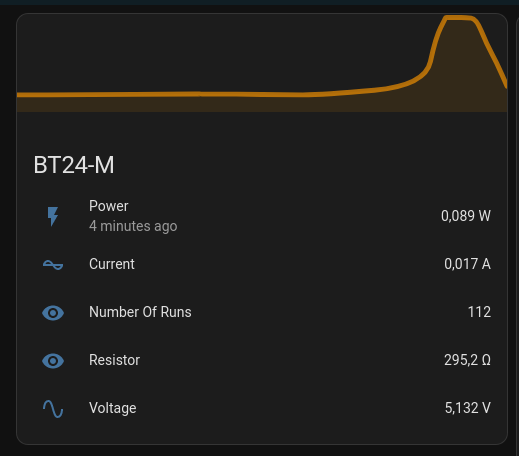
Home Assistant
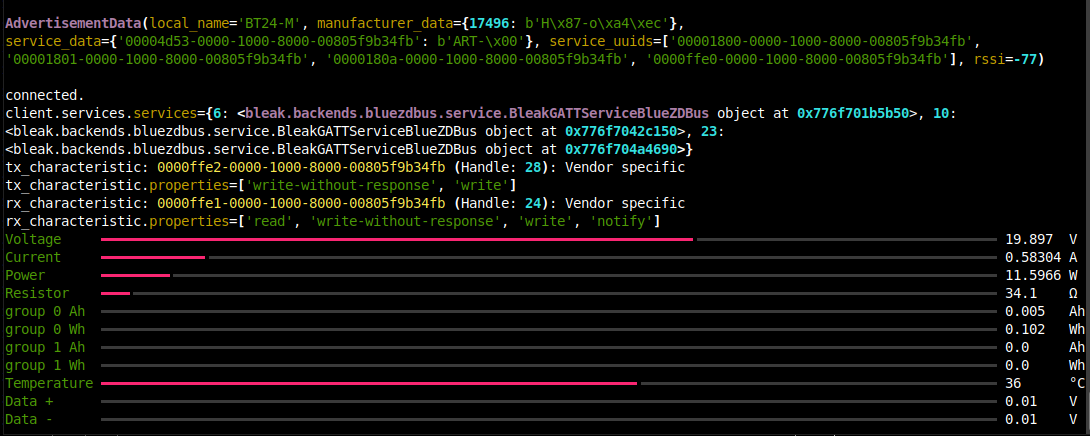
print data
test print data in terminal looks like:
~/tc66c2mqtt$ ./cli.py print-data
History
- v0.4.1
- 2025-04-21 - Set min/max validation values in MQTT components of ha-services
- v0.4.0
- 2025-04-21 - Update README.md
- 2025-04-21 - bugfix scan
- 2025-04-21 - update CLI to tyro
- 2025-04-21 - migrate pip-tools to uv
- 2025-04-21 - Enhance scan
- 2024-06-13 - typo: Not "Delta" it's "Data" voltage ;)
- v0.3.0
- 2024-06-12 - Expose Delta +/i and temperatur via MQTT, too.
- v0.2.0
- 2024-06-10 - Use Kaitai Struct and expose group Ah/Wh to MQTT add write command
- 2024-06-10 - Fix some typos
- 2024-05-31 - Update requirements
- 2024-05-31 - print device info
- 2024-05-15 - Simplify parsing TC66 data
Expand older history entries ...
- v0.1.1
- 2024-05-15 - README
- 2024-05-15 - Update README.md
- v0.1.0
- 2024-05-15 - Update requirements
- 2024-05-15 - Handle TimeoutError seperate
- 2024-05-15 - fix code style
- 2024-05-15 - Expand MQTT sensors
- 2024-05-07 - add screenshot
- 2024-05-07 - Use rich "Progress" to display data on console
- 2024-04-29 - Add initial state
1 maintainer

Metadata
1 maintainer
Release files for tc66c2mqtt 0.4.1
For a detailed explanation of source distributions (sdists) and built distributions (wheels), please see the package formats documentation.
Source distribution (sdist)
| File | Size | Uploaded | |
|---|---|---|---|
| tc66c2mqtt-0.4.1.tar.gz | 93.8 kB | Details |
Built distribution (wheel)
| File | Interpreter | ABI | Platform | Reset |
|---|---|---|---|---|
| tc66c2mqtt-0.4.1-py3-none-any.whl | Python 3 | none | any | Details |
Total release size: 122.1 kB
Release files / tc66c2mqtt-0.4.1.tar.gz
| Download URL | tc66c2mqtt-0.4.1.tar.gz |
|---|---|
| Size | 93.8 kB |
| Tags | Source |
|
SHA-256 checksum How to use checksums |
de8c5f942307daca4e50190396c3b647918cfdf484ddea1524a04253442e4eae
|
|
BLAKE2b-256 checksum How to use checksums |
cc8898e216a433dcbf95ec1cb81cd02d00a320141cf5c11ad3e776b4264a1858
|
| Upload date | |
|
Uploaded using Trusted Publishing? What is trusted publishing? |
No |
| Uploaded via |
twine/6.1.0 CPython/3.12.3
|
Release files / tc66c2mqtt-0.4.1-py3-none-any.whl
| Download URL | tc66c2mqtt-0.4.1-py3-none-any.whl |
|---|---|
| Size | 28.2 kB |
| Tags | Python 3 |
|
SHA-256 checksum How to use checksums |
3dc5f68f39b5a72e2e65eeab631f212097b3e48d42b508629314ddb4509fc23e
|
|
BLAKE2b-256 checksum How to use checksums |
d1748037e829031d200700585fba95f37aa7adf47f80eea5872cf606ff49bee7
|
| Upload date | |
|
Uploaded using Trusted Publishing? What is trusted publishing? |
No |
| Uploaded via |
twine/6.1.0 CPython/3.12.3
|














