
Sends MQTT events from TC66C device

Project description
tc66c2mqtt





Send MQTT events from RDTech TC66C device
Tested with Joy-IT TC66C.
RDTech TC66C hardware info at sigrok:
Used Kaitai Struct to parse the binary data from the TC66C device. See: tc66c.ksy and tc66c.py.
Bootstrap tc66c2mqtt
Clone the sources and just call the CLI to create a Python Virtualenv, e.g.:
~$ git clone https://github.com/jedie/tc66c2mqtt.git
~$ cd tc66c2mqtt
~/tc66c2mqtt$ ./cli.py --help
Output looks like:
usage: ./cli.py [-h]
                {edit-settings,print-data,print-settings,publish-loop,scan,systemd-debug,systemd-remove,systemd-setup,
systemd-status,systemd-stop,update-readme-history,version,write}


╭─ options ──────────────────────────────────────────────────────────────────────────────────────────────────────────╮
│ -h, --help        show this help message and exit                                                                  │
╰────────────────────────────────────────────────────────────────────────────────────────────────────────────────────╯
╭─ subcommands ──────────────────────────────────────────────────────────────────────────────────────────────────────╮
│ {edit-settings,print-data,print-settings,publish-loop,scan,systemd-debug,systemd-remove,systemd-setup,systemd-stat │
│ us,systemd-stop,update-readme-history,version,write}                                                               │
│     edit-settings                                                                                                  │
│                   Edit the settings file. On first call: Create the default one.                                   │
│     print-data    Print TC66C data to console                                                                      │
│     print-settings                                                                                                 │
│                   Display (anonymized) MQTT server username and password                                           │
│     publish-loop  Print TC66C data to console                                                                      │
│     scan          Discover Bluetooth devices and there services/descriptors                                        │
│     systemd-debug                                                                                                  │
│                   Print Systemd service template + context + rendered file content.                                │
│     systemd-remove                                                                                                 │
│                   Remove Systemd service file. (May need sudo)                                                     │
│     systemd-setup                                                                                                  │
│                   Write Systemd service file, enable it and (re-)start the service. (May need sudo)                │
│     systemd-status                                                                                                 │
│                   Display status of systemd service. (May need sudo)                                               │
│     systemd-stop  Stops the systemd service. (May need sudo)                                                       │
│     update-readme-history                                                                                          │
│                   Update project history base on git commits/tags in README.md Will be exited with 1 if the        │
│                   README.md was updated otherwise with 0.                                                          │
│                                                                                                                    │
│                   Also, callable via e.g.:                                                                         │
│                       python -m cli_base update-readme-history -v                                                  │
│     version       Print version and exit                                                                           │
│     write         Write files from TC66C data to disk.                                                             │
╰────────────────────────────────────────────────────────────────────────────────────────────────────────────────────╯
Start hacking
Create dev virtualenv:
~$ git clone https://github.com/jedie/tc66c2mqtt.git
~$ cd tc66c2mqtt
~/tc66c2mqtt$ ./dev-cli.py --help
Output looks like:
usage: ./dev-cli.py [-h]
                    {check-code-style,coverage,fix-code-style,install,mypy,nox,pip-audit,publish,test,update,update-te
st-snapshot-files,version}


╭─ options ──────────────────────────────────────────────────────────────────────────────────────────────────────────╮
│ -h, --help        show this help message and exit                                                                  │
╰────────────────────────────────────────────────────────────────────────────────────────────────────────────────────╯
╭─ subcommands ──────────────────────────────────────────────────────────────────────────────────────────────────────╮
│ {check-code-style,coverage,fix-code-style,install,mypy,nox,pip-audit,publish,test,update,update-test-snapshot-file │
│ s,version}                                                                                                         │
│     check-code-style                                                                                               │
│                   Check code style by calling darker + flake8                                                      │
│     coverage      Run tests and show coverage report.                                                              │
│     fix-code-style                                                                                                 │
│                   Fix code style of all tc66c2mqtt source code files via darker                                    │
│     install       Install requirements and 'tc66c2mqtt' via pip as editable.                                       │
│     mypy          Run Mypy (configured in pyproject.toml)                                                          │
│     nox           Run nox                                                                                          │
│     pip-audit     Run pip-audit check against current requirements files                                           │
│     publish       Build and upload this project to PyPi                                                            │
│     test          Run unittests                                                                                    │
│     update        Update "requirements*.txt" dependencies files                                                    │
│     update-test-snapshot-files                                                                                     │
│                   Update all test snapshot files (by remove and recreate all snapshot files)                       │
│     version       Print version and exit                                                                           │
╰────────────────────────────────────────────────────────────────────────────────────────────────────────────────────╯
Screenshots
Home Assistant
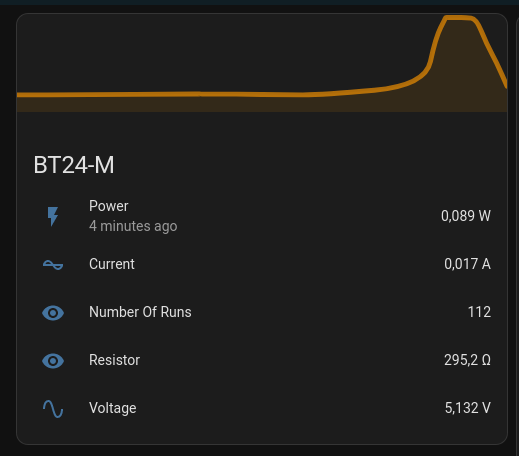
print data
test print data in terminal looks like:
~/tc66c2mqtt$ ./cli.py print-data
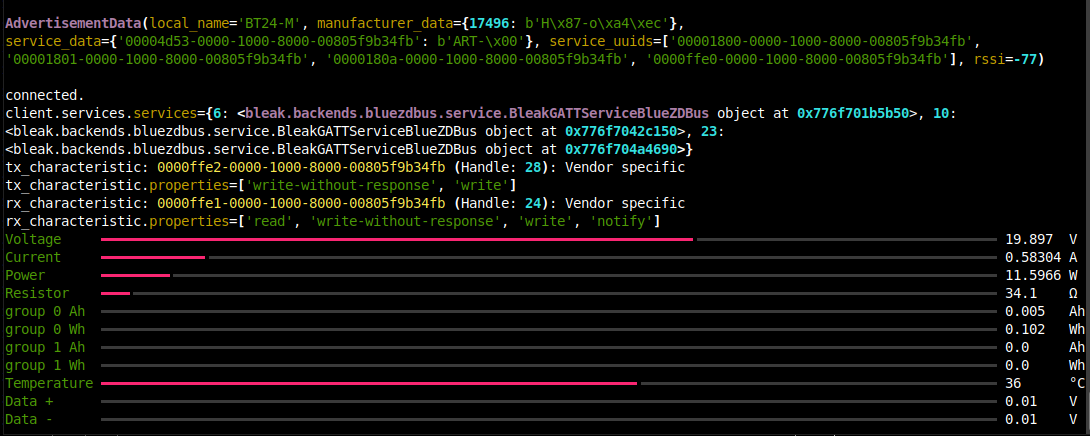
History
- v0.4.0
- 2025-04-21 - Update README.md
- 2025-04-21 - bugfix scan
- 2025-04-21 - update CLI to tyro
- 2025-04-21 - migrate pip-tools to uv
- 2025-04-21 - Enhance scan
- 2024-06-13 - typo: Not "Delta" it's "Data" voltage ;)
- v0.3.0
- 2024-06-12 - Expose Delta +/i and temperatur via MQTT, too.
- v0.2.0
- 2024-06-10 - Use Kaitai Struct and expose group Ah/Wh to MQTT add write command
- 2024-06-10 - Fix some typos
- 2024-05-31 - Update requirements
- 2024-05-31 - print device info
- 2024-05-15 - Simplify parsing TC66 data
- v0.1.1
- 2024-05-15 - README
- 2024-05-15 - Update README.md
Expand older history entries ...
- v0.1.0
- 2024-05-15 - Update requirements
- 2024-05-15 - Handle TimeoutError seperate
- 2024-05-15 - fix code style
- 2024-05-15 - Expand MQTT sensors
- 2024-05-07 - add screenshot
- 2024-05-07 - Use rich "Progress" to display data on console
- 2024-04-29 - Add initial state
Release history Release notifications | RSS feed


Download files
Download the file for your platform. If you're not sure which to choose, learn more about installing packages.
Source Distribution
Built Distribution
Filter files by name, interpreter, ABI, and platform.
If you're not sure about the file name format, learn more about wheel file names.
Copy a direct link to the current filters
File details
Details for the file tc66c2mqtt-0.4.0.tar.gz.
File metadata
- Download URL: tc66c2mqtt-0.4.0.tar.gz
- Upload date:
- Size: 93.5 kB
- Tags: Source
- Uploaded using Trusted Publishing? No
- Uploaded via: twine/6.1.0 CPython/3.12.3
File hashes
| Algorithm | Hash digest | |
|---|---|---|
| SHA256 |
5c37feac7f90eefdb7da5118c13296a44714d8db0df55c81426e960c91bcc91e
|
|
| MD5 |
13171591e8427fcc206d36f9623221a7
|
|
| BLAKE2b-256 |
aab4f2467cfb9dc00acb1af45d8cefba3190569088b31a68321f3d73cf6840a9
|
File details
Details for the file tc66c2mqtt-0.4.0-py3-none-any.whl.
File metadata
- Download URL: tc66c2mqtt-0.4.0-py3-none-any.whl
- Upload date:
- Size: 28.0 kB
- Tags: Python 3
- Uploaded using Trusted Publishing? No
- Uploaded via: twine/6.1.0 CPython/3.12.3
File hashes
| Algorithm | Hash digest | |
|---|---|---|
| SHA256 |
5c0440372ae22fc9a491c69673b49383ddd99066c75b7beed7e5beaeb851fe47
|
|
| MD5 |
1af583edbe7f6e9887b0b7cfd4fcb6af
|
|
| BLAKE2b-256 |
f9d5205b3fc13cc1b21cfd7b78dd9ddcdfe0f735d0a4555cdc0b95b334e96807
|






