
Token-Efficient Retrieval Augmented Generation with Graph-based Indexing

Project description
TERAG: Token-Efficient Graph-Based RAG
Token-Efficient Graph-Based Retrieval-Augmented Generation
Based on the research paper: arXiv:2509.18667 (September 2025)
Overview
TERAG is a lightweight graph-based RAG framework that achieves 80%+ of GraphRAG's accuracy while consuming only 3-11% of the output tokens. It addresses the high cost associated with LLM token usage during graph construction that hinders large-scale adoption of graph-based RAG systems.
Key Advantages
- Cost-Efficient: 89-97% reduction in token consumption vs. traditional graph RAG
- High Performance: Matches GraphRAG accuracy (EM: 51.2 vs. 51.4; F1: 57.8 vs. 58.6)
- Lightweight: Minimal LLM usage - only for query NER and answer generation
- Scalable: Efficient for large document collections
Supported Features & Limitations
Supported Features
- Graph Backend: Built on NetworkX for efficient in-memory graph operations.
- Ingestion: Flexible JSON ingestion for chunks, Q&A pairs, and documents.
- Retrieval Algorithms:
- Personalized PageRank (PPR): Biased random walks for entity-centric retrieval.
- Hybrid Retrieval: Combines PPR scores with semantic vector similarity.
- Named Entity Recognition:
- LLM-based: Uses Groq/OpenAI for high-accuracy extraction.
- Regex Fallback: Pattern-based extraction when LLM is unavailable.
- Embeddings: Integrated with SentenceTransformers for local semantic search.
Limitations
- Graph Database: Currently supports NetworkX (in-memory) only. Native support for Neo4j or ArangoDB is NOT currently implemented.
- Scalability: Best suited for small to medium-sized graphs (up to ~100k nodes) that fit in memory.
Architecture
1. Graph Construction
TERAG uses a directed, unweighted graph G = (V, E) where:
- Nodes (V):
- Passage nodes (squares): Document chunks/passages
- Concept nodes (circles): Named entities and document-level concepts
- Edges (E ⊆ V×V): Directed connections between passages and concepts
- Storage: Adjacency lists for efficient neighborhood expansion
Visual Representation
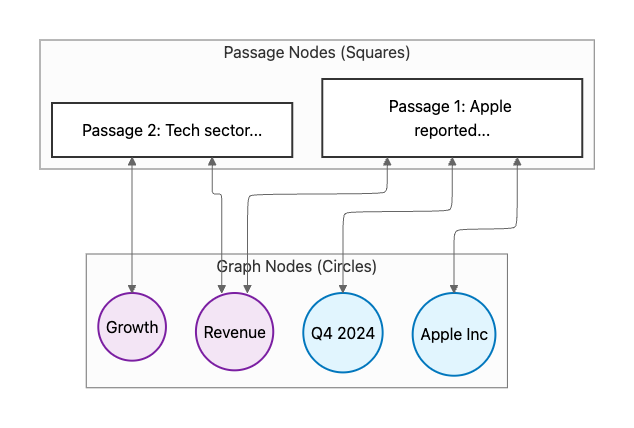
Legend:
- Passage Nodes (White Squares): The actual text chunks from your documents.
- Entity Nodes (Blue Circles): Specific named entities (People, Orgs, Dates).
- Concept Nodes (Purple Circles): Abstract topics or themes shared across passages.
- Edges: Bidirectional links. If Passage 1 mentions "Apple", they are connected. This allows the retrieval to "hop" from one passage to another via shared concepts.
2. Concept Extraction
Lightweight concept extraction focusing on:
- Named Entities: People, organizations, locations, dates (dark green circles)
- Document-level Concepts: Key topics, themes, technical terms (dark blue circles)
- Non-LLM Clustering: Efficient grouping without heavy LLM usage
3. Retrieval Algorithm
Personalized PageRank (PPR) inspired by HippoRAG:
- Query NER: Few-shot prompt extracts named entities from user query
- Node Matching: Match query entities to graph concepts
- PPR Computation: Run PPR biased towards query-relevant nodes
- Weighting: Combine frequency and semantic weights
- Passage Ranking: Return top-k most relevant passages
4. Weighting Scheme
Each matched node receives an unnormalized weight:
weight(node) = frequency_weight(node) × semantic_weight(node)
- Frequency Weight: Inverse of concept frequency (rarer = more important)
- Semantic Weight: Embedding similarity between query and concept
Performance Comparison
| Method | Accuracy | Token Consumption | Relative Cost (per token to be ingested) |
|---|---|---|---|
| Nano-GraphRAG | 100% baseline | 100% baseline | 80-200x (personal experience) |
| LightRAG | ~75% | ~30% | High |
| MiniRAG | ~70% | ~25% | High |
| TERAG | 80-90% | 3-11% | 3-5x |
Algorithm Components
Graph Construction Phase
1. Chunk documents into passages (P1, P2, ..., Pn)
2. For each passage Pi:
   a. Extract named entities → ENT(Pi)
   b. Extract document concepts → CON(Pi)
   c. Create passage node → V_passage
3. Cluster similar concepts (non-LLM)
4. Create concept nodes → V_concepts
5. Build edges:
   - Pi → concept (if concept in Pi)
   - concept → Pi (bidirectional)
6. Store as adjacency list graph G = (V, E)
Retrieval Phase
1. Query Q arrives
2. Extract query entities → ENT(Q) [Few-shot LLM]
3. Match ENT(Q) to graph concepts → matched_nodes
4. Calculate restart vector R:
   R[node] = freq_weight[node] × semantic_weight[node] for matched nodes
   R[node] = 0 for unmatched nodes
5. Run Personalized PageRank:
   PPR(G, R, alpha=0.85, max_iter=100)
6. Rank passages by PPR scores
7. Return top-k passages
8. Generate answer using LLM with retrieved passages
Installation
From PyPI
pip install terag
From Source
git clone https://github.com/rudranaik/terag.git
cd terag
pip install -e .
Quick Start
Get started with TERAG in 3 simple steps:
1. Setup
Ensure you have your API keys set (if using LLM features):
export GROQ_API_KEY="your_key_here"  # Optional: for LLM-based NER
export OPENAI_API_KEY="your_key_here" # Optional: for embeddings/LLM
2. Basic Usage
from terag import TERAG, TERAGConfig

# Define some sample data
# NOTE: The 'content' key is REQUIRED. It is the only field used for graph construction.
# 'metadata' is optional and stored but not used for indexing.
chunks = [
    {"content": "Apple Inc announced strong revenue growth in Q4 2024.", "metadata": {"source": "news"}},
    {"content": "Microsoft Corporation reported significant cloud achievements.", "metadata": {"source": "news"}}
]

# Initialize TERAG
config = TERAGConfig(top_k=3)
terag = TERAG.from_chunks(chunks, config=config)

# Retrieve
results, metrics = terag.retrieve("What is the revenue growth?")

# Inspect results
for result in results:
    print(f"Score: {result.score:.4f} | Content: {result.content}")
3. Visualization & Export
TERAG uses a custom JSON format for storage, but you can easily export to GraphML (supported by Gephi, Cytoscape, etc.) using NetworkX:
import networkx as nx

# Convert to NetworkX graph
G = terag.graph.to_networkx()

# Save as GraphML for visualization tools
nx.write_graphml(G, "terag_graph.graphml")
4. Advanced Usage
For more complex scenarios, including custom graph building and hybrid retrieval, check out terag/examples/example_usage.py.
Contributing
We welcome contributions! Please see CONTRIBUTING.md for guidelines on how to help improve TERAG.
Configuration Guide
TERAG is highly configurable to suit different use cases. Here's what each setting does:
| Parameter | Default | Developer Explanation | Product/Business Impact |
|---|---|---|---|
top_k |
10 |
Number of passages to return in the final result set. | Response Depth: Higher values give the LLM more context but increase costs and latency. Lower values are faster and cheaper but might miss details. |
min_concept_freq |
2 |
Minimum number of times a concept must appear in the corpus to be included in the graph. | Noise Reduction: Filters out one-off mentions or typos. Increase this for cleaner graphs from noisy data (e.g., social media). |
max_concept_freq_ratio |
0.5 |
Maximum ratio of documents a concept can appear in before being excluded (stopword filtering). | Relevance: Prevents common words (like "company" in a business report) from dominating the search results. |
ppr_alpha |
0.15 |
Damping factor for Personalized PageRank (teleport probability). | Exploration vs. Focus: Lower values explore further away from the query entities (finding indirect connections). Higher values stick closer to direct matches. |
semantic_weight |
0.5 |
Weight given to semantic similarity vs. frequency in the initial node scoring. | Understanding: Higher values prioritize concepts that mean the same thing as the query, even if spelled differently. |
use_llm_for_ner |
False |
Whether to use an LLM (Groq/OpenAI) for Named Entity Recognition during ingestion/querying. | Accuracy vs. Cost: True gives much better entity extraction but costs money per query. False is free and fast but less accurate. |
Example Configuration
For a high-precision legal search:
config = TERAGConfig(
    top_k=20,                  # Need comprehensive results
    min_concept_freq=1,        # Every detail matters
    use_llm_for_ner=True,      # Maximum accuracy required
    ppr_alpha=0.1              # Explore indirect relationships
)
For a real-time news chatbot:
config = TERAGConfig(
    top_k=5,                   # Fast response needed
    min_concept_freq=3,        # Ignore noise
    use_llm_for_ner=False,     # Keep costs low
    ppr_alpha=0.2              # Focus on direct matches
)
terag/graph/builder.py: Graph construction from chunksterag/ingestion/ner_extractor.py: Named Entity Recognition for queries/documentsterag/retrieval/ppr.py: Personalized PageRank retrieval algorithmterag/core.py: Main TERAG retriever interfaceterag/examples/example_usage.py: Usage examples and integration tests
## Research References

- **TERAG Paper**: [arXiv:2509.18667](https://arxiv.org/abs/2509.18667) (2025)
- **HippoRAG**: Personalized PageRank for RAG (2024)
- **GraphRAG**: Microsoft's graph-based RAG (2023-2024)
- **Personalized PageRank**: Page et al., Stanford (1998)

## Performance Metrics

### Expected Results (based on paper)

- **Accuracy**: 80-90% of GraphRAG quality
- **Token Reduction**: 89-97% fewer tokens than GraphRAG
- **Retrieval Speed**: < 2 seconds per query
- **Graph Construction**: < 15 minutes for 400-page document

### Our Implementation Goals

- Match paper's token efficiency (3-11% consumption)
- Achieve F1 score > 55% on multi-hop queries
- Support 100K+ node graphs efficiently
- Support 100K+ node graphs efficiently

## Future Enhancements

- [ ] Support for dynamic graph updates
- [ ] Advanced concept clustering (embeddings-based)
- [ ] Multi-hop reasoning chains visualization
- [ ] Hybrid retrieval combining TERAG + dense vectors
- [ ] Real-time graph construction for streaming documents

## License

MIT License


Download files
Download the file for your platform. If you're not sure which to choose, learn more about installing packages.
Source Distribution
Built Distribution
Filter files by name, interpreter, ABI, and platform.
If you're not sure about the file name format, learn more about wheel file names.
Copy a direct link to the current filters
File details
Details for the file terag-0.5.5.tar.gz.
File metadata
- Download URL: terag-0.5.5.tar.gz
- Upload date:
- Size: 78.6 kB
- Tags: Source
- Uploaded using Trusted Publishing? No
- Uploaded via: twine/6.2.0 CPython/3.12.8
File hashes
| Algorithm | Hash digest | |
|---|---|---|
| SHA256 |
443a16e5b8b31b987c051b955bf8a3a828423f50789fbc375c7812a59077b904
|
|
| MD5 |
86a94291853e1bc1411ffa2cc35c503f
|
|
| BLAKE2b-256 |
dfdc76c14e0ce6f3cdda4a30d61a28c934c6a1ac35530a9fb354484a4cd02cb8
|
File details
Details for the file terag-0.5.5-py3-none-any.whl.
File metadata
- Download URL: terag-0.5.5-py3-none-any.whl
- Upload date:
- Size: 85.0 kB
- Tags: Python 3
- Uploaded using Trusted Publishing? No
- Uploaded via: twine/6.2.0 CPython/3.12.8
File hashes
| Algorithm | Hash digest | |
|---|---|---|
| SHA256 |
bc4ba3f846ce501cc61a07a9adabbca7d54294b51c95860c5a99dc266b8e4be3
|
|
| MD5 |
ccc3536e35364cc895a252a17bb82019
|
|
| BLAKE2b-256 |
61a91d4f3fee60cacbd22a4eb13335f6e21df1f400e2e9a6d4a9ca4fee96a20b
|






