
Termai - AI-Powered Command Line Assistant
Overview
Termai is a command-line tool specially designed for beginners,it translates natural language instructions into shell commands and executes them. It streamlines terminal interactions by automating command generation, reducing the need to memorize complex syntax.
Features
- Natural Language to Shell Command Conversion – Converts plain English instructions into executable shell commands using the Gemini language model.
- Command Review – Allows users to review generated commands before execution to ensure accuracy.
- Command Execution – Runs commands directly and presents output in a user-friendly format.
- Shell Detection – Identifies the active shell environment (bash, zsh, PowerShell, etc.) for compatibility.
- Command Validation – Implements security measures to prevent execution of potentially harmful commands.
Installation
Using pip (Recommended)
pip install termai-cli
From Source
git clone https://github.com/ayushgupta4002/Termai
cd termai
pip install .
Usage
Basic Usage
termai "Your instruction here" -e
Example Commands
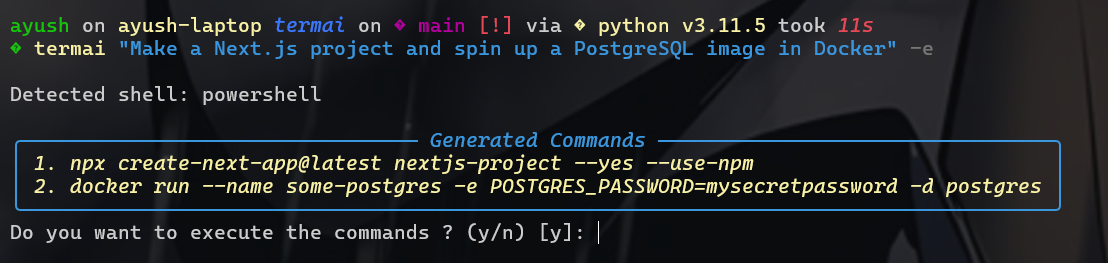
Create a Next.js project and spin up a PostgreSQL container in Docker:
termai "Make a Next.js project and spin up a PostgreSQL image in Docker" -e
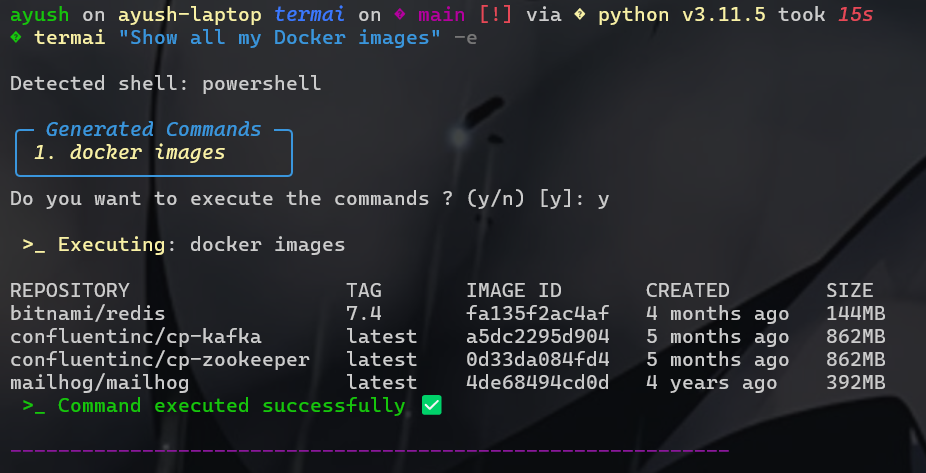
List all running Docker containers:
termai "Show all running Docker containers" -e
Find and delete all .log files in the current directory:
termai "Find and delete all .log files in this folder" -e
Architecture
Termai's core logic is in cli.py, which:
- Receives a natural language instruction.
- Uses
get_shell_command(vialangchain_google_genai) to generate shell commands. - Validates commands using
validate_commandinutils.py. - Executes commands securely and displays results.
Project Structure
termai/
├── src/
│   ├── cli.py       # Command-line interface logic
│   ├── utils.py     # Utility functions (validation, shell detection)
│   └── __init__.py
├── setup.py       # Build script for packaging
└── README.md
Dependencies
- Python – Primary language
- Typer – CLI framework
- Pydantic – Data validation
- Rich – Enhanced terminal output
- google-generativeai & langchain-google-genai – AI model integration
- python-dotenv – Environment variable management
- setuptools – Packaging and distribution
- subprocess – Command execution
Configuration
Before using Termai, set up your Gemini API key:
echo "GOOGLE_API_KEY=your_api_key" > .env
Contributing
Contributions are welcome! Please submit a pull request or open an issue.
Support
For any issues or feature requests, please open an issue on GitHub.
1 maintainer

Metadata
1 maintainer
Release files for termai-cli 1.0.1
For a detailed explanation of source distributions (sdists) and built distributions (wheels), please see the package formats documentation.
Source distribution (sdist)
| File | Size | Uploaded | |
|---|---|---|---|
| termai_cli-1.0.1.tar.gz | 11.0 kB | Details |
Built distribution (wheel)
| File | Interpreter | ABI | Platform | Reset |
|---|---|---|---|---|
| termai_cli-1.0.1-py3-none-any.whl | Python 3 | none | any | Details |
Total release size: 23.5 kB
Release files / termai_cli-1.0.1.tar.gz
| Download URL | termai_cli-1.0.1.tar.gz |
|---|---|
| Size | 11.0 kB |
| Tags | Source |
|
SHA-256 checksum How to use checksums |
f1bf2f9a12d8488b9e3f963c85dc6646cdd9728a974c5579373ed1632b26e25a
|
|
BLAKE2b-256 checksum How to use checksums |
e147456ea61c43100d9c07fe172bf627e8484e6811971cdbd39f5037557065ce
|
| Upload date | |
|
Uploaded using Trusted Publishing? What is trusted publishing? |
No |
| Uploaded via |
twine/6.1.0 CPython/3.11.5
|
Release files / termai_cli-1.0.1-py3-none-any.whl
| Download URL | termai_cli-1.0.1-py3-none-any.whl |
|---|---|
| Size | 12.5 kB |
| Tags | Python 3 |
|
SHA-256 checksum How to use checksums |
c9d63acc0e78393184dd9bd8b6ad2b1044bcc1d08040f13ab5c500e5350937e2
|
|
BLAKE2b-256 checksum How to use checksums |
878ef9428b50024220f2c426211fb95b60006b106d0f91c31861b36c6b079f64
|
| Upload date | |
|
Uploaded using Trusted Publishing? What is trusted publishing? |
No |
| Uploaded via |
twine/6.1.0 CPython/3.11.5
|














