
AI-powered CLI for generating and executing shell commands

Project description
Termai - AI-Powered Command Line Assistant
Overview
Termai is a command-line tool specially designed for beginners,it translates natural language instructions into shell commands and executes them. It streamlines terminal interactions by automating command generation, reducing the need to memorize complex syntax.
Features
- Natural Language to Shell Command Conversion – Converts plain English instructions into executable shell commands using the Gemini language model.
- Command Review – Allows users to review generated commands before execution to ensure accuracy.
- Command Execution – Runs commands directly and presents output in a user-friendly format.
- Shell Detection – Identifies the active shell environment (bash, zsh, PowerShell, etc.) for compatibility.
- Command Validation – Implements security measures to prevent execution of potentially harmful commands.
Installation
Using pip (Recommended)
pip install termai-cli
From Source
git clone https://github.com/ayushgupta4002/Termai
cd termai
pip install .
Usage
Basic Usage
termai "Your instruction here" -e
Example Commands
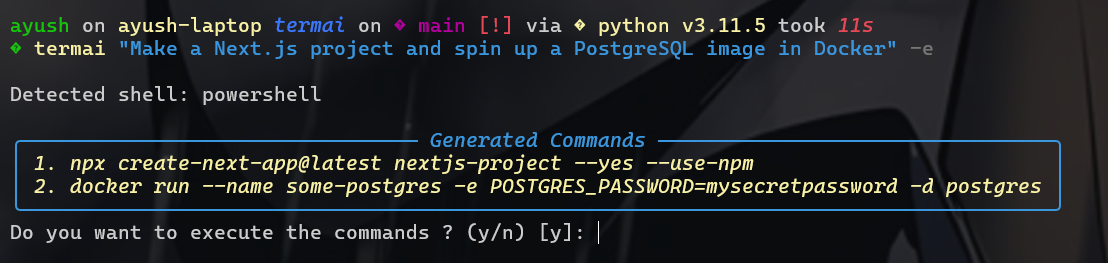
Create a Next.js project and spin up a PostgreSQL container in Docker:
termai "Make a Next.js project and spin up a PostgreSQL image in Docker" -e
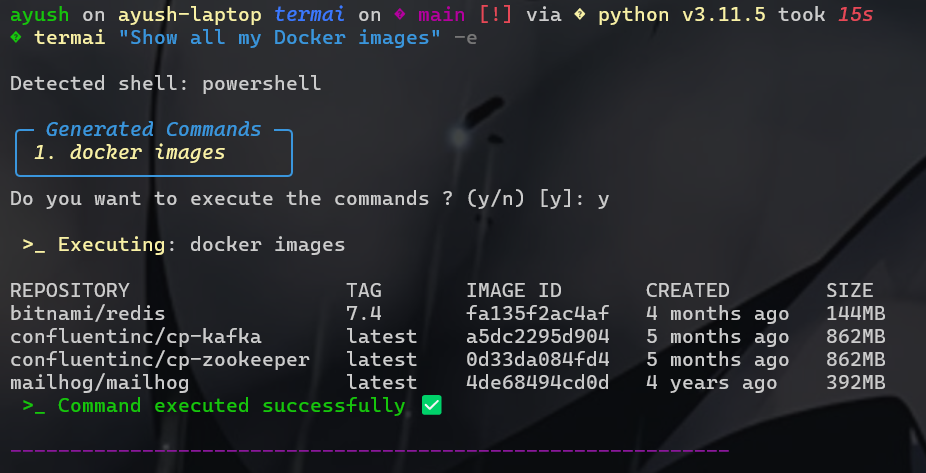
List all running Docker containers:
termai "Show all running Docker containers" -e
Find and delete all .log files in the current directory:
termai "Find and delete all .log files in this folder" -e
Architecture
Termai's core logic is in cli.py, which:
- Receives a natural language instruction.
- Uses
get_shell_command(vialangchain_google_genai) to generate shell commands. - Validates commands using
validate_commandinutils.py. - Executes commands securely and displays results.
Project Structure
termai/
├── src/
│   ├── cli.py       # Command-line interface logic
│   ├── utils.py     # Utility functions (validation, shell detection)
│   └── __init__.py
├── setup.py       # Build script for packaging
└── README.md
Dependencies
- Python – Primary language
- Typer – CLI framework
- Pydantic – Data validation
- Rich – Enhanced terminal output
- google-generativeai & langchain-google-genai – AI model integration
- python-dotenv – Environment variable management
- setuptools – Packaging and distribution
- subprocess – Command execution
Configuration
Before using Termai, set up your Gemini API key:
echo "GOOGLE_API_KEY=your_api_key" > .env
Contributing
Contributions are welcome! Please submit a pull request or open an issue.
Support
For any issues or feature requests, please open an issue on GitHub.


Download files
Download the file for your platform. If you're not sure which to choose, learn more about installing packages.
Source Distribution
Built Distribution
Filter files by name, interpreter, ABI, and platform.
If you're not sure about the file name format, learn more about wheel file names.
Copy a direct link to the current filters
File details
Details for the file termai_cli-1.0.1.tar.gz.
File metadata
- Download URL: termai_cli-1.0.1.tar.gz
- Upload date:
- Size: 11.0 kB
- Tags: Source
- Uploaded using Trusted Publishing? No
- Uploaded via: twine/6.1.0 CPython/3.11.5
File hashes
| Algorithm | Hash digest | |
|---|---|---|
| SHA256 |
f1bf2f9a12d8488b9e3f963c85dc6646cdd9728a974c5579373ed1632b26e25a
|
|
| MD5 |
9d4a93abbd67d73a6d59bed5a32016ba
|
|
| BLAKE2b-256 |
e147456ea61c43100d9c07fe172bf627e8484e6811971cdbd39f5037557065ce
|
File details
Details for the file termai_cli-1.0.1-py3-none-any.whl.
File metadata
- Download URL: termai_cli-1.0.1-py3-none-any.whl
- Upload date:
- Size: 12.5 kB
- Tags: Python 3
- Uploaded using Trusted Publishing? No
- Uploaded via: twine/6.1.0 CPython/3.11.5
File hashes
| Algorithm | Hash digest | |
|---|---|---|
| SHA256 |
c9d63acc0e78393184dd9bd8b6ad2b1044bcc1d08040f13ab5c500e5350937e2
|
|
| MD5 |
e9b1c72ed8633e2e303bdc496e363b3d
|
|
| BLAKE2b-256 |
878ef9428b50024220f2c426211fb95b60006b106d0f91c31861b36c6b079f64
|






