
Terminal Executor
Terminal executor for AI agents, with ANSI escape sequence support and image screenshots.




Demo
Using termexec for solving the "vimgolf-test" challenge:
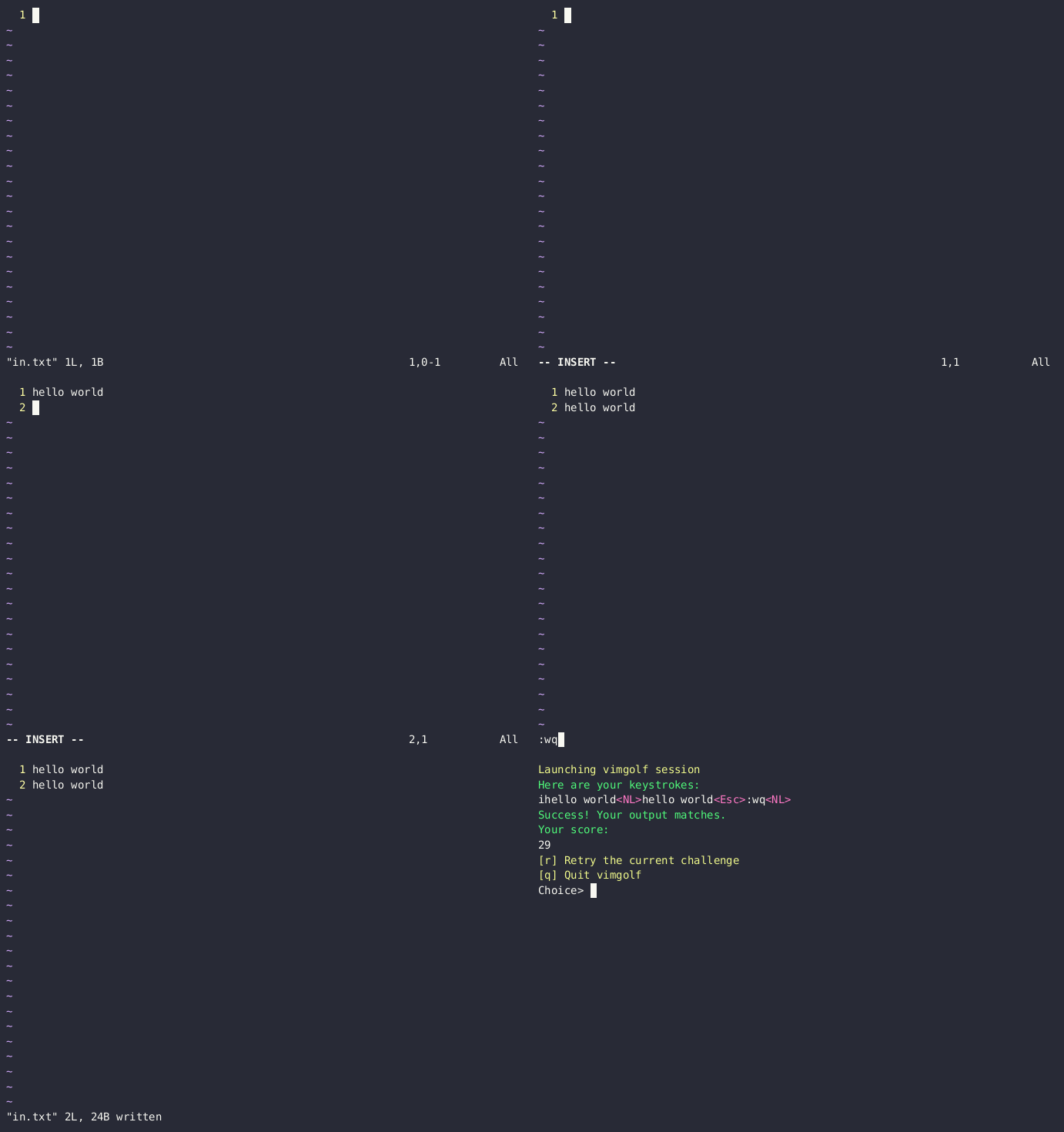
More info at vimgolf-gym
Installation
# install from pypi
pip install termexec

# or install the latest version from github
pip install git+https://github.com/james4ever0/termexec.git
Note: if your platform does not have prebuilt binaries of agg-python-bindings, just install cargo and rustc so the source code could compile.
Usage
from termexec import TerminalExecutor
import time

# Initializes executor with a command to run in terminal emulator, using avt as backend, with automatic context cleanup
with TerminalExecutor(['bash'], width=80, height=24) as executor:
    # Waits for the terminal emulator to be ready.
    time.sleep(1)  # Adjust sleep time as necessary for your environment

    # Or if you prefer to wait for terminal idle event
    try:
        executor.terminal.wait_for_terminal_idle(duration=1, timeout=10)
    except TimeoutError:
        print("Terminal did not become idle in time.")

    # Get the current display of the terminal emulator as a string.
    terminal_text = executor.display
    print("Terminal Display:")
    print(terminal_text)

    # Send input to the terminal emulator.
    executor.input("echo Hello, World!\n")
    print("After input:")
    print(executor.display)

    # Saves the current display of the terminal emulator as a .png file
    executor.screenshot("screenshot.png")
    print("Screenshot saved as screenshot.png")

    # Get the PID of the terminal process.
    print("Terminal process PID:", executor.terminal.pty_process.pid)
Alternatives
-
Xterm.js running in phantomjs, electron or headless playwright
-
LXterminal running in kiosk mode with x11vnc and novnc
License
The Unlicense
1 maintainer

Metadata
1 maintainer
Release files for termexec 0.0.3
For a detailed explanation of source distributions (sdists) and built distributions (wheels), please see the package formats documentation.
Source distribution (sdist)
| File | Size | Uploaded | Provenance | |
|---|---|---|---|---|
| termexec-0.0.3.tar.gz | 7.4 kB | Without provenance | Details |
Built distribution (wheel)
| File | Interpreter | ABI | Platform | Reset |
|---|---|---|---|---|
| termexec-0.0.3-py2.py3-none-any.whl | Python 3, Python 2 | none | any | Details |
Total release size: 14.4 kB
Release files / termexec-0.0.3.tar.gz
| Download URL | termexec-0.0.3.tar.gz |
|---|---|
| Size | 7.4 kB |
| Tags | Source |
|
SHA-256 checksum How to use checksums |
55d24eaa0278e8c9fa0b000174e54eb12ea3369d5d0520999de6d85e37ad56d1
|
|
BLAKE2b-256 checksum How to use checksums |
2b1a2234b23ca0079a17bf8d54bb1cbaf697e2816cbce99f54628c8bf8d8045d
|
| Upload date | |
|
Uploaded using Trusted Publishing? What is trusted publishing? |
No |
| Uploaded via |
twine/6.1.0 CPython/3.9.19
|
Release files / termexec-0.0.3-py2.py3-none-any.whl
| Download URL | termexec-0.0.3-py2.py3-none-any.whl |
|---|---|
| Size | 7.1 kB |
| Tags | Python 2 Python 3 |
|
SHA-256 checksum How to use checksums |
d54ed5ce42b2beafbf1b406c0c2b019713baf1fa87cdf25c8e756ccbdd2679d8
|
|
BLAKE2b-256 checksum How to use checksums |
6d755234a4964b37a08c7feb02c6ec63e71b288b83d4d8459d2fe252ec7f7f4d
|
| Upload date | |
|
Uploaded using Trusted Publishing? What is trusted publishing? |
No |
| Uploaded via |
twine/6.1.0 CPython/3.9.19
|
Security for termexec 0.0.3
Provenance
Provenance describes where a file came from. On PyPI, provenance is shared via attestations, which provide a verifiable record of the build or publishing details. View details, limitations and caveats.
No provenance found
None of the files in this release were uploaded with provenance metadata.
A note on package security
PyPI is a repository for distributing packages, not a service for auditing them. While third-party security researchers and our staff do their best to detect and remove malicious packages, PyPI cannot guarantee the quality, security or suitability of any given package.
To learn more about protecting yourself from malicious actors, visit our package security documentation.














