
tmr: terminal markdown reader
A two-column file explorer for the terminal. The files in the current folder are listed on the left. Click a markdown file, or move onto it with the arrow keys, to read it, formatted, on the right. Made for reading (and lightly editing) the documents agents write: it follows changes on disk, finds files and words quickly, copies as markdown, ticks checkboxes, and commits one file to git.
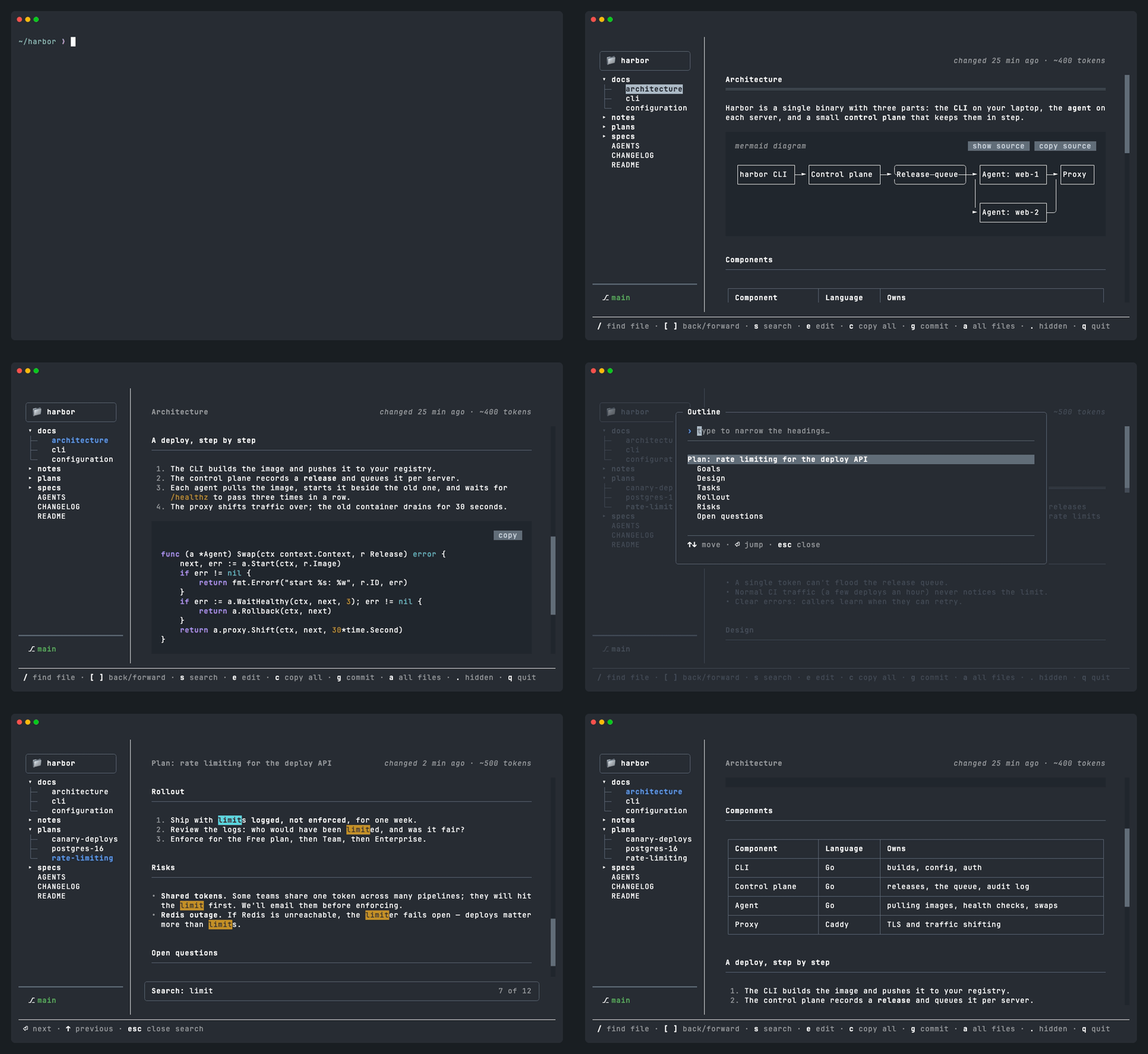
Works on macOS and Linux (Python 3.13 or later). This is version 1 (1.0.2;
tmr --version says which you have).
Install
uv tool install terminal-markdown-reader # or: pipx install terminal-markdown-reader
Start it
cd some/folder
tmr                       # browse this folder
tmr docs/plan.md          # open a specific file straight away
tmr docs/plan.md#setup    # ...at its "Setup" heading
cat notes.md | tmr        # read markdown piped in
tmr --all --hidden        # list every file, hidden and ignored ones too
tmr --help                # every option (--no-watch, --colors, --font-size)
Keys
| Key | What it does |
|---|---|
↑ ↓ |
Move through the files, showing each one the cursor rests on |
Enter |
Read the file (over to the document), or open/close a folder |
Tab |
Switch between the file list and the document |
/ |
Find a markdown file: lists the most recently changed first, or type part of a name (Tab narrows it to a recently changed folder) |
[ ] |
Back to the file you had open before, and forward again (like a browser) |
s |
Search for words in the open document (Enter/↓/n next, ↑/N previous, Esc close) |
h |
Outline: every heading in the document; type to narrow it, Enter jumps there |
e |
Edit the file right here, as written (Ctrl+S saves, Ctrl+G saves and commits, Esc goes back to reading) |
o |
Open the file in your editor (VISUAL or EDITOR; TMR_EDITOR overrides), or failing those the app your system opens it with |
c |
Copy the whole file, exactly as written (including the markdown symbols) |
p |
Copy the full path of the open file (handy for pasting to an agent) |
g |
Commit the open file to git, on the branch you're on, shown at the foot of the sidebar (only that file; asks for the message, suggesting one; doesn't push) |
w |
Switch to another worktree (a folder with another branch checked out, such as an agent's): the same file opens there, and g commits to that branch |
b |
Widen the sidebar just enough to show the longest name in full (at most half the window), then hide it to give the document the full width, then back to how it was |
a |
Show all files, not just markdown (press again to go back) |
. |
Show or hide hidden files and folders |
q |
Quit |
Good to know
- Everything works with the mouse too: click files, links and the hints at the bottom, and drag the bar between the columns to resize the file list. Clicking a task's box ticks it in the file itself, and highlighting text copies it to the clipboard as markdown.
- The file list leaves out hidden files and whatever git ignores, apart from
markdown: notes in an ignored folder (
drafts/) are still listed. Press.to show everything. - The top right shows about how many tokens the file is (
~12k tokens, at four characters to a token), to see whether it's getting big for an agent to read. - If something else (an agent, say) changes a file while you edit it, saving
keeps both your edits and theirs. If both changed the same lines, nothing is
saved yet: the two versions are shown between
<<<<<<< your editsand>>>>>>> changes on diskfor you to sort out and save again. - macOS Terminal starts out with a small font, so there tmr sets its tab to 15 points while it runs and puts your size back when you quit.
Settings
| Setting | What it does |
|---|---|
TMR_COLORS=terminal (or --colors terminal) |
Use your terminal's own 16 colours instead of tmr's gentler set for light and dark backgrounds |
TMR_FONT_SIZE=18 (or --font-size 18) |
The size to set macOS Terminal's font to while tmr runs; off leaves it alone |
TMR_EDITOR=vim |
The editor o opens files in; otherwise VISUAL, then EDITOR, then the app your system opens the file with |
Development
uv run pytest                 # run the tests
uv run ruff check src tests   # lint
uv tool install --editable .  # install the `tmr` command from this checkout
Built with Textual (layout, markdown), textual-image (pictures) and termaid (mermaid diagrams).
Textual is pinned to one minor version (textual>=8.2.8,<8.3): tmr reaches
into a few of its internals (the directory tree's rows, the text area's
highlighting, the terminal driver's mouse modes, the notifications list) to
draw things its own way. A newer Textual may well work, but each bump is
checked against the tests before the pin moves.
Contributions are welcome: see CONTRIBUTING.md. What changed in each version
is in CHANGELOG.md.
MIT licence: see LICENSE.
1 maintainer

Metadata
1 maintainer
Release files for terminal_markdown_reader 1.0.2
For a detailed explanation of source distributions (sdists) and built distributions (wheels), please see the package formats documentation.
Source distribution (sdist)
| File | Size | Uploaded | |
|---|---|---|---|
| terminal_markdown_reader-1.0.2.tar.gz | 95.0 kB | Details |
Built distribution (wheel)
| File | Interpreter | ABI | Platform | Reset |
|---|---|---|---|---|
| terminal_markdown_reader-1.0.2-py3-none-any.whl | Python 3 | none | any | Details |
Total release size: 201.6 kB
Release files / terminal_markdown_reader-1.0.2.tar.gz
| Download URL | terminal_markdown_reader-1.0.2.tar.gz |
|---|---|
| Size | 95.0 kB |
| Tags | Source |
|
SHA-256 checksum How to use checksums |
d3faea86307adfe8d3e4fdbb884229f6886498628a18aa02194985a7e8dc51e2
|
|
BLAKE2b-256 checksum How to use checksums |
b9dd08e30e85ae879b90a27896f4ffd6fd09c96444b6dd484c7791964ce13f59
|
| Upload date | |
|
Uploaded using Trusted Publishing? What is trusted publishing? |
No |
| Uploaded via |
uv/0.10.7 {"installer":{"name":"uv","version":"0.10.7","subcommand":["publish"]},"python":null,"implementation":{"name":null,"version":null},"distro":{"name":"macOS","version":null,"id":null,"libc":null},"system":{"name":null,"release":null},"cpu":null,"openssl_version":null,"setuptools_version":null,"rustc_version":null,"ci":null}
|
Release files / terminal_markdown_reader-1.0.2-py3-none-any.whl
| Download URL | terminal_markdown_reader-1.0.2-py3-none-any.whl |
|---|---|
| Size | 106.6 kB |
| Tags | Python 3 |
|
SHA-256 checksum How to use checksums |
a908abaf9bb9f96f3e529cc810f368912b67b995c37272d8ff58d1dc6d91febd
|
|
BLAKE2b-256 checksum How to use checksums |
69bdf82f859b7c31bcc65e3f2e6fa379cb07771a6939a8e22412b470deb476e9
|
| Upload date | |
|
Uploaded using Trusted Publishing? What is trusted publishing? |
No |
| Uploaded via |
uv/0.10.7 {"installer":{"name":"uv","version":"0.10.7","subcommand":["publish"]},"python":null,"implementation":{"name":null,"version":null},"distro":{"name":"macOS","version":null,"id":null,"libc":null},"system":{"name":null,"release":null},"cpu":null,"openssl_version":null,"setuptools_version":null,"rustc_version":null,"ci":null}
|














