
terminaltelemetry2
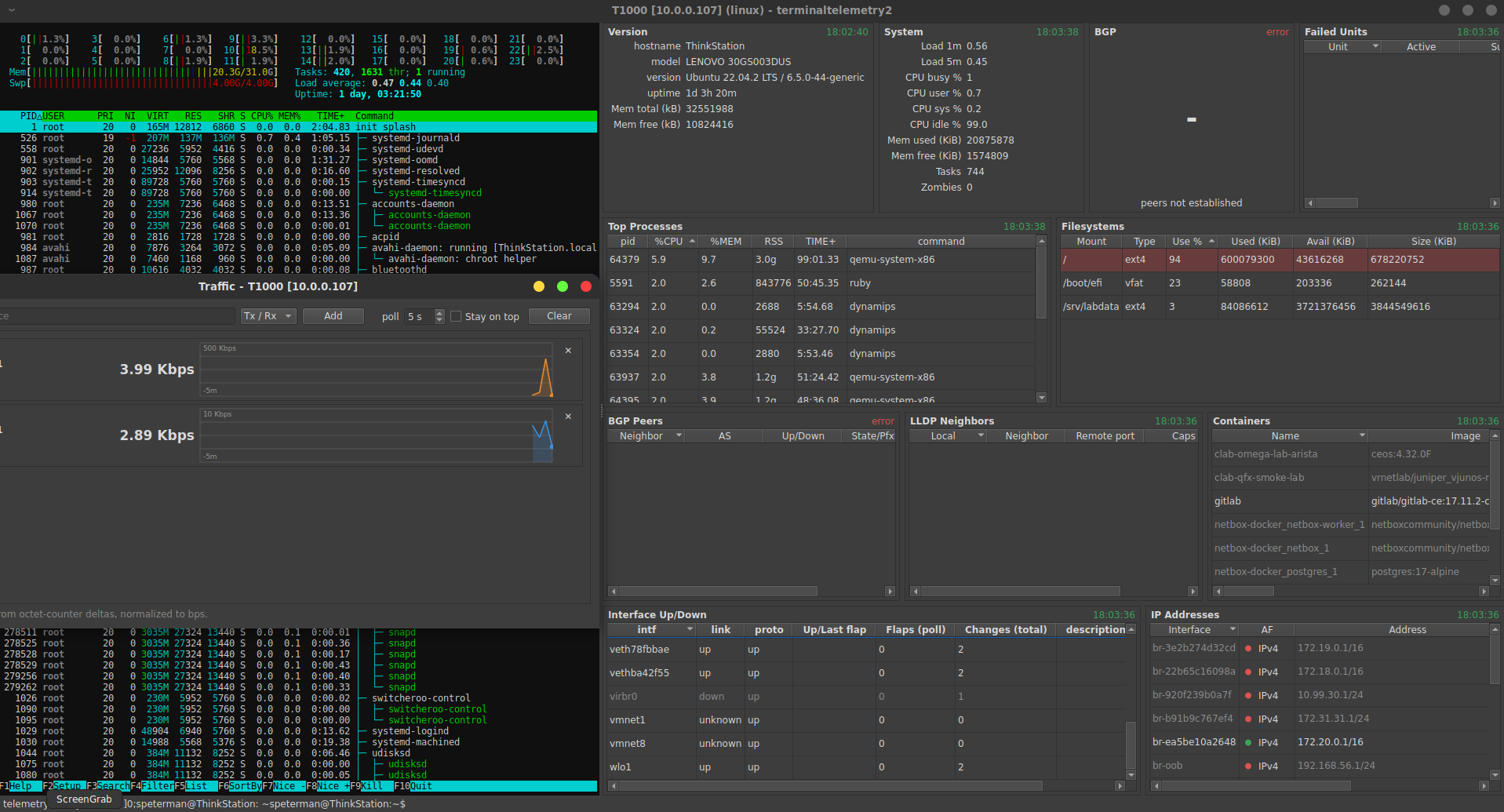
One device per window: an SSH terminal beside live, user-defined telemetry widgets. Each widget is YAML — a CLI command, a TextFSM template, a field mapping, and a native Qt view (table / stat / key-value, with embedded bar, status, and sparkline cells). Parsing runs on the vendored netlapse tfsm-fire engine against a bundled template database, so the same "output selects the template" scoring the collector uses drives the HUD.
https://github.com/scottpeterman/terminaltelemetry2
Install
From PyPI (once published):
pip install terminaltelemetry2
From source:
git clone https://github.com/scottpeterman/terminaltelemetry2
cd terminaltelemetry2
python -m venv .venv && . .venv/bin/activate
pip install -e ".[dev]"
The interactive terminal pane needs anytermqt, which pins an exact PySide6
and isn't on PyPI yet:
pip install -e ".[terminal]" \
  --find-links https://github.com/scottpeterman/anytermqt/releases/expanded_assets/v0.1.0
Without it, terminaltelemetry2 falls back to a plain terminal (no cursor addressing); the telemetry widgets are unaffected.
Run
Installed as two commands — terminaltelemetry2 and the short alias tt2:
tt2 --host 10.0.0.1 --user admin --platform arista_eos
tt2 --host eng-spine-1 --user admin --platform eos --emulate ip_lookup.json
Platforms: arista_eos, cisco_ios, cisco_nxos, juniper_junos
(short forms eos, ios, nxos, junos).
Authentication is by password or SSH key. Password comes from --password,
then $TERMINALTELEMETRY2_PASSWORD, then a prompt. For key auth, pass
-i/--key FILE (RSA, Ed25519, or ECDSA; ~ is expanded); an encrypted key's
passphrase comes from --key-passphrase or $TERMINALTELEMETRY2_KEY_PASSPHRASE.
With a key, no password is prompted for. Keys also work on jump hosts.
tt2 --host 10.0.0.1 --user admin --platform eos -i ~/.ssh/id_ed25519
Session file and device selector
tt2 --sessions ~/sessions.yaml
Opens a device selector over the same folder/sessions YAML the other terminal
apps use (folder_name or folder, then sessions with display_name,
host, port, and DeviceType/device_type/platform or Vendor/Model
for platform inference). Search terms are AND-ed across folder, name, host,
platform, vendor and model; Down moves into the list, Enter connects.
Username, key file and jump host are remembered in
~/.terminaltelemetry2/last_connect.json; passwords and passphrases are kept
in memory only. With a session file loaded, Ctrl+N opens another device in a
new window. Command-line credentials (--user, -i, -J, ...) prefill the
selector.
Jump host
tt2 --host 10.0.0.1 --user admin --platform eos -J scott@bastion1:22
Single hop. The bastion uses the device key and password unless
--jump-key / --jump-password (or $TERMINALTELEMETRY2_JUMP_PASSWORD) are
given. In a session file, per-device jump_host / jump_port /
jump_username override the default. Bypassed under --emulate.
F5 refreshes every widget. Ctrl/Cmd +, - and 0 (or Ctrl/Cmd + mouse
wheel over the terminal) size the terminal font; the size is remembered.
Useful flags: --layout NAME, --port, --enable-command 'enable' (IOS
devices that land in user mode), --paging-command, --legacy-ssh,
--terminal module:Class, --emulate [ip_lookup.json] (route SSH to
NetEmulate mocks), --debug.
IP Addresses
One row per configured address (IPv4 and IPv6; link-local and Junos
RE-internal addressing filtered out), with the link state. It reuses polls the
window already makes -- show interfaces behind Interface Up/Down on
EOS/IOS/NX-OS, show interfaces terse behind Ports on Junos -- and parses them
a second way, so it adds no commands to the device. EOS/IOS/NX-OS use small
bundled templates (data/templates/*_ifaddr.textfsm); show interfaces on IOS
and NX-OS carries IPv4 only, so IPv6 appears there on EOS and Junos.
Traffic monitor
Right-click a row in Interface Up/Down, Ports, LLDP, or the counter/util tables -> Monitor -> Tx, Rx, or Tx / Rx. Rows land in one non-modal Traffic window per device, each with its live rate and a 5-minute chart; the X removes a row, and closing the window stops every monitor poll. Interfaces can also be typed into the window's Add box.
Rates are computed from octet-counter deltas (bytes * 8 / seconds), not the
device's load-interval averages, so they're in bps on every vendor and react
within one poll (default 5 s, adjustable 2-60 s). Commands, one per monitored
interface on the telemetry shell: show interfaces <if> (EOS, IOS),
show interface <if> (NX-OS), show interfaces <if> detail (Junos) --
COUNTER_COMMANDS in monitor.py. A widget opts in with
monitor: <column> naming the column that holds the interface name.
How a widget works
The full guide, with the patterns and worked examples, is docs/WIDGETS.md.
A widget definition maps one command through to one view:
command (per platform) -> TextFSM template -> field aliases -> view
Fields alias one or more TextFSM value names to a stable key the view binds to;
computes derive values with safe arithmetic (utilization from rate ÷
bandwidth, say); rates/deltas difference counters across polls; table
columns can render a bar, status, or spark cell instead of text. Widgets
that share a command and template share one poll and one parse.
unique: true collapses rows that share the widget's key (first wins), for
templates that emit a record per sub-line -- Junos show interfaces terse
repeats a unit once per address family and address. It's opt-in: LLDP and
OSPF keys can legitimately repeat (two neighbors on one port, parallel
adjacencies to one router ID).
Templates resolve in this order, first hit wins: a template the widget names
explicitly, then its numbered siblings (<name>2, <name>3 ... newest first)
and nothing else; the one remembered from the last successful poll for that
widget's request; the exact <platform>_<command> name; then the scored
tfsm-fire sweep over that name's term filter. The exact name is a fast path;
the sweep is the fallback that picks the best-scoring template when the exact
one yields nothing. Two widgets can share one command's poll and still parse it
with different templates.
The template database and your app directory
Config lives in $TERMINALTELEMETRY2_HOME, default ~/.terminaltelemetry2:
tfsm_templates.db      seeded from the package on first run; writes go here
templates/*.textfsm    per-template overrides (win over the bundled files and the DB)
widgets/*.yaml         add or override widgets by name
layouts/*.yaml         add or override layouts by name
last_connect.json      selector: username, key file, jump host, last device (no secrets)
terminal.json          terminal font size
The template DB ships inside the wheel as a read-only seed. On first run it is copied into your app directory, and everything after — including templates you save from the lab — is written to that copy. The installed package is never modified.
The template lab
Every widget frame has a { } button; it turns red when that widget's last
parse failed. It opens the template lab preloaded with the exact capture the
widget collected and the template it resolved to, already run so a failure
shows on arrival. A TextFSM state error is reported as the input line and the
template rule it stopped on, and both are highlighted.
The Template dropdown lists the widget's template and its numbered
siblings, marks where each lives ([override], [db:ntc], [db:custom]),
and flags the one the widget is using (● in use). Picking one loads and tests
it against the capture.
Two ways to save a fix:
- Save as override writes
templates/<selected name>.textfsmin your app directory. It shadows the DB copy for every widget and device that uses that name -- right for a strict improvement, like one template that covers every release. - Save to database writes a
customrow. With the base selected it creates the next sibling (..._extensive->..._extensive2); with a sibling selected it updates that sibling in place. It never overwrites a vendor (ntc) row.
Delete sibling removes a custom sibling you saved; the base and vendor
rows can't be deleted from the lab.
Fixing a template that fails on some gear
Fix a copy, not the original, so the base keeps serving the gear it already parses:
- A widget errors -> click
{ }-> the lab opens on the failing capture. - Edit the template until Test parses what you need. Parse only the fields
the widget consumes -- a strict
-> Erroron a line you don't read turns an unexpected format into a whole-parse failure. - Save to database as the next sibling.
On the next poll the parser tries the base first and falls through to the sibling where the base returns nothing: through the family for a widget that names its template, through the scored sweep for one that doesn't. Delete the failed attempts once the fix works, since a stale sibling that returns partial records for some other release can win.
To seed fixes into an existing install's DB from source rather than the lab:
python scripts/add_junos_templates.py ~/.terminaltelemetry2/tfsm_templates.db
python scripts/add_top_once_sibling.py ~/.terminaltelemetry2/tfsm_templates.db
Writing widgets and templates, with the patterns behind the bundled ones, is covered in docs/WIDGETS.md.
Connections
Two SSH sessions per device: a persistent, prompt-driven telemetry shell (serialized, de-duplicated polls, reconnect with backoff) and a raw PTY for the terminal. Both use the vendored netlapse client (two-pass read algorithms, jump hosts, NetEmulate redirect for offline demos).
Development
pytest
Tests run headless against ntc-templates fixtures, real device captures in
tests/fixtures/, and a fake paramiko CLI device; the Qt views and the lab dialog are exercised by the app, the parsing,
pipeline, cell-renderer, and template-lab layers by the suite.
Vendored from netlapse
terminaltelemetry2/ssh/{client,emulation,proxy}.py and
terminaltelemetry2/parsing/{tfsm_fire,engine}.py (engine.py: import path and default DB
locations changed only).
License
GPL-3.0-or-later.
1 maintainer

Metadata
1 maintainer
Release files for terminaltelemetry2 0.1.0
For a detailed explanation of source distributions (sdists) and built distributions (wheels), please see the package formats documentation.
Built distribution (wheel)
| File | Interpreter | ABI | Platform | Reset |
|---|---|---|---|---|
| terminaltelemetry2-0.1.0-py3-none-any.whl | Python 3 | none | any | Details |
Release files / terminaltelemetry2-0.1.0-py3-none-any.whl
| Download URL | terminaltelemetry2-0.1.0-py3-none-any.whl |
|---|---|
| Size | 779.7 kB |
| Tags | Python 3 |
|
SHA-256 checksum How to use checksums |
d2e863bd9e91199abf33b172623859874b92a28634920d5cbbc904e99853022e
|
|
BLAKE2b-256 checksum How to use checksums |
fbee5c1a1a953a0a31235b50a906f688efb7114984654d63751121bda239dcaa
|
| Upload date | |
|
Uploaded using Trusted Publishing? What is trusted publishing? |
No |
| Uploaded via |
twine/7.0.0 CPython/3.10.12
|














