
termseries





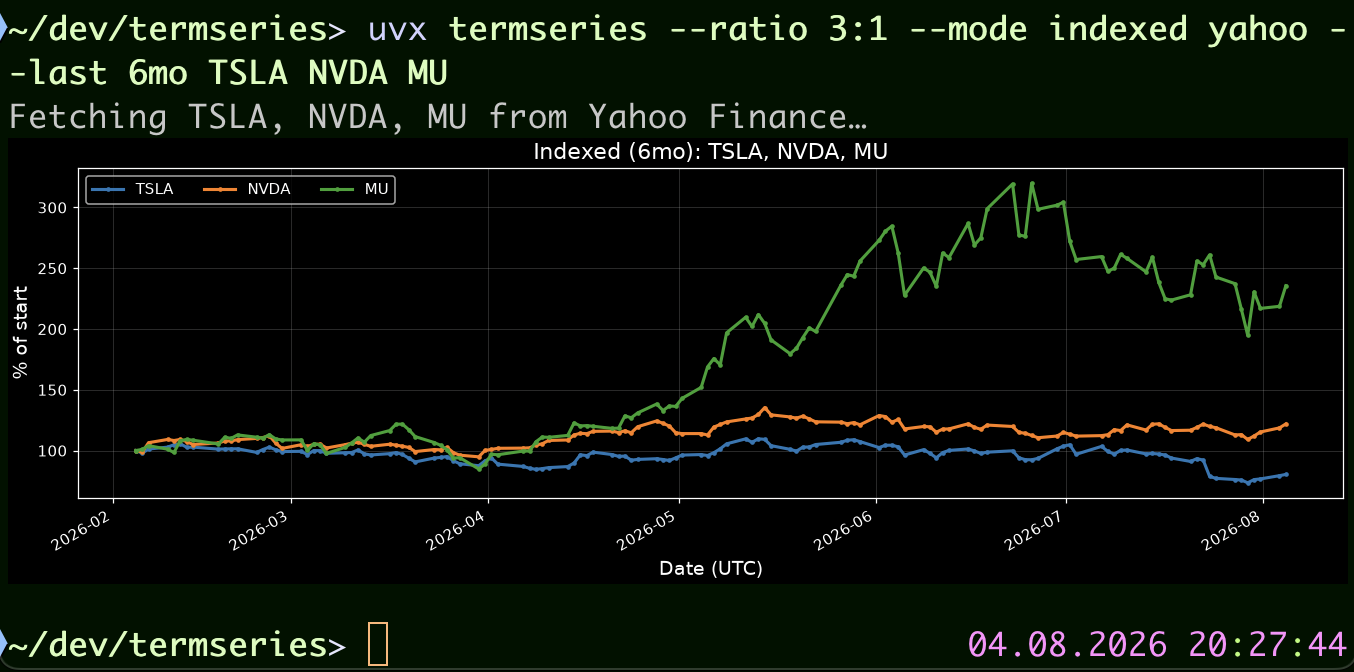
Show timeseries data in the terminal using matplotlib. Plot stock prices from Yahoo Finance, sensor data from Home Assistant, or any numeric timeseries from local CSV files. Renders high-quality PNG charts inline (Kitty, iTerm2, Sixel) or saves to file, with an optional interactive Textual TUI.
Features
Data Sources
- Fetch stock/crypto/index prices from Yahoo Finance via the
yahoosubcommand, with auto-picked intra-day intervals for short periods (e.g. 5m for 1d, 15m for 5d/7d) - Chart prediction-market prices from Polymarket via the
polymarketsubcommand, with auto-picked aggregation intervals based on period duration - Plot Home Assistant sensor history via the
hasssubcommand (REST API) - Load local two-column CSV files (timestamp, value) via the
csvsubcommand - Auto-detect and skip CSV headers, blank lines, NaN/Inf values
- Accept ISO 8601 timestamps and Unix epochs in CSV files
- Auto-detect the unit of measurement from Home Assistant entity attributes
- All timestamps are stored internally as UTC; use
--tzto display in another timezone
Chart Modes
- Absolute values (default), indexed to 100%, logarithmic scale
- Drawdown from running peak, interval-aware returns (label adapts to interval), and relative price ratio
- Cumulative running total and point-to-point delta
- Rolling windows via
--lastand fixed bounds via--from/--toacross all subcommands - Calendar-anchored to-date periods:
ytd,mtd,wtd,dtd,htd
Terminal Rendering
- Auto-detect Kitty, iTerm2, and Sixel-capable terminals for inline PNG display
- Fall back to writing a PNG file when no inline protocol is available
- Adaptive vertical calendar dividers (hours, days, months, or years), aligned to
--tz - Auto-detect dark/light terminal background for theme selection
- Force dark/light theme or inline/file output via environment variables
Interactive TUI
- Full-screen Textual TUI with dropdowns for period, aspect ratio, mode, and color cycle; "custom..." option in the Period menu for arbitrary values
- Live ticker/entity/file input with immediate re-render on submit
- Debounced chart re-render on terminal resize using cached data
- Auto-reload at a configurable interval (
--reload N) or toggled with Ctrl+R - Copy current plot to clipboard with Ctrl+Y
Customization
- Configurable aspect ratio (
--ratio W:Horfitfor terminal-filling) - Seven built-in color cycles (tab10, Set1, Set2, Dark2, Accent, Pastel1, tab20)
- Layer custom
.mplstyleoverrides on top of the built-in dark/light themes - Consistent font sizes across terminal widths in TUI mode
Clipboard & Output
- Copy rendered plot to system clipboard (
-cor Ctrl+Y in TUI) - Clipboard warnings when running inside Docker or over SSH
- Built-in
democommand showcasing multiple chart modes
Developer Experience
- Fully typed (
py.typed, mypy-checked) - Pre-commit hooks for ruff, ruff-format, and mypy
- 430+ unit tests covering all modules, run in CI on Linux and Windows
- Docker support with Compose for containerized usage
Installation
pip install termseries
Or with uv:
uv tool install termseries
Or run it without installing, via uvx:
uvx termseries yahoo TSLA AAPL MSFT
Quick Start
# Plot stock prices (7-day default)
termseries yahoo TSLA AAPL MSFT

# Indexed comparison over 1 month
termseries --mode indexed yahoo --last 1mo TSLA AAPL MSFT

# Log scale over 5 years
termseries --mode log yahoo --last 5y AAPL MSFT GOOGL

# Drawdown chart
termseries --mode drawdown yahoo --last 1y TSLA AAPL

# Intra-day: 1-day period auto-picks 5-minute intervals
termseries yahoo TSLA --last 1d

# Explicit 1-minute interval override
termseries yahoo TSLA --interval 1m --last 1d

# Relative price ratio (exactly 2 tickers)
termseries --mode relative yahoo --last 1y AAPL MSFT

# Cumulative sum
termseries --mode cumulative csv sensor.csv --last 30d

# Point-to-point delta
termseries --mode delta yahoo TSLA --last 1mo

# Show gaps in data (break lines where data is missing)
termseries --gaps show hass sensor.living_room_temperature --last 7d

# Connect gaps under 1 hour, break larger ones
termseries --gaps 1h csv sensor.csv --last 30d

# Step-style line (staircase effect)
termseries --line-style step-post yahoo TSLA --last 5d

# Display x-axis in your local timezone
termseries --tz local yahoo TSLA AAPL

# Display x-axis in a specific timezone
termseries --tz Europe/Berlin hass sensor.living_room_temperature --last 1d

# Copy plot to clipboard
termseries yahoo -c TSLA AAPL

# Interactive TUI
termseries -i yahoo TSLA

# --- Home Assistant sensors ---

# Plot HASS sensor data (requires HASS_SERVER and HASS_TOKEN env vars)
termseries hass sensor.living_room_temperature sensor.bedroom_temperature

# Last 3 hours of data
termseries hass sensor.living_room_temperature --last 3h

# Last 30 days with explicit unit
termseries hass sensor.living_room_temperature --last 30d --unit '°C'

# Glob pattern: plot every matching entity in one call
termseries hass "sensor.*battery_level" --last 7d

# Interactive TUI with HASS data
termseries -i hass sensor.power_consumption

# --- Polymarket markets ---

# Plot a Polymarket market's "yes" price
termseries polymarket will-bitcoin-hit-150k-in-2026

# Plot the "no" outcome instead
termseries polymarket will-bitcoin-hit-150k-in-2026 --outcome no

# Last 30 days
termseries polymarket will-bitcoin-hit-150k-in-2026 --last 30d

# --- CSV files ---

# Plot a local CSV (two columns: timestamp, value)
termseries csv /path/to/sensor.csv

# Multiple files, last 7 days, with a custom unit label
termseries csv temp.csv humidity.csv --last 7d --unit '°C'

# Non-standard periods work everywhere
termseries yahoo TSLA --last 14d
termseries yahoo TSLA --last 2w

# Calendar-anchored to-date periods
termseries yahoo TSLA --last ytd
termseries yahoo TSLA --last mtd
termseries hass sensor.power_consumption --last dtd

# Interactive TUI with CSV data
termseries -i csv sensor.csv
CSV File Format
The csv subcommand expects two-column CSV files (timestamp, value). Header
rows are auto-detected and skipped. Timestamps can be ISO 8601 strings or Unix
epochs. Blank lines and NaN/Inf values are silently skipped. Naive timestamps
(without an explicit offset) are assumed to be UTC.
2024-01-01T00:00:00Z,20.5
2024-01-02T00:00:00Z,21.0
2024-01-03T00:00:00Z,22.1
Each file becomes one series labelled by its filename (without extension). The
--last filters to a now-anchored time window using free-form
<number><unit> syntax (e.g. 7d, 2w, 3mo). Special values: max
(default) shows all data with the x-axis extending to now; auto auto-fits
the x-axis to the data with no empty space. The --unit option sets the
y-axis label (default: value).
For high-frequency data, --resample reduces points into fixed, UTC-aligned
buckets before rendering. Use --aggregate to select the bucket reducer
(mean by default; also median, min, max, sum, count, first, and
last). The plotted timestamp is the start of each bucket. For example:
termseries csv data/heart.csv --last 1mo --resample 1m --aggregate mean --unit bpm
--last 1m means the last minute; use --last 1mo for the last month.
The hass subcommand uses the same --last syntax and auto-detects the unit
from the entity's attributes. Entity IDs may include glob-style patterns
(* matches any run of characters, ? matches a single character),
expanded against all entities currently known to Home Assistant:
# Plot every sensor whose ID contains "battery_level"
termseries hass "sensor.*battery_level" --period 7d
Quote patterns so your shell doesn't expand them first. The match isn't
anchored to the end, so sensor.*battery_level also matches
sensor.phone_battery_level_2.
Fitbit JSON conversion
tools/fitbit_to_csv.py combines Fitbit JSON exports in data/ into the
standard two-column CSV consumed by termseries csv. Fitbit timestamps have no
timezone marker, so the converter interprets them as Europe/Berlin by default
and writes normalized UTC timestamps; override this with --timezone as needed.
python tools/fitbit_to_csv.py steps data data/steps.csv
python tools/fitbit_to_csv.py heart data data/heart.csv
python tools/fitbit_to_csv.py sleep data data/sleep.csv

termseries csv data/steps.csv --unit steps --last max
termseries csv data/heart.csv --unit bpm --last max
termseries --line-style step-post --gaps show csv data/sleep.csv --unit stage --last max
The sleep CSV represents detailed main-session sleep stages as a numeric step
series: wake=0, REM=1, light=2, and deep=3. The converter sorts records
and removes duplicate timestamps, and uses a temporary on-disk index so large
heart-rate exports do not need to fit in memory.
Shared Options
| Option | Description |
|---|---|
--ratio W:H |
Figure aspect ratio (default: 4:1) |
--mode |
Chart mode: absolute, indexed, log, drawdown, returns, relative, cumulative, delta |
--tz TZ |
Timezone for x-axis: UTC (default), local, or IANA name (e.g. Europe/Berlin) |
--colors |
Matplotlib color cycle: tab10, Set1, Set2, Dark2, Accent, Pastel1, tab20 |
--gaps |
Gap handling: connect (default), show (break lines at gaps), or duration threshold (e.g. 1h) |
--line-style |
Line connection style: linear (default), step-pre, step-post, step-mid |
--style PATH |
Extra .mplstyle file layered on top of the base theme (see Custom Styles) |
-c / --copy |
Copy plot to system clipboard |
-i / --interactive |
Launch Textual TUI |
Time range syntax (all subcommands)
Use --last for a rolling window ending now, --from and --to for a fixed
inclusive interval, or --first for a duration beginning at the earliest
returned data point. --to defaults to now; these forms cannot be combined.
--period remains a compatibility alias for --last.
termseries yahoo TSLA --last 7d
termseries yahoo TSLA --from 2026-07-01 --to 2026-07-31
termseries csv readings.csv --from ytd
termseries csv readings.csv --first 7d
--from and --to accept ISO-8601 dates/times (such as 2026-07-01 or
2026-07-01T12:00:00Z), now, and the same relative/calendar expressions as
--last (such as 7d and ytd).
Warning: --first is data-anchored, not calendar-anchored. Its effective start
can change when a source adds or backfills older history, so use --from and
--to for reproducible charts. It accepts durations only (for example 7d,
2w, or 3mo).
--last accepts free-form <number><unit> values:
| Unit | Example | Meaning |
|---|---|---|
m |
30m |
minutes |
h |
6h |
hours |
d |
14d |
days |
w |
2w |
weeks |
mo |
3mo |
months (≈30 days) |
y |
1y |
years (≈365 days) |
ytd |
ytd |
year-to-date (from Jan 1st) |
mtd |
mtd |
month-to-date (from 1st of month) |
wtd |
wtd |
week-to-date (from Monday) |
dtd |
dtd |
day-to-date (from midnight) |
htd |
htd |
hour-to-date (from start of hour) |
max |
all data, x-axis extends to now | |
auto |
all data, x-axis fits to data |
Calendar boundaries for ytd/mtd/wtd/dtd/htd are computed in the
timezone set by --tz (default UTC) — e.g. --tz local --last dtd means
"since local midnight", not UTC midnight.
For Yahoo, non-native periods (e.g. 14d, 2w) are handled automatically by
overfetching the next-larger native range and trimming client-side.
Yahoo-specific Options
| Option | Description |
|---|---|
--last |
Rolling chart range ending now (default: 7d). Any <number><unit>, max, or auto; --period is an alias |
--from, --to |
Inclusive fixed bounds; --to defaults to now |
--first |
Data-anchored duration; may change when older history is backfilled |
--interval |
Data interval: auto (default), 1m, 5m, 15m, 30m, 60m, 90m, 1d |
When --interval auto (the default), termseries picks a sensible interval based
on the period duration:
| Period duration | Auto interval |
|---|---|
| ≤ 1 day | 5m |
| ≤ 7 days | 15m |
| > 7 days | 1d |
Polymarket-specific Options
| Option | Description |
|---|---|
--outcome |
Outcome label to chart, usually yes or no for binary markets (default: yes) |
--interval |
Aggregation interval: auto (default), max, all, 1m, 1h, 6h, 1d, 1w |
--fidelity |
Data fidelity in minutes for the Polymarket history API (default: 1) |
When --interval auto (the default), termseries picks a sensible interval based
on the period duration:
| Period duration | Auto interval |
|---|---|
| ≤ 6 hours | 1m |
| ≤ 3 days | 1h |
| ≤ 30 days | 6h |
| ≤ 180 days | 1d |
| > 180 days | 1w |
Home Assistant Setup
The hass subcommand connects to a running Home Assistant instance via the
REST API. Set these environment variables:
export HASS_SERVER=http://homeassistant.local:8123
export HASS_TOKEN=your_long_lived_access_token
Create a long-lived access token in HASS under Profile > Security > Long-Lived
Access Tokens. The unit label (y-axis) is auto-detected from the entity's
unit_of_measurement attribute; use --unit to override.
Custom Styles
Chart appearance is controlled by Matplotlib .mplstyle files. termseries
ships with two built-in themes (dark and light) that are automatically
selected based on your terminal's background color. You can override any
setting by passing an extra style file with --style:
# Use thinner lines, no markers
termseries --style my-overrides.mplstyle yahoo TSLA AAPL
The override file only needs the keys you want to change -- everything else is inherited from the base theme.
Built-in theme defaults
Both dark.mplstyle and light.mplstyle share the same layout settings
(they differ only in colors):
| Key | Default | Controls |
|---|---|---|
axes.titlesize |
14 | Chart title |
axes.labelsize |
12 | Axis labels ("Date (UTC)", "Close (USD)") |
xtick.labelsize |
10 | X-axis tick values |
ytick.labelsize |
10 | Y-axis tick values |
legend.fontsize |
10 | Legend text |
lines.linewidth |
2 | Line thickness |
lines.marker |
o | Data-point marker shape |
lines.markersize |
6 | Marker size |
grid.alpha |
0.3 | Grid transparency |
grid.linewidth |
0.5 | Grid line thickness |
figure.dpi |
200 | Output resolution |
Example override file
# my-overrides.mplstyle
axes.titlesize:   18          # bigger title
axes.labelsize:   16          # bigger axis labels
xtick.labelsize:  14          # bigger tick labels
ytick.labelsize:  14
lines.linewidth:  1.5
lines.marker:     None        # no markers, just lines
figure.dpi:       150         # lower DPI for smaller file size
grid.linestyle:   --          # dashed grid
See the full Matplotlib customization guide for all available keys.
Environment Variables
| Variable | Effect |
|---|---|
HASS_SERVER |
Home Assistant base URL (e.g. http://ha.local:8123) |
HASS_TOKEN |
Home Assistant long-lived access token |
Theme
Use --theme dark|light|auto to control the plot theme. The default is auto, which detects the terminal background.
termseries --theme dark yahoo TSLA
To persist the setting, create a termseries.env config file. Termseries searches for (first found wins):
.termseries.envin the current working directory~/.config/termseries/termseries.env
# termseries.env
THEME=dark
See termseries.env.example for a commented template.
Precedence (highest to lowest): --theme flag → config file → auto-detection.
Output
Use --output to control where the rendered PNG goes:
| Value | Behaviour |
|---|---|
(omitted) or auto |
Inline display if the terminal supports it; otherwise write an auto-named file |
inline |
Force inline display; warn and fall back to file if no protocol detected |
- |
Write raw PNG bytes to stdout (no terminal escape sequences — useful for piping) |
path/to/file.png |
Write to the named file |
termseries --output chart.png yahoo TSLA
termseries --output - yahoo TSLA | display   # pipe to ImageMagick
termseries --output inline yahoo TSLA
Use --protocol to override which inline graphics protocol is used (default: auto):
| Value | Protocol |
|---|---|
auto |
Auto-detect from terminal environment (default) |
kitty |
Kitty Terminal Graphics Protocol |
iterm2 |
iTerm2 OSC 1337 Inline Images Protocol |
sixel |
Sixel graphics |
This is especially useful inside tmux or other multiplexers where terminal detection can fail:
termseries --output inline --protocol iterm2 yahoo TSLA
Both options can be persisted in termseries.env:
# termseries.env
OUTPUT=inline
PROTOCOL=kitty
Precedence (highest to lowest): CLI flag → config file → auto-detection.
Development
git clone https://github.com/deeplook/termseries.git
cd termseries
uv sync --all-extras
uv run pre-commit install
make test
Contributing
See CONTRIBUTING.md.
License
1 maintainer

Download files
Download the file for your platform. If you're not sure which to choose, learn more about installing packages.
Source Distribution
Built Distribution
Filter files by name, interpreter, ABI, and platform.
If you're not sure about the file name format, learn more about wheel file names.
Copy a direct link to the current filters
File details
Details for the file termseries-0.2.0.tar.gz.
File metadata
- Download URL: termseries-0.2.0.tar.gz
- Upload date:
- Size: 233.4 kB
- Tags: Source
- Uploaded using Trusted Publishing? Yes
- Uploaded via: uv/0.12.1 {"installer":{"name":"uv","version":"0.12.1","subcommand":["publish"]},"python":null,"implementation":{"name":null,"version":null},"distro":{"name":"Ubuntu","version":"24.04","id":"noble","libc":null},"system":{"name":null,"release":null},"cpu":null,"openssl_version":null,"setuptools_version":null,"rustc_version":null,"ci":true}
File hashes
| Algorithm | Hash digest | |
|---|---|---|
| SHA256 |
afccd78e0593d079c18acdbc120d846f8e1ed4831a5da4153784aff18266ccdc
|
|
| MD5 |
e1ee53a46e6d945f59cead48e50998ec
|
|
| BLAKE2b-256 |
7cbd4c06b4d28b2f22c21ee17556eab09eb3b8dea078666e19138c7418d8b8ce
|
File details
Details for the file termseries-0.2.0-py3-none-any.whl.
File metadata
- Download URL: termseries-0.2.0-py3-none-any.whl
- Upload date:
- Size: 52.1 kB
- Tags: Python 3
- Uploaded using Trusted Publishing? Yes
- Uploaded via: uv/0.12.1 {"installer":{"name":"uv","version":"0.12.1","subcommand":["publish"]},"python":null,"implementation":{"name":null,"version":null},"distro":{"name":"Ubuntu","version":"24.04","id":"noble","libc":null},"system":{"name":null,"release":null},"cpu":null,"openssl_version":null,"setuptools_version":null,"rustc_version":null,"ci":true}
File hashes
| Algorithm | Hash digest | |
|---|---|---|
| SHA256 |
388068fea704795fffd50730d70a352c5e7d8478a8dc424599b5bfe6fb0ca633
|
|
| MD5 |
1b87a760392a10f7315274b02b27bf45
|
|
| BLAKE2b-256 |
819679d148c032d440121f86d0d5fc7aabe14526346b58571612a0c36c973255
|







