
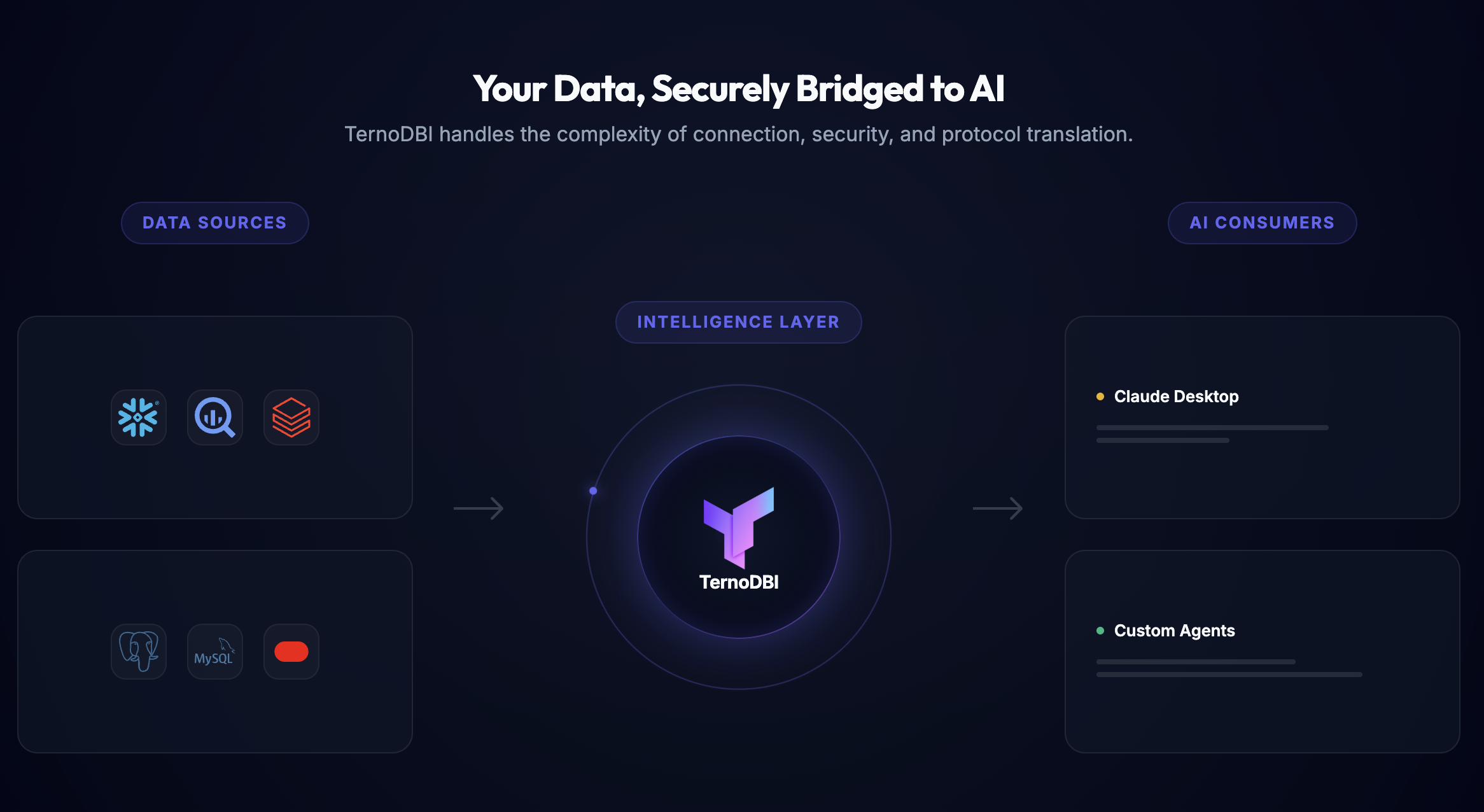
TernoDBI: Database Intelligence Layer



TernoDBI is a data layer for AI agents, built for security and accuracy. It gives agents one controlled way to read your databases (Postgres, MySQL, Snowflake, BigQuery, Databricks, Oracle, SQLite) and your business tools (Google Ads, GA4, HubSpot, Salesforce, Shopify and more), with access rules enforced on every query.
Run it as a standalone Model Context Protocol (MCP) server — locally over stdio, or hosted over HTTP with OAuth — or embed it in an existing Django project.
Quick Start: Chat with your DB in 5 Minutes
- Install TernoDBI
pip install terno-dbi
- Start the server
ternodbi start [port]
By default this starts on127.0.0.1:8376. On first boot it runs migrations, creates anadmin/adminuser and adefaultorganisation. It runs in development mode, which is fine on your own machine — see Configuration before exposing it anywhere. - Add your database Open the admin panel at http://127.0.0.1:8376/admin and add a datasource. Credentials are encrypted at rest.
- Generate an access token, bound to your organisation and a user (
--org/--user) — an unbound token can't use organisation features such as memory:# Query token (read-only, for AI agents) ternodbi manage issue_token --name "My Agent" --type query --org default --user admin # Admin token (schema metadata, memory, organisation prompt) ternodbi manage issue_token --name "System Admin" --type admin --org default --user admin
- Connect your MCP client — see TernoDBI as an MCP Server.
- Start chatting with your data.
Key Features
- Databases: Postgres, MySQL, Snowflake, BigQuery, Databricks, Oracle and SQLite through one API.
- Business tools (API connectors): 17 sources — ads, analytics, CRM, commerce and documents — queried through the same agent tools. See API Connectors.
- Security by default:
- SQLShield: every query is parsed and rewritten before it runs. Only
SELECTis accepted; writes and stacked statements never reach your database. - Row-level security: SQL filters (e.g.
department_id = 5) are injected into every query, per role. - Private tables and columns: hidden from the model's context unless a role is allowed to see them.
- Scoped tokens: per organisation, per datasource, with expiry; OAuth scopes and an Org Admin check for anything that writes.
- SQLShield: every query is parsed and rewritten before it runs. Only
- LLM-ready schema:
- Semantic names: expose
Customersinstead oft_users_v2_fnl; descriptions for tables and columns. - Column statistics: row and null counts, cardinality and common values, to help models write correct filters.
- Semantic names: expose
- Memory and organisation prompt: durable facts and instructions that agents read before answering, per organisation and per user.
- MCP, two ways:
- stdio: separate query (read-only) and admin servers, each with its own token.
- Hosted HTTP: one server with OAuth 2.1 (dynamic client registration, PKCE, consent screen), plus a
previewchannel for unreleased tools.
- Large results: server-side cursors stream rows as NDJSON or download them as CSV.
Usage & Core APIs
Running the server
ternodbi start          # default port 8376
ternodbi start 9000     # custom port
ternodbi start runs the REST API and admin panel. To also serve MCP over HTTP (/mcp), run the ASGI app — see Hosted over HTTP.
Sharing the database with an existing Django project
If your Django project embeds terno_dbi.core and uses SQLite, the standalone server can read and write the same database file:
DJANGO_PROJECT_PATH=/path/to/your/django/project ternodbi start
This uses /path/to/your/django/project/db.sqlite3.
Management commands
Always pass --org / --user so the token has an identity:
# Query token that expires in 30 days
ternodbi manage issue_token --name "Claude Agent" --type query --expires 30 --org acme --user alice

# Admin token
ternodbi manage issue_token --name "System Admin" --type admin --org acme --user alice

# Token restricted to one datasource
ternodbi manage issue_token --name "Finance Data Only" --type query --datasource 1 --org acme --user alice
ternodbi manage runs any Django management command (migrate, createsuperuser, …).
Query API
Every request carries Authorization: Bearer <token>. Datasources can be addressed by ID or display name.
| Endpoint | Purpose |
|---|---|
GET /api/query/datasources/ |
Datasources this token can reach |
GET /api/query/datasources/{ds}/tables/ |
Tables, by public name |
GET /api/query/datasources/{ds}/tables/{table}/columns/ |
Columns and types |
GET /api/query/tables/{table_id}/sample/?rows=10 |
Sample rows (max 100) |
POST /api/query/datasources/{ds}/query/ |
Run a query, results as JSON |
POST /api/query/datasources/{ds}/stream/ |
Run a query, results streamed as NDJSON |
POST /api/query/datasources/{ds}/export/ |
Run a query, results as a CSV download |
POST /api/query/datasources/1/query/
{
    "sql": "SELECT name, email FROM Customers WHERE country = 'DE'",
    "max_rows": 500
}
Queries use public (semantic) names and are rewritten by SQLShield for the caller's role. Results are capped at MAX_QUERY_ROWS (10,000 by default) with a 300-second timeout; both are configurable in DBI_LAYER.
TernoDBI as an MCP Server
Query tools (read-only)
| Tool | What it does |
|---|---|
list_datasources |
Datasources this connection can reach |
list_tables, list_table_columns |
Schema, by public name |
get_sample_data |
Sample rows from a table |
execute_query |
Run SQL through SQLShield |
list_memories, get_memory, grep_memory |
Read stored memory |
get_org_prompt, grep_org_prompt |
Read the organisation prompt |
terno_guide |
A tour of the server, or what's new |
Admin tools
| Tool | What it does |
|---|---|
connect_datasource |
Returns a link where the user adds a datasource — credentials never pass through the chat |
add_datasource, validate_connection |
Add or test a connection string (stdio only; never offered over OAuth) |
delete_datasource |
Remove a database connection; an API connector is disconnected instead, keeping its settings |
sync_metadata |
Refresh the schema from the database |
rename_table, rename_column |
Set public names |
update_table_description, update_column_description, get_table_info |
Write descriptions, with column statistics to inform them |
save_memory, edit_memory, delete_memory |
Manage memory |
update_org_prompt, edit_org_prompt |
Manage the organisation prompt |
The server also provides prompts (explore-datasources, build-a-query, schema-health) and resources (ternodbi://docs, ternodbi://changelog). The API-connector tools are listed under API Connectors.
Local (stdio): connecting Claude Desktop
- Install Claude Desktop and open Settings → Developer → Edit Config.
- Mint a query and an admin token (see Management commands) and add:
{
  "mcpServers": {
    "ternodbi-query": {
      "command": "uvx",
      "args": ["--from", "terno-dbi", "dbi-mcp", "query"],
      "env": {
        "TERNODBI_API_URL": "http://127.0.0.1:8376",
        "TERNODBI_API_KEY": "dbi_query_YOUR_TOKEN_HERE"
      }
    },
    "ternodbi-admin": {
      "command": "uvx",
      "args": ["--from", "terno-dbi", "dbi-mcp", "admin"],
      "env": {
        "TERNODBI_API_URL": "http://127.0.0.1:8376",
        "TERNODBI_API_KEY": "dbi_admin_YOUR_TOKEN_HERE"
      }
    }
  }
}
- Restart Claude Desktop and ask: "Show me the available datasources."
If you started TernoDBI on another port, update TERNODBI_API_URL.
Hosted over HTTP with OAuth
Hosted, both tool sets are one server over Streamable HTTP. Users sign in with OAuth 2.1 — dynamic client registration, PKCE, and a consent screen where they pick the organisation — so no API key is pasted into the client. Write access needs both a write scope and the Org Admin role, re-checked on every request.
pip install 'terno-dbi[http]'
uvicorn terno_dbi.server.asgi:application --port 8376
This serves two release channels: /mcp (stable: released tools, changes only on purpose) and /mcp/preview (everything, including tools not yet released on stable). See the MCP guide for OAuth discovery, scopes and releasing tools.
API Connectors
Besides databases, TernoDBI connects to business tools and queries them through the same agent workflow:
| Category | Sources |
|---|---|
| Advertising | Google Ads, Meta Ads, LinkedIn Ads, Microsoft Ads, Amazon Ads |
| Analytics | Google Analytics 4, Google Search Console, YouTube |
| Social | Instagram Insights, Instagram Public Data |
| CRM | HubSpot, Salesforce, Pipedrive, Zoho CRM |
| Commerce | Shopify |
| Documents | Google Sheets, Google Drive |
Connecting a source. An organisation admin opens /connect?connector=<key> (for example google_ads), signs in with the provider, and chooses which of their accounts TernoDBI may query. Tokens are stored encrypted and refreshed automatically. The server needs an OAuth app for each provider you enable:
| Provider | Environment variables |
|---|---|
| Google (Ads, GA4, Search Console, YouTube, Sheets, Drive) | TERNO_GOOGLE_OAUTH_CLIENT_ID, TERNO_GOOGLE_OAUTH_CLIENT_SECRET |
| Meta (Meta Ads, Instagram via Facebook Login) | TERNO_META_APP_ID, TERNO_META_APP_SECRET |
| Instagram (Instagram Login) | TERNO_INSTAGRAM_APP_ID, TERNO_INSTAGRAM_APP_SECRET |
TERNO_LINKEDIN_CLIENT_ID, TERNO_LINKEDIN_CLIENT_SECRET |
|
| Microsoft Advertising | TERNO_MICROSOFT_ADS_CLIENT_ID, TERNO_MICROSOFT_ADS_CLIENT_SECRET |
| Amazon Ads | TERNO_AMAZON_ADS_CLIENT_ID, TERNO_AMAZON_ADS_CLIENT_SECRET |
| HubSpot | TERNO_HUBSPOT_CLIENT_ID, TERNO_HUBSPOT_CLIENT_SECRET |
| Salesforce | TERNO_SALESFORCE_CLIENT_ID, TERNO_SALESFORCE_CLIENT_SECRET |
| Pipedrive | TERNO_PIPEDRIVE_CLIENT_ID, TERNO_PIPEDRIVE_CLIENT_SECRET |
| Zoho | TERNO_ZOHO_CLIENT_ID, TERNO_ZOHO_CLIENT_SECRET |
| Shopify | TERNO_SHOPIFY_CLIENT_ID, TERNO_SHOPIFY_CLIENT_SECRET |
Register <your server>/connectors/oauth/callback/ as the redirect URI with each provider.
Querying. Agents use list_accounts (only the accounts the admin allowed), list_fields (dimensions and metrics), data_query (returns a query_id) and get_query_results. Requests are rate-limited per organisation and source.
Write actions. Some sources support changes such as pausing a campaign (list_actions, execute_action). Every write needs all of: the connector:write scope, the Org Admin role, and writes enabled on that specific account (off by default). dry_run validates with the provider without applying, and every real write is recorded in an audit log.
On the hosted server the connector tools are currently on the /mcp/preview channel.
Configuration
The standalone server reads these environment variables (full list in the Setup Guide):
| Variable | Purpose | Default |
|---|---|---|
DBI_DEBUG |
Development mode | True |
DBI_SECRET_KEY |
Django signing key | an insecure placeholder |
DBI_ALLOWED_HOSTS |
Comma-separated hostnames | * |
MCP_ENCRYPTION_KEY |
Fernet key that encrypts stored credentials and tokens (MCP_ENCRYPTION_KEYS for rotation, comma-separated, newest first) |
derived from DBI_SECRET_KEY in development only |
DATABASE_ENGINE |
POSTGRESQL, MYSQL, or empty for SQLite |
SQLite |
TERNO_MCP_BASE_URL |
Public URL of the MCP server, used in OAuth discovery | http://127.0.0.1:8376 |
TERNODBI_LOG_LEVEL |
Log level | INFO |
Before running anywhere other than your own machine:
- Set
DBI_DEBUG=False, a randomDBI_SECRET_KEY, andDBI_ALLOWED_HOSTS. - Set
MCP_ENCRYPTION_KEY— with development mode off, credentials can't be stored without it. Generate one withpython -c "from cryptography.fernet import Fernet; print(Fernet.generate_key().decode())"and keep it safe: losing it makes stored credentials unreadable. - Change the
admin/adminpassword created on first boot. - Serve over HTTPS.
Advanced Integrations
Inside your Django project
pip install terno-dbi- Add
'terno_dbi.core'toINSTALLED_APPS. - Add
'terno_dbi.middleware.ServiceTokenMiddleware'toMIDDLEWARE, afterAuthenticationMiddleware— without it, API tokens are not authenticated. - Set
MCP_ENCRYPTION_KEYin your settings. - Include the URLs, e.g.
path('api/', include('terno_dbi.core.urls')), and runpython manage.py migrate.
The services and models are then usable directly from your views and tasks. See the Django Integration Guide for settings and customisation.
Custom AI agents (LangChain, AutoGen, OpenAI Agents SDK)
Any agent can use the REST API without an MCP host:
- Issue a
querytoken for the agent. - List datasources (
/api/query/datasources/), then tables and columns for the one you need. - Put that schema in the prompt, send the generated SQL to
/api/query/datasources/{ds}/query/, and retry on SQLShield errors.
Working examples: src/terno_dbi/examples/agents/. pip install 'terno-dbi[agents]' installs LangChain, LangGraph, CrewAI and AutoGen; the OpenAI Agents SDK example needs that SDK installed separately.
Documentation
- Setup Guide
- System Architecture
- MCP Integration
- Security & SQLShield
- Django Integration
- API Reference
- Changelog
Development
git clone https://github.com/terno-ai/ternodbi.git
cd ternodbi
pip install -e '.[dev,http]'
pytest tests/unit
ruff check src tests
See CONTRIBUTING.md.
Contributing
Contributions are welcome — bug reports, connectors, docs and fixes. Read CONTRIBUTING.md for setup, tests and what we look for in a pull request.
Security
Please don't report vulnerabilities in public issues. See SECURITY.md for how to report them privately.
Community & Support
- Issues for bug reports and feature requests.
- Discussions for questions and ideas.
License
TernoDBI is open source under the Apache 2.0 License. See LICENSE.
1 maintainer

Metadata
1 maintainer
Release files for terno-dbi 1.0.35.1
For a detailed explanation of source distributions (sdists) and built distributions (wheels), please see the package formats documentation.
Source distribution (sdist)
| File | Size | Uploaded | |
|---|---|---|---|
| terno_dbi-1.0.35.1.tar.gz | 1.7 MB | Details |
Built distribution (wheel)
| File | Interpreter | ABI | Platform | Reset |
|---|---|---|---|---|
| terno_dbi-1.0.35.1-py3-none-any.whl | Python 3 | none | any | Details |
Total release size: 3.5 MB
Release files / terno_dbi-1.0.35.1.tar.gz
| Download URL | terno_dbi-1.0.35.1.tar.gz |
|---|---|
| Size | 1.7 MB |
| Tags | Source |
|
SHA-256 checksum How to use checksums |
39bd45ca8752a71f33c48530ee9abd89424f1202b988ad5828250882f0b766df
|
|
BLAKE2b-256 checksum How to use checksums |
d32c1183c8a17135af91a2965881f3bbec945beb05e1963ef79db56de9d04d76
|
| Upload date | |
|
Uploaded using Trusted Publishing? What is trusted publishing? |
No |
| Uploaded via |
twine/7.0.0 CPython/3.10.19
|
Release files / terno_dbi-1.0.35.1-py3-none-any.whl
| Download URL | terno_dbi-1.0.35.1-py3-none-any.whl |
|---|---|
| Size | 1.8 MB |
| Tags | Python 3 |
|
SHA-256 checksum How to use checksums |
d913ffc83a82c379748cc92ae3eb40e78323a5eef59bf86cb694830f1c029660
|
|
BLAKE2b-256 checksum How to use checksums |
abf7016dfa388a0d4c5af41cac5f58eb1c05bb5eb07c668c8ee9dfbab7bae858
|
| Upload date | |
|
Uploaded using Trusted Publishing? What is trusted publishing? |
No |
| Uploaded via |
twine/7.0.0 CPython/3.10.19
|














