
A customizable Python tool for generating maps for games and simulations.

Project description
TerraForge v1.6.1 🗺️
Procedural Biome/Island, Town & Dungeon Map Generator using Simplex Noise
TerraForge is a versatile Python toolset for procedural map generation.
It includes tools for creating noise-based biome maps, procedural town layouts, and multi-level dungeon layouts...
🚀 Features
🌍 Biome Generator (TerraForge)
- Elevation, Moisture, and Temperature map generation
- Supports single and clustered multi-island generation
- Falloff support: Radial, Edge, or None
- Parameters for island spread, spacing, scale, and strength
- Biome mapping based on environmental conditions (supports both visual colors and logic-driven biome data)
- Outputs high-resolution PNG images
- JSON preset import/export for reuse in games
🏰 Dungeon Generator (DungeonForge)
- Multi-level dungeon generation (3D stack of floors)
- Procedural room placement and corridor carving
- Up/down stairs for vertical navigation
- Console-based movement demo included
- Optional PNG export per dungeon level
- Tile color customization for export
- JSON preset import/export
🏘️ Town Generator (TownForge)
- Procedural town generation
- Configurable building types and quantities
- Randomized building sizes and placement
- Overlap prevention with configurable spacing
- Configurable edge padding
- Randomized door placement
- Configurable door sides and inset spacing
- Building metadata access helpers
- Optional building label rendering
- PNG export support
- Deterministic generation using seeds
📦 Requirements
📦 Installation
You can install TerraForge using pip.
pip install terraforge-core
🧪 Demos
Biome Map Generator
Run the included demo script:
python demo.py
The generated maps will be saved as biome_map, elevation_map, moisture_map, temperature_map, (noise_type)_map.
Dungeon Map Generator
Run either the included dungeon_demo script or dungeon_demo1 script.
python dungeon_demo.py
Console based demo with movement.
python dungeon_demo1.py
Generates .pngs for each dungeon level.
Town Map Generator
from townforge import TownForge

generator = TownForge(
	map_size=300,
	image_size=None,
	seed=None,
	building_padding=4,
	map_edge_padding=5,
	door_inset=1,
	door_sides=("north", "south", "east", "west"),
)

town_map = generator.generate()

generator.export_town_map_image(
	output_dir=".",
	show_building_names=False,
)
This generates a procedural town map and exports it as a PNG image.
🚀 Usage - TerraForge (Biome Maps)
from terraforge import TerraForge
generator = TerraForge(map_size=300, image_size=(600, 600))
generator.generate(output_dir="maps")
🔁 Preset Workflow
generator.export_preset("world_preset.json")

generator.import_preset("world_preset.json")
generator.generate("maps")
🧩 Biome Schema (Presets)
Biomes are stored as a list of objects. Each biome requires:
color(hex string)rules(dict of noise_type -> [min, max])
Optional (recommended for tools like TerraForge Studio):
id(unique string per biome)name(display name)
Example biome:
{
  "id": "forest",
  "name": "Forest",
  "color": "#3E7C3C",
  "rules": {
    "elevation": [0.4, 0.6],
    "moisture": [0.5, 1.0]
  }
}
Notes:
- id is optional, but if provided it must be unique within the preset.
- Rule ranges must satisfy min <= max.
🧠 Accessing Biome Data
Each tile now stores full biome data instead of just a color.
biome = generator.get_biome(x, y)

print(biome["id"]) # logic (e.g., "forest", "ocean")
print(biome["name"]) # display name
To get the visual color of a tile:
color = generator.tile_color(x, y)
⚠️ Update (v1.4.0)
- biome_map now stores full biome dictionaries instead of hex color strings
- Use tile_color(x, y) to retrieve the visual color
- Use get_biome(x, y) for biome data and game logic
- PNG export behavior remains unchanged
🚀 Usage - DungeonForge (Dungeons)
from dungeonforge import DungeonForge
generator = DungeonForge()
dungeon_map = generator.generate()
🔁 Preset Workflow
generator.export_preset("dungeon_preset.json")

generator.import_preset("dungeon_preset.json")
generator.generate()
🚀 Usage - TownForge (Towns)
from townforge import TownForge
generator = TownForge()
town_map = generator.generate()
generator.export_town_map_image()
🧠 Accessing Building Data
building = generator.get_building_at(x, y)

print(building["name"])
print(building["type"])
You can also retrieve buildings by their door tile:
building = generator.get_building_by_door(x, y)
⚙️ Customization Options
Biome Generator
Edit the values in terraforge.py or the demo to control:
-
map_size and image_size
-
falloff type: "radial", "edge", or None
-
num_islands, island_spread, min_island_spacing
-
noise types (elevation, moisture, temperature)
-
biome_thresholds for noise types (elevation, moisture, and temperature)
Dungeon Generator
- Map size (width, height)
- Number of levels (z_levels)
- Maximum rooms and room size constraints
- Tile symbols and export colors
- Specify which levels to export (levels=[0, 2])
Town Generator
- Map size
- Image size
- Building spacing/padding
- Map edge padding
- Door placement rules
- Door inset spacing
- Building types
- Building quantities
- Building sizes
- Building colors
- Ground color
- Door color
- Outline color
- Building label rendering
- Random seeds
Related Tools
TerraForge Studio
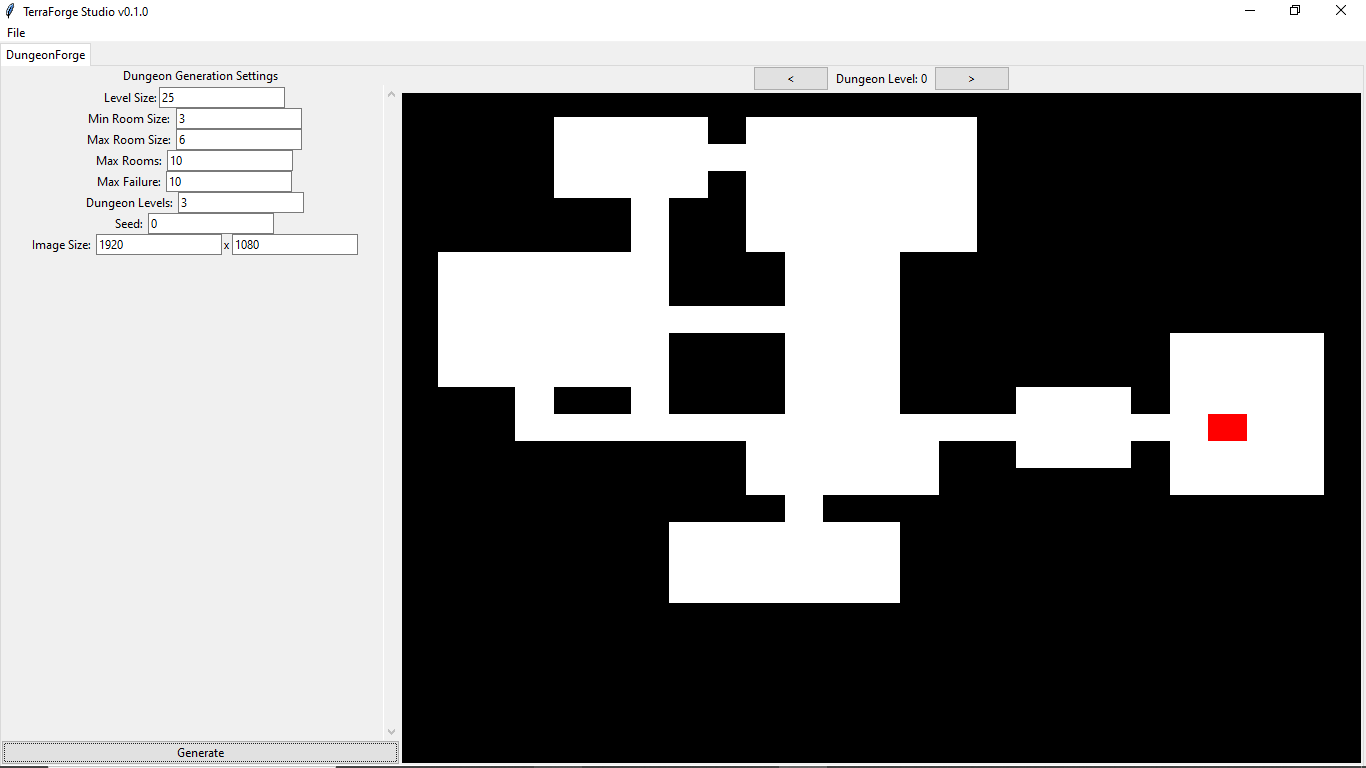
A GUI tool built on top of the TerraForge library that allows you to quickly generate multi-level dungeons for games, prototypes, and tabletop use.
Related Libraries
- CQCalendar: A lightweight, tick-based time/calendar/lunar cycle system for Python games and simulations.
- MoonTex: A procedural moon texture generator for Python that creates stylized, noise-based moon phase images.
Release history Release notifications | RSS feed


Download files
Download the file for your platform. If you're not sure which to choose, learn more about installing packages.
Source Distribution
Built Distribution
Filter files by name, interpreter, ABI, and platform.
If you're not sure about the file name format, learn more about wheel file names.
Copy a direct link to the current filters
File details
Details for the file terraforge_core-1.6.1.tar.gz.
File metadata
- Download URL: terraforge_core-1.6.1.tar.gz
- Upload date:
- Size: 17.4 kB
- Tags: Source
- Uploaded using Trusted Publishing? No
- Uploaded via: twine/6.2.0 CPython/3.12.7
File hashes
| Algorithm | Hash digest | |
|---|---|---|
| SHA256 |
a6f1c7ff3efa8cf7ca4a0ae03339bb275c9cea415b8d304d09b70ff53c326d45
|
|
| MD5 |
7f32a07834b90eb0d2cc9fb32caa57c5
|
|
| BLAKE2b-256 |
c04d37c58d9058648700350aff8527ce389db522e5bbbf7b96da15bb9ecfab73
|
File details
Details for the file terraforge_core-1.6.1-py3-none-any.whl.
File metadata
- Download URL: terraforge_core-1.6.1-py3-none-any.whl
- Upload date:
- Size: 16.9 kB
- Tags: Python 3
- Uploaded using Trusted Publishing? No
- Uploaded via: twine/6.2.0 CPython/3.12.7
File hashes
| Algorithm | Hash digest | |
|---|---|---|
| SHA256 |
23591dfe564d23149c19f3a39d902fc113b0ee00cde9b9a9515621f94c342bad
|
|
| MD5 |
c3a311e8348eea88d040ed95df7837f0
|
|
| BLAKE2b-256 |
ab9e484d05e6c8528b6b2b5a6ff76a8c20df0b4f1fd266ed0b0dd92769e4092d
|






