
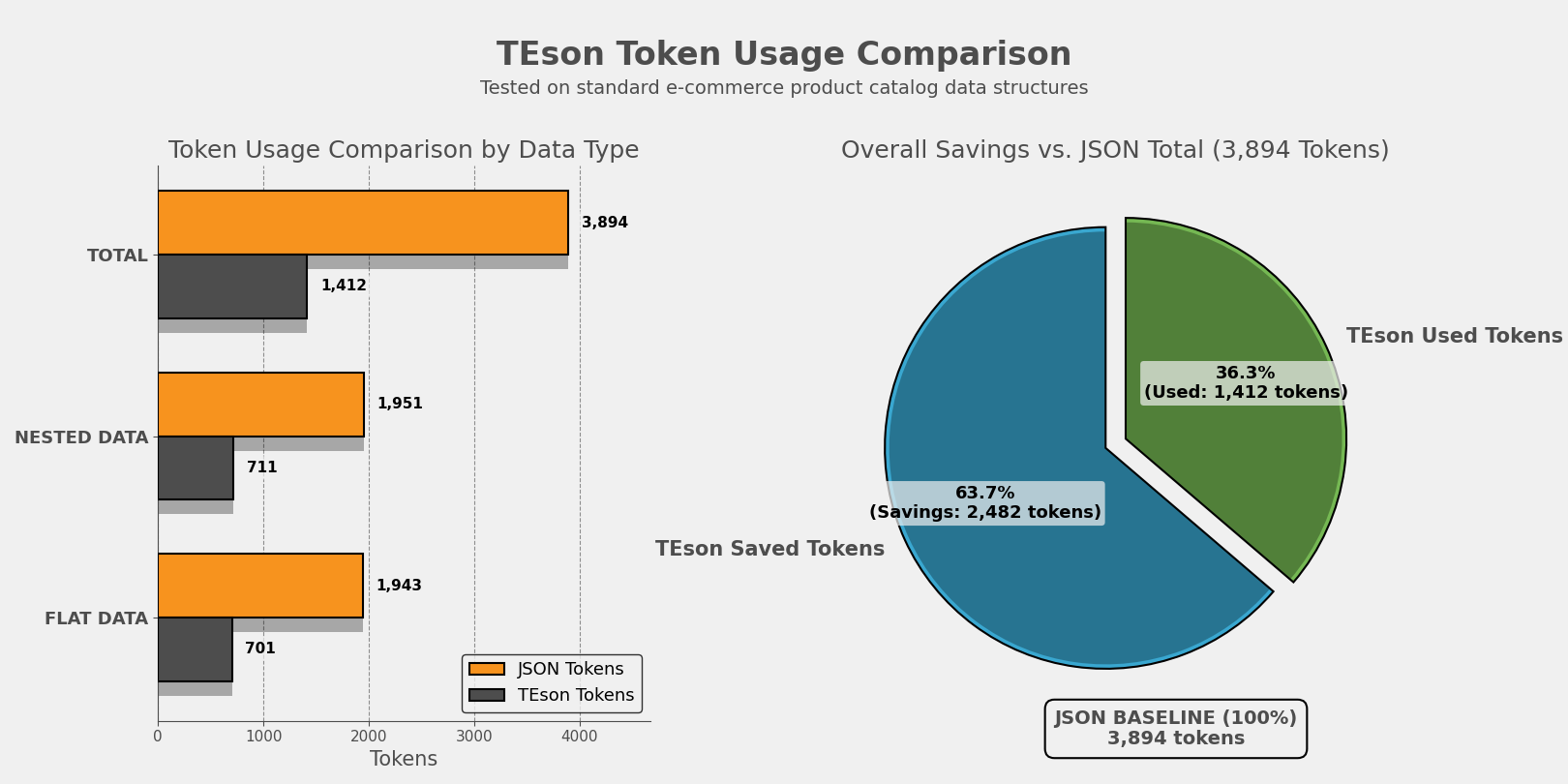
TEson - Token-efficient structured object notation
A Python library for converting arbitrary JSON data structures to CSV format, optimized for LLM data ingestion with automatic structure detection and nested data flattening. Reduce input token consumption upto 65%.
Installation
pip install -U teson
🚀 Features
- LLM-Optimized: Built specifically for efficient LLM data ingestion and token reduction
- Automatic Structure Detection: Intelligently identifies flat vs nested JSON
- Nested Data Flattening: Creates one row per leaf-level record with inherited parent data
- Array Handling: Joins array values with pipe separator
- High Performance: Processes 10,000+ records in under 50ms
🚀 Getting Started
TEson converts JSON to CSV format, making it ideal for LLM consumption by reducing token count while maintaining data structure.
- Install the package using pip
- Import the
decode_jsonfunction - Pass your JSON data (string, dict, or list of dicts)
- Get CSV output optimized for LLM ingestion with original field names
📝 Usage
📦 Import the function
from teson import decode_json
📄 Converting Flat JSON
flat_data = [
    {"id": 1, "name": "Alice", "role": "Engineer"},
    {"id": 2, "name": "Bob", "role": "Designer"}
]

csv_output = decode_json(flat_data)
print(csv_output)
Output:
id,name,role
1,Alice,Engineer
2,Bob,Designer
🌳 Converting Nested JSON
nested_data = [
    {
        "company_name": "TechCorp",
        "departments": [
            {
                "department_id": "D1",
                "employees": [
                    {"employee_id": "E1", "name": "Alice", "skills": ["Python", "Java"]},
                    {"employee_id": "E2", "name": "Bob", "skills": ["JavaScript"]}
                ]
            }
        ]
    }
]

csv_output = decode_json(nested_data)
print(csv_output)
Output:
company_name,department_id,employee_id,name,skills
TechCorp,D1,E1,Alice,Python|Java
TechCorp,D1,E2,Bob,JavaScript
⚠️ Error Handling
The library raises a TesonError when encountering invalid inputs or conversion failures.
Example:
from teson import decode_json, TesonError

try:
    decode_json("{invalid json}")
except TesonError as e:
    print(f"Conversion Error: {e}")
Error Output Example:
TesonError: Invalid JSON string: Expecting property name enclosed in double quotes: line 1 column 2 (char 1)
🎯 Use Cases
LLM & AI Applications
- LLM Data Ingestion: Reduce token usage when feeding data to language models
- Prompt Engineering: Efficiently include structured data in prompts
- RAG Systems: Optimize retrieval-augmented generation data formats
- AI Training Data: Prepare datasets for model training and fine-tuning
Data Engineering
- ETL (Extract, Transform, Load) pipelines
- Data warehouse ingestion
- API response normalization
Data Analysis
- Excel/BI tool preparation
- Statistical analysis datasets
- Quick data exploration
Machine Learning
- Training data preparation
- Feature engineering
- Model input formatting
🔧 API Reference
decode_json(data_in)
Primary function to convert JSON data to CSV format.
Parameters:
data_in(str | dict | list[dict]): JSON string or Python dict/list of dicts
Returns:
str: CSV string with original field names as headers
Raises:
TesonError: If input is invalid or conversion fails
Features:
- Automatic structure detection (flat vs nested)
- Nested data flattening
- Original field names preserved in headers
- Array handling (joins with pipe separator)
- Standard CSV output format
📚 Requirements
- Python 3.9+
🧪 Testing
python tests/example.py
python tests/test_llm_actual.py
python tests/test_token_cost.py
🧪 Generate Data for Testing
python tests/generate_flat_data.py
python tests/generate_nested_data.py
📈 Performance
- Speed: Processes 10,000 records in ~25-40ms
- Token Efficiency: CSV format typically uses 40-60% fewer tokens than JSON for LLMs
- Production Ready: 100% success rate on valid JSON inputs
Token Savings Example
JSON Format (verbose):
[{"id": 1, "name": "Alice"}, {"id": 2, "name": "Bob"}]
~26 tokens
TEson Format (efficient):
id,name
1,Alice
2,Bob
~10 tokens (60% reduction)
🛠️ Technical Design
The library implements a state machine that:
- Detects Structure: Analyzes JSON to identify nested vs flat format
- Processes Data: Routes to appropriate processor (nested/flat)
- Flattens Records: Creates one row per leaf-level record with parent context
- Handles Arrays: Joins array values with pipe separator
- Generates CSV: Produces standard CSV format output
📃 License
MIT License. Use freely and contribute!
1 maintainer

Metadata
1 maintainer
Release files for teson 0.1.4
For a detailed explanation of source distributions (sdists) and built distributions (wheels), please see the package formats documentation.
Source distribution (sdist)
| File | Size | Uploaded | |
|---|---|---|---|
| teson-0.1.4.tar.gz | 7.9 kB | Details |
Built distribution (wheel)
| File | Interpreter | ABI | Platform | Reset |
|---|---|---|---|---|
| teson-0.1.4-py3-none-any.whl | Python 3 | none | any | Details |
Total release size: 19.0 kB
Release files / teson-0.1.4.tar.gz
| Download URL | teson-0.1.4.tar.gz |
|---|---|
| Size | 7.9 kB |
| Tags | Source |
|
SHA-256 checksum How to use checksums |
a2fc188b05851ad474dde872b3cd1da3ca2727c7dab75bd5256dde40af3f307d
|
|
BLAKE2b-256 checksum How to use checksums |
afbaf1f09a623f1e8c177fe0e09595b715d8d0576394c606b65555727042fdfa
|
| Upload date | |
|
Uploaded using Trusted Publishing? What is trusted publishing? |
No |
| Uploaded via |
twine/6.1.0 CPython/3.13.7
|
Release files / teson-0.1.4-py3-none-any.whl
| Download URL | teson-0.1.4-py3-none-any.whl |
|---|---|
| Size | 11.1 kB |
| Tags | Python 3 |
|
SHA-256 checksum How to use checksums |
fbc987f8036ff06376ebbeea8f7c3e9c340cb80789efc77632af65204e803aac
|
|
BLAKE2b-256 checksum How to use checksums |
0a7b525cdd1632b7313958273a9e49edb147ccc995057b486d4802dcaf56a1e0
|
| Upload date | |
|
Uploaded using Trusted Publishing? What is trusted publishing? |
No |
| Uploaded via |
twine/6.1.0 CPython/3.13.7
|














