
Python library for converting arbitrary JSON data structures to Token-efficient CSV format

Project description
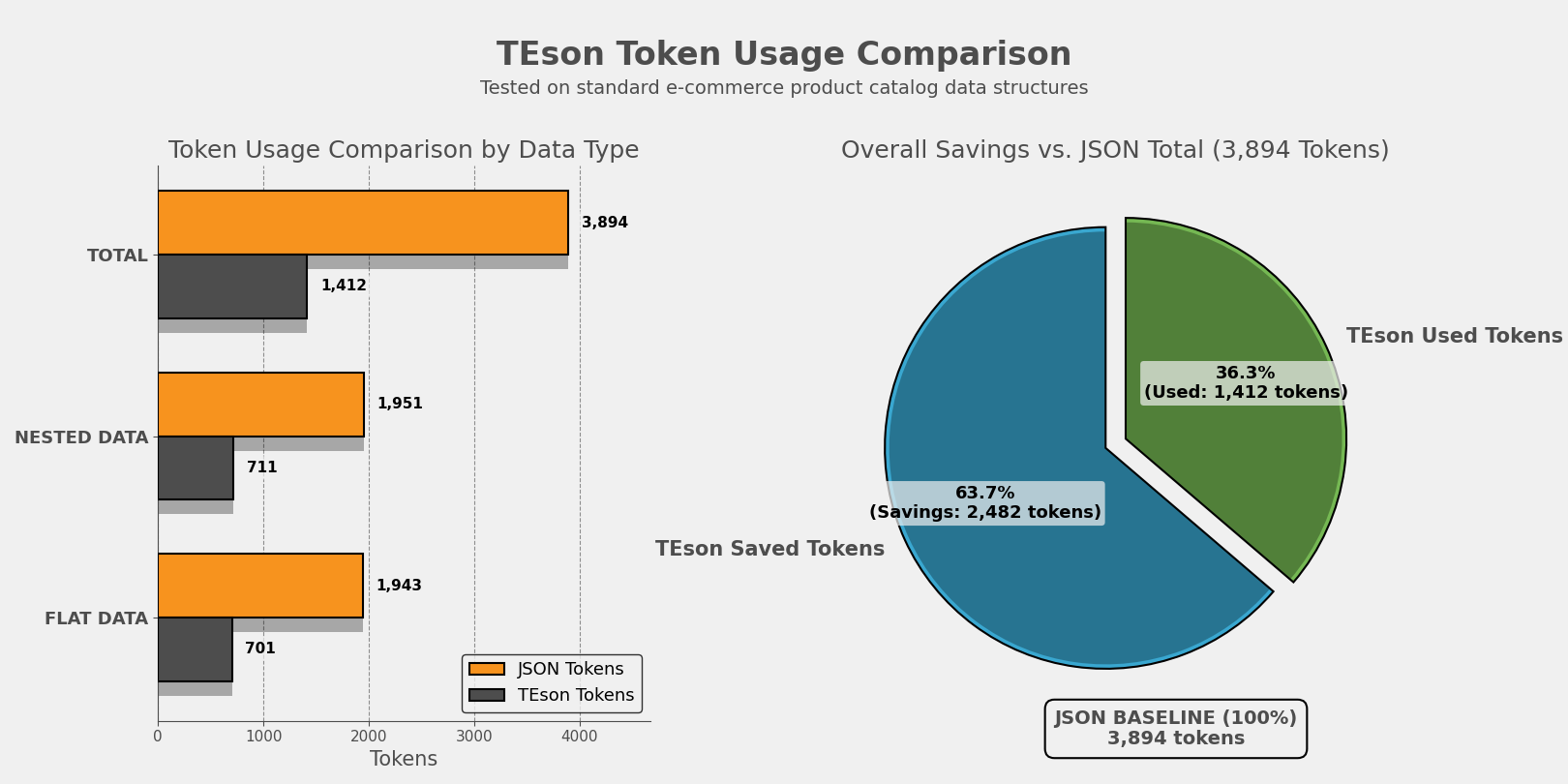
TEson - Token-efficient structured object notation
A Python library for converting arbitrary JSON data structures to CSV format, optimized for LLM data ingestion with automatic structure detection and nested data flattening. Reduce input token consumption upto 65%.
Installation
pip install -U teson
🚀 Features
- LLM-Optimized: Built specifically for efficient LLM data ingestion and token reduction
- Automatic Structure Detection: Intelligently identifies flat vs nested JSON
- Nested Data Flattening: Creates one row per leaf-level record with inherited parent data
- Array Handling: Joins array values with pipe separator
- High Performance: Processes 10,000+ records in under 50ms
🚀 Getting Started
TEson converts JSON to CSV format, making it ideal for LLM consumption by reducing token count while maintaining data structure.
- Install the package using pip
- Import the
decode_jsonfunction - Pass your JSON data (string, dict, or list of dicts)
- Get CSV output optimized for LLM ingestion with original field names
📝 Usage
📦 Import the function
from teson import decode_json
📄 Converting Flat JSON
flat_data = [
    {"id": 1, "name": "Alice", "role": "Engineer"},
    {"id": 2, "name": "Bob", "role": "Designer"}
]

csv_output = decode_json(flat_data)
print(csv_output)
Output:
id,name,role
1,Alice,Engineer
2,Bob,Designer
🌳 Converting Nested JSON
nested_data = [
    {
        "company_name": "TechCorp",
        "departments": [
            {
                "department_id": "D1",
                "employees": [
                    {"employee_id": "E1", "name": "Alice", "skills": ["Python", "Java"]},
                    {"employee_id": "E2", "name": "Bob", "skills": ["JavaScript"]}
                ]
            }
        ]
    }
]

csv_output = decode_json(nested_data)
print(csv_output)
Output:
company_name,department_id,employee_id,name,skills
TechCorp,D1,E1,Alice,Python|Java
TechCorp,D1,E2,Bob,JavaScript
⚠️ Error Handling
The library raises a TesonError when encountering invalid inputs or conversion failures.
Example:
from teson import decode_json, TesonError

try:
    decode_json("{invalid json}")
except TesonError as e:
    print(f"Conversion Error: {e}")
Error Output Example:
TesonError: Invalid JSON string: Expecting property name enclosed in double quotes: line 1 column 2 (char 1)
🎯 Use Cases
LLM & AI Applications
- LLM Data Ingestion: Reduce token usage when feeding data to language models
- Prompt Engineering: Efficiently include structured data in prompts
- RAG Systems: Optimize retrieval-augmented generation data formats
- AI Training Data: Prepare datasets for model training and fine-tuning
Data Engineering
- ETL (Extract, Transform, Load) pipelines
- Data warehouse ingestion
- API response normalization
Data Analysis
- Excel/BI tool preparation
- Statistical analysis datasets
- Quick data exploration
Machine Learning
- Training data preparation
- Feature engineering
- Model input formatting
🔧 API Reference
decode_json(data_in)
Primary function to convert JSON data to CSV format.
Parameters:
data_in(str | dict | list[dict]): JSON string or Python dict/list of dicts
Returns:
str: CSV string with original field names as headers
Raises:
TesonError: If input is invalid or conversion fails
Features:
- Automatic structure detection (flat vs nested)
- Nested data flattening
- Original field names preserved in headers
- Array handling (joins with pipe separator)
- Standard CSV output format
📚 Requirements
- Python 3.9+
🧪 Testing
python tests/example.py
python tests/test_llm_actual.py
python tests/test_token_cost.py
🧪 Generate Data for Testing
python tests/generate_flat_data.py
python tests/generate_nested_data.py
📈 Performance
- Speed: Processes 10,000 records in ~25-40ms
- Token Efficiency: CSV format typically uses 40-60% fewer tokens than JSON for LLMs
- Production Ready: 100% success rate on valid JSON inputs
Token Savings Example
JSON Format (verbose):
[{"id": 1, "name": "Alice"}, {"id": 2, "name": "Bob"}]
~26 tokens
TEson Format (efficient):
id,name
1,Alice
2,Bob
~10 tokens (60% reduction)
🛠️ Technical Design
The library implements a state machine that:
- Detects Structure: Analyzes JSON to identify nested vs flat format
- Processes Data: Routes to appropriate processor (nested/flat)
- Flattens Records: Creates one row per leaf-level record with parent context
- Handles Arrays: Joins array values with pipe separator
- Generates CSV: Produces standard CSV format output
📃 License
MIT License. Use freely and contribute!


Download files
Download the file for your platform. If you're not sure which to choose, learn more about installing packages.
Source Distribution
Built Distribution
Filter files by name, interpreter, ABI, and platform.
If you're not sure about the file name format, learn more about wheel file names.
Copy a direct link to the current filters
File details
Details for the file teson-0.1.4.tar.gz.
File metadata
- Download URL: teson-0.1.4.tar.gz
- Upload date:
- Size: 7.9 kB
- Tags: Source
- Uploaded using Trusted Publishing? No
- Uploaded via: twine/6.1.0 CPython/3.13.7
File hashes
| Algorithm | Hash digest | |
|---|---|---|
| SHA256 |
a2fc188b05851ad474dde872b3cd1da3ca2727c7dab75bd5256dde40af3f307d
|
|
| MD5 |
ad2cc38fb5a2eafd66056f3bc75b5dea
|
|
| BLAKE2b-256 |
afbaf1f09a623f1e8c177fe0e09595b715d8d0576394c606b65555727042fdfa
|
File details
Details for the file teson-0.1.4-py3-none-any.whl.
File metadata
- Download URL: teson-0.1.4-py3-none-any.whl
- Upload date:
- Size: 11.1 kB
- Tags: Python 3
- Uploaded using Trusted Publishing? No
- Uploaded via: twine/6.1.0 CPython/3.13.7
File hashes
| Algorithm | Hash digest | |
|---|---|---|
| SHA256 |
fbc987f8036ff06376ebbeea8f7c3e9c340cb80789efc77632af65204e803aac
|
|
| MD5 |
64673d2df06ff5bf2d14c2cfb8bae9ef
|
|
| BLAKE2b-256 |
0a7b525cdd1632b7313958273a9e49edb147ccc995057b486d4802dcaf56a1e0
|






