
Easily add autocomplete dropdowns to your Textual apps.

Project description
textual-autocomplete
textual-autocomplete is a Python library for creating dropdown autocompletion menus in Textual applications, allowing users to quickly select from a list of suggestions as they type. textual-autocomplete supports Textual version 0.14.0 and above.
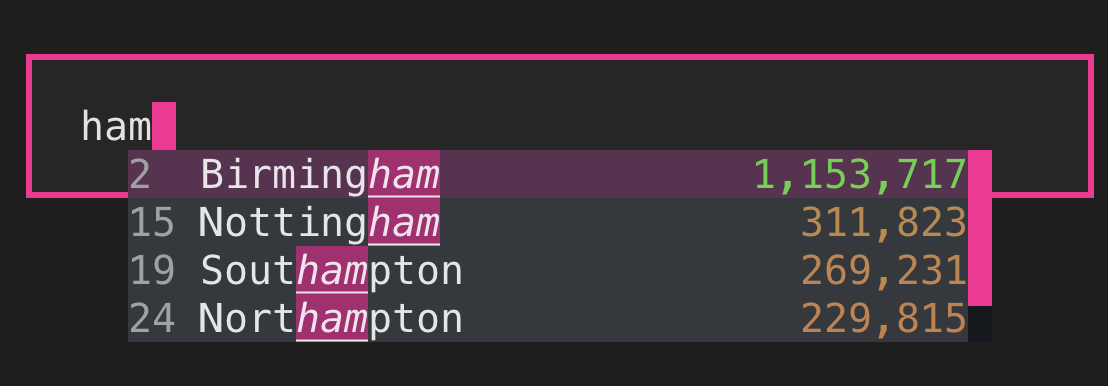
Video example
https://user-images.githubusercontent.com/5740731/205718330-a9364894-9133-40ca-8249-6e3dcc13f456.mov
Warning Textual still has a major version number of
0, meaning there are still significant API changes happening which can sometimes impact this project. I'll do my best to keep it compatible with the latest version of Textual, but there may be a slight delay between Textual releases and this library working with said release.
Quickstart
Simply wrap a Textual Input widget as follows:
from textual.app import ComposeResult
from textual.widgets import Input
from textual_autocomplete import AutoComplete, Dropdown, DropdownItem

def compose(self) -> ComposeResult:
    yield AutoComplete(
        Input(placeholder="Type to search..."),
        Dropdown(items=[
            DropdownItem("Glasgow"),
            DropdownItem("Edinburgh"),
            DropdownItem("Aberdeen"),
            DropdownItem("Dundee"),
        ]),
    )
There are more complete examples here.
Installation
textual-autocomplete can be installed from PyPI using your favourite dependency
manager.
Usage
Wrapping your Input
As shown in the quickstart, you can wrap the Textual builtin Input widget with
AutoComplete, and supply a Dropdown.
The AutoComplete manages communication between the Input and the Dropdown.
The Dropdown is the widget you see on screen, as you type into the input.
The DropdownItems contain up to 3 columns. All must contain a "main" column, which
is the central column used in the filtering. They can also optionally contain a left and right metadata
column.
Supplying data to Dropdown
You can supply the data for the dropdown via a list or a callback function.
Using a list
The easiest way to use textual-autocomplete is to pass in a list of DropdownItems,
as shown in the quickstart.
Using a callable
Instead of passing a list of DropdownItems, you can supply a callback function
which will be called with the current input state. From this function, you should
return the list of DropdownItems you wish to be displayed.
See here for a usage example.
Keyboard control
- Press the Up/Down arrow keys to navigate.
- Press Enter to select the item in the dropdown and fill it in.
- Press Tab to fill in the selected item, and move focus.
- Press Esc to hide the dropdown.
- Press the Up/Down arrow keys to force the dropdown to appear.
Styling
The Dropdown itself can be styled using Textual CSS.
For more fine-grained control over styling, you can target the following CSS classes:
.autocomplete--highlight-match: the highlighted portion of a matching item.autocomplete--selection-cursor: the item the selection cursor is on.autocomplete--left-column: the left metadata column, if it exists.autocomplete--right-column: the right metadata column, if it exists
Since the 3 columns in DropdownItem support Rich Text objects, they can be styled dynamically.
The custom_meta.py file is an example of this, showing how the rightmost column is coloured dynamically based on the city population.
The examples directory contains multiple examples of custom styling.
Messages
When you select an item in the dropdown, an AutoComplete.Selected event is emitted.
You can declare a handler for this event on_auto_complete_selected(self, event) to respond
to an item being selected.
An item is selected when it's highlighted in the dropdown, and you press Enter or Tab.
Pressing Enter simply fills the value in the dropdown, whilst Tab fills the value and then shifts focus from the input.
Other notes
- textual-autocomplete will create a new layer at runtime on the
Screenthat theAutoCompleteis on. TheDropdownwill be rendered on this layer. - The position of the dropdown is currently fixed below the value entered into the
Input. This means if yourInputis at the bottom of the screen, it's probably not going to be much use for now. I'm happy to discuss or look at PRs that offer a flag for having it float above. - There's currently no special handling for when the dropdown meets the right-hand side of the screen.
- Do not apply
marginto theDropdown. The position of the dropdown is updated by applying margin to the top/left of it. - There's currently no debouncing support, but I'm happy to discuss or look at PRs for this.
- There are a few known issues/TODOs in the code, which will later be transferred to GitHub.
- Test coverage is currently non-existent - sorry!
Release history Release notifications | RSS feed


Download files
Download the file for your platform. If you're not sure which to choose, learn more about installing packages.
Source Distribution
Built Distribution
Filter files by name, interpreter, ABI, and platform.
If you're not sure about the file name format, learn more about wheel file names.
Copy a direct link to the current filters
File details
Details for the file textual_autocomplete-4.0.0a0.tar.gz.
File metadata
- Download URL: textual_autocomplete-4.0.0a0.tar.gz
- Upload date:
- Size: 95.3 kB
- Tags: Source
- Uploaded using Trusted Publishing? No
- Uploaded via: uv/0.6.3
File hashes
| Algorithm | Hash digest | |
|---|---|---|
| SHA256 |
c2c8e680e0ef1607dbcaac56de3b07f3c242f33d1365038284b82272cef00076
|
|
| MD5 |
4b5d18b28a19f7797099d7dd9c4501ea
|
|
| BLAKE2b-256 |
06708540596d2f6c00657fe346c49d8ceb09785e5333d6be969d781cf51260c6
|
File details
Details for the file textual_autocomplete-4.0.0a0-py3-none-any.whl.
File metadata
- Download URL: textual_autocomplete-4.0.0a0-py3-none-any.whl
- Upload date:
- Size: 17.4 kB
- Tags: Python 3
- Uploaded using Trusted Publishing? No
- Uploaded via: uv/0.6.3
File hashes
| Algorithm | Hash digest | |
|---|---|---|
| SHA256 |
9eeab043a34cce7ac7140dce567d658bad1ad9fc2643eb56f5a5623cce60f1de
|
|
| MD5 |
6df060a3147ad49e6ce8b1562e01ccb3
|
|
| BLAKE2b-256 |
312eb44ae4408965e01cf128f3a8e41712a83d5579ad88ff4032ceef87279c85
|






