
Textual-Window





Textual-Window is an extension library for Textual.
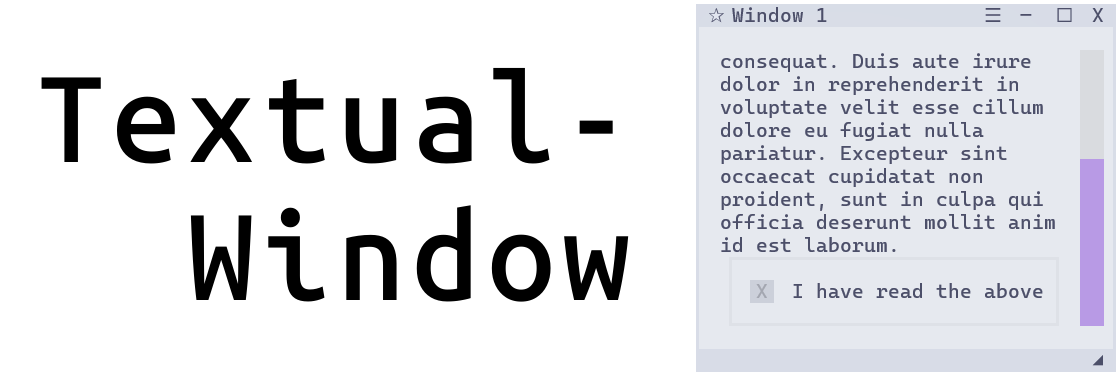
It provides a Window widget, along with an included WindowBar and WindowSwitcher, that makes it easy to create a desktop GUI-like experience inside of a TUI built with Textual.
Window widgets are floating, draggable, resizable, snappable, closable, and you can even cycle through them in a manner similar to alt-tab. It's like a mini desktop inside of your terminal. (Is it ridiculous? Yes, yes it is. But is it awesome? Also yes.)
Features
- Drag, resize, and maximize windows. Close windows with ctrl+w.
- Windows can focus, and highlight to show which one is focused. Controls are passed from the highlighted window to its inner scrolling container.
- Included fully-automatic Window Bar (aka Task Bar). Don't worry about keeping track of the windows. Just compose and go. The library will track them for you.
- Included Window Switcher, to cycle window focus in a manner similar to alt-tab. The most recently focused window is always at the start (left side).
- Set the window's min and max size through Textual CSS as you normally would, and the window will respect those settings when resizing. Resizing can also be disabled per window.
- Windows snap to the terminal by default, toggle this on/off in real-time.
- WindowBar can toggle the dock between top and bottom of the screen in real-time.
- Window Bar has right-click context menus, one for each window, as well as a global context menu with options such as close/open all or snap/unsnap all.
- Set the window's starting location on the screen using plain descriptions (ie. right + bottom), as well as whether to initialize open or closed.
- An optional hamburger menu for custom callbacks - The window has a 'menu_options' argument. Pass in a dictionary of functions (label + callback) and these functions will appear in that window's hamburger menu. (If nothing is passed in, the menu is not shown).
- Smooth fade in/out animation adds a convincing touch.
- Create windows in all 3 ways textual supports - context manager, passing in a list of children, and custom Window objects.
- ...and many small QoL things too numerous to list here.
See the documentation for more details.
Note: This library is under pretty active development and so the API is subject to change. If you find a bug, please report it on the issues page.
Demo App
If you have uv or pipx, you can immediately try the demo app:
uvx textual-window
pipx run textual-window
Documentation
Click here for documentation
Video
Your browser does not support the video tag.Questions, Issues, Suggestions?
Use the issues section for bugs or problems, and post ideas or feature requests on the TTY group discussion board.
1 maintainer

Metadata
1 maintainer
Release files for textual-window 0.8.1
For a detailed explanation of source distributions (sdists) and built distributions (wheels), please see the package formats documentation.
Source distribution (sdist)
| File | Size | Uploaded | |
|---|---|---|---|
| textual_window-0.8.1.tar.gz | 127.8 kB | Details |
Built distribution (wheel)
| File | Interpreter | ABI | Platform | Reset |
|---|---|---|---|---|
| textual_window-0.8.1-py3-none-any.whl | Python 3 | none | any | Details |
Total release size: 159.8 kB
Release files / textual_window-0.8.1.tar.gz
| Download URL | textual_window-0.8.1.tar.gz |
|---|---|
| Size | 127.8 kB |
| Tags | Source |
|
SHA-256 checksum How to use checksums |
1a38e1b8387629716e0297362195de227d96685eabadff0bffdcca9b7a4b1dd2
|
|
BLAKE2b-256 checksum How to use checksums |
f547f3bf99ccce5e6b37ddc397ef6cbcd34dac72b10fa938386d36972cfe5477
|
| Upload date | |
|
Uploaded using Trusted Publishing? What is trusted publishing? |
Yes |
| Uploaded via |
twine/6.1.0 CPython/3.12.9
|
Provenance
Provenance describes where a file came from. On PyPI, provenance is shared via attestations, which provide a verifiable record of the build or publishing details. View details, limitations and caveats.


PyPI Publish Attestation
PyPI verified that this artifact, at this checksum, originated from the publisher listed below.
Signed by GitHub Actions, verified by PyPI on Aug 3, 2025.
Transparency logRelease files / textual_window-0.8.1-py3-none-any.whl
| Download URL | textual_window-0.8.1-py3-none-any.whl |
|---|---|
| Size | 32.0 kB |
| Tags | Python 3 |
|
SHA-256 checksum How to use checksums |
3abbf909b3c11a225d08cab79008e8b0171c88b9cedd4568022793d858049892
|
|
BLAKE2b-256 checksum How to use checksums |
57e7a1e34f40cccf6a52fa24ced140aaf5ae278a5afd9d124bb579ba29e61e70
|
| Upload date | |
|
Uploaded using Trusted Publishing? What is trusted publishing? |
Yes |
| Uploaded via |
twine/6.1.0 CPython/3.12.9
|
Provenance
Provenance describes where a file came from. On PyPI, provenance is shared via attestations, which provide a verifiable record of the build or publishing details. View details, limitations and caveats.
PyPI Publish Attestation
PyPI verified that this artifact, at this checksum, originated from the publisher listed below.
Signed by GitHub Actions, verified by PyPI on Aug 3, 2025.
Transparency log













