

t0



Open-weights time-series forecasting foundation model from The Forecasting Company.
t0 is a transformer-based model that
produces probabilistic multi-horizon forecasts and natively operates on
multiple covariates. t0-alpha is our first iteration of the model.
You can use t0 on Retrocast, our platform for forecasting on your own data. You can also compare forecast across different open-weight models.
Model family: t0-alpha (PyTorch/MLX) · ONNX FP16 · ONNX INT8 · Collection
Choose how to run t0-alpha
This repository contains the first-party PyTorch and MLX runtimes, published as separate packages so each installation keeps only its native tensor backend. ONNX artifacts and our managed API cover other deployment targets:
| Use case | Install or open |
|---|---|
| Local inference with PyTorch | pip install tfc-t0 |
| Local inference on Apple silicon with MLX | pip install tfc-t0-mlx |
| Accelerator-oriented local and edge inference with ONNX FP16 | t0-alpha-onnx-fp16 |
| CPU and in-browser inference with ONNX INT8 | t0-alpha-onnx-int8 |
| Managed inference without local weights | The Forecasting Company API |
The MLX runtime lives in mlx/. It is inference-only, has a closely
matched T0Forecaster.predict() API, loads the same safetensors directly, and
does not install PyTorch.
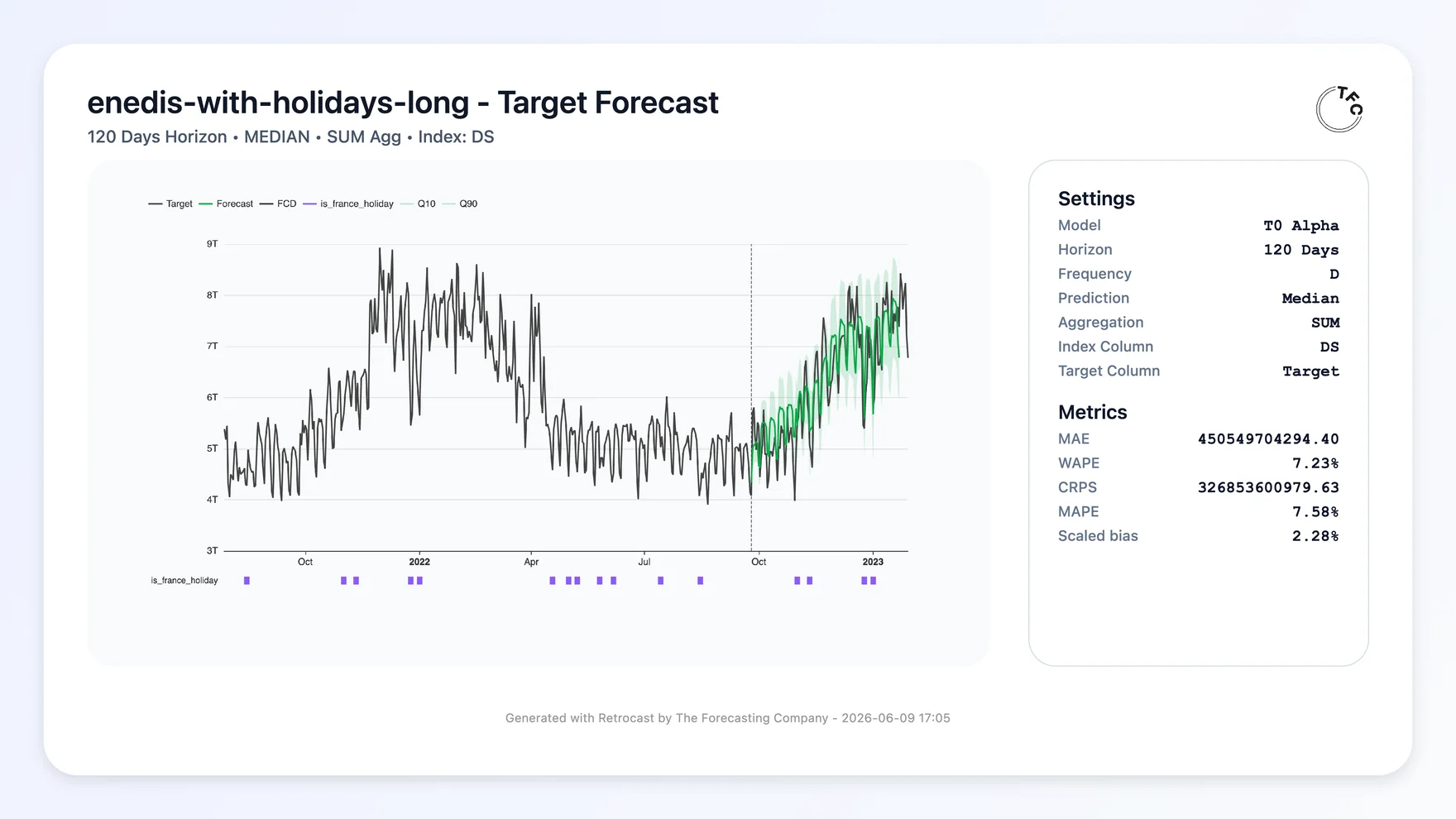
t0 forecasting French national electricity demand in Retrocast. Data:
Enedis open data.
📈 Forecasting with covariates
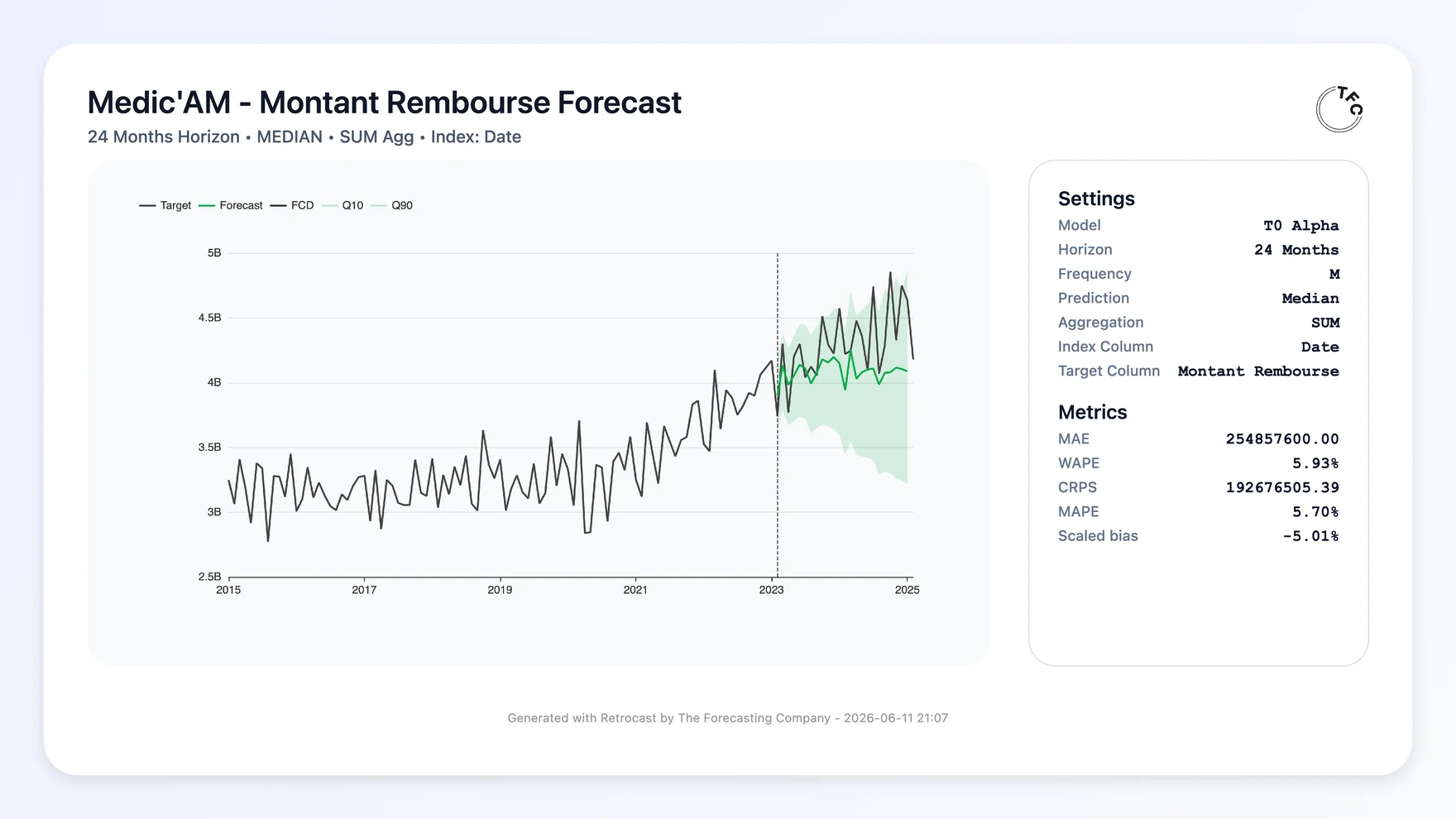
t0 leverages covariate information, in the past and future when
available, to improve its forecast.
| Without covariates | With covariates |
|---|---|
 |
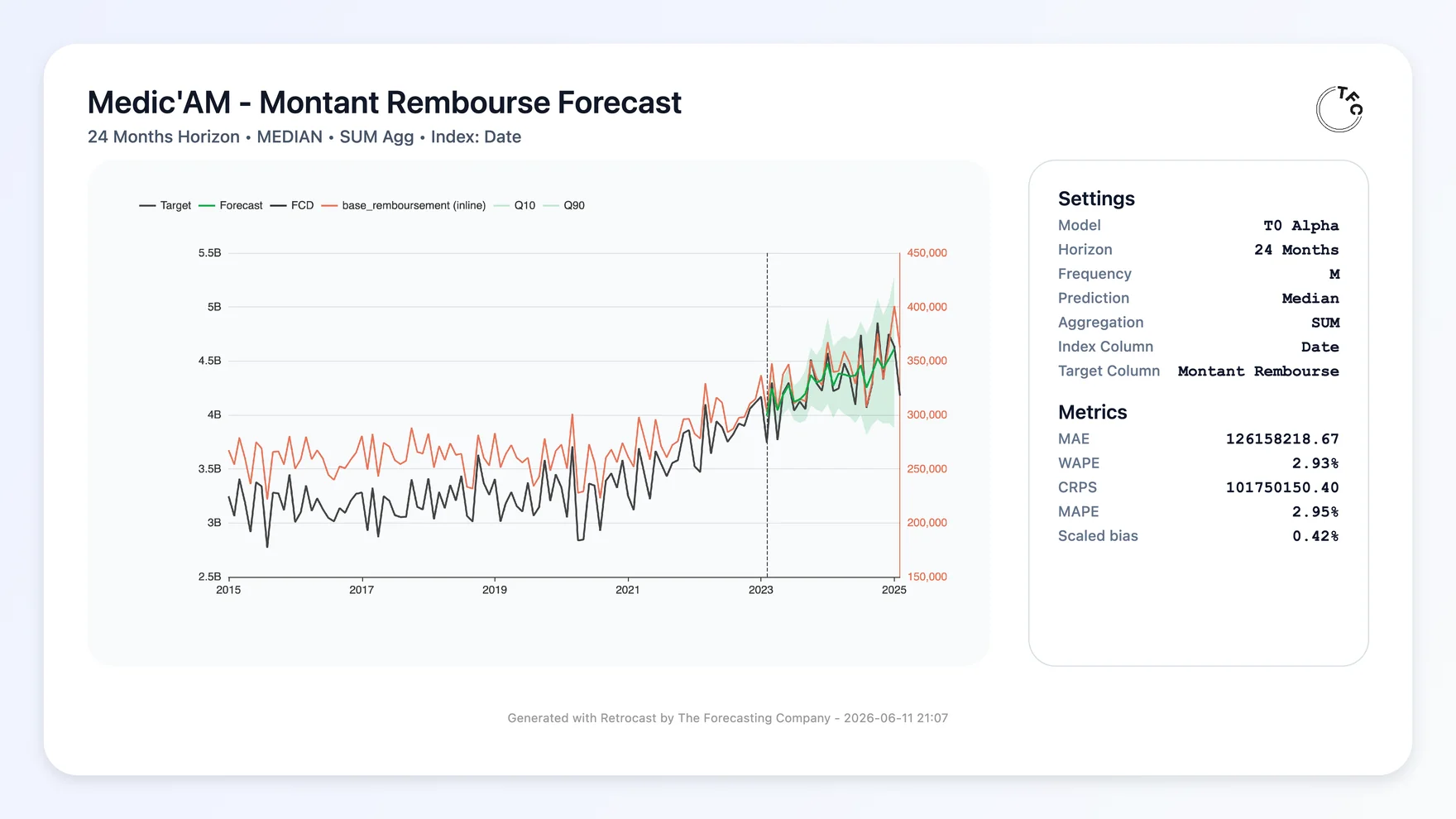 |
Data: Medic'AM, monthly drug reimbursements from the French national health insurance.
The Quickstart below shows the API for both a plain univariate forecast and a multivariate forecast that conditions on historical and known-future covariates.
🚀 Quickstart
pip install tfc-t0
The model repository is gated. Before the first download, sign in to the model page and accept its access conditions. Then authenticate with a token from that same account that can read the model:
hf auth login
In a notebook, use from huggingface_hub import login; login() instead.
For scripts and CI, set HF_TOKEN in the environment. Signing in to the
website alone does not authenticate your Python environment.
The simplest path is a univariate forecast through predict:
import torch
from t0 import T0Forecaster

model = T0Forecaster.from_pretrained("theforecastingcompany/t0-alpha", token=True).eval()

context = torch.randn(4, 512)  # 4 series, 512 past timesteps
out = model.predict(context, horizon=64, quantiles=[0.1, 0.5, 0.9])
out.quantiles  # (4, 64, 3)
out.median     # (4, 64)
predict accepts numpy arrays. 1-D contexts are auto-promoted to a
single-row batch. NaN in the context is read as a missing observation. To
say that some cells are padding instead, pass a mask. See
batched inference.
Forecasting with covariates
Anything you know over the past goes in context — alongside the
target, extra variates attend to it and are forecast together. Anything
you know over the future (calendar features, planned promotions,
weather forecasts) goes in future_covariates, shaped
[B, F, context + horizon]. The model conditions on it but does not
forecast it.
import torch
from t0 import T0Forecaster

model = T0Forecaster.from_pretrained("theforecastingcompany/t0-alpha").eval()

context = torch.randn(2, 512)                    # 2 series, 512 past timesteps
future_covariates = torch.randn(2, 3, 512 + 64)  # 3 covariates known over context + horizon

out = model.predict(
    context,
    horizon=64,
    quantiles=[0.1, 0.5, 0.9],
    future_covariates=future_covariates,
)
out.quantiles  # (2, 64, 3)
out.median     # (2, 64)
Batched inference
import numpy as np
from t0 import T0Forecaster, batch_series

model = T0Forecaster.from_pretrained("theforecastingcompany/t0-alpha").eval()

daily = np.random.randn(180)    # one series, 180 past timesteps
store = np.random.randn(2, 96)  # one series of 2 variates, 96 past timesteps
hourly = np.random.randn(1024)  # one series, 1024 past timesteps

context, mask, group_ids = batch_series([daily, store, hourly])
context.shape  # (4, 1024) — variates stacked, right-aligned to the longest
group_ids      # [0, 1, 1, 2] — `store`'s two variates are forecast jointly

out = model.predict(
    context,
    horizon=24,
    quantiles=[0.1, 0.5, 0.9],
    mask=mask,
    group_ids=group_ids,
)
out.quantiles  # (4, 24, 3)
out.median[0]  # the 24-step median forecast for `daily`
Integrations that prepare complete T0 inputs, including known-future covariates, can batch the native representation directly:
from t0 import TimeSeries

first = TimeSeries.from_array(context_1, future_covariates_1)
second = TimeSeries.from_array(context_2, future_covariates_2)
batch = TimeSeries.batch([first, second])

out = model.predict(
    batch,
    horizon=64,
    context_length=max(context_1.shape[-1], context_2.shape[-1]),
)
Here each context includes its batch axis, for example [1, V, T], and each
known-future input is [1, F, T + horizon]. The output is ordered by the
flattened target rows in batch.
Converting your data to TimeSeries
TimeSeries is the model's native input. It holds target rows, known-future
covariate rows, a mask and group ids, all on one width. predict builds one for
you from a raw array. You only need to construct one yourself to batch inputs of
different widths, or to call forward directly.
from t0 import TimeSeries

# context only, with `horizon` marking the region to predict
model_input = TimeSeries.from_array(context, horizon=24)          # context: [B, V, T]

# with known-future covariates, whose width sets the horizon
model_input = TimeSeries.from_array(context, future_covariates)   # covariates: [B, F, T + 24]

out = model.predict(model_input, horizon=24, quantiles=[0.1, 0.5, 0.9])
predict infers context_length from where the forecast region starts. Pass it
explicitly when batching series of different widths. forward takes the same
TimeSeries and runs a single differentiable pass over it, with no rollout. That
is the entry point for fine-tuning.
For efficient inference at scale, look at Retrocast.
🏗️ Architecture
t0 is a decoder-style patch transformer that alternates time and
covariate attention layers. It predicts 5 quantiles (0.1, 0.25, 0.5,
0.75, 0.9), decoding multiple horizons in parallel — up to 1024
timesteps in one forward pass — and falling back on autoregressive
rollout for longer horizons.
| Parameters | ~102M |
| Layers | 24 |
| Embedding dim | 512 |
| Feedforward dim | 2048 |
| Attention heads | 8 |
| Patch size | 32 |
| Quantile levels | 0.1, 0.25, 0.5, 0.75, 0.9 |
🧬 Lineage
t0 builds on ideas — and in places, code — from open-source forecasting
models. We gratefully acknowledge:
- Toto by Datadog (repo) & Chronos-2 by Amazon (repo) — factorizing attention in the time and variates dimension.
- TiRex by NXAI (repo) — contiguous patch masking.
Code-level attributions are listed in NOTICE, all under
Apache-2.0.
🧰 Public API
T0Forecaster—nn.Modulewithfrom_pretrained/save_pretrained(viahuggingface_hub.PyTorchModelHubMixin). It has two forecasting entry points.forward(model_input)runs a single differentiable pass with no rollout.predict(model_input, horizon, quantiles, ...)is inference-only and rolls out autoregressively pastmax_horizon.Forecast— the object returned by the model.T0Config— the configuration of the model.T0Config.medium()is the published one.MaskType— the reason a time step is masked out:PAD(a cell that only widens a shorter series out to the batch's width) orMISSING(an absent observation).batch_series— utility to batch time series of potentially different lengths.TimeSeries.from_array/TimeSeries.batch— build the model's native input, including known-future covariates and an explicit forecasthorizon.predictaccepts either aTimeSeriesor a raw context array.
📚 Citation
If our model is useful, please use the following citation and star our repo!
@misc{tfc-t0,
  title  = {t0: A time-series forecasting foundation model},
  author = {The Forecasting Company},
  year   = {2026},
  url    = {https://huggingface.co/theforecastingcompany/t0-alpha},
}
⚖️ License
Metadata
Release files for tfc-t0 0.4.0
For a detailed explanation of source distributions (sdists) and built distributions (wheels), please see the package formats documentation.
Source distribution (sdist)
| File | Size | Uploaded | |
|---|---|---|---|
| tfc_t0-0.4.0.tar.gz | 518.7 kB | Details |
Built distribution (wheel)
| File | Interpreter | ABI | Platform | Reset |
|---|---|---|---|---|
| tfc_t0-0.4.0-py3-none-any.whl | Python 3 | none | any | Details |
Total release size: 570.4 kB
Release files / tfc_t0-0.4.0.tar.gz
| Download URL | tfc_t0-0.4.0.tar.gz |
|---|---|
| Size | 518.7 kB |
| Tags | Source |
|
SHA-256 checksum How to use checksums |
aee43d5855f13b77d6113c17924ff0cdc7cdb436c5955c3e191b1aa39f4d11ab
|
|
BLAKE2b-256 checksum How to use checksums |
b8c1dd92f4cded347ee47331bfe17bb2d160b34561a7ea85e378b9c03d6f1ee4
|
| Upload date | |
|
Uploaded using Trusted Publishing? What is trusted publishing? |
Yes |
| Uploaded via |
twine/7.0.0 CPython/3.13.14
|
Provenance
Provenance describes where a file came from. On PyPI, provenance is shared via attestations, which provide a verifiable record of the build or publishing details. View details, limitations and caveats.


PyPI Publish Attestation
PyPI verified that this artifact, at this checksum, originated from the publisher listed below.
Signed by GitHub Actions, verified by PyPI on Sep 15, 2026.
Transparency logRelease files / tfc_t0-0.4.0-py3-none-any.whl
| Download URL | tfc_t0-0.4.0-py3-none-any.whl |
|---|---|
| Size | 51.7 kB |
| Tags | Python 3 |
|
SHA-256 checksum How to use checksums |
55204a372e471d3fc09bb329ee0fe4feb375178404ed5837b939a743f460e4c4
|
|
BLAKE2b-256 checksum How to use checksums |
e012b82aad2dcd366700b47b7abbb2213190156ce364aab2dd61888488621ae3
|
| Upload date | |
|
Uploaded using Trusted Publishing? What is trusted publishing? |
Yes |
| Uploaded via |
twine/7.0.0 CPython/3.13.14
|
Provenance
Provenance describes where a file came from. On PyPI, provenance is shared via attestations, which provide a verifiable record of the build or publishing details. View details, limitations and caveats.
PyPI Publish Attestation
PyPI verified that this artifact, at this checksum, originated from the publisher listed below.
Signed by GitHub Actions, verified by PyPI on Sep 15, 2026.
Transparency log













