
TFTUI — the Terraform textual UI




TFTUI is a terminal UI for viewing and working with your Terraform state.
Browse the full state tree, search it, read individual resources, reveal sensitive values, taint or remove resources, and create and apply plans — without leaving the terminal.

More screenshots: docs/screenshots.md
Features
- Full state tree, with modules nested as they are in your configuration
- Search across resource names and their definitions
- Read a single resource with HCL syntax highlighting
- Reveal sensitive values on demand
- Select one resource, or a whole module at a time, and taint, untaint or remove from state
- Create plans — including targeted and destroy plans — in full colour, search them, and apply them
- Switch workspaces without restarting
- Works with Terraform, OpenTofu and wrappers such as Terragrunt
Installation
| Tool | Install | Upgrade | Run |
|---|---|---|---|
| Homebrew | brew install idoavrah/homebrew/tftui |
brew upgrade tftui |
cd /path/to/terraform/project && tftui |
| pipx | pipx install tftui |
pipx upgrade tftui |
cd /path/to/terraform/project && tftui |
| uv | uv tool install tftui |
uv tool upgrade tftui |
cd /path/to/terraform/project && tftui |
| pip | pip install tftui |
pip install --upgrade tftui |
cd /path/to/terraform/project && tftui |
Requires Python 3.10 or newer and a terraform (or compatible) binary on PATH.
Keys
Press ? in the application for the full list.
| Key | Action |
|---|---|
↑ ↓ / j k |
Move up and down |
← → / h l |
Collapse and expand, or step in and out |
Enter |
View the resource, or expand the module |
Esc |
Back to the state tree |
/ |
Filter the tree, or search within a resource or plan |
n N |
Next / previous match when searching a resource or plan |
0–9 |
Collapse the tree to a module depth (0 expands everything) |
Space |
Select the resource — or, on a module, everything under it |
Ctrl+A |
Clear the selection |
T U D |
Taint, untaint, or remove from state |
P |
Create a plan |
Ctrl+D |
Create a destruction plan |
A |
Apply the current plan |
X |
Reveal sensitive values |
F |
Full screen (hold Shift or Option to select text) |
C |
Copy to clipboard |
R |
Refresh state |
W |
Switch workspace |
M |
Toggle light and dark mode |
Q |
Quit |
Configuration
Every option can be set with a flag or an environment variable. Flags win.
| Flag | Environment variable | Meaning |
|---|---|---|
-e, --executable |
TFTUI_EXECUTABLE |
Binary to drive (default terraform) |
-f, --var-file |
TFTUI_VAR_FILE |
tfvars file; repeat the flag for several |
-C, --chdir |
TFTUI_WORKING_DIR |
Directory to run in (default current) |
-n, --no-init |
TFTUI_NO_INIT |
Skip terraform init on startup |
-o, --offline |
TFTUI_OFFLINE |
No outbound calls at all |
-d, --disable-usage-tracking |
TFTUI_DISABLE_USAGE_TRACKING |
Turn off usage tracking |
-l, --light-mode |
TFTUI_LIGHT_MODE |
Start in the light theme |
-g, --generate-debug-log |
TFTUI_DEBUG_LOG |
Write tftui.log in the working directory |
-v, --version |
— | Print the version and exit |
Several var-files
Repeat -f as often as you need; the files are applied in order, so a later
one overrides an earlier one. They are passed to init as well as to plan,
which is what OpenTofu 1.8+ needs to evaluate variables used in a backend
block.
tftui -f common.tfvars -f prod.tfvars
The environment variable takes a list separated by your platform's path
separator (: on Linux and macOS, ; on Windows):
export TFTUI_VAR_FILE="common.tfvars:prod.tfvars"
Using OpenTofu or Terragrunt
tftui --executable tofu
tftui --executable terragrunt
Handling of sensitive data
Terraform state routinely contains secrets, so tftui is deliberate about them:
- Sensitive attributes stay redacted as
(sensitive value)until you pressX. - When revealed, values are matched to attributes by name, so one secret can never be displayed under another attribute's label.
- Plan files are written to a private temporary directory (mode
0700) and deleted when the plan is superseded, applied, or the program exits. They are never written into your Terraform directory, where they could be committed by accident. - A plan is discarded once applied, so a stale plan cannot be applied twice.
- tftui never invokes a shell. Terraform is executed directly with an argument
list, so resource addresses containing quotes, spaces or
$are safe.
Usage tracking
- tftui uses PostHog to understand how the tool is used.
- No personal data is sent. Returning users are identified by a two-word handle derived from a one-way hash of the machine name.
- Crash reports have directory names stripped out before they are sent.
- Tracking never blocks the UI and never takes the application down.
- Opt out with
-d, or turn off every outbound call — tracking and the update check alike — with-o.
Contributing
See CONTRIBUTING.md. In short:
make setup     # install dependencies and git hooks
make check     # lint, type-check and test
make run       # run against the bundled example project
Changelog
See CHANGELOG.md.
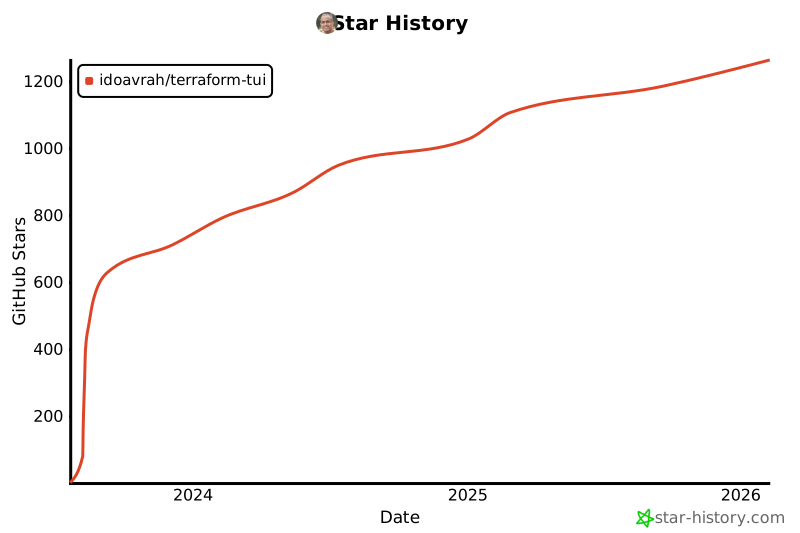
Star history
1 maintainer

Metadata
1 maintainer
Release files for tftui 0.14.1
For a detailed explanation of source distributions (sdists) and built distributions (wheels), please see the package formats documentation.
Source distribution (sdist)
| File | Size | Uploaded | Provenance | |
|---|---|---|---|---|
| tftui-0.14.1.tar.gz | 95.6 kB | With provenance | Details |
Built distribution (wheel)
| File | Interpreter | ABI | Platform | Reset |
|---|---|---|---|---|
| tftui-0.14.1-py3-none-any.whl | Python 3 | none | any | Details |
Total release size: 160.3 kB
Release files / tftui-0.14.1.tar.gz
| Download URL | tftui-0.14.1.tar.gz |
|---|---|
| Size | 95.6 kB |
| Tags | Source |
|
SHA-256 checksum How to use checksums |
341c2ad9c0b423a1fa83d1415011be2d86811dec96d74b09422934078ae481e3
|
|
BLAKE2b-256 checksum How to use checksums |
83f6e9f6c2a381993d3b39f828846ccb68380d1b2a7540a15d3943bcc271b485
|
| Upload date | |
|
Uploaded using Trusted Publishing? What is trusted publishing? |
Yes |
| Uploaded via |
twine/7.0.0 CPython/3.13.14
|
Provenance
Provenance describes where a file came from. On PyPI, provenance is shared via attestations, which provide a verifiable record of the build or publishing details. View details, limitations and caveats.


PyPI Publish Attestation
PyPI verified that this artifact, at this checksum, originated from the publisher listed below.
Signed by GitHub Actions, verified by PyPI on Sep 7, 2026.
Transparency logRelease files / tftui-0.14.1-py3-none-any.whl
| Download URL | tftui-0.14.1-py3-none-any.whl |
|---|---|
| Size | 64.7 kB |
| Tags | Python 3 |
|
SHA-256 checksum How to use checksums |
f15a2a71f31bdb8aaaaa18a169197ce56f8871d55333e17a03a0fa1693c21275
|
|
BLAKE2b-256 checksum How to use checksums |
b5f32f2f5a9c62b44a6d3131c958c1bf7bd50cc9b41c2f789aa87f31743b303e
|
| Upload date | |
|
Uploaded using Trusted Publishing? What is trusted publishing? |
Yes |
| Uploaded via |
twine/7.0.0 CPython/3.13.14
|
Provenance
Provenance describes where a file came from. On PyPI, provenance is shared via attestations, which provide a verifiable record of the build or publishing details. View details, limitations and caveats.
PyPI Publish Attestation
PyPI verified that this artifact, at this checksum, originated from the publisher listed below.
Signed by GitHub Actions, verified by PyPI on Sep 7, 2026.
Transparency logSecurity for tftui 0.14.1
Provenance
Provenance describes where a file came from. On PyPI, provenance is shared via attestations, which provide a verifiable record of the build or publishing details. View details, limitations and caveats.
Full provenance
All 2 files in this release have been uploaded with provenance metadata.
Attestation for tftui-0.14.1.tar.gz
PyPI Publish Attestation
PyPI verified that this artifact, at this checksum, originated from the publisher listed below.
Signed by GitHub Actions, verified by PyPI on Sep 7, 2026.
Transparency logA note on package security
PyPI is a repository for distributing packages, not a service for auditing them. While third-party security researchers and our staff do their best to detect and remove malicious packages, PyPI cannot guarantee the quality, security or suitability of any given package.














