









The Notebook MCP
A Model Context Protocol (MCP) server that enables AI agents to interact with Jupyter Notebook (.ipynb) files. Designed to overcome limitations with Cursor's AI agent mode, this tool allows AI assistants to directly manipulate notebook cells and structure through a secure, well-defined API.
Current Version: 0.9.0 - See the CHANGELOG.md for details on recent changes.
Why Use This?
- For Cursor Users: Enables AI assistants to properly edit, create, and manipulate Jupyter notebooks.
- For Data Scientists: No more copy-pasting AI output manually into your notebooks.
- For Developers: Create complex notebook workflows with AI assistance while maintaining proper notebook structure.
Although originally designed for Cursor, this MCP server can be used with any MCP-compatible AI assistant tool, such as Claude Code.
Quick Start
# Install
uv pip install the-notebook-mcp

# Run (minimal example)
the-notebook-mcp --allow-root /path/to/your/notebooks
Video Walkthrough
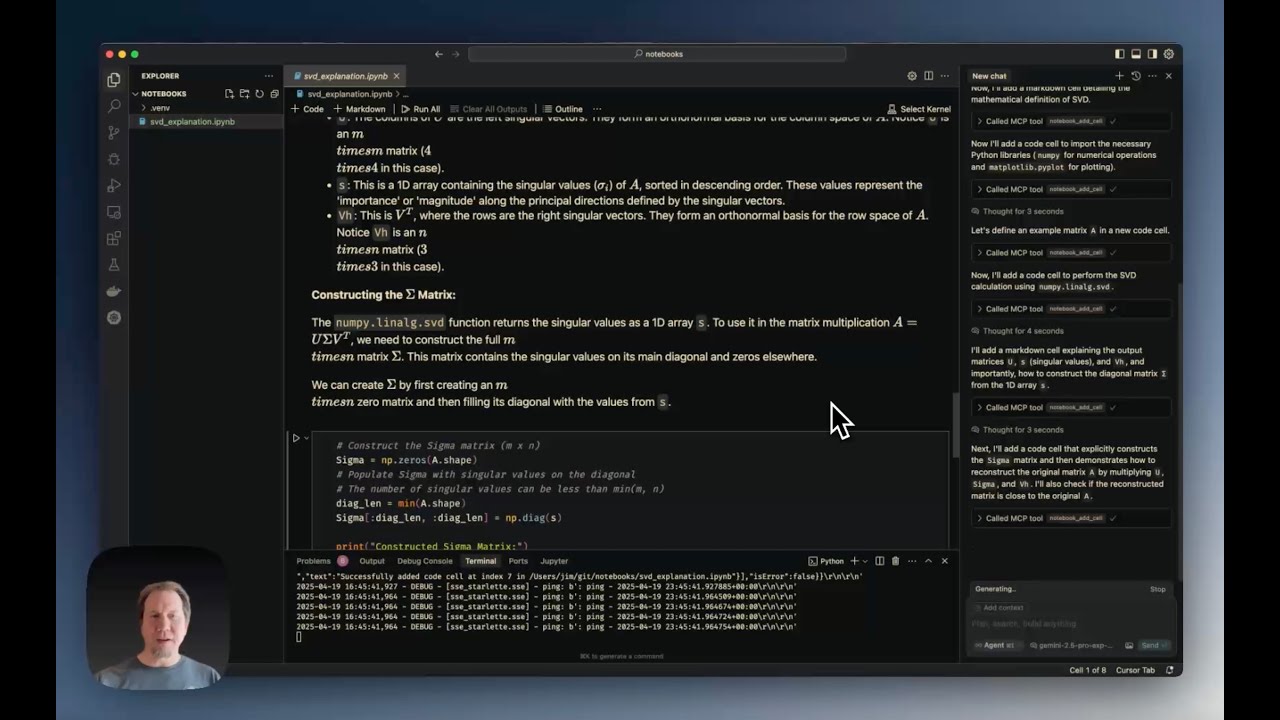
Cursor Jupyter Notebook MCP Server Tutorial demonstrates:
- Installation and configuration
- Creating notebooks from scratch
- Using editing tools (edit, split, duplicate cells)
- Working with notebook metadata
- Exporting notebooks to Python
Features
The server provides the following MCP tools:
File Operations
notebook_create: Creates a new, empty notebook filenotebook_delete: Deletes an existing notebook filenotebook_rename: Renames/moves a notebook file from one path to anothernotebook_export: Exports the notebook to another format (python, html, etc.)notebook_validate: Validates the notebook structure against the nbformat schema
Reading Operations
notebook_read: Reads an entire notebook and returns its structure as a dictionarynotebook_read_cell: Reads the source content of a specific cellnotebook_get_cell_count: Returns the total number of cellsnotebook_get_info: Retrieves general information about the notebooknotebook_get_outline: Generates a structural outline of the notebook (headings, definitions)notebook_search: Searches for a string within all notebook cells
Cell Manipulation
notebook_add_cell: Adds a new code or markdown cellnotebook_edit_cell: Replaces the source content of a specific cellnotebook_delete_cell: Deletes a specific cellnotebook_move_cell: Moves a cell to a different positionnotebook_change_cell_type: Changes a cell's type (code, markdown, or raw)notebook_duplicate_cell: Duplicates a cell multiple timesnotebook_split_cell: Splits a cell into two at a specified line numbernotebook_merge_cells: Merges a cell with the one immediately following itnotebook_execute_cell: Executes a code cell and returns its outputs- Note: Requires an active Jupyter server
- Example:
notebook_execute_cell('/path/to/notebook.ipynb', 1, server_url='http://localhost:8888', token='your-token') - Kernel state is preserved between calls, allowing variables defined in earlier cells to be accessed in later cells
Metadata and Outputs
notebook_read_metadata: Reads the top-level notebook metadatanotebook_edit_metadata: Updates the top-level notebook metadatanotebook_read_cell_metadata: Reads the metadata of a specific cellnotebook_edit_cell_metadata: Updates the metadata of a specific cellnotebook_read_cell_output: Reads the output list of a specific code cellnotebook_clear_cell_outputs: Clears the outputs and execution count of a specific cellnotebook_clear_all_outputs: Clears outputs and execution counts for all code cells
Requirements
Python Dependencies
-
Python Version: ≥ 3.10
-
Core Dependencies: (automatically installed)
fastmcp ≥ 2.3.3nbformat ≥ 5.0nbconvert ≥ 6.0ipythonjupyter_coreloguru ≥ 0.7.3
-
SSE Transport: (install with
uv pip install "the-notebook-mcp[sse]")uvicorn ≥ 0.20.0starlette ≥ 0.25.0
External System Dependencies
For exporting to certain formats, you may need:
- Pandoc: Required for many non-HTML export formats (installation instructions)
- LaTeX: Required for PDF export (installation instructions)
Installation
Standard Installation
# Basic installation (stdio transport only)
uv pip install the-notebook-mcp

# With SSE transport support
uv pip install "the-notebook-mcp[sse]"
Development Installation
-
Clone the repository:
git clone https://github.com/svallory/the-notebook-mcp.git
cd the-notebook-mcp
-
Create and activate a virtual environment:
uv venv
source .venv/bin/activate  # On Windows use `.venv\Scripts\activate`
-
Install in development mode:
uv pip install -e ".[dev]"
-
Set up pre-commit hooks (recommended):
pre-commit installSee Pre-commit Hook Setup for details.
Running the Server
Basic Usage
# stdio transport (default)
the-notebook-mcp --allow-root /path/to/notebooks

# SSE transport
the-notebook-mcp --transport sse --allow-root /path/to/notebooks --host 0.0.0.0 --port 8889
Development Mode
Use one of these methods when working with the source code:
# Using poethepoet tasks
uv run poe start

# Using the Python module
python -m the_notebook_mcp.server --allow-root /path/to/notebooks
Available Tasks (poethepoet)
The project includes these predefined tasks:
start: Start the server with default settingscheck-help: Show help informationcheck-version: Show version informationtest: Run the test suite
Example:
# Show help
uv run poe check-help

# Run tests
uv run poe test
Command-Line Arguments
--allow-root: (Required) Path to a directory where notebooks are allowed (can be used multiple times)--transport:stdio(default) orsse--host: Host for SSE transport (default:0.0.0.0)--port: Port for SSE transport (default:8889)--max-cell-source-size: Maximum bytes for cell source (default: 10MB)--max-cell-output-size: Maximum bytes for cell output (default: 10MB)--log-dir: Directory for log files (default:~/.the_notebook_mcp)--log-level:DEBUG,INFO(default),WARNING,ERROR,CRITICAL
Cursor Integration
To configure Cursor to use this server, add settings to ~/.cursor/mcp.json (global) or .cursor/mcp.json (project-specific).
SSE Transport (Recommended)
Start the server separately, then configure Cursor:
{
  "mcpServers": {
    "notebook_mcp": {
      "url": "http://127.0.0.1:8889/sse"
    }
  }
}
stdio Transport
{
  "mcpServers": {
    "notebook_mcp": {
      "command": "/absolute/path/to/venv/bin/the-notebook-mcp",
      "args": [
        "--allow-root", "/absolute/path/to/your/notebooks"
      ]
    }
  }
}
Limitations and Security
- Security Measures:
- Paths are restricted to allowed root directories
- Size limits on cell sources and outputs
- Input validation for file extensions and types
Development & Testing
# Setup
uv venv
source .venv/bin/activate
uv pip install -e ".[dev]"
pre-commit install

# Testing
uv run poe test
Known Issues
- UI Refresh Issues: Some operations may succeed at the file level, but the Cursor UI might not update immediately. To fix, close and reopen the notebook or choose "Revert" when prompted.
Contributing
Contributions are welcome! Please:
- Fork the repository
- Create a feature branch
- Make your changes with tests
- Submit a pull request
See GitHub Issues for existing bugs or feature requests.
Acknowledgments
This project is based on the work of Jim Beno in cursor-notebook-mcp.
License
This project is licensed under the MIT License. See the LICENSE file for details.
Author
Maintained by Saulo Vallory.
1 maintainer

Metadata
1 maintainer
Release files for the-notebook-mcp 0.9.0
For a detailed explanation of source distributions (sdists) and built distributions (wheels), please see the package formats documentation.
Source distribution (sdist)
| File | Size | Uploaded | Provenance | |
|---|---|---|---|---|
| the_notebook_mcp-0.9.0.tar.gz | 175.4 kB | Without provenance | Details |
Built distribution (wheel)
| File | Interpreter | ABI | Platform | Reset |
|---|---|---|---|---|
| the_notebook_mcp-0.9.0-py3-none-any.whl | Python 3 | none | any | Details |
Total release size: 212.5 kB
Release files / the_notebook_mcp-0.9.0.tar.gz
| Download URL | the_notebook_mcp-0.9.0.tar.gz |
|---|---|
| Size | 175.4 kB |
| Tags | Source |
|
SHA-256 checksum How to use checksums |
53da3f6ac8042381cd2d4197acd8a79f1c46b48dae53f4402171f0cc23545640
|
|
BLAKE2b-256 checksum How to use checksums |
9e1eaa3233a010ff64b840a296446369b641f545bfb540d3a513910067fb6990
|
| Upload date | |
|
Uploaded using Trusted Publishing? What is trusted publishing? |
No |
| Uploaded via |
uv/0.7.3
|
Release files / the_notebook_mcp-0.9.0-py3-none-any.whl
| Download URL | the_notebook_mcp-0.9.0-py3-none-any.whl |
|---|---|
| Size | 37.1 kB |
| Tags | Python 3 |
|
SHA-256 checksum How to use checksums |
d47dc2e012dbbaa120e3f15f5215a23e8ecc7045b474621bef226fa890fdec11
|
|
BLAKE2b-256 checksum How to use checksums |
b47b3ae4d8c4ad77b45772cde227dea955ad9fbfa9a726540adc2271a912e3cb
|
| Upload date | |
|
Uploaded using Trusted Publishing? What is trusted publishing? |
No |
| Uploaded via |
uv/0.7.3
|
Security for the-notebook-mcp 0.9.0
Provenance
Provenance describes where a file came from. On PyPI, provenance is shared via attestations, which provide a verifiable record of the build or publishing details. View details, limitations and caveats.
No provenance found
None of the files in this release were uploaded with provenance metadata.
A note on package security
PyPI is a repository for distributing packages, not a service for auditing them. While third-party security researchers and our staff do their best to detect and remove malicious packages, PyPI cannot guarantee the quality, security or suitability of any given package.
To learn more about protecting yourself from malicious actors, visit our package security documentation.














