
ThinkBooster: a unified framework for test-time compute scaling of LLM reasoning


Project description

ThinkBooster: A Unified Framework for Seamless Test-Time Scaling of LLM Reasoning


Quick Start | Key Features | Strategies | Visual Debugger | Documentation
ThinkBooster is an open-source framework for test-time compute scaling of large language models. It implements nine state-of-the-art scaling strategies — beam search, best-of-N, self-consistency, DeepConf, MUR, phi-decoding, and more — scored by process reward models (PRMs), uncertainty estimators, LLM-as-a-critic, and ReProbes. The framework includes an evaluation pipeline for math, science, and coding benchmarks, an OpenAI-compatible endpoint gateway, and an interactive visual debugger for inspecting strategy behavior step by step.
Key Features
- 9 scaling strategies — beam search, best-of-N, self-consistency, DeepConf, MUR, phi-decoding, extended thinking, uncertainty CoT, and adaptive scaling (online and offline)
- 4 scorer families — process reward models (PRMs), uncertainty/confidence scores, LLM-as-a-critic, and ReProbes; with configurable aggregation (min, mean, max, product) and sliding window
- OpenAI-compatible endpoint gateway — drop-in replacement for any OpenAI SDK; select strategy and scorer via URL path; enables "Pro reasoning mode" for any LLM deployment
- Visual debugger — interactive web UI for comparing strategies, inspecting step-by-step reasoning traces and confidence signals
- Evaluation pipeline — math (MATH-500, OlympiadBench, GaoKao, AIME), science (GPQA-Diamond), and coding (HumanEval+, MBPP+, KernelBench) with crash-resistant resume
Quick Start
Installation
# Clone the repository
git clone https://github.com/IINemo/thinkbooster.git
cd thinkbooster

# Create conda environment
conda create -n thinkbooster python=3.11 -y
conda activate thinkbooster

# Install dependencies
./setup.sh

# Configure API keys
cp .env.example .env
# Edit .env and add your OPENROUTER_API_KEY
REST API
pip install -e ".[service]"
python service_app/main.py   # starts on http://localhost:8001
Use with any OpenAI SDK:
from openai import OpenAI

client = OpenAI(
    base_url="http://localhost:8001/v1/beam_search/prm",
    api_key="<YOUR_API_KEY>",
)
response = client.chat.completions.create(
    model="Qwen/Qwen3-30B-A3B",
    messages=[{"role": "user", "content":
        "Find the number of ordered pairs (x, y) of "
        "positive integers satisfying x + 2y = 2xy."}],
    extra_body={
        "max_tokens": 8192, "tts_beam_size": 4,
    },
)
print(response.choices[0].message.content)
The base_url encodes the scaling strategy and scorer (beam_search/prm). To switch strategy, just change the URL — no other code changes needed.
See Service API Guide for the full reference.
Run an Experiment
# Beam search on GSM8K (3 samples for quick verification)
python scripts/run_tts_eval.py \
  --config-name experiments/beam_search/gsm8k/window_all/mean/beam_search_vllm_qwen25_math_7b_instruct_gsm8k_prm \
  dataset.subset=3
Results are saved to outputs/ with full config snapshots for reproducibility. Add --resume to continue interrupted runs.
Visual Debugger
The interactive debugger lets you compare multiple TTS strategies side by side on the same problem. Inspect per-step decisions (escalate, stop, prune, select), view confidence and uncertainty signals, and drill into sampled candidates and tree expansions.
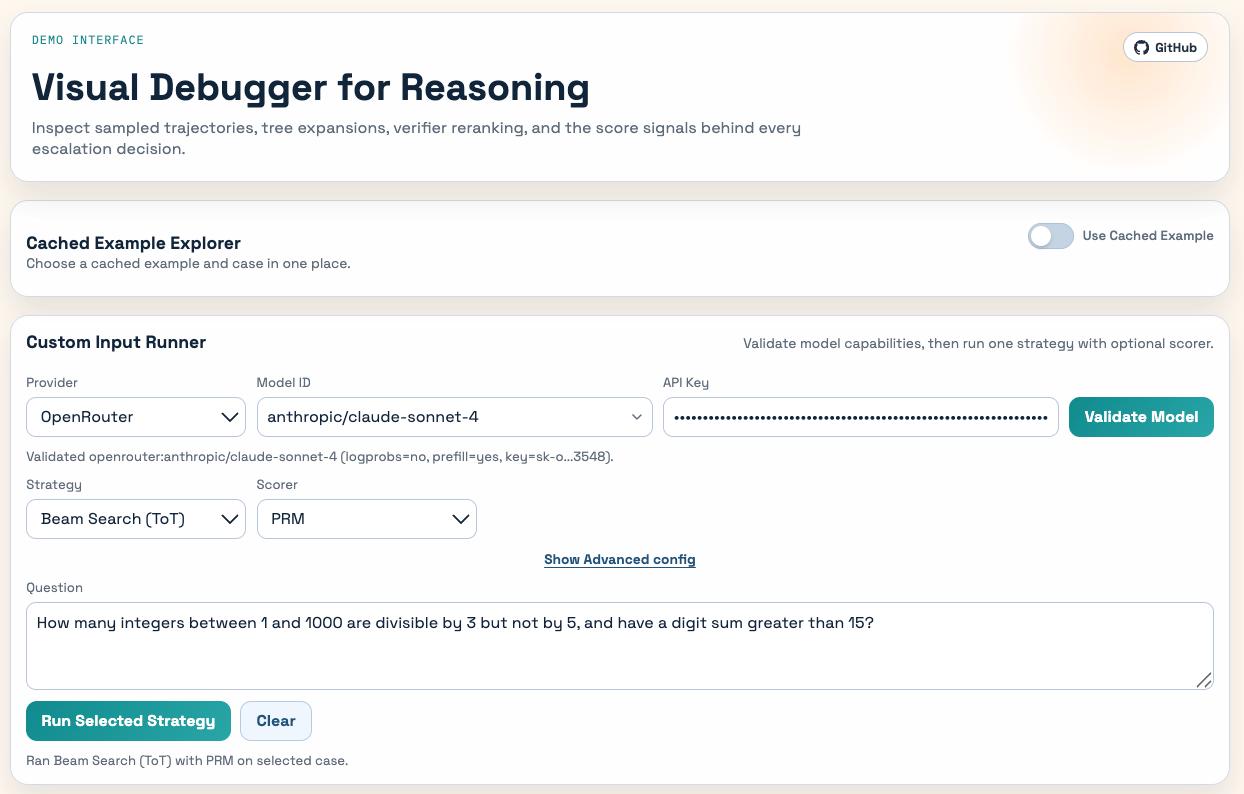 |
Main interface. Select a cached example or enter a custom math/science/coding problem. Choose any strategy (beam search, best-of-N, MUR, …) and scorer (PRM, uncertainty, LLM-as-a-critic) and run it directly from the browser. |
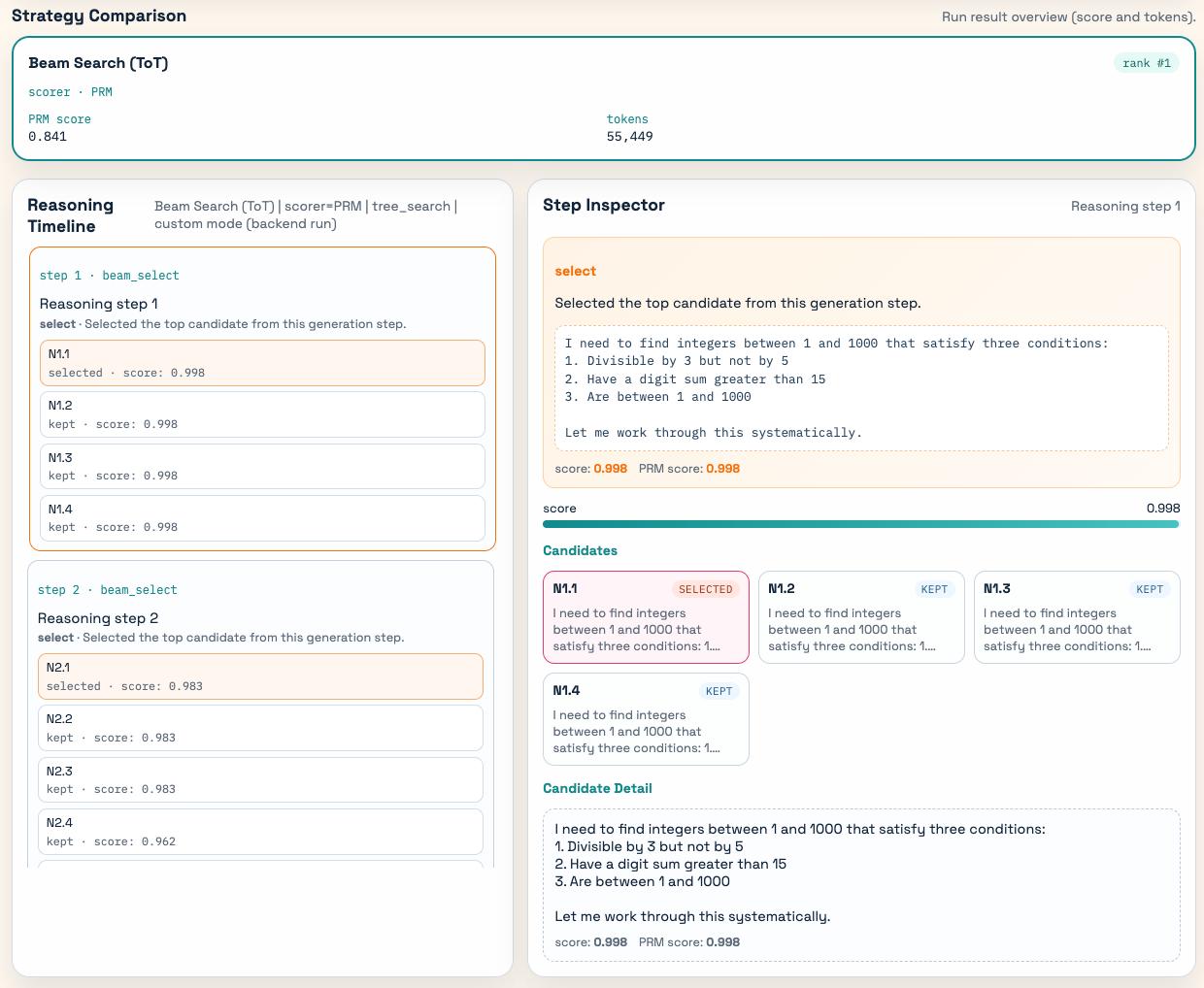 |
Step inspector. Replay the strategy execution step by step. Each entry in the reasoning timeline shows the operation (select, prune, escalate), the candidates considered, their scores, and the full text of the chosen step. |
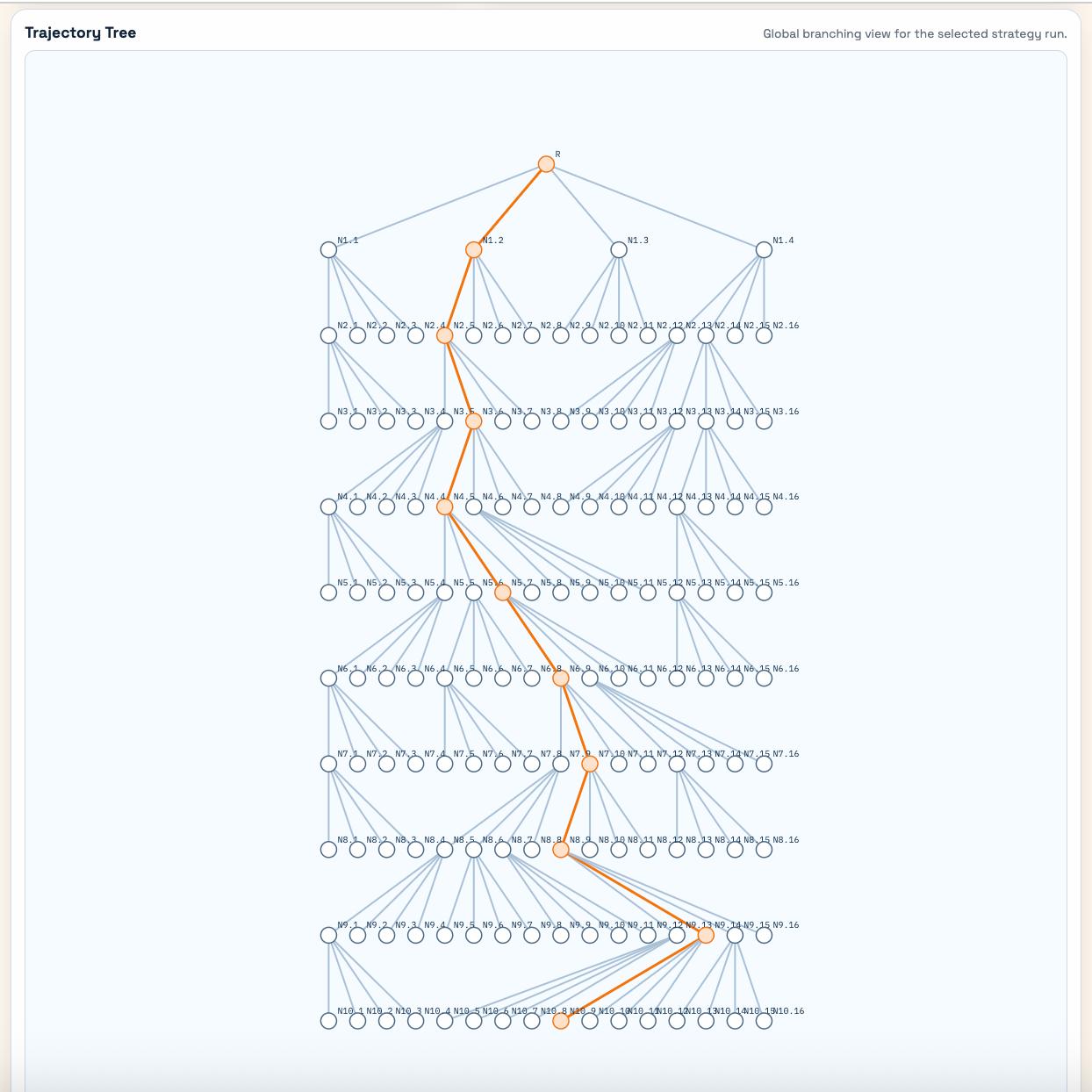 |
Trajectory tree. Global branching view of the entire strategy run. Nodes represent reasoning steps; the orange path highlights the final selected trajectory. Useful for understanding how beam search or tree-of-thought explores and prunes the search space. |
After starting the REST API service, open:
http://localhost:8001/debugger
See service_app/README.md for details on cached examples and custom input modes.
Supported Strategies
| Strategy | Online/Offline | LLM Access | Prefill | Description |
|---|---|---|---|---|
| Best-of-N | Offline | Black-box | No | Sample N solutions, select best by scorer |
| Majority Voting | Offline | Black-box | No | Sample N solutions, select answer by majority vote |
| Beam Search (ToT) | Online | Black-box | Yes | Explore tree of reasoning paths, prune by score |
| Extended Thinking | Online | Black-box | Yes | Control reasoning budget to force longer CoT |
| MUR | Online | White-box | Yes | Allocate more compute only on uncertain steps |
| DeepConf Online | Online | White-box | Yes | Steer generation toward high-confidence tokens |
| DeepConf Offline | Offline | White-box | No | Rerank candidates by model confidence scores |
| Phi-decoding | Online | White-box | Yes | Foresight sampling and adaptive pruning |
| Uncertainty CoT | Online | White-box | Yes | Generate multiple trajectories when uncertain |
Project Structure
thinkbooster/
├── llm_tts/              # Core library
│   ├── strategies/       # TTS strategy implementations
│   ├── models/           # Model wrappers (vLLM, HuggingFace, API)
│   ├── scorers/          # Step scoring (PRM, uncertainty, voting)
│   ├── evaluation/       # Correctness evaluation (exact match, LLM judge)
│   └── datasets/         # Dataset loaders and utilities
├── config/               # Hydra configuration system
├── scripts/              # Evaluation scripts (run_tts_eval.py)
├── service_app/          # REST API service + visual debugger
├── tests/                # Test suite with strategy registry
├── docs/                 # Documentation
└── lm-polygraph/         # Submodule: uncertainty estimation
See Project Structure for a detailed architecture overview.
Documentation
- Project Structure — architecture and component descriptions
- Evaluation Protocol — datasets, metrics (accuracy, tokens, FLOPs), and reporting
- Strategy Registration — how to add new strategies with tests
- Service API Guide — REST API reference and configuration
- DeepConf Guide — confidence-based test-time scaling
Contributing
We welcome contributions! Whether it's a new strategy, scorer, dataset, or bug fix — see the Contributing Guide for setup instructions, development workflow, and coding standards.
Citation
If you use ThinkBooster in your research, please cite:
@misc{thinkbooster2026,
  title     = {ThinkBooster: A Unified Framework for Seamless Test-Time Scaling of LLM Reasoning},
  author    = {Smirnov, Vladislav and Nguyen, Chieu and Senichev, Sergey and Ta, Minh Ngoc and Fadeeva, Ekaterina and Vazhentsev, Artem and Galimzianova, Daria and Rozanov, Nikolai and Mazanov, Viktor and Ni, Jingwei and Wu, Tianyi and Kiselev, Igor and Sachan, Mrinmaya and Gurevych, Iryna and Nakov, Preslav and Baldwin, Timothy and Shelmanov, Artem},
  booktitle = {Preprint},
  year      = {2026},
  url       = {https://thinkbooster.s3.us-east-1.amazonaws.com/thinkbooster.pdf}
}
Troubleshooting
vLLM engine fails to start
Corrupted torch compile cache: If you see RuntimeError: Engine core initialization failed:
rm -rf ~/.cache/vllm/torch_compile_cache/
Missing C compiler: If Triton can't find gcc:
conda install -c conda-forge gcc_linux-64 gxx_linux-64 -y
ln -s $CONDA_PREFIX/bin/x86_64-conda-linux-gnu-gcc $CONDA_PREFIX/bin/gcc
ln -s $CONDA_PREFIX/bin/x86_64-conda-linux-gnu-g++ $CONDA_PREFIX/bin/g++
ANTLR version mismatch warnings
ANTLR runtime and generated code versions disagree: 4.9.3!=4.7.2
This is expected — Hydra uses ANTLR 4.9.3, latex2sympy2 was built with 4.7.2. Both work correctly.
License
This project is licensed under the MIT License — see the LICENSE file for details.
Release history Release notifications | RSS feed


Download files
Download the file for your platform. If you're not sure which to choose, learn more about installing packages.
Source Distribution
Built Distribution
Filter files by name, interpreter, ABI, and platform.
If you're not sure about the file name format, learn more about wheel file names.
Copy a direct link to the current filters
File details
Details for the file thinkbooster-0.1.0.tar.gz.
File metadata
- Download URL: thinkbooster-0.1.0.tar.gz
- Upload date:
- Size: 315.1 kB
- Tags: Source
- Uploaded using Trusted Publishing? No
- Uploaded via: twine/6.1.0 CPython/3.13.12
File hashes
| Algorithm | Hash digest | |
|---|---|---|
| SHA256 |
58eeca41b7d2bb8c363eadb6584256567d9a842484d998e9611fdff4dbabd096
|
|
| MD5 |
641509f2de3d98bdde406a4ec7660569
|
|
| BLAKE2b-256 |
78b26b496f3197ce932f7ec0dc58380ad06c496b5ea4191d26369b4b5fefb7aa
|
File details
Details for the file thinkbooster-0.1.0-py3-none-any.whl.
File metadata
- Download URL: thinkbooster-0.1.0-py3-none-any.whl
- Upload date:
- Size: 363.1 kB
- Tags: Python 3
- Uploaded using Trusted Publishing? No
- Uploaded via: twine/6.1.0 CPython/3.13.12
File hashes
| Algorithm | Hash digest | |
|---|---|---|
| SHA256 |
fff1e6063b4f523807b8fb0329525361468d36a7d3a7a97b63a46181c0948dbe
|
|
| MD5 |
a9ab77003fd49a57eb23b6222fcbcac1
|
|
| BLAKE2b-256 |
0ba9a9c0ff5fbf1e8c30de8bcb5b3cdc8dcb61954a563b25b11d178d2e869613
|






