
Thonny Local LLM Plugin
A Thonny IDE plugin that integrates local LLM capabilities using llama-cpp-python to provide GitHub Copilot-like features without requiring external API services.
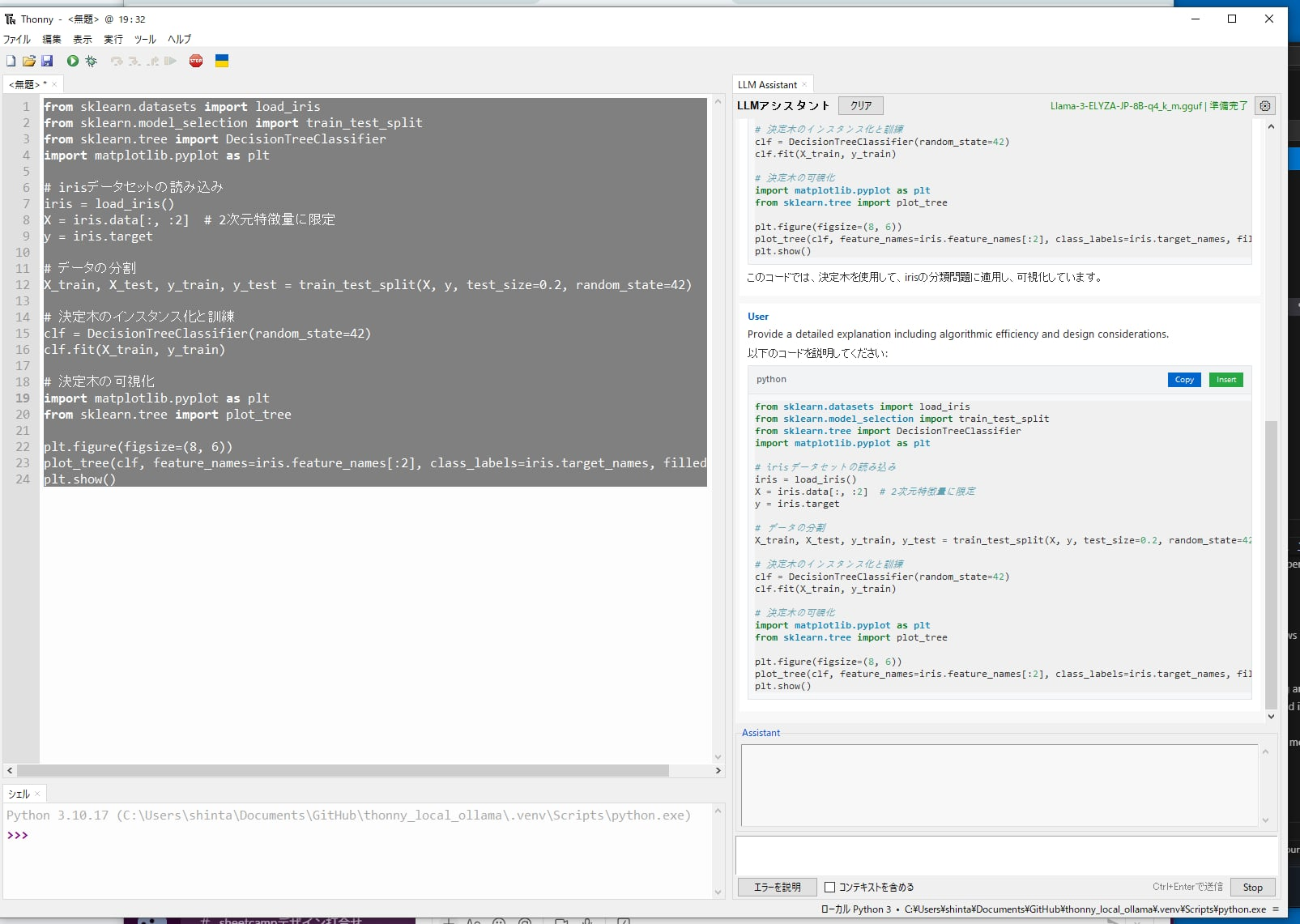
Features
- 🤖 Local LLM Integration: Uses llama-cpp-python to load GGUF models directly (no Ollama server required)
- 🚀 On-Demand Model Loading: Models are loaded on first use (not at startup) to avoid slow startup times
- 📝 Code Generation: Generate code based on natural language instructions
- 💡 Code Explanation: Select code and get AI-powered explanations via context menu
- 🎯 Context-Aware: Understands multiple files and project context
- 💬 Conversation Memory: Maintains conversation history for contextual responses
- 🎚️ Skill Level Adaptation: Adjusts responses based on user's programming skill level
- 🔌 External API Support: Optional support for ChatGPT, Ollama server, and OpenRouter as alternatives
- 📥 Model Download Manager: Built-in download manager for recommended models
- 🎨 Customizable System Prompts: Tailor AI behavior with custom system prompts
- 📋 Interactive Code Blocks: Copy and insert code blocks directly from chat
- 🎨 Markdown Rendering: Optional rich text formatting with tkinterweb
- 💾 USB Portable: Can be bundled with Thonny and models for portable use
- 🛡️ Error Resilience: Advanced error handling with automatic retry and user-friendly messages
- ⚡ Performance Optimized: Message virtualization and caching for handling large conversations
- 🔧 Smart Provider Detection: Automatically detects Ollama vs LM Studio based on API responses
- 🌐 Multi-language Support: Japanese, Chinese (Simplified/Traditional), and English UI
Installation
From PyPI
# Standard installation (includes llama-cpp-python for CPU)
pip install thonny-codemate
For GPU support, see INSTALL_GPU.md for detailed instructions:
- NVIDIA GPUs (CUDA)
- Apple Silicon (Metal)
- Automatic GPU detection
Development Installation
Quick Setup with uv (Recommended)
# Clone the repository
git clone https://github.com/tokoroten/thonny-codemate.git
cd thonny-codemate

# Install uv if not already installed
# Windows (PowerShell):
powershell -c "irm https://astral.sh/uv/install.ps1 | iex"
# Linux/macOS:
curl -LsSf https://astral.sh/uv/install.sh | sh

# Install all dependencies (including llama-cpp-python)
uv sync --all-extras

# Or install with development dependencies only
uv sync --extra dev

# (Optional) Install Markdown rendering support
# Basic Markdown rendering:
uv sync --extra markdown
# Full JavaScript support for interactive features:
uv sync --extra markdown-full

# Activate virtual environment
.venv\Scripts\activate  # Windows
source .venv/bin/activate  # macOS/Linux
Alternative Setup Script
# Use the setup script for guided installation
python setup_dev.py
Installing with GPU Support
By default, llama-cpp-python is installed with CPU support. For GPU acceleration:
CUDA support:
# Reinstall llama-cpp-python with CUDA support
uv pip uninstall llama-cpp-python
uv pip install llama-cpp-python --extra-index-url https://abetlen.github.io/llama-cpp-python/whl/cu124
Metal support (macOS):
# Rebuild with Metal support
uv pip uninstall llama-cpp-python
CMAKE_ARGS="-DLLAMA_METAL=on" uv pip install llama-cpp-python --no-cache-dir
Model Setup
Download GGUF Models
Recommended models:
- Qwen2.5-Coder-14B - Latest high-performance model specialized for programming (8.8GB)
- Llama-3.2-1B/3B - Lightweight and fast models (0.8GB/2.0GB)
- Llama-3-ELYZA-JP-8B - Japanese-specialized model (4.9GB)
# Install Hugging Face CLI
pip install -U "huggingface_hub[cli]"

# Qwen2.5 Coder (programming-focused, recommended)
huggingface-cli download bartowski/Qwen2.5-Coder-14B-Instruct-GGUF Qwen2.5-Coder-14B-Instruct-Q4_K_M.gguf --local-dir ./models

# Llama 3.2 1B (lightweight)
huggingface-cli download bartowski/Llama-3.2-1B-Instruct-GGUF Llama-3.2-1B-Instruct-Q4_K_M.gguf --local-dir ./models
Usage
- Start Thonny - The plugin will load automatically
- Model Setup:
- Open Settings → LLM Assistant Settings
- Choose between local models or external APIs
- For local models: Select a GGUF file or download recommended models
- For external APIs: Enter your API key and model name
- Code Explanation:
- Select code in the editor
- Right-click and choose "Explain Selection"
- The AI will explain the code based on your skill level
- Code Generation:
- Write a comment describing what you want
- Right-click and choose "Generate from Comment"
- Edit Mode (New in v0.1.5):
- Switch to "Edit" mode in the LLM Assistant panel
- Type your modification request (e.g., "Add error handling to this function")
- The AI will modify your code directly in the editor
- Works with selected text or entire file
- Interactive Chat:
- Use the AI Assistant panel for general questions
- Include context from your current file with the checkbox
- Error Fixing:
- When you encounter an error, click "Explain Error" in the assistant panel
- The AI will analyze the error and suggest fixes
External API Configuration
ChatGPT
- Get an API key from OpenAI
- In settings, select "chatgpt" as provider
- Enter your API key
- Choose model (e.g., gpt-3.5-turbo, gpt-4)
Ollama
- Install and run Ollama
- In settings, select "ollama" as provider
- Set base URL (default: http://localhost:11434)
- Choose installed model (e.g., llama3, mistral)
OpenRouter
- Get an API key from OpenRouter
- In settings, select "openrouter" as provider
- Enter your API key
- Choose model (free models available)
Development
Project Structure
thonny-codemate/
├── thonnycontrib/
│   └── thonny_codemate/
│       ├── __init__.py       # Plugin entry point
│       ├── llm_client.py     # LLM integration
│       ├── ui_widgets.py     # UI components
│       └── config.py         # Configuration
├── models/                   # GGUF model storage
├── tests/                    # Unit tests
├── docs_for_ai/             # AI documentation
└── README.md
Running in Development Mode
# Normal mode
python run_dev.py

# Debug mode (for VS Code/PyCharm attachment)
python run_dev.py --debug

# Quick run with uv
uv run thonny
Running Tests
uv run pytest -v
Configuration
The plugin stores its configuration in Thonny's settings system. You can configure:
- Provider Selection: Local models or external APIs (ChatGPT, Ollama, OpenRouter)
- Model Settings: Model path, context size, generation parameters
- User Preferences: Skill level (beginner/intermediate/advanced)
- System Prompts: Choose between coding-focused, explanation-focused, or custom prompts
- Generation Parameters: Temperature, max tokens, etc.
Requirements
- Python 3.8+
- Thonny 4.0+
- llama-cpp-python (automatically installed)
- 4GB+ RAM (depending on model size)
- 5-10GB disk space for models
- uv (for development)
- tkinterweb with JavaScript support (for Markdown rendering and interactive features)
- Automatically installed with the plugin
- Includes PythonMonkey for JavaScript-Python communication
- Enables Copy/Insert buttons with direct Python integration
Contributing
Contributions are welcome! Please feel free to submit a Pull Request.
- Fork the repository
- Create your feature branch (
git checkout -b feature/AmazingFeature) - Commit your changes (
git commit -m 'Add some AmazingFeature') - Push to the branch (
git push origin feature/AmazingFeature) - Open a Pull Request
License
This project is licensed under the MIT License - see the LICENSE file for details.
Acknowledgments
- Inspired by GitHub Copilot's functionality
- Built on top of llama-cpp-python
- Designed for Thonny IDE
- 99% of the code in this project was generated by Claude Code - This project demonstrates the capabilities of AI-assisted development
Status
🚧 Under Development - This plugin is currently in early development stage.
Roadmap
- Initial project setup
- Development environment with uv
- Basic plugin structure
- LLM integration with llama-cpp-python
- Chat panel UI (right side)
- Context menu for code explanation
- Code generation from comments
- Error fixing assistance
- Configuration UI
- Multi-file context support
- Model download manager
- External API support (ChatGPT, Ollama, OpenRouter)
- Customizable system prompts
- Inline code completion
- USB portable packaging
- PyPI release
Links
1 maintainer

Metadata
1 maintainer
Release files for thonny-codemate 0.1.7
For a detailed explanation of source distributions (sdists) and built distributions (wheels), please see the package formats documentation.
Source distribution (sdist)
| File | Size | Uploaded | |
|---|---|---|---|
| thonny_codemate-0.1.7.tar.gz | 114.3 kB | Details |
Built distribution (wheel)
| File | Interpreter | ABI | Platform | Reset |
|---|---|---|---|---|
| thonny_codemate-0.1.7-py3-none-any.whl | Python 3 | none | any | Details |
Total release size: 216.4 kB
Release files / thonny_codemate-0.1.7.tar.gz
| Download URL | thonny_codemate-0.1.7.tar.gz |
|---|---|
| Size | 114.3 kB |
| Tags | Source |
|
SHA-256 checksum How to use checksums |
3e9ef712a11f87b5923b75fdf7ab3d0d1291fc3d177f166483eba69271bcd4af
|
|
BLAKE2b-256 checksum How to use checksums |
3257fc8c87b062c2f9e09cc3542d365f57154f6764e32b2c38de8a80fc6bda15
|
| Upload date | |
|
Uploaded using Trusted Publishing? What is trusted publishing? |
No |
| Uploaded via |
twine/6.1.0 CPython/3.10.18
|
Release files / thonny_codemate-0.1.7-py3-none-any.whl
| Download URL | thonny_codemate-0.1.7-py3-none-any.whl |
|---|---|
| Size | 102.1 kB |
| Tags | Python 3 |
|
SHA-256 checksum How to use checksums |
35bd5fb31df73698e54e15860b1d8e69bc02075caf8a72b97c0cbe2427b6fb94
|
|
BLAKE2b-256 checksum How to use checksums |
b1fc163935485cdb69e150c39e1fca113872b51b491d06c6fa689fee566009ea
|
| Upload date | |
|
Uploaded using Trusted Publishing? What is trusted publishing? |
No |
| Uploaded via |
twine/6.1.0 CPython/3.10.18
|














