
A Thonny IDE plugin that provides AI-powered coding assistance using local and cloud LLMs

Project description
Thonny Local LLM Plugin
A Thonny IDE plugin that integrates local LLM capabilities using llama-cpp-python to provide GitHub Copilot-like features without requiring external API services.
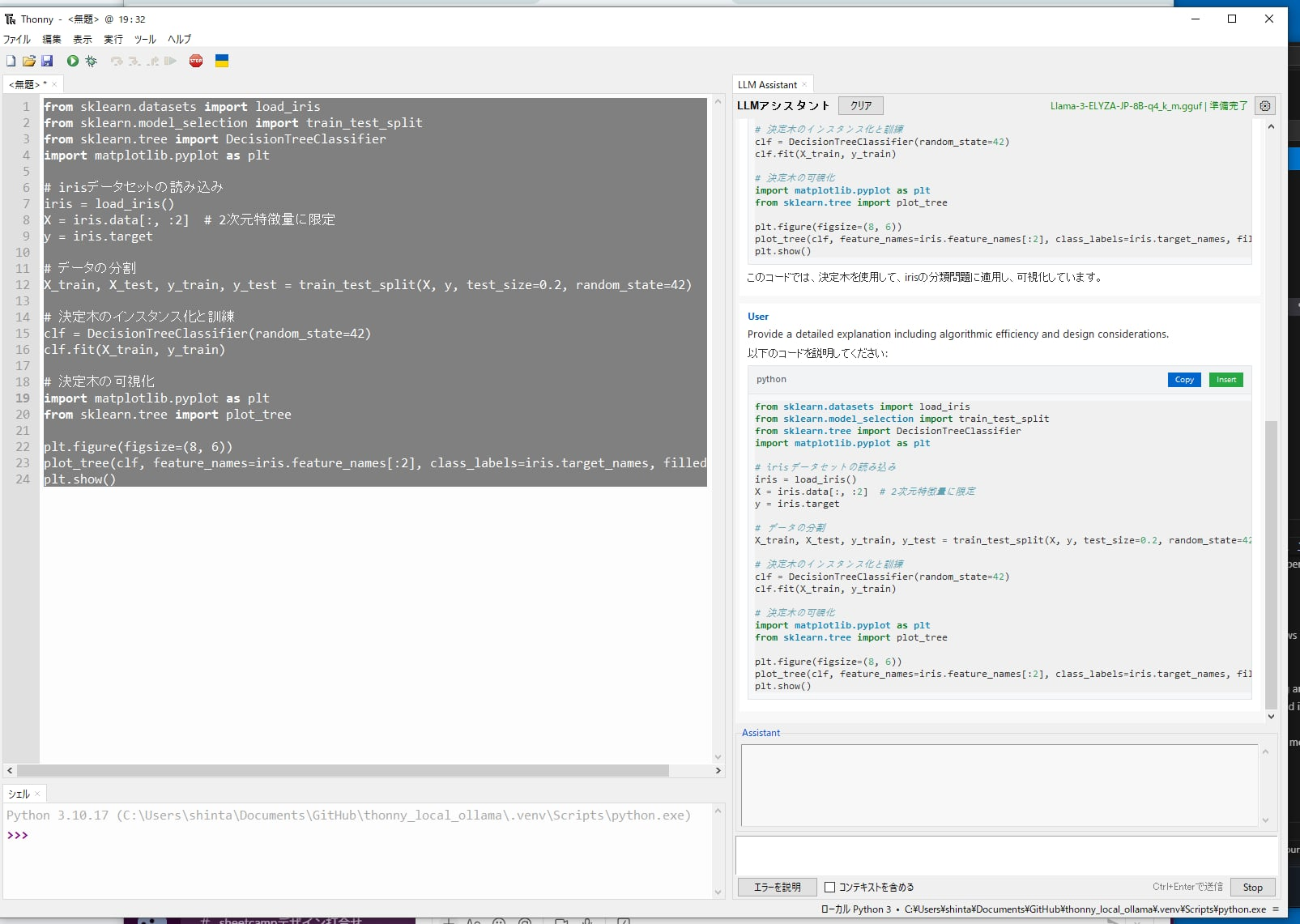
Features
- 🤖 Local LLM Integration: Uses llama-cpp-python to load GGUF models directly (no Ollama server required)
- 🚀 On-Demand Model Loading: Models are loaded on first use (not at startup) to avoid slow startup times
- 📝 Code Generation: Generate code based on natural language instructions
- 💡 Code Explanation: Select code and get AI-powered explanations via context menu
- 🎯 Context-Aware: Understands multiple files and project context
- 💬 Conversation Memory: Maintains conversation history for contextual responses
- 🎚️ Skill Level Adaptation: Adjusts responses based on user's programming skill level
- 🔌 External API Support: Optional support for ChatGPT, Ollama server, and OpenRouter as alternatives
- 📥 Model Download Manager: Built-in download manager for recommended models
- 🎨 Customizable System Prompts: Tailor AI behavior with custom system prompts
- 📋 Interactive Code Blocks: Copy and insert code blocks directly from chat
- 🎨 Markdown Rendering: Optional rich text formatting with tkinterweb
- 💾 USB Portable: Can be bundled with Thonny and models for portable use
- 🛡️ Error Resilience: Advanced error handling with automatic retry and user-friendly messages
- ⚡ Performance Optimized: Message virtualization and caching for handling large conversations
- 🔧 Smart Provider Detection: Automatically detects Ollama vs LM Studio based on API responses
- 🌐 Multi-language Support: Japanese, Chinese (Simplified/Traditional), and English UI
Installation
From PyPI
# Standard installation (includes llama-cpp-python for CPU)
pip install thonny-codemate
For GPU support, see INSTALL_GPU.md for detailed instructions:
- NVIDIA GPUs (CUDA)
- Apple Silicon (Metal)
- Automatic GPU detection
Development Installation
Quick Setup with uv (Recommended)
# Clone the repository
git clone https://github.com/tokoroten/thonny-codemate.git
cd thonny-codemate

# Install uv if not already installed
# Windows (PowerShell):
powershell -c "irm https://astral.sh/uv/install.ps1 | iex"
# Linux/macOS:
curl -LsSf https://astral.sh/uv/install.sh | sh

# Install all dependencies (including llama-cpp-python)
uv sync --all-extras

# Or install with development dependencies only
uv sync --extra dev

# (Optional) Install Markdown rendering support
# Basic Markdown rendering:
uv sync --extra markdown
# Full JavaScript support for interactive features:
uv sync --extra markdown-full

# Activate virtual environment
.venv\Scripts\activate  # Windows
source .venv/bin/activate  # macOS/Linux
Alternative Setup Script
# Use the setup script for guided installation
python setup_dev.py
Installing with GPU Support
By default, llama-cpp-python is installed with CPU support. For GPU acceleration:
CUDA support:
# Reinstall llama-cpp-python with CUDA support
uv pip uninstall llama-cpp-python
uv pip install llama-cpp-python --extra-index-url https://abetlen.github.io/llama-cpp-python/whl/cu124
Metal support (macOS):
# Rebuild with Metal support
uv pip uninstall llama-cpp-python
CMAKE_ARGS="-DLLAMA_METAL=on" uv pip install llama-cpp-python --no-cache-dir
Model Setup
Download GGUF Models
Recommended models:
- Qwen2.5-Coder-14B - Latest high-performance model specialized for programming (8.8GB)
- Llama-3.2-1B/3B - Lightweight and fast models (0.8GB/2.0GB)
- Llama-3-ELYZA-JP-8B - Japanese-specialized model (4.9GB)
# Install Hugging Face CLI
pip install -U "huggingface_hub[cli]"

# Qwen2.5 Coder (programming-focused, recommended)
huggingface-cli download bartowski/Qwen2.5-Coder-14B-Instruct-GGUF Qwen2.5-Coder-14B-Instruct-Q4_K_M.gguf --local-dir ./models

# Llama 3.2 1B (lightweight)
huggingface-cli download bartowski/Llama-3.2-1B-Instruct-GGUF Llama-3.2-1B-Instruct-Q4_K_M.gguf --local-dir ./models
Usage
- Start Thonny - The plugin will load automatically
- Model Setup:
- Open Settings → LLM Assistant Settings
- Choose between local models or external APIs
- For local models: Select a GGUF file or download recommended models
- For external APIs: Enter your API key and model name
- Code Explanation:
- Select code in the editor
- Right-click and choose "Explain Selection"
- The AI will explain the code based on your skill level
- Code Generation:
- Write a comment describing what you want
- Right-click and choose "Generate from Comment"
- Edit Mode (New in v0.1.5):
- Switch to "Edit" mode in the LLM Assistant panel
- Type your modification request (e.g., "Add error handling to this function")
- The AI will modify your code directly in the editor
- Works with selected text or entire file
- Interactive Chat:
- Use the AI Assistant panel for general questions
- Include context from your current file with the checkbox
- Error Fixing:
- When you encounter an error, click "Explain Error" in the assistant panel
- The AI will analyze the error and suggest fixes
External API Configuration
ChatGPT
- Get an API key from OpenAI
- In settings, select "chatgpt" as provider
- Enter your API key
- Choose model (e.g., gpt-3.5-turbo, gpt-4)
Ollama
- Install and run Ollama
- In settings, select "ollama" as provider
- Set base URL (default: http://localhost:11434)
- Choose installed model (e.g., llama3, mistral)
OpenRouter
- Get an API key from OpenRouter
- In settings, select "openrouter" as provider
- Enter your API key
- Choose model (free models available)
Development
Project Structure
thonny-codemate/
├── thonnycontrib/
│   └── thonny_codemate/
│       ├── __init__.py       # Plugin entry point
│       ├── llm_client.py     # LLM integration
│       ├── ui_widgets.py     # UI components
│       └── config.py         # Configuration
├── models/                   # GGUF model storage
├── tests/                    # Unit tests
├── docs_for_ai/             # AI documentation
└── README.md
Running in Development Mode
# Normal mode
python run_dev.py

# Debug mode (for VS Code/PyCharm attachment)
python run_dev.py --debug

# Quick run with uv
uv run thonny
Running Tests
uv run pytest -v
Configuration
The plugin stores its configuration in Thonny's settings system. You can configure:
- Provider Selection: Local models or external APIs (ChatGPT, Ollama, OpenRouter)
- Model Settings: Model path, context size, generation parameters
- User Preferences: Skill level (beginner/intermediate/advanced)
- System Prompts: Choose between coding-focused, explanation-focused, or custom prompts
- Generation Parameters: Temperature, max tokens, etc.
Requirements
- Python 3.8+
- Thonny 4.0+
- llama-cpp-python (automatically installed)
- 4GB+ RAM (depending on model size)
- 5-10GB disk space for models
- uv (for development)
- tkinterweb with JavaScript support (for Markdown rendering and interactive features)
- Automatically installed with the plugin
- Includes PythonMonkey for JavaScript-Python communication
- Enables Copy/Insert buttons with direct Python integration
Contributing
Contributions are welcome! Please feel free to submit a Pull Request.
- Fork the repository
- Create your feature branch (
git checkout -b feature/AmazingFeature) - Commit your changes (
git commit -m 'Add some AmazingFeature') - Push to the branch (
git push origin feature/AmazingFeature) - Open a Pull Request
License
This project is licensed under the MIT License - see the LICENSE file for details.
Acknowledgments
- Inspired by GitHub Copilot's functionality
- Built on top of llama-cpp-python
- Designed for Thonny IDE
- 99% of the code in this project was generated by Claude Code - This project demonstrates the capabilities of AI-assisted development
Status
🚧 Under Development - This plugin is currently in early development stage.
Roadmap
- Initial project setup
- Development environment with uv
- Basic plugin structure
- LLM integration with llama-cpp-python
- Chat panel UI (right side)
- Context menu for code explanation
- Code generation from comments
- Error fixing assistance
- Configuration UI
- Multi-file context support
- Model download manager
- External API support (ChatGPT, Ollama, OpenRouter)
- Customizable system prompts
- Inline code completion
- USB portable packaging
- PyPI release
Links


Download files
Download the file for your platform. If you're not sure which to choose, learn more about installing packages.
Source Distribution
Built Distribution
Filter files by name, interpreter, ABI, and platform.
If you're not sure about the file name format, learn more about wheel file names.
Copy a direct link to the current filters
File details
Details for the file thonny_codemate-0.1.5.tar.gz.
File metadata
- Download URL: thonny_codemate-0.1.5.tar.gz
- Upload date:
- Size: 112.3 kB
- Tags: Source
- Uploaded using Trusted Publishing? No
- Uploaded via: twine/6.1.0 CPython/3.10.18
File hashes
| Algorithm | Hash digest | |
|---|---|---|
| SHA256 |
83b17428752b4282cd2d434ebfe72739d86a8037621570912a870777621e6f1f
|
|
| MD5 |
a7e9b1dd8d687caaac26f229cdc34710
|
|
| BLAKE2b-256 |
4f20ed42e5aa0961b5e22288e692e01425b664547dee70bb5e08aa9bdcb8f3c1
|
File details
Details for the file thonny_codemate-0.1.5-py3-none-any.whl.
File metadata
- Download URL: thonny_codemate-0.1.5-py3-none-any.whl
- Upload date:
- Size: 100.9 kB
- Tags: Python 3
- Uploaded using Trusted Publishing? No
- Uploaded via: twine/6.1.0 CPython/3.10.18
File hashes
| Algorithm | Hash digest | |
|---|---|---|
| SHA256 |
5d724f499ff496c406fe08409bd791f06db489e378e5bd013a835eb36653bdd4
|
|
| MD5 |
5cde35fcd657ae64e1fd6c70c50ebe64
|
|
| BLAKE2b-256 |
d7c0591e06cbe99778f76265a5edbc5507062b799c24d12352ca43546e1be6cf
|






