
A lightweight framework for running functions concurrently across multiple threads while maintaining a defined execution order.

Project description



thread-order
thread-order is a lightweight Python framework for running functions in parallel while honoring explicit dependency order.
You declare dependencies; the scheduler handles sequencing, concurrency, and correctness.
Great for dependency-aware test runs, build steps, pipelines, and automation flows that need structure without giving up speed.
Why thread-order?
Use it when you want:
- Parallel execution with strict upstream → downstream ordering
- A simple, declarative way to express dependencies (
after=['a', 'b']) - Deterministic behavior even under concurrency
- A DAG-driven execution model without heavyweight tooling
- A clean decorator-based API for organizing tasks
- A CLI (
tdrun) for running functions as parallel tasks
Key Features
- Parallel execution using Python threads backed by a dependency DAG
- Deterministic ordering based on
after=[...]relationships - Decorator-based API (
@mark,@dregister) for clean task definitions - Shared state (opt-in) with a thread-safe, built-in lock
- Thread-safe logging via
ThreadProxyLogger - Graceful interrupt handling and clear run summaries
- CLI:
tdrun— dependency-aware test runner with tag filtering - DAG visualization — inspect your dependency graph with --graph
- Simple, extensible design — no external dependencies
About the DAG
thread-order schedules work using a Directed Acyclic Graph (DAG) — this structure defines which tasks must run before others.
If you’re new to DAGs or want a quick refresher, this short primer is helpful: https://en.wikipedia.org/wiki/Directed_acyclic_graph
Installation
pip install thread-order
CLI Overview (tdrun)
tdrun is a DAG-aware, parallel test runner built on top of the thread-order scheduler.
It discovers @mark functions inside a module, builds a dependency graph, and executes everything in parallel while preserving deterministic order.
You get:
- Parallel execution based on the Scheduler
- Predictable, DAG-driven ordering
- Tag filtering (
--tags=tag1,tag2) - Arbitrary state injection via
--key=value - Mock upstream results for single-function runs
- Graph inspection (
--graph) to validate ordering and parallelism - Clean pass/fail summary
- Functions with failed dependendencies are skipped (default behaivor)
- Progress Bar integration-ready - requires progress1bar package.
- Thread Viewer integration-ready - requires thread-viewer package.
CLI usage
usage: tdrun [-h] [--workers WORKERS] [--tags TAGS] [--log] [--verbose] [--graph] [--skip-deps] [--progress] [--viewer] target

A thread-order CLI for dependency-aware, parallel function execution.

positional arguments:
  target             Python file containing @mark functions

options:
  -h, --help         show this help message and exit
  --workers WORKERS  Number of worker threads (default: Scheduler default)
  --tags TAGS        Comma-separated list of tags to filter functions by
  --log              enable logging output
  --verbose          enable verbose logging output
  --graph            show dependency graph and exit
  --skip-deps        skip functions whose dependencies failed
  --progress         show progress bar (requires progress1bar package)
  --viewer           show thread viewer visualizer (requires thread-viewer package)
Run all marked functions in a module:
tdrun path/to/module.py
tdrun Example
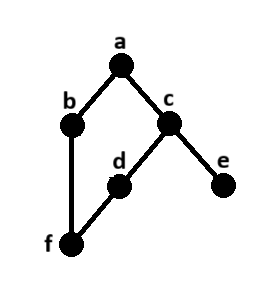
Code
import time
import random
from faker import Faker
from thread_order import mark, ThreadProxyLogger

logger = ThreadProxyLogger()

def setup_state(state):
    state.update({'faker': Faker()})

def run(name, state, deps=None, fail=False):
    with state['_state_lock']:
        last_name = state['faker'].last_name()
    sleep = random.uniform(.5, 3.5)
    logger.debug(f'{name} \"{last_name}\" running - sleeping {sleep:.2f}s')
    time.sleep(sleep)
    if fail:
        assert False, 'Intentional Failure'
    else:
        results = []
        for dep in (deps or []):
            dep_result = state['results'].get(dep, '--no-result--')
            results.append(f'{name}.{dep_result}')
        if not results:
            results.append(name)
        logger.debug(f'{name} PASSED')
        return '|'.join(results)

@mark()
def task_a(state): return run('task_a', state)

@mark(after=['task_a'])
def task_b(state): return run('task_b', state, deps=['task_a'])

@mark(after=['task_a'])
def task_c(state): return run('task_c', state, deps=['task_a'])

@mark(after=['task_c'])
def task_d(state): return run('task_d', state, deps=['task_c'], fail=True)

@mark(after=['task_c'])
def task_e(state): return run('task_e', state, deps=['task_c'])

@mark(after=['task_b', 'task_d'])
def task_f(state): return run('task_f', state, deps=['task_b', 'task_d'])

Run a single function:
tdrun module.py::fn_b
This isolates the function and ignores its upstream dependencies.
You can provide mocked results:
tdrun module.py::fn_b --result-fn_a=mock_value
Inject arbitrary state parameters
tdrun module.py --env=dev --region=us-west
These appear in initial_state and can be processed in your module’s setup_state(state).
This allows your module to compute initial state based on CLI parameters.
DAG Inspection
Use graph-only mode to inspect dependency structure:
tdrun examples/example4c.py --graph
Example output:
Graph: 6 nodes, 6 edges
Roots: [0]
Leaves: [4], [5]
Levels: 4

Nodes:
  [0] test_a
  [1] test_b
  [2] test_c
  [3] test_d
  [4] test_e
  [5] test_f

Edges:
  [0] -> [1], [2]
  [1] -> [5]
  [2] -> [3], [4]
  [3] -> [5]
  [4] -> (none)
  [5] -> (none)

Stats:
  Longest chain length (edges): 3
  Longest chains:
    test_a -> test_c -> test_d -> test_f
  High fan-in nodes (many dependencies):
    test_f (indegree=2)
  High fan-out nodes (many dependents):
    test_a (children=2)
    test_c (children=2)
API Overview
thread-order also exposes a low-level scheduler API for embedding into custom workflows.
Most users should start with tdrun CLI.
class Scheduler(
    workers=None,                 # max number of worker threads
    state=None,                   # shared state dict passed to @mark functions
    store_results=True,           # save return values into state["results"]
    clear_results_on_start=True,  # wipe previous results
    setup_logging=False,          # enable built-in logging config
    add_stream_handler=True,      # attach stream handler to logger
    verbose=False,                # enable extra debug logging
    skip_dependents=False         # skip dependents when prerequisites fail
)
Runs registered callables across multiple threads while respecting declared dependencies.
Core Methods
| Method | Description |
|---|---|
register(obj, name, after=None, with_state=False) |
Register a callable for execution. after defines dependencies by name, specify if function is to receive the shared state. |
dregister(after=None, with_state=False) |
Decorator variant of register() for inline task definitions. |
start() |
Start execution, respecting dependencies. Returns a summary dictionary. |
mark(after=None, with_state=True, tags=None) |
Decorator that marks a function for deferred registration by the scheduler, allowing you to declare dependencies (after) and whether the function should receive the shared state (with_state), and optionally add tags to the function (tags) for execution filtering. |
Callbacks
All are optional and run on the scheduler thread (never worker threads).
| Callback | When Fired | Signature |
|---|---|---|
on_task_start(fn) |
Before a task starts | (name) |
on_task_run(fn) |
When tasks starts running on a thread | (name, thread) |
on_task_done(fn) |
After a task finishes | (name, status, count) |
on_scheduler_start(fn) |
Before scheduler starts running tasks | (meta) |
on_scheduler_done(fn) |
After all tasks complete | (summary) |
Shared state and _state_lock
If with_state=True, tasks receive the shared state dict.
thread-order inserts a re-entrant lock at state['_state_lock'] you can use when modifying shared values.
For more information refer to Shared State Guidelines
Interrupt Handling
Press Ctrl-C during execution to gracefully cancel outstanding work:
- Running tasks finish naturally or are marked as cancelled
- Remaining queued tasks are discarded
- Final summary reflects all results
More Examples
See the examples/ folder for runnable demos.
Development
Clone the repository and ensure the latest version of Docker is installed on your development server.
Build the Docker image:
docker image build \
-t thread-order:latest .
Run the Docker container:
docker container run \
--rm \
-it \
-v $PWD:/code \
thread-order:latest \
bash
Execute the dev pipeline:
make dev
Release history Release notifications | RSS feed


Download files
Download the file for your platform. If you're not sure which to choose, learn more about installing packages.
Source Distribution
Built Distribution
Filter files by name, interpreter, ABI, and platform.
If you're not sure about the file name format, learn more about wheel file names.
Copy a direct link to the current filters
File details
Details for the file thread_order-1.0.0.tar.gz.
File metadata
- Download URL: thread_order-1.0.0.tar.gz
- Upload date:
- Size: 30.9 kB
- Tags: Source
- Uploaded using Trusted Publishing? No
- Uploaded via: twine/6.2.0 CPython/3.12.12
File hashes
| Algorithm | Hash digest | |
|---|---|---|
| SHA256 |
e7676158d0484bec1e56b10c5d74ff0398e3cfa732f2fe9ebb2359a11dd23b5e
|
|
| MD5 |
6a16c7515add5747c3d82917436df191
|
|
| BLAKE2b-256 |
1957fc0fa97a2c3aec22aac490bcb5a1cf7352e7bc5ff9ca082e5b06697a9b5c
|
File details
Details for the file thread_order-1.0.0-py3-none-any.whl.
File metadata
- Download URL: thread_order-1.0.0-py3-none-any.whl
- Upload date:
- Size: 25.7 kB
- Tags: Python 3
- Uploaded using Trusted Publishing? No
- Uploaded via: twine/6.2.0 CPython/3.12.12
File hashes
| Algorithm | Hash digest | |
|---|---|---|
| SHA256 |
db0b087871e357dd6124eaf9da0134159deaa24d5e63c6dba07ae0cd4b934c55
|
|
| MD5 |
4d1870233ba5fd4ca75d3674935aa757
|
|
| BLAKE2b-256 |
2c0cd289af9e23541aa76475ee3172744af71f26b22b9a7416bc366788e338d8
|






