



thread-viewer
A lightweight terminal UI for visualizing thread pool activity in real time.
thread-viewer shows:
- how many tasks are
queued,active, andclosed(i.e. completed) - which threads are currently active (represented as blocks)
- when threads finish and start tasks (via color changes)
- live activity even under high throughput
It’s built on top of list2term and designed to work naturally with ThreadPoolExecutor.
Features
- Real-time terminal visualization
- Colorized activity to make thread reuse visible
- Minimal API:
run()/done() - Safe to use in long-running jobs
Installation
pip install thread-viewer
Example
Code
import sys
import time
import random
import threading
from concurrent.futures import ThreadPoolExecutor
from thread_viewer import ThreadViewer

def process_task(item, viewer):
    thread_name = threading.current_thread().name
    viewer.run(thread_name)
    try:
        seconds = random.uniform(.1, 1)
        time.sleep(seconds)
        return seconds
    finally:
        viewer.done(thread_name)

def main():
    args = dict(a.split('=', 1) for a in sys.argv[1:])
    workers = int(args['workers'])
    tasks = int(args['tasks'])

    with ThreadPoolExecutor(max_workers=workers, thread_name_prefix='thread') as executor:
        with ThreadViewer(
            thread_count=workers,
            task_count=tasks,
            thread_prefix='thread_',
            inactive_char='░',
        ) as viewer:
            futures = [executor.submit(process_task, task, viewer) for task in range(tasks)]
            return [future.result() for future in futures]

if __name__ == '__main__':
    main()
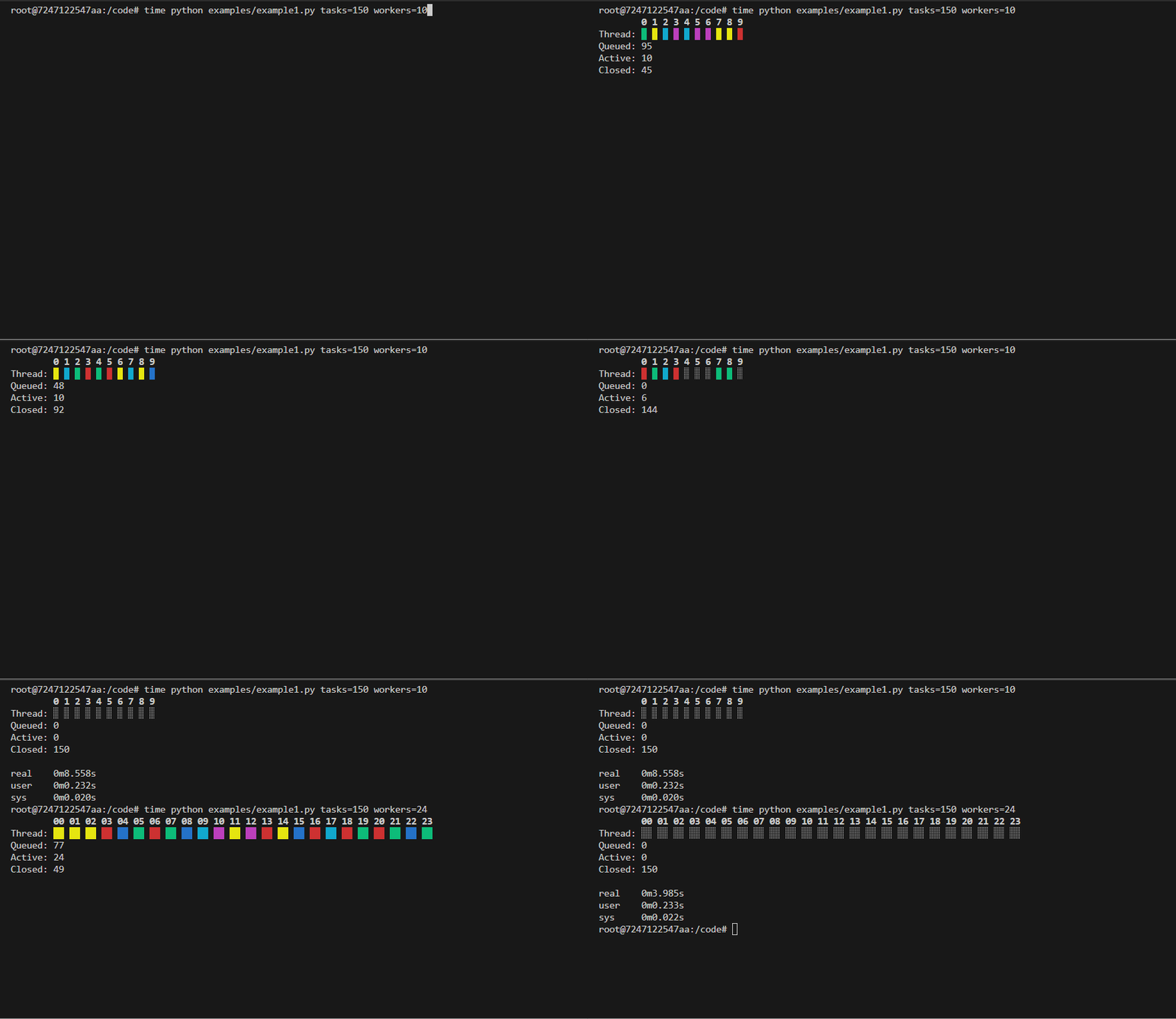
- Each cell represents a thread
- Active threads are shown as blocks
- Every activation changes color so you can see reuse
- Counts are updated live
API Overview
class ThreadViewer(
    thread_count,               # number of worker threads
    task_count,                 # total number of tasks expected
    thread_prefix='thread_'     # prefix used to extract thread index
    active_char='█',            # char for active thread
    inactive_char='⬚'          # char for inactive thread
)
Creates a terminal viewer. Default works with ThreadPoolExecutor(thread_name_prefix='thread')
Core Methods
| Method | Description |
|---|---|
run(thread_name) |
Marks a task as started on a thread. |
done(thread_name) |
Marks a task as completed on a thread. |
Context manager
Always use ThreadViewer as a context manager:
with ThreadViewer(...) as viewer:
This ensures proper terminal setup and cleanup.
How It Works
- Uses
list2term.Linesfor efficient terminal updates - Each thread maps to a fixed cell index
- On every activation - when thread finishes task or starts a new task:
- the cell is updated
- a new foreground color is chosen (different from the previous one)
- This makes activity visible even when threads never truly go idle
No polling. No timers. Just state changes.
When to Use
Good fit if you want:
- visibility into thread pool behavior
- confirmation that work is parallelized
- insight into hot threads or uneven scheduling
- a lightweight alternative to logging spam
Not intended to replace profilers or tracing tools.
Limitations
- Terminal-only
- ANSI colors required
- Not meant for very narrow terminals
- Visualization is informational, not a scheduler
Development
Clone the repository and ensure the latest version of Docker is installed on your development server.
Build the Docker image:
docker image build \
-t thread-viewer:latest .
Run the Docker container:
docker container run \
--rm \
-it \
-v $PWD:/code \
thread-viewer:latest \
bash
Execute the dev pipeline:
make dev
1 maintainer

Metadata
1 maintainer
Release files for thread-viewer 1.3.3
For a detailed explanation of source distributions (sdists) and built distributions (wheels), please see the package formats documentation.
Source distribution (sdist)
| File | Size | Uploaded | Provenance | |
|---|---|---|---|---|
| thread_viewer-1.3.3.tar.gz | 13.1 kB | Without provenance | Details |
Built distribution (wheel)
| File | Interpreter | ABI | Platform | Reset |
|---|---|---|---|---|
| thread_viewer-1.3.3-py3-none-any.whl | Python 3 | none | any | Details |
Total release size: 23.5 kB
Release files / thread_viewer-1.3.3.tar.gz
| Download URL | thread_viewer-1.3.3.tar.gz |
|---|---|
| Size | 13.1 kB |
| Tags | Source |
|
SHA-256 checksum How to use checksums |
0cf944ca801c46cdb9f4cfa6befe62f05910c4cd92039578de7691c88a6b4a5c
|
|
BLAKE2b-256 checksum How to use checksums |
b8fcba7e5156fd5354e7d354929bc140fcc8478ca567582e409b5af764f49547
|
| Upload date | |
|
Uploaded using Trusted Publishing? What is trusted publishing? |
No |
| Uploaded via |
twine/6.2.0 CPython/3.12.12
|
Release files / thread_viewer-1.3.3-py3-none-any.whl
| Download URL | thread_viewer-1.3.3-py3-none-any.whl |
|---|---|
| Size | 10.4 kB |
| Tags | Python 3 |
|
SHA-256 checksum How to use checksums |
14d2ae0664ec4b4e76685c84a0771b3f683666e8a11a211ffca58cef65ed3b7a
|
|
BLAKE2b-256 checksum How to use checksums |
4cdcd7e04266217c4005b41a97a4b6fa235c9b748ed1b188b649973846650eec
|
| Upload date | |
|
Uploaded using Trusted Publishing? What is trusted publishing? |
No |
| Uploaded via |
twine/6.2.0 CPython/3.12.12
|
Security for thread-viewer 1.3.3
Provenance
Provenance describes where a file came from. On PyPI, provenance is shared via attestations, which provide a verifiable record of the build or publishing details. View details, limitations and caveats.
No provenance found
None of the files in this release were uploaded with provenance metadata.
A note on package security
PyPI is a repository for distributing packages, not a service for auditing them. While third-party security researchers and our staff do their best to detect and remove malicious packages, PyPI cannot guarantee the quality, security or suitability of any given package.
To learn more about protecting yourself from malicious actors, visit our package security documentation.














