
A lightweight terminal UI for visualizing thread pool activity in real time.

Project description



thread-viewer
A lightweight terminal UI for visualizing thread pool activity in real time.
thread-viewer shows:
- how many tasks are
queued,active, andclosed(i.e. completed) - which threads are currently active (represented as blocks)
- when threads finish and start tasks (via color changes)
- live activity even under high throughput
It’s built on top of list2term and designed to work naturally with ThreadPoolExecutor.
Features
- Real-time terminal visualization
- Colorized activity to make thread reuse visible
- Minimal API:
run()/done() - Safe to use in long-running jobs
Installation
pip install thread-viewer
Example
Code
import sys
import time
import random
import threading
from concurrent.futures import ThreadPoolExecutor
from thread_viewer import ThreadViewer

def process_task(item, viewer):
    thread_name = threading.current_thread().name
    viewer.run(thread_name)
    try:
        seconds = random.uniform(.1, 1)
        time.sleep(seconds)
        return seconds
    finally:
        viewer.done(thread_name)

def main():
    args = dict(a.split('=', 1) for a in sys.argv[1:])
    workers = int(args['workers'])
    tasks = int(args['tasks'])

    with ThreadPoolExecutor(max_workers=workers, thread_name_prefix='thread') as executor:
        with ThreadViewer(
            thread_count=workers,
            task_count=tasks,
            thread_prefix='thread_'
        ) as viewer:
            futures = [executor.submit(process_task, task, viewer) for task in range(tasks)]
            return [future.result() for future in futures]

if __name__ == '__main__':
    main()
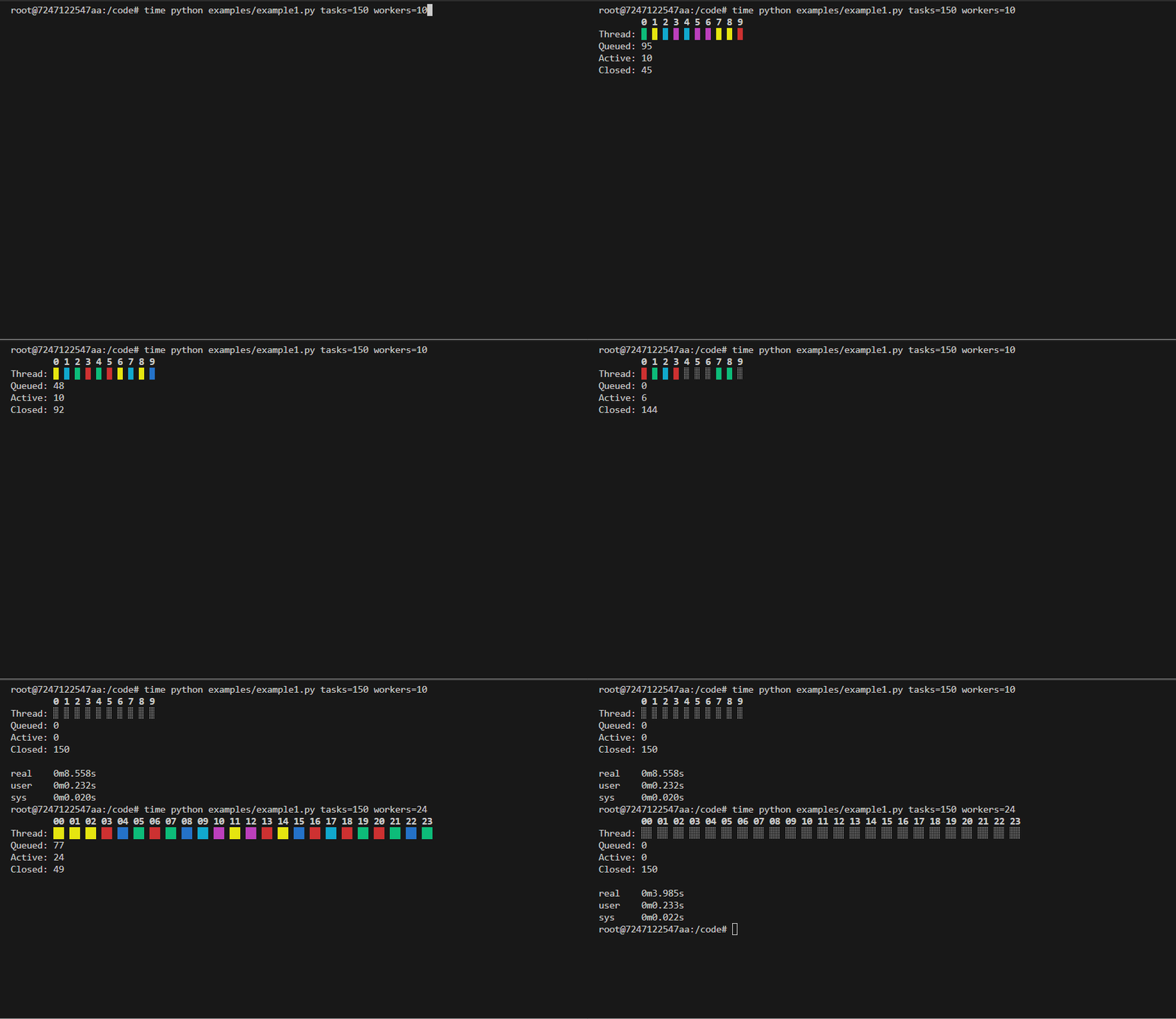
- Each cell represents a thread
- Active threads are shown as blocks
- Every activation changes color so you can see reuse
- Counts are updated live
API Overview
class ThreadViewer(
    thread_count,               # number of worker threads
    task_count,                 # total number of tasks expected
    thread_prefix='thread_'     # prefix used to extract thread index
)
Creates a terminal viewer. Default works with ThreadPoolExecutor(thread_name_prefix='thread')
Core Methods
| Method | Description |
|---|---|
run(thread_name) |
Marks a task as started on a thread. |
done(thread_name) |
Marks a task as completed on a thread. |
Context manager
Always use ThreadViewer as a context manager:
with ThreadViewer(...) as viewer:
This ensures proper terminal setup and cleanup.
How It Works
- Uses
list2term.Linesfor efficient terminal updates - Each thread maps to a fixed cell index
- On every activation - when thread finishes task or starts a new task:
- the cell is updated
- a new foreground color is chosen (different from the previous one)
- This makes activity visible even when threads never truly go idle
No polling. No timers. Just state changes.
When to Use
Good fit if you want:
- visibility into thread pool behavior
- confirmation that work is parallelized
- insight into hot threads or uneven scheduling
- a lightweight alternative to logging spam
Not intended to replace profilers or tracing tools.
Limitations
- Terminal-only
- ANSI colors required
- Not meant for very narrow terminals
- Visualization is informational, not a scheduler
Development
Clone the repository and ensure the latest version of Docker is installed on your development server.
Build the Docker image:
docker image build \
-t thread-viewer:latest .
Run the Docker container:
docker container run \
--rm \
-it \
-v $PWD:/code \
thread-viewer:latest \
bash
Execute the dev pipeline:
make dev
Release history Release notifications | RSS feed


Download files
Download the file for your platform. If you're not sure which to choose, learn more about installing packages.
Source Distribution
Built Distribution
Filter files by name, interpreter, ABI, and platform.
If you're not sure about the file name format, learn more about wheel file names.
Copy a direct link to the current filters
File details
Details for the file thread_viewer-1.3.1.tar.gz.
File metadata
- Download URL: thread_viewer-1.3.1.tar.gz
- Upload date:
- Size: 13.0 kB
- Tags: Source
- Uploaded using Trusted Publishing? No
- Uploaded via: twine/6.2.0 CPython/3.12.12
File hashes
| Algorithm | Hash digest | |
|---|---|---|
| SHA256 |
29d878528ec20acd4e3ccebecfa2300d87d5533d44fa6d2e1c422c7f22f1173b
|
|
| MD5 |
d3a3e5aad239ec323d5444c2739f479e
|
|
| BLAKE2b-256 |
6b93e08f8e3971436b15ee9626dc10c4c6405713fa0d1bd21ce51b4f94a26540
|
File details
Details for the file thread_viewer-1.3.1-py3-none-any.whl.
File metadata
- Download URL: thread_viewer-1.3.1-py3-none-any.whl
- Upload date:
- Size: 10.3 kB
- Tags: Python 3
- Uploaded using Trusted Publishing? No
- Uploaded via: twine/6.2.0 CPython/3.12.12
File hashes
| Algorithm | Hash digest | |
|---|---|---|
| SHA256 |
ebfbc441b192252ed368d1bb1254e55b321c53e210b03dc29cc97df7e7ce585a
|
|
| MD5 |
36d57bee6292f2e65a0e8defdfd2aff6
|
|
| BLAKE2b-256 |
f93de76eabad1b22c1c298120d3dfe081a79155c6a66ae3b9e70e8d3989c2eab
|






