
The Undisputed Heavyweight Champion of SCTE-35.

Project description
threefive is the undisputed heavyweight champion of SCTE-35.
SCTE-35 Decoder and Encoder.
Supports the latest specification SCTE-35 2023r1
If you aren't using threefive, you're a loser and nobody likes you.
⚡ Decodes SCTE-35.
⚡ Encodes SCTE-35.
⚡ Parses SCTE-35 from Base64, Bytes, Hex, Integers, and MPEGTS Streams.
⚡ Parses SCTE-36 from files, http(s), Multicast, UDP and even stdin ( you can pipe to it).
⚡ Parses SCTE-35 from streams converted to bin data ( type 0x06 ) by ffmpeg.
Latest Version is 2.4.21
- v2.4.19 * new
threefive.Streammethods *threefive.Stream.pts()returns dict of{program:pts}for current pts. *threefive.Stream.show_pts()prints realtimeprogram -> pts- threefive
clitool now acceptsshowandptskeywords showdisplays stream info
- threefive
a@fu:~$ threefive show https://futzu.com/xaa.ts

Program: 1
   Service:	Service01
   Provider:	FFmpeg
   Pid:	4096
   Pcr Pid:	256
   Streams:
   	Pid: 134[0x86]	Type: 0x86 SCTE35 Data
   	Pid: 256[0x100]	Type: 0x1b AVC Video
   	Pid: 257[0x101]	Type: 0xf AAC Audio
ptsdisplays realtime program -> pts
a@fu:~$ threefive pts /home/a/msnbc.ts
1-> 3164.442756
1-> 3164.409422
1-> 3164.476089
1-> 3164.476089
1-> 3164.476089
1-> 3164.642756
1-> 3164.576089
threefive has Twenty-Two SCTE-35 code examples
Documentation (click a topic to expand)
Supported Platforms
- threefive is expected to work on any platform that runs python3.6 and up.
- There are no known platform specific issues.
Requirements
-
threefive requires
- pypy3 or python 3.6+ (pypy3 runs threefive 2-3 times faster than python 3.10)
- new_reader
- pyaes
Versions and Releases
Every time I fix a bug or add a feature, I do a new release. I only support the latest version. Stay up with me.
a@fu:~$ pypy3
Python 3.9.17 (7.3.12+dfsg-1, Jun 16 2023, 18:55:49)
[PyPy 7.3.12 with GCC 12.3.0] on linux
Type "help", "copyright", "credits" or "license" for more information.
>>>> import threefive
>>>> threefive.version
'2.4.9'
>>>>
- Release versions are odd.
- Unstable testing versions are even.
Parse SCTE-35 on the command line.
Parse base64
threefive '/DAvAAAAAAAA///wFAVIAACPf+/+c2nALv4AUsz1AAAAAAAKAAhDVUVJAAABNWLbowo='
Parse a hex value
threefive 0xFC302F000000000000FFFFF014054800008F7FEFFE7369C02EFE0052CCF500000000000A0008435545490000013562DBA30A
Parse MPEGTS from stdin
cat video.ts | threefive
Parse MPEGTS video over https
threefive https://so.slo.me/longb.ts
Parse multicast
threefive udp://@235.35.3.5:3535
Parse SCTE-35 programmatically with a few lines of code.
Mpegts Multicast in three lines of code.
import threefive

strm = threefive.Stream('udp://@239.35.0.35:1234')
strm.decode()
(need an easy multicast server? gumd )
Mpegts over Https in three lines of code.
import threefive
strm = threefive.Stream('https://iodisco.com/ch1/ready.ts')
strm.decode()


   </details>

 <details><summary>Base64 in five lines of code.</summary>

```python3
>>> from threefive import Cue
>>> stuff = '/DAvAAAAAAAA///wBQb+dGKQoAAZAhdDVUVJSAAAjn+fCAgAAAAALKChijUCAKnMZ1g='
>>> cue=Cue(stuff)
>>> cue.decode()
True
 >>> cue.show()
Bytes in five lines of code.
>>> import threefive

>>> stuff = b'\xfc0\x11\x00\x00\x00\x00\x00\x00\x00\xff\xff\xff\x00\x00\x00O%3\x96'
>>> cue=Cue(stuff)
>>> cue.decode()
True
>>> cue.show()
Hex in 4 lines of code.
import threefive

cue = threefive.Cue("0XFC301100000000000000FFFFFF0000004F253396")
cue.decode()
cue.show()
Easy SCTE-35 encoding with threefive.
-
Need SCTE-35 Packet Injection? SuperKabuki, powered by threefive.
-
Helper functions for SCTE35 Cue encoding
Python 3.8.13 (7.3.9+dfsg-5, Oct 30 2022, 09:55:31)
[PyPy 7.3.9 with GCC 12.2.0] on linux
Type "help", "copyright", "credits" or "license" for more information.
>>>> import threefive.encode
>>>> help(threefive.encode)


Help on module threefive.encode in threefive:

NAME
    threefive.encode - encode.py

DESCRIPTION
    threefive.encode has helper functions for Cue encoding.

FUNCTIONS
    mk_splice_insert(event_id, pts=None, duration=None, out=False)
        mk_cue returns a Cue with a Splice Insert.

        The args set the SpliceInsert vars.

        splice_event_id = event_id

        if pts is None (default):
            splice_immediate_flag      True
            time_specified_flag        False

        if pts:
            splice_immediate_flag      False
            time_specified_flag        True
            pts_time                   pts

        If duration is None (default)
            duration_flag              False

        if duration IS set:
            out_of_network_indicator   True
            duration_flag              True
            break_auto_return          True
            break_duration             duration
            pts_time                   pts

        if out is True:
            out_of_network_indicator   True

        if out is False (default):
            out_of_network_indicator   False

    mk_splice_null()
        mk_splice_null returns a Cue
        with a Splice Null

    mk_time_signal(pts=None)
         mk_time_signal returns a Cue
         with a Time Signal
        if pts is None:
             time_specified_flag   False

        if pts IS set:
             time_specified_flag   True
             pts_time              pts
Cue Class
- src cue.py
- The threefive.Cue class decodes a SCTE35 binary, base64, or hex encoded string.
class Cue(threefive.base.SCTE35Base)
 |  Cue(data=None, packet_data=None)
 |  __init__(self, data=None, packet_data=None)
 |      data may be packet bites or encoded string
 |      packet_data is a instance passed from a Stream instance
Cue.decode()
 |  decode(self)
 |      Cue.decode() parses for SCTE35 data
- After Calling cue.decode() the instance variables can be accessed via dot notation.
    >>>> cue.command
    {'calculated_length': 5, 'name': 'Time Signal', 'time_specified_flag': True, 'pts_time': 21695.740089}

    >>>> cue.command.pts_time
    21695.740089

    >>>> cue.info_section.table_id

    '0xfc'
Cue.get()
 |  get(self)
 |      Cue.get returns the SCTE-35 Cue
 |      data as a dict of dicts.
Cue.get() Example
>>> from threefive import Cue
>>> cue = Cue('0XFC301100000000000000FFFFFF0000004F253396')
>>> cue.decode()
True
>>> cue
{'bites': b'\xfc0\x11\x00\x00\x00\x00\x00\x00\x00\xff\xff\xff\x00\x00\x00O%3\x96',
'info_section': {'table_id': '0xfc', 'section_syntax_indicator': False, 'private': False, 'sap_type': '0x3',
'sap_details': 'No Sap Type', 'section_length': 17, 'protocol_version': 0, 'encrypted_packet': False,
'encryption_algorithm': 0, 'pts_adjustment_ticks': 0, 'pts_adjustment': 0.0, 'cw_index': '0x0', 'tier': '0xfff',
'splice_command_length': 4095, 'splice_command_type': 0, 'descriptor_loop_length': 0, 'crc': '0x4f253396'},
'command': {'command_length': None, 'command_type': 0, 'name': 'Splice Null'},
'descriptors': [], 'packet_data': None}
- Cue.get() omits cue.bites and empty values
>>> cue.get()
{'info_section': {'table_id': '0xfc', 'section_syntax_indicator': False,'private': False, 'sap_type': '0x3',
'sap_details': 'No Sap Type', 'section_length': 17, 'protocol_version': 0, 'encrypted_packet': False,
'encryption_algorithm': 0, 'pts_adjustment_ticks': 0, 'pts_adjustment': 0.0, 'cw_index': '0x0', 'tier': '0xfff',
'splice_command_length': 4095, 'splice_command_type': 0, 'descriptor_loop_length': 0, 'crc': '0x4f253396'},
'command': {'command_type': 0, 'name': 'Splice Null'},
'descriptors': []}
Cue.get_descriptors()
 |  get_descriptors(self)
 |      Cue.get_descriptors returns a list of
 |      SCTE 35 splice descriptors as dicts.
Cue.get_json()
 |  get_json(self)
 |      Cue.get_json returns the Cue instance
 |      data in json.
Cue.show()
 |  show(self)
 |      Cue.show prints the Cue as JSON
Cue.to_stderr()
 |  to_stderr(self)
 |      Cue.to_stderr prints the Cue
Stream Class
-
src stream.py
-
The threefive.Stream class parses SCTE35 from Mpegts.
-
Supports:
- File and Http(s) and Udp and Multicast protocols.
- Multiple Programs.
- Multi-Packet PAT, PMT, and SCTE35 tables.
-
threefive tries to include pid, program, anf pts of the SCTE-35 packet.
class Stream(builtins.object)
 |  Stream(tsdata, show_null=True)
 |
 |  Stream class for parsing MPEG-TS data.
|  __init__(self, tsdata, show_null=True)
|
|      tsdata is a file or http, https,
|       udp or multicast url.
|
|      set show_null=False to exclude Splice Nulls
Stream.decode(func=show_cue)
|  decode(self, func=show_cue)
|      Stream.decode reads self.tsdata to find SCTE35 packets.
|      func can be set to a custom function that accepts
|      a threefive.Cue instance as it's only argument.
Stream.decode Example
import sys
from threefive import Stream
>>>> Stream('plp0.ts').decode()
-
Pass in custom function
-
func should match the interface
func(cue)
Stream.decode with custom function Example
import sys
import threefive

def display(cue):
   print(f'\033[92m{cue.packet_data}\033[00m')
   print(f'{cue.command.name}')

def do():
   sp = threefive.Stream(tsdata)
   sp.decode(func = display)

if __name__ == '__main__':
    do()
Stream.decode_next()
|  decode_next(self)
|      Stream.decode_next returns the next
|      SCTE35 cue as a threefive.Cue instance.
Stream.decode_next Example
import sys
import threefive

def do():
    arg = sys.argv[1]
    with open(arg,'rb',encoding="utf-8") as tsdata:
        st = threefive.Stream(tsdata)
        while True:
            cue = st.decode_next()
            if not cue:
                return False
            if cue:
                cue.show()

if __name__ == "__main__":
    do()
-
Stream.proxy(func = show_cue)-
Writes all packets to sys.stdout.
-
Writes scte35 data to sys.stderr.
-
|  decode(self, func=show_cue_stderr)
|      Stream.decode_proxy writes all ts packets are written to stdout
|      for piping into another program like mplayer.
|      SCTE-35 cues are printed to stderr.
Stream.proxy Example
import threefive
sp = threefive.Stream('https://futzu.com/xaa.ts')
sp.decode_proxy()
- Pipe to mplayer
$ python3 proxy.py | mplayer -
Stream.show()
|  show(self)
|   List programs and streams and info for MPEGTS
Stream.show() Example
>>>> from threefive import Stream
>>>> Stream('https://slo.me/plp0.ts').show()
    Service:    fancy ˹
    Provider:   fu-corp
    Pcr Pid:    1051[0x41b]
    Streams:
                Pid: 1051[0x41b]        Type: 0x1b AVC Video
                Pid: 1052[0x41c]        Type: 0x3 MP2 Audio
                Pid: 1054[0x41e]        Type: 0x6 PES Packets/Private Data
                Pid: 1055[0x41f]        Type: 0x86 SCTE35 Data
Need to verify your splice points?
-
Try cue2vtt.py in the examples.
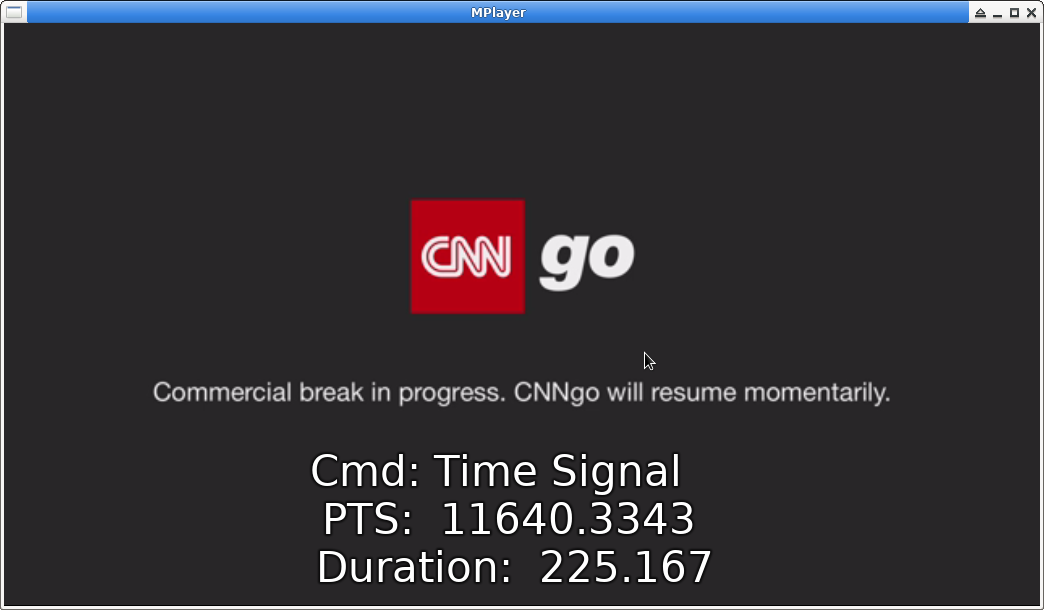
- cue2vtt.py creates webvtt subtitles out of SCTE-35 Cue data
-
use it like this
pypy3 cue2vtt.py video.ts | mplayer video.ts -sub -
Custom charsets for UPIDS aka upids.charset
Specify a charset for Upid data by setting threefive.upids.charset issue #55
- default charset is ascii
- python charsets info Here
- setting charset to None will return raw bytes.
Example Usage:
>>> from threefive import Cue,upids
>>> i="/DBKAAAAAAAAAP/wBQb+YtC8/AA0AiZDVUVJAAAD6X/CAAD3W3ACEmJibG5kcHBobkQCAsGDpQIAAAAAAAEKQ1VFSRSAIyowMljRk9c="

>>> upids.charset
'ascii'
>>> cue=Cue(i)
>>> cue.decode()
ascii
True
>>> cue.descriptors[0].segmentation_upid
'bblndpphnD\x02\x02���\x02\x00\x00'

>>> upids.charset="utf16"
>>> cue.decode()
utf16
True
>>> cue.descriptors[0].segmentation_upid
'扢湬灤桰䑮Ȃ菁ʥ\x00'
Parse Custom Splice Descriptors
- Subclass
threefive.descriptors.SpliceDescriptor - Add
self.private_datato__init__ - Add a
decodemethod - Add it to
threefive.descriptors.descriptor_maptag:Class112: MDSNDescriptor
import threefive

class MDSNDescriptor(threefive.descriptors.SpliceDescriptor):
    """
    MDSNDescriptor
    """
    def __init__(self, bites=None):
        super().__init__(bites)
        self.name = "MDSN Descriptor"
        self.private_data=None

    def decode(self):
        self.private_data="".join(list(self.bites[: self.descriptor_length -4].decode()))


if __name__ == '__main__':
    threefive.descriptors.descriptor_map[112]=MDSNDescriptor

    cue = threefive.Cue('/DBlAAAAAAAAAP/wBQb+GVJTDABPcAZNRFNOQzUCRUNVRUkAAKTff8MAACky4A8xdXJuOnV1aWQ6QnJlYWstQjAwMjA4NTU2ODlfMDAxMi0wNy0xMC1YMDExMjUxNjEyNDAAAPkSB7E=')
    cue.decode()
    cue.show()
a@debian:~/clean/scte35-threefive$ pypy3 mdsn.py
{
    "info_section": {
        "table_id": "0xfc",
        "section_syntax_indicator": false,
        "private": false,
        "sap_type": "0x3",
        "sap_details": "No Sap Type",
        "section_length": 101,
        "protocol_version": 0,
        "encrypted_packet": false,
        "encryption_algorithm": 0,
        "pts_adjustment_ticks": 0,
        "pts_adjustment": 0.0,
        "cw_index": "0x0",
        "tier": "0xfff",
        "splice_command_length": 5,
        "splice_command_type": 6,
        "descriptor_loop_length": 79,
        "crc": "0xf91207b1"
    },
    "command": {
        "command_length": 5,
        "command_type": 6,
        "name": "Time Signal",
        "time_specified_flag": true,
        "pts_time": 4720.284578,
        "pts_time_ticks": 424825612
    },
    "descriptors": [
        {
            "tag": 112,
            "descriptor_length": 6,
            "name": "MDSN Descriptor",   # <---- Custom Descriptor parsed.
            "identifier": "MDSN",
            "private_data": "C5"
        },
        {
            "tag": 2,
            "descriptor_length": 69,
            "name": "Segmentation Descriptor",
            "identifier": "CUEI",
            "components": [],
            "segmentation_event_id": "0xa4df",
            "segmentation_event_cancel_indicator": false,
            "program_segmentation_flag": true,
            "segmentation_duration_flag": true,
            "delivery_not_restricted_flag": false,
            "web_delivery_allowed_flag": false,
            "no_regional_blackout_flag": false,
            "archive_allowed_flag": false,
            "device_restrictions": "No Restrictions",
            "segmentation_duration": 30.0,
            "segmentation_duration_ticks": 2700000,
            "segmentation_message": "Provider Advertisement Start",
            "segmentation_upid_type": 15,
            "segmentation_upid_type_name": "URI",
            "segmentation_upid_length": 49,
            "segmentation_upid": "urn:uuid:Break-B0020855689_0012-07-10-X0112516124",
            "segmentation_type_id": 48,
            "segment_num": 0,
            "segments_expected": 0
        }
    ]
}
Powered by threefive
⚡ threefive/go is now cuei
⚡ POIS Server is Super Cool.
⚡ bpkio-cli: A command line interface to the broadpeak.io APIs.
⚡ x9k3: SCTE-35 HLS Segmenter and Cue Inserter.
⚡ amt-play uses x9k3.
⚡ m3ufu: SCTE-35 m3u8 Parser.
⚡ six2scte35: ffmpeg changes SCTE-35 stream type to 0x06 bin data, six2scte35 changes it back.
⚡ SuperKabuki: SCTE-35 Packet Injection.
⚡ showcues m3u8 SCTE-35 parser.
threefive | more
⚡ Diagram of a threefive SCTE-35 Cue.
⚡ ffmpeg and threefive and SCTE35 and Stream Type 0x6 bin data.
⚡ Issues and Bugs and Feature Requests No forms man, just open an issue and tell me what you need.
(It needs to be threefive related or a "What is the meaning of life and stuff?" type of question)
data
this might be wild baseless speculation.
Release history Release notifications | RSS feed


Download files
Download the file for your platform. If you're not sure which to choose, learn more about installing packages.
Source Distribution
Built Distribution
Filter files by name, interpreter, ABI, and platform.
If you're not sure about the file name format, learn more about wheel file names.
Copy a direct link to the current filters
File details
Details for the file threefive-2.4.21.tar.gz.
File metadata
- Download URL: threefive-2.4.21.tar.gz
- Upload date:
- Size: 36.0 kB
- Tags: Source
- Uploaded using Trusted Publishing? No
- Uploaded via: twine/4.0.2 CPython/3.11.7
File hashes
| Algorithm | Hash digest | |
|---|---|---|
| SHA256 |
8e073132de488433ddfd3a1ed1566337010020b9f9f2a5576bf3f4e93af6a571
|
|
| MD5 |
0d2c94ab8302ded635f439112bb00d25
|
|
| BLAKE2b-256 |
35271e2ad7ce927340660ab565684c37bfb6df3b06c3e47b6469ecbf1672f4b0
|
File details
Details for the file threefive-2.4.21-py3-none-any.whl.
File metadata
- Download URL: threefive-2.4.21-py3-none-any.whl
- Upload date:
- Size: 34.3 kB
- Tags: Python 3
- Uploaded using Trusted Publishing? No
- Uploaded via: twine/4.0.2 CPython/3.11.7
File hashes
| Algorithm | Hash digest | |
|---|---|---|
| SHA256 |
3cafaec29d02ad96305a8a3d23e47270865956abac039b0b91bfac06d44ef94c
|
|
| MD5 |
40d9da29026f23b042d8f753b050460d
|
|
| BLAKE2b-256 |
ab59f7a617b7c8ed4c9b348a16b6ed3fb9e3891a0bdbe223c681b394fba9690d
|






