
Download PBR materials on demand and convert to Three.js MeshPhysicalMaterial JSON

Project description
threejs-materials
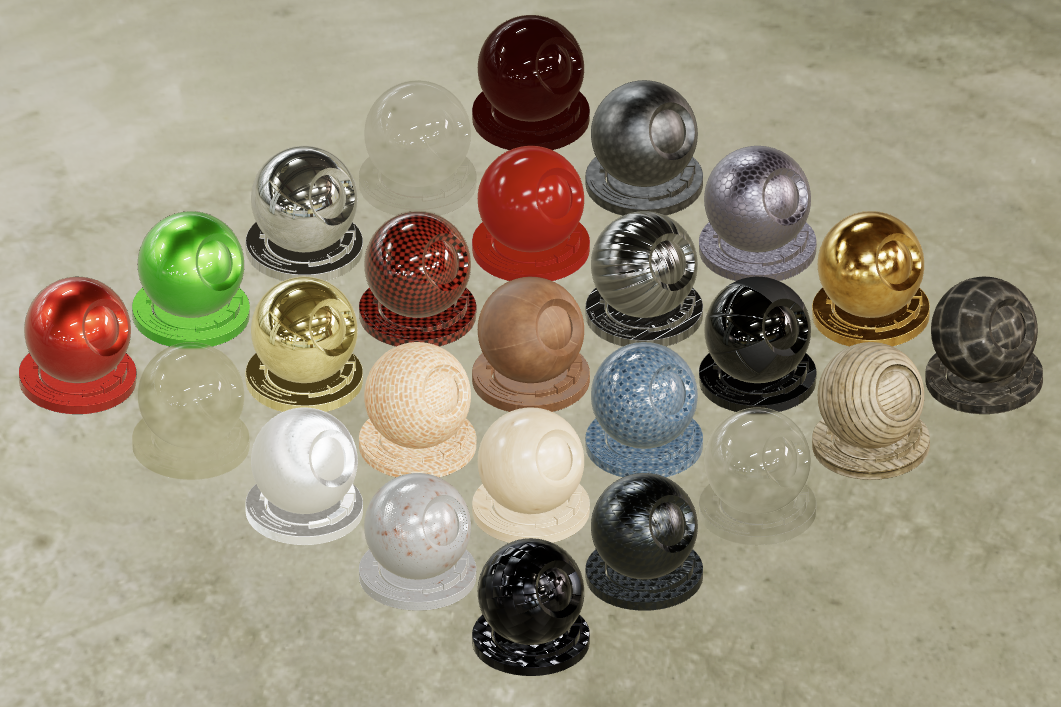
A Python library that converts PBR materials into Three.js MeshPhysicalMaterial-compatible JSON. Textures are stored as separate files on disk and only base64-encoded when sending to the viewer.
Uses pygltflib for standard glTF 2.0 file I/O (.gltf and .glb).
Supported input formats:
- glTF exports from Blender — export a mesh with the desired material to a
.gltfor.glbfile and load it withPbrProperties.load_gltf(). All PBR textures are read automatically via pygltflib. - MaterialX — download MaterialX materials on demand from four open sources, bake procedural graphs into flat textures, and cache results locally. See MaterialX sources.
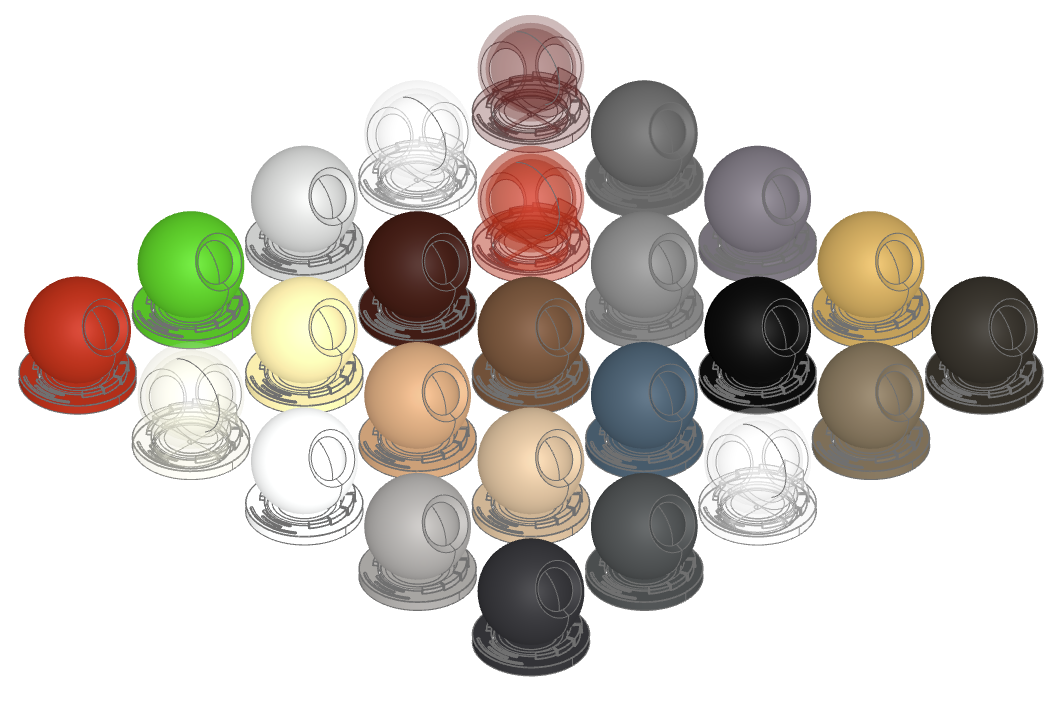
| Studio mode (full PBR) | CAD mode (interpolate_color()) |
 |
 |
Migration from v0.x to v1.0.0
v1.0.0 is a breaking change. The Material class has been replaced by typed dataclasses. See Migration details for a full guide.
Installation
glTF support
pip install threejs-materials
# uv pip install threejs-materials
# uv add threejs-materials
Dependencies
pillow >= 10.0— image processingpygltflib >= 1.16— glTF 2.0 file I/O (pure Python)requests >= 2.31.0— HTTP downloads from material sources
MaterialX support (optional)
pip install threejs-materials[materialx]
# uv pip install threejs-materials[materialx]
# uv add --extra materialx threejs-materials
Additional dependencies
materialx >= 1.39.4— MaterialX SDK with TextureBakeropenexr >= 3.3— EXR to PNG conversion
Note: For the latest Python, the installer tries to compile materialx and openexr. This might not be possible under Windows if no compiler is installed.
Input Formats
1 Blender glTF exports
Blender supports two main ways of building materials:
- Texture materials use image files, such as photos or painted maps, to define how a surface looks. They are straightforward to export and reuse because they rely on standard image data.
- Procedural materials are generated mathematically inside Blender. They can create detailed, seamless looks and are easy to tweak, but they are more tied to Blender's internal system.
glTF/GLB export
glTF and GLB exports handle texture materials reliably but struggle with complex procedural materials. In Blender's glTF exporter, procedural features like shader node graphs (Noise, Voronoi, Wave, etc.) are typically not supported; they often export as a flat color or lose detail. To preserve the appearance, bake procedural materials into image textures first, converting them to standard texture materials.
Baking
Baking turns a procedural material into image maps. Blender renders the material into texture files like base color, roughness, or normal maps, which then replace the procedural nodes. This ensures compatibility with glTF/GLB and other software unfamiliar with Blender's procedural system. Use Blender's built-in baking tools, or simplify the process with add-ons like SimpleBake. Workflow
-
Apply the material to a mesh in Blender (.g. to the standard cube).
-
If procedural, bake it to a texture material.
-
Go to File → Export → glTF 2.0 (.glb/.gltf).
-
Select glTF Separate (.gltf + .bin + textures) for separate texture files if needed.
-
Load in Python:
from threejs_materials import PbrProperties
materials = PbrProperties.load_gltf("brass_cube.gltf")   # .gltf or .glb
brass = materials["Brushed brass"]  # access by material name
That gives you a clean, portable material workflow: procedural inside Blender, baked to textures for export. Both .gltf and .glb are supported, and texture file paths are typically resolved automatically during export.
Format mapping glTF → internal
| glTF field | Internal property | Notes |
|---|---|---|
pbrMetallicRoughness.baseColorFactor |
color (RGB) + opacity (alpha) |
Alpha < 1.0 also sets transparent: true |
pbrMetallicRoughness.baseColorTexture |
color texture |
|
pbrMetallicRoughness.metallicFactor |
metalness |
Default 1.0 |
pbrMetallicRoughness.roughnessFactor |
roughness |
Default 1.0 |
pbrMetallicRoughness.metallicRoughnessTexture |
metalness + roughness texture |
Same packed texture assigned to both; Three.js reads G=roughness, B=metalness |
normalTexture |
normal texture |
.scale → normalScale |
occlusionTexture |
ao texture |
|
emissiveFactor |
emissive |
|
emissiveTexture |
emissive texture |
|
alphaMode: "BLEND" |
transparent: true |
|
alphaMode: "MASK" |
alphaTest = alphaCutoff |
|
doubleSided |
side: 2 |
|
KHR_materials_* extensions |
Corresponding internal properties | See glTF extensions table |
Limitations
- Multiple materials supported —
load_gltf()andfrom_gltf()return adict[str, PbrProperties]keyed by material name. A Blender export with multiple materials is loaded in a single call. - Geometry is ignored — only the material and its textures are imported. The mesh, nodes, and scene hierarchy are discarded.
- No UV transforms —
KHR_texture_transformon the Blender side (offset, rotation) is imported astexture_repeatfor the scale component only. Offset and rotation are not supported. - glTF defaults applied — when
metallicFactororroughnessFactorare absent, glTF defaults (1.0) are used. This is correct for texture-driven materials where the scalar is a neutral multiplier. - Fully opaque alpha ignored — when Blender exports
alphaMode: "BLEND"but the baseColor texture alpha channel is entirely opaque (255 everywhere), the transparency flag is skipped. This is a common Blender export artifact.
2 MaterialX
The following sources are available for MaterialX downloads:
| Source | Type | Shader model |
|---|---|---|
| ambientCG | Texture-based | open_pbr_surface |
| GPUOpen MaterialX Library | Procedural (baked) | standard_surface |
| PolyHaven | Texture-based | standard_surface |
| PhysicallyBased | Parametric (no textures) | open_pbr_surface |
Browse materials on the source websites, then load them by name.
When a material is loaded the following steps are executed:
- Download — source-specific: fetch ZIP (ambientCG, GPUOpen), individual files (PolyHaven), or generate from parameters (PhysicallyBased)
- Bake — run MaterialX
TextureBaker(GLSL preferred, MSL fallback on macOS) to flatten procedural graphs into texture images - Fallback merge — if the baker can't handle certain textures, merge from the original document
- EXR to PNG — convert any EXR textures to 8-bit PNG
- Extract — map shader inputs to
MeshPhysicalMaterialproperties with texture file references - Cache — write JSON + texture files to
~/.materialx-cache/
Converted materials are cached in ~/.materialx-cache/ as a small JSON file (property values + texture filenames) plus a companion directory with the texture images:
~/.materialx-cache/
    gpuopen_car_paint_1k.json              # few KB — values + texture refs
    gpuopen_car_paint_1k/                  # texture images
        color.png
        roughness.png
        normal.png
    ambientcg_onyx015_1k.json
    ambientcg_onyx015_1k/
        color.png
        ...
Textures are only base64-encoded when to_dict() is called (for sending to the Three.js viewer). This keeps the cache lightweight and allows multiple materials to share the same texture files without duplicating large blobs in memory.
To force re-conversion, clear the cache with clear_cache(name=...) or delete the files manually.
Shader model coverage
Supported models: standard_surface, gltf_pbr, open_pbr_surface. Other models produce empty output with a logged warning.
| Feature | standard_surface | gltf_pbr | open_pbr_surface |
|---|---|---|---|
| Base color | Yes | Yes | Yes |
| Metalness | Yes | Yes | Yes |
| Roughness | Yes | Yes | Yes |
| Normal map | Yes | Yes | Yes |
| Specular | Yes (weight, color, IOR) | Yes (weight, color, IOR) | Yes (weight, color, IOR) |
| Transmission | Yes | Yes (+ attenuation) | Yes (+ attenuation) |
| Emission | Yes | Yes | Yes |
| Clearcoat | Yes | Yes | Yes |
| Clearcoat normal | Yes | Yes | Yes |
| Sheen | Yes | Yes | Yes (fuzz) |
| Iridescence | Yes | Yes | Yes |
| Anisotropy | No (see note) | Yes | No (see note) |
| Opacity | Yes | Yes (alpha/alpha_mode) | Yes (geometry_opacity) |
| Displacement | Yes (model-independent) | Yes | Yes |
| Dispersion | No | Yes | Yes |
| Normal scale | No (baked into texture) | Yes | No (baked into texture) |
| Thin-walled | No | No | Yes (→ DoubleSide) |
| Subsurface | No | No | No |
Subsurface scattering is not mapped — Three.js MeshPhysicalMaterial has no SSS support.
Anisotropy is only mapped for gltf_pbr, where anisotropy_strength corresponds directly to glTF/Three.js anisotropyStrength. For standard_surface (specular_anisotropy) and open_pbr_surface (specular_roughness_anisotropy), anisotropy is not mapped — these models split roughness into directional axes (α·(1±a)), while glTF boosts one axis from base roughness (mix(α, 1, s²)). The models are structurally incompatible and no scalar remap produces correct results across different roughness values.
MaterialX limitations
-
Materials
- Single material per document — only the first material is used when a
.mtlxfile contains multiple materials. A warning is logged. - First shader node — if a material has multiple shader nodes (e.g. surface + volume), only the first surface shader is extracted.
- Single material per document — only the first material is used when a
-
Baking
- 8-bit textures — the TextureBaker uses
UINT8output. HDR information (emissive, HDR environment lighting baked into textures) is clamped to [0,1]. This is acceptable for web preview but lossy for physically accurate emissive maps. - Global bake lock — baking operations are serialized via a
threading.Lockbecause the MaterialX baker requiresos.chdir. This is thread-safe but becomes a bottleneck under concurrent load. The lock is per-process only (threading.Lock, notmultiprocessing.Lock). - Geometry-dependent nodes — procedurals driven by
<position>,<normal>, or<tangent>cannot be baked (the baker renders on a flat UV quad with no 3D geometry).
- 8-bit textures — the TextureBaker uses
-
Image tracing
- Single upstream image —
find_upstream_imagereturns the first image node found when walking upstream. Complex graphs with multiple images (layered blends, channel packing before baking) will only capture one image. After baking, this is fine since the baker flattens everything to single<image>nodes. - No channel extraction tracking — when an image passes through
extractorswizzlenodes, the specific channel being used is not recorded. The consumer must know glTF metallicRoughness packing conventions (G=roughness, B=metalness).
- Single upstream image —
-
EXR conversion
- LDR clamp — EXR textures are clamped to [0,1] and converted to 8-bit PNG. Dynamic range beyond 1.0 is lost.
- Channel naming — EXR files with non-standard channel names (not R/G/B/A) fall back to source-order channel selection, which may produce incorrect color mappings for unusual EXR layouts.
-
Network
- No retry logic — a single network failure raises an exception. The caller is responsible for retries.
- GPUOpen pagination — the material search assumes all results fit in one API page. Materials not in the first page may not be found.
- GPUOpen sequential package lookup — each package UUID is queried individually; materials with many packages may be slow to resolve.
-
Caching
- No cache invalidation — cached materials are never automatically refreshed. Delete the cache file manually to force re-conversion.
Output Formats
1 Three.js (internal format)
The internal format uses Three.js MeshPhysicalMaterial property names. Both MaterialX and glTF import pipelines produce the same structure. Scalar values live in PbrValues, texture references in PbrMaps.
In memory, textures are stored as filenames relative to maps_dir. When to_dict() is called (for the viewer), they are resolved to base64 data URIs:
mat = PbrProperties.from_gpuopen("Car Paint")
mat.values   # PbrValues(color=[0.944, 0.776, 0.373], metalness=1.0, ...)
mat.maps     # PbrMaps(roughness='roughness.png', normal='normal.png')
mat.maps_dir # Path('~/.materialx-cache/gpuopen_car_paint_1k')
to_dict() output:
{
  "id": "Car Paint",
  "name": "Car Paint",
  "source": "gpuopen",
  "values": {
    "color": [0.944, 0.776, 0.373],
    "metalness": 1.0,
    "roughness": 0.5,
    "ior": 1.5
  },
  "textures": {
    "roughness": "data:image/png;base64,...",
    "normal": "data:image/png;base64,..."
  }
}
Each output property maps to Three.js MeshPhysicalMaterial fields:
| Output property | value → |
texture → |
|---|---|---|
color |
color |
map |
metalness |
metalness |
metalnessMap |
roughness |
roughness |
roughnessMap |
normal |
— | normalMap |
normalScale |
normalScale |
— |
ao |
— | aoMap |
emissive |
emissive |
emissiveMap |
emissiveIntensity |
emissiveIntensity |
— |
ior |
ior |
— |
transmission |
transmission |
transmissionMap |
thickness |
thickness |
thicknessMap |
attenuationColor |
attenuationColor |
— |
attenuationDistance |
attenuationDistance |
— |
clearcoat |
clearcoat |
clearcoatMap |
clearcoatRoughness |
clearcoatRoughness |
— |
clearcoatNormal |
— | clearcoatNormalMap |
sheen |
sheen |
— |
sheenColor |
sheenColor |
sheenColorMap |
sheenRoughness |
sheenRoughness |
— |
iridescence |
iridescence |
iridescenceMap |
iridescenceIOR |
iridescenceIOR |
— |
iridescenceThicknessRange |
iridescenceThicknessRange |
— |
anisotropy |
anisotropy |
— |
anisotropyRotation |
anisotropyRotation |
— |
specularIntensity |
specularIntensity |
specularIntensityMap |
specularColor |
specularColor |
specularColorMap |
opacity |
opacity |
alphaMap |
transparent |
transparent |
— |
alphaTest |
alphaTest |
— |
dispersion |
dispersion |
— |
displacement |
— | displacementMap |
displacementScale |
displacementScale |
— |
side |
side |
— |
metallicRoughness |
— | metalnessMap + roughnessMap (G=roughness, B=metalness) |
2 glTF
to_gltf() converts a single material to a pygltflib.GLTF2 object. collect_gltf_textures() does the same for multiple materials with shared, deduplicated textures. save_gltf() writes to disk as .gltf (JSON + external texture files) or .glb (single binary). Advanced material features are mapped to standard KHR_materials_* extensions:
| Feature | glTF extension |
|---|---|
| IOR | KHR_materials_ior |
| Transmission | KHR_materials_transmission |
| Volume (thickness, attenuation) | KHR_materials_volume |
| Clearcoat | KHR_materials_clearcoat |
| Sheen | KHR_materials_sheen |
| Iridescence | KHR_materials_iridescence |
| Anisotropy | KHR_materials_anisotropy |
| Specular | KHR_materials_specular |
| Emissive strength | KHR_materials_emissive_strength |
| Dispersion | KHR_materials_dispersion |
| Texture repeat | KHR_texture_transform |
Usage
-
Save to file
from threejs_materials import PbrProperties

mat = PbrProperties.from_gpuopen("Car Paint")
mat.save_gltf("car-paint.gltf")   # .gltf + car-paint/ (texture files)
mat.save_gltf("car-paint.glb")    # single binary file
-
Load from file
materials = PbrProperties.load_gltf("scene.gltf")   # .gltf or .glb
brass = materials["Brushed brass"]              # access by name
-
In-memory GLTF2 object
gltf = mat.to_gltf()                            # pygltflib.GLTF2
materials = PbrProperties.from_gltf(gltf)        # dict[str, PbrProperties]
-
Multiple materials with texture deduplication
from threejs_materials import PbrProperties, collect_gltf_textures

materials = {
    "body": PbrProperties.from_gpuopen("Car Paint"),
    "wood": PbrProperties.from_gpuopen("Ivory Walnut Solid Wood"),
    "glass": PbrProperties.from_physicallybased("Glass"),
}

gltf = collect_gltf_textures(materials)  # pygltflib.GLTF2
-
Texture repeat
scale()is exported as theKHR_texture_transformextension on each texture reference:tiled = mat.scale(2, 2) # texture appears 2x larger gltf = tiled.to_gltf() # Each texture ref gets: "extensions": {"KHR_texture_transform": {"scale": [0.5, 0.5]}}
Note:
scale(1, 1)is a no-op for glTF export — noKHR_texture_transformextension is added.
Three.js ↔ glTF conversion
The glTF export is visually lossless for all properties except displacement. The round-trip to_gltf() → from_gltf() preserves material appearance but merges some internal representations:
| Property | Round-trip behavior |
|---|---|
| All scalar values | Preserved exactly |
| All textures | Preserved (base64 URIs survive the round-trip) |
| Opacity texture | Merged into baseColorTexture alpha channel — cannot be separated back |
| Separate metalness + roughness textures | Packed into one metallicRoughnessTexture — comes back as same packed texture on both metalness and roughness |
displacement / displacementScale |
Lost — no glTF equivalent (see note below) |
texture_repeat / scale() |
Preserved via KHR_texture_transform |
Source metadata (id, source, url, license) |
Not stored in glTF; from_gltf() sets source="gltf" |
Round-trip example
from threejs_materials import PbrProperties

m = PbrProperties.from_gpuopen("Perforated Metal")
g = m.to_gltf()
m2 = PbrProperties.from_gltf(g)["Perforated Metal"]
Results
-
Original material (
m):PbrProperties(name='Perforated Metal', source='gpuopen', license='MIT Public Domain') values: PbrValues(color=[0.665, 0.665, 0.665], metalness=1.0, ...) maps: PbrMaps(color='color.png', roughness='roughness.png', normal='normal.png', opacity='opacity.png') -
After round-trip (
m2):PbrProperties(name='Perforated Metal', source='gltf', license='') values: PbrValues(color=[0.665, 0.665, 0.665], metalness=1.0, alpha_test=0.5, ...) maps: PbrMaps(color='data:...;base64,...', metalness='data:...;base64,...', roughness='data:...;base64,...', normal='data:...;base64,...')
What changed:
opacitymap disappeared — it was merged into thecolortexture's alpha channel (glTF has no separate opacity texture). The resulting RGBAbaseColorTextureis now thecolortexture.alpha_test: 0.5appeared — since the original had an opacity texture,to_gltf()setsalphaMode: "MASK"withalphaCutoff: 0.5. On import this becomesalpha_test.- Separate
metalness+roughnesstextures → packed and back — glTF packs metalness and roughness into a singlemetallicRoughnessTexture(G=roughness, B=metalness). On import, this packed texture is assigned to bothmetalnessandroughnessproperties (same texture, Three.js reads the correct channel from each).
The visual result is identical — all changes are representation differences, not data loss.
Note on displacement
Displacement mapping is the only property fully lost in the glTF conversion. In practice this is rarely an issue for CAD workflows:
- Displacement is a vertex-level effect — it offsets mesh vertices along their normals based on a texture. This requires a sufficiently dense mesh to produce visible detail.
- CAD tessellation produces meshes optimized for geometric accuracy, not displacement fidelity. Large flat faces (common in CAD) are tessellated with very few triangles, making displacement ineffective.
- Even in the internal Three.js format, displacement is optional and most CAD viewers ignore it.
- For visual surface detail, normal maps (which survive the round-trip) are a better fit — they simulate surface relief without requiring extra geometry.
Common API
Loading from sources
-
PbrProperties.from_gpuopen(name, resolution="1K") -> PbrProperties -
PbrProperties.from_ambientcg(name, resolution="1K") -> PbrProperties -
PbrProperties.from_polyhaven(name, resolution="1K") -> PbrProperties -
PbrProperties.from_physicallybased(name, resolution="1K") -> PbrPropertiesDownload, convert, and cache a material.
from threejs_materials import PbrProperties

mat = PbrProperties.from_gpuopen("Car Paint", resolution="1K")
mat = PbrProperties.from_ambientcg("Onyx015", resolution="1K")
mat = PbrProperties.from_polyhaven("plank_flooring_04", resolution="1K")
mat = PbrProperties.from_physicallybased("Titanium")
The first call downloads and converts the material (takes a few seconds). Subsequent calls return the cached JSON instantly from
~/.materialx-cache/.Resolution
Pass a normalized resolution (
1K,2K,4K,8K— case-insensitive). Each source maps it to its native format:Input GPUOpen ambientCG PolyHaven PhysicallyBased 1K 1k 8b 1K-PNG 1k n/a 2K 2k 8b 2K-PNG 2k n/a 4K 4k 8b 4K-PNG 4k n/a 8K — 8K-PNG 8k n/a PhysicallyBased materials are parametric — no resolution needed (and not accepted).
-
list_sources()Print available sources with clickable URLs.
from threejs_materials.sources import list_sources

list_sources()
# Material sources:
#   load_ambientcg        https://ambientcg.com/list?type=material
#   load_gpuopen          https://matlib.gpuopen.com/main/materials/all
#   load_polyhaven        https://polyhaven.com/textures
#   load_physicallybased  https://physicallybased.info/
-
PbrProperties.from_mtlx(mtlx_file) -> PbrPropertiesConvert a local
.mtlxfile without downloading anything.from threejs_materials import PbrProperties mat = PbrProperties.from_mtlx("examples/gpuo-car-paint.mtlx")
Texture paths in the
.mtlxare resolved relative to the file's location.
Customization
-
material.override(**props) -> PbrPropertiesReturn a new
PbrPropertieswith value overrides. The original material is not modified.from threejs_materials import PbrProperties mat = PbrProperties.from_gpuopen("Car Paint") red_paint = mat.override(color=(0.8, 0.1, 0.1)) rough_red = mat.override(color=(0.8, 0.1, 0.1), roughness=0.9)
Overrides set the value of the named property, creating it if absent. Existing textures are preserved. Calls can be chained:
mat.override(color=(1,0,0)).override(roughness=0.5). -
material.scale(u, v, fixed=True) -> PbrPropertiesReturn a new
PbrPropertieswith texture scaling applied. The original material is not modified.tiled = mat.scale(3, 3) # texture appears 3x larger small = mat.scale(0.5, 0.5) # texture tiles 2x in each direction
scale(u, v)setstexture_repeat = (1/u, 1/v)internally. In Three.js this maps totexture.repeat, in glTF it is exported asKHR_texture_transformwithscale: [1/u, 1/v]. Can be chained withoverride():mat.override(color=(1,0,0)).scale(2, 2).
Texture scaling
The fixed parameter on scale() controls how UVs are interpreted:
-
fixed=True(default): The viewer normalizes UVs so that texture density is independent of object size. A brushed aluminum pattern looks the same on a small bracket and a large panel. This is the physically correct behavior for CAD — materials have a fixed physical scale. -
fixed=False: Raw parametric UVs are used. Texture size depends on object geometry, matching standard glTF/GLB viewer behavior.
# Fixed physical scale (default) — same texture density on all parts
wood = PbrProperties.from_gpuopen("Walnut").scale(2, 2)

# Geometry-dependent — texture tiles based on surface parameterization
wood_raw = PbrProperties.from_gpuopen("Walnut").scale(2, 2, fixed=False)
The normalize_uvs flag is serialized in to_dict() as "normalizeUvs": false when disabled. Materials imported from glTF (from_gltf, load_gltf) default to normalize_uvs=False since glTF UVs are already baked into the mesh.
Import and Export
-
PbrProperties.from_mtlx(mtlx_file) -> PbrPropertiesConvert a local
.mtlxfile. Texture paths are resolved relative to the file's location. See MaterialX for details.mat = PbrProperties.from_mtlx("examples/gpuo-car-paint.mtlx")
-
PbrProperties.load_gltf(gltf_file) -> dict[str, PbrProperties]Load all materials from a
.gltfor.glbfile on disk. Returns a dict keyed by material name. Uses pygltflib to read the file and resolve textures automatically. Ideal for importing Blender glTF exports.materials = PbrProperties.load_gltf("brass_cube.gltf") # or .glb brass = materials["Brushed brass"]
-
PbrProperties.from_gltf(gltf) -> dict[str, PbrProperties]Import all materials from a
pygltflib.GLTF2object. Returns a dict keyed by material name. Accepts both file-referenced and data-URI images (file references are converted to data URIs automatically). See Three.js ↔ glTF conversion for round-trip behavior.from pygltflib import GLTF2 gltf = GLTF2().load("scene.gltf") materials = PbrProperties.from_gltf(gltf) body = materials["Car Paint"] glass = materials["Glass"]
-
material.to_gltf() -> GLTF2Convert a single material to a self-contained
pygltflib.GLTF2object with data-URI textures. See glTF for the schema.gltf = mat.to_gltf()
-
material.save_gltf(path, overwrite=False)Save the material as a
.gltfor.glbfile. For.gltf, textures are written as separate files in a companion directory. For.glb, textures are embedded.mat.save_gltf("wood.gltf") # wood.gltf + wood/color.png, ... mat.save_gltf("wood.glb") # single binary file mat.save_gltf("wood.gltf", overwrite=True) # overwrite existing
-
collect_gltf_textures(materials) -> GLTF2Convert multiple materials to a
pygltflib.GLTF2with shared, deduplicated textures. Returns the same type asto_gltf(). See glTF for details.from threejs_materials import PbrProperties, collect_gltf_textures gltf = collect_gltf_textures({ "body": PbrProperties.from_gpuopen("Car Paint"), "glass": PbrProperties.from_physicallybased("Glass"), })
Utilities
-
material.dump(gltf=False, json_format=False) -> strReturn a human-readable summary of the material. Textures are abbreviated. Also used by
repr(material).print(mat.dump()) # Three.js properties, text print(mat.dump(gltf=True)) # glTF structure, text print(mat.dump(json_format=True)) # Three.js properties, JSON print(mat.dump(gltf=True, json_format=True)) # glTF structure, JSON
-
material.interpolate_color() -> (r, g, b, a)Estimate a single representative sRGB color from a material — useful for CAD viewers that need a flat color per object while keeping a material dictionary for full PBR rendering.
from threejs_materials import PbrProperties

wood = PbrProperties.from_gpuopen("Ivory Walnut Solid Wood")
materials = {"wood": wood}      # keep for full PBR rendering
object.material = "wood"
object.color = wood.interpolate_color()   # (0.53, 0.31, 0.18, 1.0)
When the material has a color texture, the texture is decoded and averaged (requires
Pillow). Scalar colors (linear RGB) are converted to sRGB. Transmission and opacity are mapped to the alpha channel so glass-like materials appear semi-transparent. -
encode_texture_base64(file_path) -> strEncode an image file as a base64 data URI. Automatically converts EXR to PNG.
from threejs_materials import encode_texture_base64

data_uri = encode_texture_base64("path/to/textures/normal.png")
# -> 'data:image/png;base64,iVBORw0KGgo...'
Cache management
-
list_cache(as_json=False)Print a grouped summary of cached materials, or return a list of tuples.
from threejs_materials import list_cache

list_cache()
# gpuopen
#   - Aluminum Brushed
#   - Car Paint
# ambientcg
#   - Metal 009

list_cache(as_json=True)
# [('ambientcg', 'Metal 009'), ('gpuopen', 'Aluminum Brushed'), ...]
-
clear_cache(name=None, source=None) -> intDelete cached material files. Returns number of files deleted.
from threejs_materials import clear_cache

clear_cache()                          # delete all
clear_cache(source="gpuopen")          # delete all GPUOpen caches
clear_cache(name="Car Paint")          # delete by name
clear_cache(name="brick", source="ambientcg")  # combined filter
Three.js usage
From internal format (single material)
const data = JSON.parse(jsonStr);
const material = new THREE.MeshPhysicalMaterial();

for (const [key, value] of Object.entries(data.values)) {
  if (Array.isArray(value) && value.length === 3) {
    material[key] = new THREE.Color(...value);
  } else {
    material[key] = value;
  }
}

for (const [key, textureUri] of Object.entries(data.textures)) {
  material[PROPERTY_TO_MAP[key]] = new THREE.TextureLoader().load(textureUri);
}
From glTF (multi-material)
When using collect_gltf_textures() to produce a multi-material glTF JSON, load it with Three.js's GLTFLoader:
import { GLTFLoader } from "three/addons/loaders/GLTFLoader.js";

// gltfJson is the output of collect_gltf_textures(), serialized as JSON
const blob = new Blob([gltfJson], { type: "application/json" });
const url = URL.createObjectURL(blob);

const loader = new GLTFLoader();
loader.load(url, (gltf) => {
  // Materials are already created as MeshStandardMaterial / MeshPhysicalMaterial
  const materials = gltf.parser.json.materials;

  // If injected into a geometry glTF, the scene contains the full model
  scene.add(gltf.scene);

  URL.revokeObjectURL(url);
});
Alternatively, when injecting materials into an existing glTF file (e.g. from build123d), simply load that file with GLTFLoader — Three.js handles the images, textures, and materials arrays automatically, including all KHR_materials_* extensions.
Consumer notes
- Color space: Textures include a
colorSpacefield when available. Three.js expects color textures (baseColor, emissive, sheenColor, specularColor) in sRGB and data textures (roughness, metalness, normal, AO, displacement) in linear. Settexture.colorSpaceaccordingly. - Normal maps: Baked using the OpenGL convention (Y-up), matching Three.js and glTF expectations.
- Scalar x texture: When both
valueandtextureare present, Three.js multiplies them. The library sets scalars to1.0(neutral) when a texture is present so the texture controls fully. - glTF packed metallicRoughness: When imported from glTF, the packed
metallicRoughnessTextureis assigned to bothmetalnessandroughnessas the same texture. Three.js reads G=roughness and B=metalness from the correct channels automatically.
Clients
build123d
build123d exports glTF geometry via OCCT's RWGltf_CafWriter, which handles meshes, nodes, and flat colors. To add PBR materials, post-process the generated glTF file by injecting material data from threejs-materials:
from build123d import export_gltf
from threejs_materials import PbrProperties, inject_materials

# 1. Build your CAD model and assign materials
body.material = Material.create("body", pbr=PbrProperties.from_gpuopen("Car Paint"))
wood.material = Material.create("wood", pbr=PbrProperties.from_gpuopen("Walnut").scale(2, 2))

# 2. Export geometry to glTF (materials are injected automatically)
export_gltf(assembly, "model.glb")
The export_gltf function in build123d automatically detects PBR materials on shapes and calls inject_materials to replace the OCCT-generated placeholder materials with full PBR data including textures and KHR extensions.
Migration details
API changes
| v0.x | v1.0.0 |
|---|---|
Material(data_dict) |
PbrProperties.from_dict(data_dict) |
Material.gpuopen.load("Car Paint") |
PbrProperties.from_gpuopen("Car Paint") |
Material.ambientcg.load("Onyx015") |
PbrProperties.from_ambientcg("Onyx015") |
Material.polyhaven.load("plank") |
PbrProperties.from_polyhaven("plank") |
Material.physicallybased.load("Gold") |
PbrProperties.from_physicallybased("Gold") |
Material.from_gltf(gltf) |
PbrProperties.from_gltf(gltf) |
Material.load_gltf("file.glb") |
PbrProperties.load_gltf("file.glb") |
Material.from_mtlx("file.mtlx") |
PbrProperties.from_mtlx("file.mtlx") |
Material.list_sources() |
from threejs_materials.sources import list_sources |
Material.list_cache() |
from threejs_materials import list_cache |
Material.clear_cache() |
from threejs_materials import clear_cache |
Data model changes
The properties dict has been replaced by two typed dataclasses:
| v0.x | v1.0.0 |
|---|---|
mat.properties["color"]["value"] |
mat.values.color |
mat.properties["color"]["texture"] |
mat.maps.color |
mat.properties["normalScale"]["value"] |
mat.values.normal_scale |
mat.properties["sheenColor"]["value"] |
mat.values.sheen_color |
mat.properties["specularIntensity"]["value"] |
mat.values.specular_intensity |
PbrValuesholds scalar values with snake_case field namesPbrMapsholds texture references (file paths or data URIs) with snake_case field names- Field names are automatically mapped to camelCase for Three.js/glTF output via
to_dict() - All fields support IDE tab completion
JSON format changes
The to_dict() output format has changed:
// v0.x
{"properties": {"color": {"value": [1, 0, 0], "texture": "data:..."}}}

// v1.0.0
{"values": {"color": [1, 0, 0]}, "textures": {"color": "data:..."}}
Cache
The cache format changed from "properties" to "values" + "textures". After upgrading, clear the cache:
from threejs_materials import clear_cache
clear_cache()
New in v1.0.0
PbrProperties.from_gpuopen(),from_ambientcg(),from_polyhaven(),from_physicallybased()classmethods with full IDE tab completionPbrProperties.create()for building materials from explicit values and texture pathsnormalize_uvsflag for UV mode control (see Texture scaling)scale(u, v, fixed=True/False)—fixed=True(default) normalizes UVs for size-independent texture densitylist_cache()prints grouped summary by default,list_cache(as_json=True)for tuplesclear_cache()prints success messages
Release history Release notifications | RSS feed


Download files
Download the file for your platform. If you're not sure which to choose, learn more about installing packages.
Source Distribution
Built Distribution
Filter files by name, interpreter, ABI, and platform.
If you're not sure about the file name format, learn more about wheel file names.
Copy a direct link to the current filters
File details
Details for the file threejs_materials-1.0.3.tar.gz.
File metadata
- Download URL: threejs_materials-1.0.3.tar.gz
- Upload date:
- Size: 89.4 kB
- Tags: Source
- Uploaded using Trusted Publishing? No
- Uploaded via: twine/6.2.0 CPython/3.14.3
File hashes
| Algorithm | Hash digest | |
|---|---|---|
| SHA256 |
8eff5bf828d492178d37e3320dd171e89d78e36f44dc5996df97db448120168c
|
|
| MD5 |
f68aaa06c2d94da43a98ec16b0db46ee
|
|
| BLAKE2b-256 |
d4f2f51e0dd939f848b54edad2462beb6b4d86cb6d796c2aea69f37dc6a8f0d5
|
File details
Details for the file threejs_materials-1.0.3-py3-none-any.whl.
File metadata
- Download URL: threejs_materials-1.0.3-py3-none-any.whl
- Upload date:
- Size: 57.3 kB
- Tags: Python 3
- Uploaded using Trusted Publishing? No
- Uploaded via: twine/6.2.0 CPython/3.14.3
File hashes
| Algorithm | Hash digest | |
|---|---|---|
| SHA256 |
d9437672b88302b8fbefd90a4b08c5a3ad913a13611029ecb272a690f6f75ef8
|
|
| MD5 |
b0b027f3f67c25735b381ac6ba8d454d
|
|
| BLAKE2b-256 |
48190166b2a809d94ca360cc2f4fd2937473660268f730f883615f0d351c2d63
|






