

thumbnails-readme
Create thumbnails for raster and vector images in parent and its subdirectories and append them to the README.md file


🚀 GitHub Action • 💡 How does it work? • 📦 Installation • 🔗 Additional dependencies • 📓 Example • 📂 Use Cases • 🔑 License • 📷 Thumbnails
The thumbnails-readme package is a simple library devoted to automatically generating thumbnails from a directory. It is explicitly designed to create thumbnails from Git folders. The thumbnails are shown in the README file of that Git folder. 📁🌐📸
🔄 Multi-page PDFs are turned into .gif thumbnails
Current supported filetype extensions are: .bmp, .gif, .ico, jpeg, .jpg, .png, .tga, .tiff, .webp, .pdf, and .svg
🚀 GitHub Action
See the associated GitHub Action in the following repository: thumbnails-readme-action.
💡 How does it work?
In the first step the program finds graphical material in your directories:
- ['fig1.pdf', 'fig2.pdf', 'fig3.pdf', 'fig4.pdf']
In the second step the program generates thumbnails for each material identified in folders.
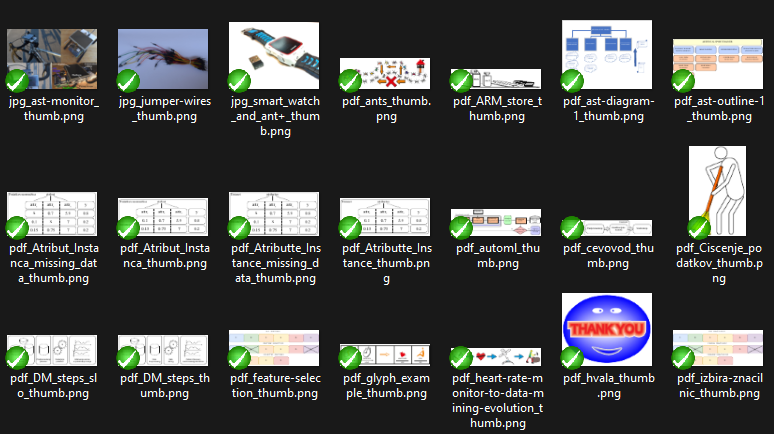
In the third step the program appends thumbnails to the README file.

📦 Installation
To install thumbnails-readme with pip, use:
pip install thumbnails-readme
To install thumbnails-readme directly from the source code, use:
$ git clone https://github.com/firefly-cpp/thumbnails-readme.git
$ cd thumbnails-readme
$ poetry build
$ python setup.py install
To install thumbnails-readme on Alpine Linux, please use:
$ apk add py3-thumbnails-readme
To install thumbnails-readme on Arch Linux, use an AUR helper:
$ yay -Syyu python-thumbnails-readme
🔗 Additional dependencies
Windows
Windows users have to download poppler for Windows. Add poppler path in your Python file (see the main example).
poppler_path = path/to/your/poppler/bin/
For example: poppler_path = C:/Program Files/poppler-0.68.0/bin
Linux
Linux's users can install poppler-utils from the main repositories.
📓 Examples
Examples of Usage
# Maximum thumbnail size - lower the number, smaller the thumbnail
MAX_SIZE = (128, 128)

# PDF quality, lower the number, lower the quality
pdf_quality = 15

# Skiplist - which directories to ignore
skiplist = (
  ".git",
)

# Path to your directory
path = os.getcwd()
path = os.path.dirname(path)

# Path to the folder, you want new thumbnails to be placed in
path_to_thumbnails_folder = Path(path + "/image_thumbnails")

# Path to README.md file to be written to
path_to_readme = Path(path + "/README.md")
Run the script
# Prepare thumbnails folder (check if exists, delete old thumbnails and create new ones)
thumbnails_readme.prepare_thumbnails_folder(path_to_thumbnails_folder)

# Prepare README.md file (check if exists, delete last modifications and place newly generated ones)
thumbnails_readme.prepare_readme(path_to_readme)

# Generate thumbnails
thumbnails_readme.crawl(path, path_to_readme, path_to_thumbnails_folder, MAX_SIZE, pdf_quality, skiplist, poppler_path)
📂 Use Cases
🔑 License
This package is distributed under the BSD-3-Clause license. This license can be found online at http://www.opensource.org/licenses/bsd-3-clause/.
Disclaimer
This framework is provided as-is, and there are no guarantees that it fits your purposes or that it is bug-free. Use it at your own risk!
📷 Thumbnails


1 maintainer

Metadata
1 maintainer
Release files for thumbnails-readme 0.4.2
For a detailed explanation of source distributions (sdists) and built distributions (wheels), please see the package formats documentation.
Source distribution (sdist)
| File | Size | Uploaded | Provenance | Actions |
|---|---|---|---|---|
| thumbnails_readme-0.4.2.tar.gz | 7.1 kB | Without provenance | Details for thumbnails_readme-0.4.2.tar.gz |
Built distribution (wheel)
| File | Interpreter | ABI | Platform | Actions Reset |
|---|---|---|---|---|
| thumbnails_readme-0.4.2-py3-none-any.whl | Python 3 | none | any | Details for thumbnails_readme-0.4.2-py3-none-any.whl |
Total release size: 14.4 kB
Release files / thumbnails_readme-0.4.2.tar.gz
| Download URL | thumbnails_readme-0.4.2.tar.gz |
|---|---|
| Size | 7.1 kB |
| Tags | Source |
|
SHA-256 checksum How to use checksums |
f87dd6ea486b42a1cd987f24f527969ddf99537c55fa64435bc254514240b40d
|
|
BLAKE2b-256 checksum How to use checksums |
eec90aa1c604ccf4f1f5fa22caaff43af4c379ca2a773195a1d1a161942cb713
|
| Upload date | |
|
Uploaded using Trusted Publishing? What is trusted publishing? |
No |
| Uploaded via |
poetry/1.7.1 CPython/3.12.5 Linux/6.10.8-200.fc40.x86_64
|
Release files / thumbnails_readme-0.4.2-py3-none-any.whl
| Download URL | thumbnails_readme-0.4.2-py3-none-any.whl |
|---|---|
| Size | 7.3 kB |
| Tags | Python 3 |
|
SHA-256 checksum How to use checksums |
49ddb75fd0ace605907c613033c54cf3b3f4027ee5b80a6db5f2bbfefca794e2
|
|
BLAKE2b-256 checksum How to use checksums |
c83b3056d6853679fbaedd6e04ac3c2dc64c4c0d3f569892254e4213a9dd0195
|
| Upload date | |
|
Uploaded using Trusted Publishing? What is trusted publishing? |
No |
| Uploaded via |
poetry/1.7.1 CPython/3.12.5 Linux/6.10.8-200.fc40.x86_64
|
Security for thumbnails-readme 0.4.2
Provenance
Provenance describes where a file came from. On PyPI, provenance is shared via attestations, which provide a verifiable record of the build or publishing details. View details, limitations and caveats.
No provenance found
None of the files in this release were uploaded with provenance metadata.
A note on package security
PyPI is a repository for distributing packages, not a service for auditing them. While third-party security researchers and our staff do their best to detect and remove malicious packages, PyPI cannot guarantee the quality, security or suitability of any given package.
To learn more about protecting yourself from malicious actors, visit our package security documentation.














