
🖱️ 🛠️ Thunar Plugins
This Python package extends the Thunar file manager and provides a way for other Python packages to do the same without worrying about Thunar finding them.
✨ Features Added to Thunar
-
✅ a settings menu to en-/disable plugins added by this or other Python packages
-
🔗 creating links to a file or folder
-
☑️ Calculating various checksums of files
-
🗓️ planned: all features from
thunar-custom-actions -
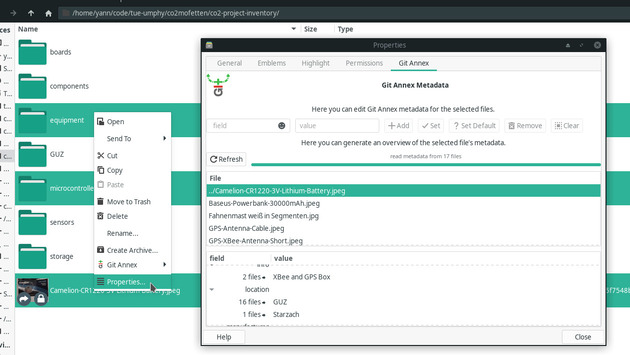
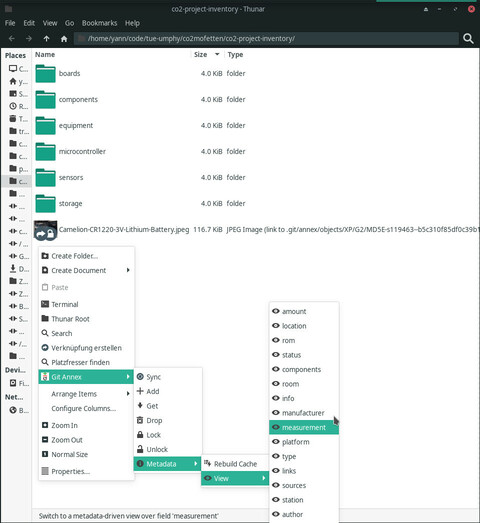
🔄 Git Annex support:
git annex sync|add|get|drop|lock|unlock- branch switching
- metadata-driven views
- editing metadata in the file properties dialog
📦 Installation


If you are on an Arch-based Linux, you can install the python-thunar-plugins-git package from the AUR:
# using yay, you may of course use your favourite AUR installer
pacman -Syu yay
yay -Syu python-thunar-plugins-git
In this case you might only have to restart Thunar to see the new plugins:
thunar -q
Other Platforms: Installation from PyPI
☝️ Prerequisites
For these Thunar plugins to work, you will need to have installed:
- Thunar (obviously)
- thunarx-python
# Install this package from PyPI:
pip install thunar-plugins

# Install the latest development version:
pip install git+https://gitlab.com/nobodyinperson/thunar-plugins

# Install from the repository root
git clone https://gitlab.com/nobodyinperson/thunar-plugins
cd thunar-plugins
pip install .
If that fails, try
python3 -m pip install --user ...instead of justpip install ...
⚡ Troubleshooting
- try
thunar -qor log out and back in if the plugins aren't shown in Thunar - run
thunar -qand thenTHUNARX_PYTHON_DEBUG=all THUNAR_PLUGINS_LOGLEVEL=debug thunarto debug - run
thunar-plugins activate(orpython3 -m thunar_plugins activate) to place the activator script (should be done upon installation) - run
thunar-plugins deactivateto deactivate plugins
➕ Adding More Plugins
This thunar_plugins package can act as a stepping stone for other packages
that add plugins to Thunar: The activator script loads all thunar_plugin
entry points provided by any installed Python package. So if another package
provides a Thunar plugin (e.g. a new context menu entry) with class
mypackage.mymodule.mysubmodule.MyThunarPlugin, that package may adjust its
setup.cfg like this and stop caring about how to tell Thunar where the plugin
can be found:
[options]
install_requires = thunar_plugins

[options.entry_points]
thunar_plugin =
    my-thunar-plugin = mypackage.mymodule.mysubmodule:MyThunarPlugin
For proper display in the
thunar-pluginssettings dialog, every Python Thunar plugin class registered like this should also have a shortnameand a one-sentencedescriptionstring attribute.
1 maintainer

Release files for thunar-plugins 1.4.0
For a detailed explanation of source distributions (sdists) and built distributions (wheels), please see the package formats documentation.
Source distribution (sdist)
| File | Size | Uploaded | |
|---|---|---|---|
| thunar-plugins-1.4.0.tar.gz | 137.0 kB | Details |
Built distribution (wheel)
| File | Interpreter | ABI | Platform | Reset |
|---|---|---|---|---|
| thunar_plugins-1.4.0-py3-none-any.whl | Python 3 | none | any | Details |
Total release size: 187.9 kB
Release files / thunar-plugins-1.4.0.tar.gz
| Download URL | thunar-plugins-1.4.0.tar.gz |
|---|---|
| Size | 137.0 kB |
| Tags | Source |
|
SHA-256 checksum How to use checksums |
c4d72a64063952f7c89de9f708d0fbaa921e55d165821d4d95bd433f64a103a6
|
|
BLAKE2b-256 checksum How to use checksums |
8d843b2d1f21525fc0890a9f7f535ebd6ced20344c05ebce52130eb77eb9ea09
|
| Upload date | |
|
Uploaded using Trusted Publishing? What is trusted publishing? |
No |
| Uploaded via |
twine/4.0.2 CPython/3.11.1
|
Release files / thunar_plugins-1.4.0-py3-none-any.whl
| Download URL | thunar_plugins-1.4.0-py3-none-any.whl |
|---|---|
| Size | 50.9 kB |
| Tags | Python 3 |
|
SHA-256 checksum How to use checksums |
d7ce4b423a589bb1e96d8ad4a38b08eee5a2da413cd613ceea02ab903d05112d
|
|
BLAKE2b-256 checksum How to use checksums |
fad0bb0987e2adba33aa2650c8b92d04fa10dd9c732fb16c9e9e8ebb368eea8d
|
| Upload date | |
|
Uploaded using Trusted Publishing? What is trusted publishing? |
No |
| Uploaded via |
twine/4.0.2 CPython/3.11.1
|














