

Tidekeeper
Tidekeeper is an unofficial maintained fork of
yaronzz/Tidal-Media-Downloader,
with a reliable terminal workflow and optional desktop GUI. The primary command
is tidekeeper; tidal-dl remains available for compatibility.






Install
Tidekeeper requires Python 3.10 or newer.
ffmpeg is recommended for video downloads and optional FLAC remux
(tidekeeper --doctor reports whether it is available).
From PyPI (recommended)
python -m pip install -U tidekeeper
tidekeeper --help
Desktop GUI:
python -m pip install -U "tidekeeper[gui]"
tidekeeper-gui
From Git
python -m pip install -U "git+https://github.com/OpenNerdz/tidekeeper.git#subdirectory=TIDALDL-PY"
tidekeeper --help
One-line installer (Linux / Termux)
curl -fsSL https://raw.githubusercontent.com/OpenNerdz/tidekeeper/main/install.sh | bash
For Android shared storage, run termux-setup-storage and optionally set:
export TIDEKEEPER_DOWNLOAD_PATH="/storage/emulated/0/Download/Tidekeeper"
Prebuilt binaries
Terminal and desktop GUI executables for Windows, macOS, and Linux (x86-64 and ARM64) are attached to each GitHub Release.
Docker
Build the image from the repository, then persist account configuration and downloads with bind mounts. The image includes ffmpeg.
docker build -t tidekeeper .
docker run --rm -it \
  -v "$PWD/config:/config" \
  -v "$PWD/downloads:/downloads" \
  tidekeeper
docker run --rm \
  -v "$PWD/config:/config" \
  -v "$PWD/downloads:/downloads" \
  tidekeeper -l "https://tidal.com/browse/track/70973230"
The container runs as non-root UID 1000. Ensure both host directories are
writable by that user. A GUI is not included in the container image.
Usage
tidekeeper --help
tidekeeper --doctor
tidekeeper --paths
tidekeeper --open-output
tidekeeper --update
tidekeeper -l "https://tidal.com/browse/track/70973230"
tidekeeper --video-only -l "https://tidal.com/browse/artist/123456"
Dolby Atmos downloads are opt-in with tidekeeper -q Atmos (or GUI audio quality
Atmos). TIDAL keeps Atmos mixes on separate catalog IDs that often report
quality LOW with an Atmos flag — search now labels those rows clearly, and
when Atmos quality is selected Tidekeeper will switch a stereo album/track pick
to the matching Atmos catalog release when one exists.
Failed downloads are saved to failed-tracks.txt in the download folder and can
be retried with:
tidekeeper -l "/path/to/downloads/failed-tracks.txt"
URL lists accept comments starting with #, comma- or whitespace-separated
URLs/IDs, and nested text files. Nested filenames resolve relative to the list
containing them; repeated inputs and file cycles are skipped. The terminal
continues past individual lookup failures and returns a failure status if any
item failed.
TIDEKEEPER_DOWNLOAD_PATH sets the default download folder on every platform,
including Docker. An existing saved profile keeps its configured folder.
Customizability
Custom filename formats are supported:
| Tokens | Description | Album | Track | Video | Playlist |
|---|---|---|---|---|---|
| {ArtistID} | Comma separated list of each artists' ID for that media (i.e: 123, 456) |
:white_check_mark: | :white_check_mark: | :white_check_mark: | :x: |
| {ArtistName} | Comma separated list of each artists' name for that media (i.e: ABC, DEF) |
:white_check_mark: | :x: | :x: | :x: |
| {ArtistName} | Primary artist's name for that media | :x: | :white_check_mark: | :white_check_mark: | :x: |
| {ArtistsName} | Comma separated list of each artists' name for that media (i.e: ABC, DEF) |
:x: | :white_check_mark: | :white_check_mark: | :x: |
| {AlbumArtistID} | Primary artist's ID for that media | :white_check_mark: | :x: | :x: | :x: |
| {AlbumArtistName} | Primary artist's name for that media | :white_check_mark: | :x: | :x: | :x: |
| {TrackArtistID} | Primary artist's ID for that media | :x: | :white_check_mark: | :x: | :x: |
| {TrackArtistName} | Primary artist's name for that media | :x: | :white_check_mark: | :x: | :x: |
| {VideoArtistID} | Primary artist's ID for that media | :x: | :x: | :white_check_mark: | :x: |
| {VideoArtistName} | Primary artist's name for that media | :x: | :x: | :white_check_mark: | :x: |
| {Flag} | Quality/content flags: M (Master), A (Dolby Atmos), E (Explicit) |
:white_check_mark: | :x: | :x: | :x: |
| {AlbumID} | :white_check_mark: | :x: | :x: | :x: | |
| {AlbumYear} | :white_check_mark: | :white_check_mark: | :x: | :x: | |
| {AlbumTitle} | :white_check_mark: | :white_check_mark: | :x: | :x: | |
| {AudioQuality} | Audio quality reported by TIDAL (e.g. LOSSLESS, HI_RES) |
:white_check_mark: | :white_check_mark: | :x: | :x: |
| {DurationSeconds} | :white_check_mark: | :white_check_mark: | :x: | :x: | |
| {Duration} | Duration formatted as MM:SS (or H:MM:SS) |
:white_check_mark: | :white_check_mark: | :x: | :x: |
| {NumberOfTracks} | :white_check_mark: | :x: | :x: | :x: | |
| {NumberOfVideos} | :white_check_mark: | :x: | :x: | :x: | |
| {NumberOfVolumes} | :white_check_mark: | :x: | :x: | :x: | |
| {ReleaseDate} | :white_check_mark: | :x: | :x: | :x: | |
| {RecordType} | :white_check_mark: | :x: | :x: | :x: | |
| {TrackID} | :x: | :white_check_mark: | :x: | :x: | |
| {TrackNumber} | :x: | :white_check_mark: | :x: | :x: | |
| {TrackTitle} | :x: | :white_check_mark: | :x: | :x: | |
| {ExplicitFlag} | :x: | :white_check_mark: | :white_check_mark: | :x: | |
| {StreamQuality} | :x: | :white_check_mark: | :x: | :x: | |
| {Codec} | :x: | :white_check_mark: | :x: | :x: | |
| {VideoID} | :x: | :x: | :white_check_mark: | :x: | |
| {VideoNumber} | :x: | :x: | :white_check_mark: | :x: | |
| {VideoTitle} | :x: | :x: | :white_check_mark: | :x: | |
| {VideoYear} | :x: | :x: | :white_check_mark: | :x: | |
| {PlaylistUUID} | :x: | :x: | :x: | :white_check_mark: | |
| {PlaylistName} | :x: | :x: | :x: | :white_check_mark: |
Desktop GUI
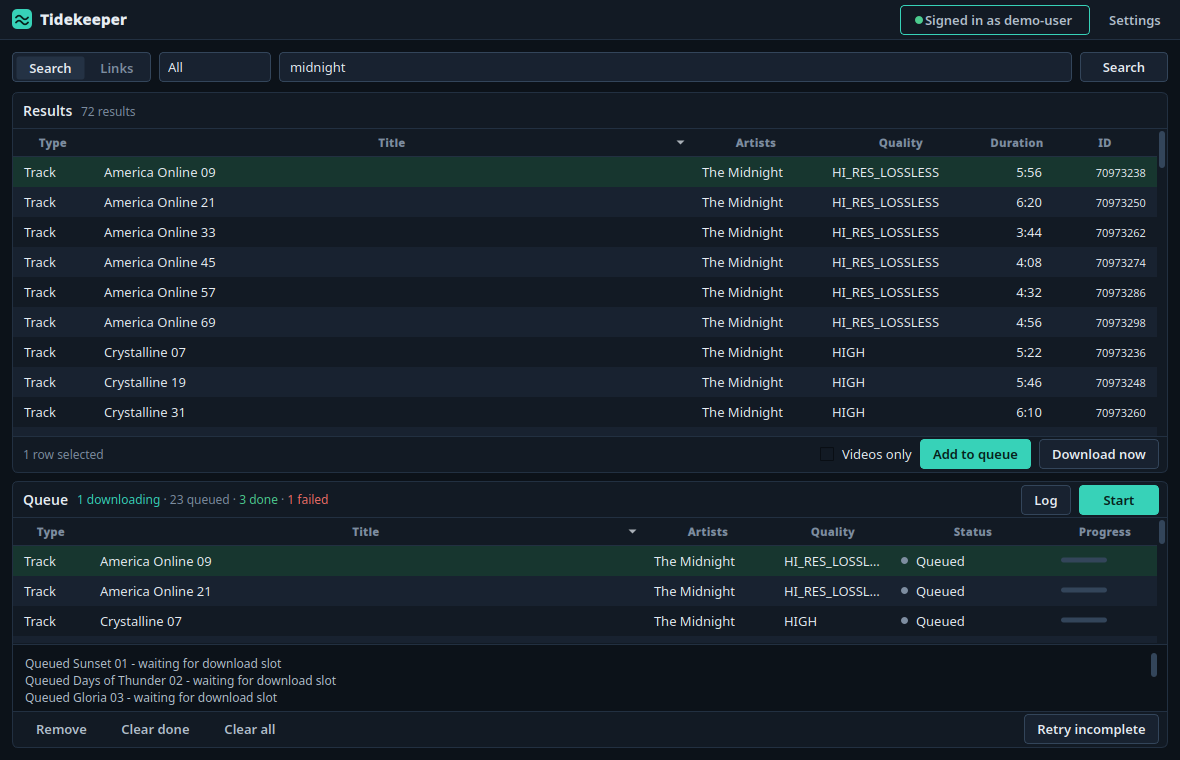
The GUI is a single workspace: find catalog items or paste links at the top,
queue them, and run the queue below. Session and settings open in a side panel
so the queue stays in view. After installing with the GUI extra above, launch it
with tidekeeper-gui or tidekeeper --gui. Update GUI installs with
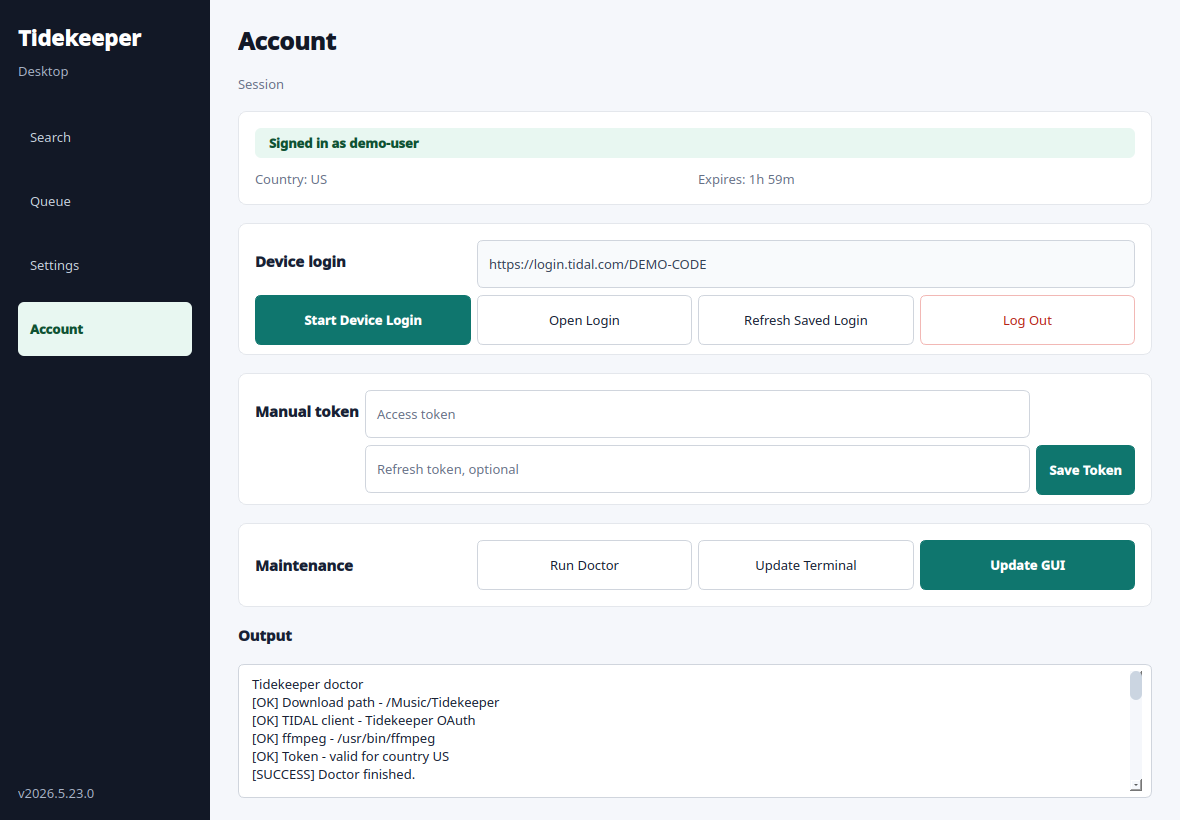
tidekeeper --update-gui or the Update button in the Account panel.
Repeated additions reuse an unfinished queue job, including a pasted link to a catalog result already queued. Clear done removes completed rows; Undo restores the last removal. Retry incomplete retries failed, partial, interrupted, or cancelled jobs. Select a row to read its failure details.
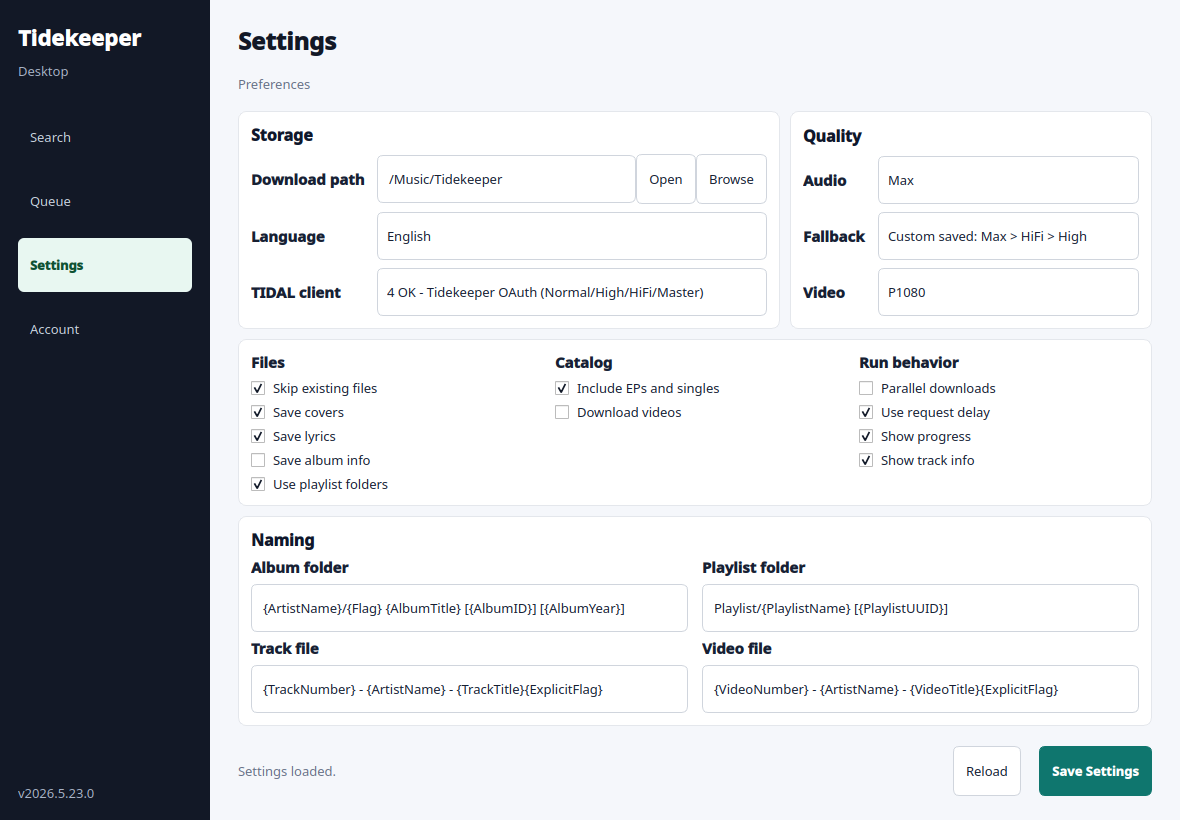
Search can be cancelled while it runs. Settings mark unsaved changes; download options apply to the next run, and Save keeps them after restarting. Changing the TIDAL client requires saving and signing in again. Tables hide secondary columns when space is tight; title tooltips retain the additional information.
Shortcuts: Ctrl+F search, Enter on a result adds it to the queue, Delete
removes queue rows, Ctrl+Z in the queue undoes removal, Ctrl+, opens Settings,
and Esc closes the side panel.
| Settings panel | Account panel |
|---|---|
 |
 |
Troubleshooting
Run diagnostics first:
tidekeeper --doctor
tidekeeper --paths
For repeated HTTP 429 errors, keep Use request delay enabled and raise
Request delay seconds to 30 or 60 before retrying.
If doctor warns that ffmpeg is missing, install it from your OS package manager (or use the Docker image). Video downloads and FLAC remux may otherwise be limited.
If Termux reports cannot locate symbol "x265_api_get_216", refresh its media
packages with pkg upgrade -y && pkg reinstall -y ffmpeg x265. If that fails,
change mirrors with termux-change-repo and retry.
Development
See CONTRIBUTING.md for setup and checks, CHANGELOG.md for release history, and SECURITY.md for private vulnerability reporting.
git clone https://github.com/OpenNerdz/tidekeeper.git
cd tidekeeper/TIDALDL-PY
python -m pip install -e .
python -m unittest discover -s tests
Build release artifacts with ./build.sh from the repository root.
Project policy
Tidekeeper does not aim to bypass access controls, subscription checks, or DRM. Use it only where permitted by law and applicable service terms. This project is not affiliated with or endorsed by TIDAL or Block, Inc.
The original project was created by YaronH and contributors. See NOTICE and LICENSE for attribution and licensing.
1 maintainer

Release files for tidekeeper 2026.9.9.1
For a detailed explanation of source distributions (sdists) and built distributions (wheels), please see the package formats documentation.
Source distribution (sdist)
| File | Size | Uploaded | |
|---|---|---|---|
| tidekeeper-2026.9.9.1.tar.gz | 169.7 kB | Details |
Built distribution (wheel)
| File | Interpreter | ABI | Platform | Reset |
|---|---|---|---|---|
| tidekeeper-2026.9.9.1-py3-none-any.whl | Python 3 | none | any | Details |
Total release size: 316.3 kB
Release files / tidekeeper-2026.9.9.1.tar.gz
| Download URL | tidekeeper-2026.9.9.1.tar.gz |
|---|---|
| Size | 169.7 kB |
| Tags | Source |
|
SHA-256 checksum How to use checksums |
e3e48cc20dbd97079229b35818764eb3ec755ba55b8f966b7f7362313d527361
|
|
BLAKE2b-256 checksum How to use checksums |
234a57aa1809a5960181049a2df6240ee16e9bb822250ed81a9f88be1fea082f
|
| Upload date | |
|
Uploaded using Trusted Publishing? What is trusted publishing? |
No |
| Uploaded via |
twine/7.0.0 CPython/3.13.14
|
Release files / tidekeeper-2026.9.9.1-py3-none-any.whl
| Download URL | tidekeeper-2026.9.9.1-py3-none-any.whl |
|---|---|
| Size | 146.6 kB |
| Tags | Python 3 |
|
SHA-256 checksum How to use checksums |
dca903494c25012b753af61bf3dcf4122304002747bc82621ac58d55a7abe9b8
|
|
BLAKE2b-256 checksum How to use checksums |
bed052a04be9a8e96a95a75c7c6a76e19a695447dbd083929f076556e879b34f
|
| Upload date | |
|
Uploaded using Trusted Publishing? What is trusted publishing? |
No |
| Uploaded via |
twine/7.0.0 CPython/3.13.14
|














