
Tiny8





From bare-metal computer architecture to Generative AI — an educational 8-bit AVR RISC CPU simulator with real-time interactive visualization
Tiny8 is a lightweight educational toolkit that bridges bare-metal computer architecture and modern Generative AI. Designed for hands-on learning and experimentation, it guides you through the full stack of computing — from 32 general-purpose registers, ALU operations, stack frames, and C compilation up to executing an iterative reverse-diffusion model synthesizing 28x28 MNIST digits directly on an AVR 8-bit RISC processor. With an interactive Vim-inspired terminal debugger, time-travel reverse execution, and a 32x32 TrueColor memory heatmap, Tiny8 lets you see, step through, and understand computation at every level.
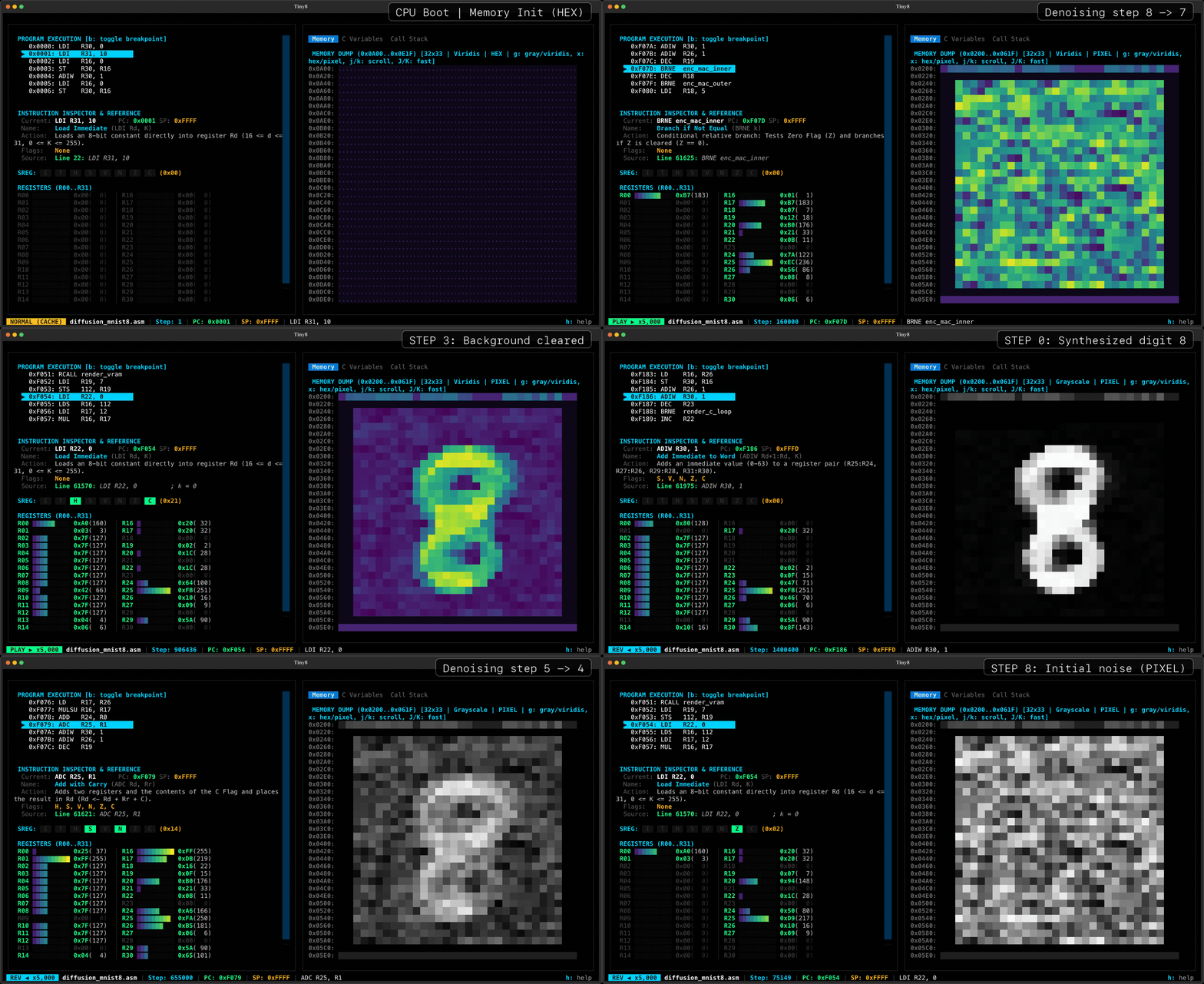
Real-time generative reverse-diffusion synthesis (MNIST digit 8) executing at x5,000 speed in Tiny8 TUI (HEX mode for weight/LFSR init → PIXEL mode for reverse denoising trajectory)
Features
Modern Textual TUI Debugger & Dashboard
- Reactive Terminal Dashboard: Real-time panels with gradient heatmap bars, SREG condition timeline, call stack, and memory dump
- Bottom statusline: High-contrast mode badges (
NORMAL,RUNNING,INSERT,COMMAND), file progress, and key hints (h: help) - Interactive controls: Step forward/back (
n/p), continue (c), toggle breakpoint (b), play/pause (Space), speed control (+/-), TUI application help guide (h/?), and instruction inspector modal (i) - Seamless Vim Editor: Press
eanytime to jump into the built-in editor, modify code, and hit:runto debug
Built-in Vim-Style Modal Editor
- Standalone file creation & editing: Run
tiny8ortiny8 my_prog.cto create and edit files directly inside the terminal - Complete Vim modes:
NORMAL:h/j/k/lmovement,w/bword jump,0/$line limits,gg/Gbounds,xdelete char,dddelete line,yyyank,ppaste,uundo,Ctrl+rredoINSERT: Full typing with syntax highlighting, line numbers, and<Esc>to return to normal modeCOMMAND(:)::w(save),:w <file>,:q(exit),:wq/:x(save and run),:run(compile/assemble and launch debugger),:e <file>(switch file)
32x32 Heatmap Memory Dump & Diffusion Synthesis
- 32x32 Heatmap Memory Grid (1024 Bytes): TrueColor gradient heatmap background mapped directly to memory (
0x0200..0x05FFVRAM default), rendering 28x28 MNIST handwritten digits directly inside the memory dump with 1:1 pixel aspect ratio. - Embedded Generative AI: Iterative reverse-diffusion synthesis generating MNIST digits on Tiny8 AVR CPU (
tiny8 examples/diffusion_mnist8.asm). - Viridis & Grayscale Palettes: Supports both colorful Viridis heatmap and realistic MNIST Grayscale pixel display modes (toggle with
gfor gray/viridis andxfor hex/pixel). - Sample Programs: Native 28x28 diffusion generation (
tiny8 examples/diffusion_mnist8.asm) showcasing real-time image synthesis on the 32x32 VRAM heatmap monitor.
Built-in C Compiler & Extensions
- Compile and run C programs directly: Write C code (
.c) and execute on Tiny8 (tiny8 program.c) - Enhanced C features: Character literals (
'A','#'), string literals, fixed-size arrays (int arr[4];),forloops,break;, logical&&and||, function calls,peek()/poke(), and VRAM helpers (vram_set,vram_get,vram_puts,vram_clear) - Compile-to-assembly inspection: Generate and inspect clean Tiny8 assembly with
-cflag
Optimized AVR Instruction Set
- Extended SRAM Addressing:
LDS Rd, k(Load Direct from SRAM) andSTS k, Rr(Store Direct to SRAM) for direct 16-bit address access - 16-bit Pointer Pairs: Full support for pointer pairs
Z (R31:R30),X (R27:R26), andY (R29:R28)withLDandSTacross the entire 64KB address space
Complete 8-bit Architecture
- 32 general-purpose registers (R0-R31)
- 8-bit ALU with arithmetic, logical, and bit manipulation operations
- Status register (SREG) with 8 condition flags
- 64KB address space for unified memory and I/O
- Stack operations with dedicated stack pointer
- AVR instruction set with 67 instructions compliant with Microchip DS40002198A
Educational Focus
- Clean, readable Python implementation
- Comprehensive examples (Fibonacci, bubble sort, factorial, and more)
- Step-by-step execution traces for debugging
- Full API documentation and instruction set reference
Quick Start
Installation
pip install tiny8
Your First Program
Create fibonacci.asm:
; Fibonacci Sequence Calculator
; Calculates the 10th Fibonacci number (F(10) = 55)
; F(0) = 0, F(1) = 1, F(n) = F(n-1) + F(n-2)
;
; Results stored in registers:
; R16 and R17 hold the two most recent Fibonacci numbers

    ldi r16, 0          ; F(0) = 0
    ldi r17, 1          ; F(1) = 1
    ldi r18, 9          ; Counter: 9 more iterations to reach F(10)

loop:
    add r16, r17        ; F(n) = F(n-1) + F(n-2)
    mov r19, r16        ; Save result temporarily
    mov r16, r17        ; Shift: previous = current
    mov r17, r19        ; Shift: current = new result
    dec r18             ; Decrement counter
    brne loop           ; Continue if counter != 0

done:
    jmp done            ; Infinite loop at end
Run it:
tiny8 fibonacci.asm            # Interactive Textual debugger
tiny8 examples/factorial.c     # Run C program directly in debugger
tiny8 examples/factorial.c -c  # Print compiled Tiny8 assembly
Python API
from tiny8 import CPU, assemble_file, compile_c

# Run assembly program
asm = assemble_file("fibonacci.asm")
cpu = CPU()
cpu.load_program(asm)
cpu.run(max_steps=1000)
print(f"Result: R17 = {cpu.read_reg(17)}")

# Or compile and run C code directly!
asm_from_c = compile_c("int main() { return 10 + 32; }")
Why Tiny8?
For Students — Write assembly, see immediate results with visual feedback. Understand how each instruction affects CPU state without abstractions.
For Educators — Interactive demonstrations, easy assignment creation, and generate animations for lectures.
For Hobbyists — Rapid algorithm prototyping at the hardware level with minimal overhead and an extensible, readable codebase.
Documentation
- Full Documentation — Complete API reference and guides
- Instruction Set Reference — All 60+ instructions
- CLI Guide — Terminal debugger keyboard shortcuts
- Examples — Sample programs with explanations
- Contributing — Guidelines for contributors
Interactive CLI Controls
The terminal debugger provides modern modal navigation and inspection capabilities.
Navigation & Execution Shortcuts
n/p— Step forward / backward (+1 / -1)c— Continue run forward until next breakpoint, watchpoint, or program completionC(Shift+C) — Reverse continue run backward until previous breakpoint or watchpointb— Toggle breakpoint at current PCSpace— Play / pause automatic step execution+/-— Increase / decrease playback speedj/k(orJ/K) — Scroll memory dump down / up (by 32-byte line or fast 128-byte page)e— Open full-screen Vim Editor for source coder— Reset execution to step 0h/?— Open TUI application usage & keyboard guide modali— Inspect specification & status details for the currently selected instructionq— Quit debugger
Tabbed Views (Inspector & Telemetry)
- Registers & Memory — Gradient heatmap bars for R0..R31 alongside 32x32 memory dump with TrueColor heatmap background (0x0200..0x05FF VRAM)
- C Variables — Live symbol table tracking C variable names, types, memory addresses, hex/dec values, and update status
- Call Stack — Dynamic function call backtrace reconstructed from execution calls and returns
Command Bar (press :)
:<step>or:goto <step>— Jump directly to step number:b <pc>or:break <pc>— Toggle breakpoint at PC (0x000Eor14):b <pc> if <expr>— Set conditional breakpoint (e.g.:b 10 if R16 == 42,:b 0x12 if mem[0x60] > 0):bcor:clear— Clear all breakpoints and conditional breakpoints:watch <expr>or:w <expr>— Add watchpoint on register, memory address, or condition (e.g.:watch R0,:watch mem[0x60]):unwatch [expr]— Remove watchpoint or clear all watchpoints:mark <name>— Create bookmark for current execution state:'<name>or:goto <name>— Jump to bookmarked step:cor:run— Continue execution to next breakpoint:rcor:rev— Reverse continue execution backward:set R<n> <val>— Live modify register value in current state (e.g.:set R16 42):poke <addr> <val>— Live modify memory value at address (e.g.:poke 0x60 255):exec <instruction>— Mini REPL: assemble and execute an instruction on the fly (e.g.:exec LDI R17, 88):mem <addr>or:m <addr>— Jump memory view to address (0x0060):find <text>— Search forward for instruction:e [file]— Open Vim editor for file:ror:reset— Reset to step 0:hor:help— Show instruction reference modal:qor:quit— Exit tiny8<Esc>— Cancel command bar / close modal dialog
Examples
The examples/ directory contains programs demonstrating key concepts:
| Example | Description |
|---|---|
fibonacci.asm |
Fibonacci sequence using registers |
bubblesort.asm |
Sorting algorithm with memory visualization |
diffusion_mnist8.asm |
Native 28x28 MNIST digit generation using an iterative reverse diffusion process |
find_max.asm |
Finding maximum value in array |
is_prime.asm |
Prime number checking algorithm |
gcd.asm |
Greatest common divisor (Euclidean algorithm) |
Bubble Sort
Sort 32 pseudo-random bytes in ascending order (RAM 0x60..0x7F):
tiny8 examples/bubblesort.asm
Using Python
from tiny8 import CPU, assemble_file

cpu = CPU()
cpu.load_program(assemble_file("examples/bubblesort.asm"))
cpu.run()

print("Sorted:", [cpu.read_ram(i) for i in range(0x60, 0x80)])
CLI Options
Command Syntax
tiny8 [FILE] [OPTIONS]
General Options
| Option | Description |
|---|---|
-v, --version |
Show version and exit |
-e, --edit |
Launch directly into Vim editor mode |
--max-steps N |
Maximum execution steps (default: until infinite loop or halt) |
-c, --compile-only |
Compile C program and print generated Tiny8 assembly without running |
Interactive Controls (Textual TUI)
| Key | Action |
|---|---|
Space |
Play / Pause auto execution |
Shift+Space |
Reverse playback auto execution |
n |
Step forward (+1 instruction) |
p |
Step backward (-1 instruction, time-travel) |
c |
Continue execution forward to next breakpoint |
C (Shift+c) |
Reverse continue backward to previous breakpoint |
b |
Toggle breakpoint on current instruction |
: |
Open command line prompt (e.g. :goto <step>, :b <pc>, :q) |
j / k (or J / K) |
Scroll memory viewport down / up by 32 bytes (or 128-byte fast page) |
g |
Toggle Grayscale / Viridis color palette |
x |
Toggle Hexadecimal digits (02X) / Graphic Pixel blocks |
m |
Cycle view modes (Viridis+Hex -> Viridis+Pixel -> Grayscale+Pixel -> Grayscale+Hex) |
e |
Launch full-screen Vim-style modal editor |
h / ? |
Open TUI Application Usage & Keyboard Guide |
i |
Open Instruction Reference modal (all 67 instructions) |
+ / - |
Increase / Decrease playback speed |
r |
Reset execution back to step 0 |
q |
Quit debugger |
Instruction Set Reference
Tiny8's instruction set strictly adheres to the official Microchip AVR® Instruction Set Manual (DS40002198A). All mnemonics are case-insensitive. Registers are specified as R0–R31, and immediates support decimal, hex (0xFF), and binary (0b11111111) notation.
Data Transfer
| Instruction | Description (DS40002198A) | Operation | Example |
|---|---|---|---|
LDI Rd, K |
Load Immediate | Rd ← K (16 ≤ d ≤ 31) | ldi r16, 42 |
MOV Rd, Rr |
Copy Register | Rd ← Rr | mov r17, r16 |
LD Rd, Rr |
Load Indirect from Data Space | Rd ← (Rr) | ld r18, r26 |
ST Rr, Rs |
Store Indirect to Data Space | (Rr) ← Rs | st r26, r18 |
LDS Rd, k |
Load Direct from Data Space | Rd ← (k) | lds r16, 0x0200 |
STS k, Rr |
Store Direct to Data Space | (k) ← Rr | sts 0x0200, r16 |
IN Rd, P |
Load an I/O Location to Register | Rd ← P | in r16, 0x3F |
OUT P, Rr |
Store Register to an I/O Location | P ← Rr | out 0x3F, r16 |
PUSH Rr |
Push Register on Stack | STACK ← Rr, SP ← SP - 1 | push r16 |
POP Rd |
Pop Register from Stack | SP ← SP + 1, Rd ← STACK | pop r16 |
Arithmetic Operations
| Instruction | Description (DS40002198A) | Operation | Flags | Example |
|---|---|---|---|---|
ADD Rd, Rr |
Add without Carry | Rd ← Rd + Rr | H, S, V, N, Z, C | add r16, r17 |
ADC Rd, Rr |
Add with Carry | Rd ← Rd + Rr + C | H, S, V, N, Z, C | adc r16, r17 |
ADIW Rd, K |
Add Immediate to Word | Rd+1:Rd ← Rd+1:Rd + K | S, V, N, Z, C | adiw r24, 1 |
SUB Rd, Rr |
Subtract without Carry | Rd ← Rd - Rr | H, S, V, N, Z, C | sub r16, r17 |
SUBI Rd, K |
Subtract Immediate | Rd ← Rd - K | H, S, V, N, Z, C | subi r16, 10 |
SBC Rd, Rr |
Subtract with Carry | Rd ← Rd - Rr - C | H, S, V, N, Z, C | sbc r16, r17 |
SBCI Rd, K |
Subtract Immediate with Carry | Rd ← Rd - K - C | H, S, V, N, Z, C | sbci r16, 5 |
SBIW Rd, K |
Subtract Immediate from Word | Rd+1:Rd ← Rd+1:Rd - K | S, V, N, Z, C | sbiw r24, 1 |
INC Rd |
Increment | Rd ← Rd + 1 | S, V, N, Z | inc r16 |
DEC Rd |
Decrement | Rd ← Rd - 1 | S, V, N, Z | dec r16 |
MUL Rd, Rr |
Multiply Unsigned | R1:R0 ← Rd × Rr | Z, C | mul r16, r17 |
MULS Rd, Rr |
Multiply Signed | R1:R0 ← Rd × Rr (signed) | Z, C | muls r16, r17 |
MULSU Rd, Rr |
Multiply Signed with Unsigned | R1:R0 ← Rd × Rr (Rd signed, Rr unsigned) | Z, C | mulsu r16, r17 |
NEG Rd |
Two's Complement Negation | Rd ← 0x00 - Rd | H, S, V, N, Z, C | neg r16 |
Logical & Bit Operations
| Instruction | Description (DS40002198A) | Operation | Flags | Example |
|---|---|---|---|---|
AND Rd, Rr |
Logical AND | Rd ← Rd · Rr | S, V=0, N, Z | and r16, r17 |
ANDI Rd, K |
Logical AND with Immediate | Rd ← Rd · K | S, V=0, N, Z | andi r16, 0x0F |
OR Rd, Rr |
Logical OR | Rd ← Rd ∨ Rr | S, V=0, N, Z | or r16, r17 |
ORI Rd, K |
Logical OR with Immediate | Rd ← Rd ∨ K | S, V=0, N, Z | ori r16, 0x80 |
EOR Rd, Rr |
Exclusive OR | Rd ← Rd ⊕ Rr | S, V=0, N, Z | eor r16, r17 |
COM Rd |
One's Complement | Rd ← 0xFF - Rd | S, V=0, N, Z, C=1 | com r16 |
CLR Rd |
Clear Register (Alias: EOR Rd, Rd) | Rd ← Rd ⊕ Rd | S=0, V=0, N=0, Z=1 | clr r16 |
SER Rd |
Set Register (Alias: LDI Rd, 0xFF) | Rd ← 0xFF | None | ser r16 |
TST Rd |
Test for Zero or Minus (Alias: AND Rd, Rd) | Rd ← Rd · Rd | S, V=0, N, Z | tst r16 |
SWAP Rd |
Swap Nibbles | Rd(7..4) ↔ Rd(3..0) | None | swap r16 |
SBI P, b |
Set Bit in I/O Register | I/O(P, b) ← 1 | None | sbi 0x18, 3 |
CBI P, b |
Clear Bit in I/O Register | I/O(P, b) ← 0 | None | cbi 0x18, 3 |
Shifts & Rotates
| Instruction | Description (DS40002198A) | Operation | Flags | Example |
|---|---|---|---|---|
LSL Rd |
Logical Shift Left (Alias: ADD Rd, Rd) | Rd ← Rd ≪ 1 | H, S, V, N, Z, C | lsl r16 |
LSR Rd |
Logical Shift Right | 0 → Rd7 … Rd0 → C | S, V, N, Z, C | lsr r16 |
ASR Rd |
Arithmetic Shift Right | Rd7 → Rd7 … Rd0 → C | S, V, N, Z, C | asr r16 |
ROL Rd |
Rotate Left through Carry (Alias: ADC Rd, Rd) | C ← Rd7 … Rd0 ← C | H, S, V, N, Z, C | rol r16 |
ROR Rd |
Rotate Right through Carry | C → Rd7 … Rd0 → C | S, V, N, Z, C | ror r16 |
Control Flow & Branches
| Instruction | Description (DS40002198A) | Condition / Target | Flags | Example |
|---|---|---|---|---|
JMP k |
Jump | PC ← k | None | jmp loop |
RJMP k |
Relative Jump | PC ← PC + k + 1 | None | rjmp -5 |
CALL k |
Long Call to Subroutine | STACK ← PC + 1, PC ← k | None | call function |
RCALL k |
Relative Call to Subroutine | STACK ← PC + 1, PC ← PC + k + 1 | None | rcall -10 |
RET |
Return from Subroutine | PC ← STACK | None | ret |
RETI |
Return from Interrupt | PC ← STACK, I ← 1 | I | reti |
BREQ k |
Branch if Equal | Z = 1 | None | breq done |
BRNE k |
Branch if Not Equal | Z = 0 | None | brne loop |
BRCS k |
Branch if Carry Set | C = 1 | None | brcs overflow |
BRCC k |
Branch if Carry Clear | C = 0 | None | brcc no_carry |
BRLO k |
Branch if Lower (Unsigned) | C = 1 (Alias for BRCS) | None | brlo lower |
BRSH k |
Branch if Same or Higher (Unsigned) | C = 0 (Alias for BRCC) | None | brsh same_or_higher |
BRGE k |
Branch if Greater or Equal (Signed) | S = 0 (N ⊕ V = 0) | None | brge positive |
BRLT k |
Branch if Less Than (Signed) | S = 1 (N ⊕ V = 1) | None | brlt negative |
BRMI k |
Branch if Minus | N = 1 | None | brmi negative |
BRPL k |
Branch if Plus | N = 0 | None | brpl positive |
Compare & Skip Instructions
| Instruction | Description (DS40002198A) | Operation | Flags | Example |
|---|---|---|---|---|
CP Rd, Rr |
Compare | Rd - Rr | H, S, V, N, Z, C | cp r16, r17 |
CPI Rd, K |
Compare with Immediate | Rd - K | H, S, V, N, Z, C | cpi r16, 42 |
CPSE Rd, Rr |
Compare Skip if Equal | Skip next if Rd = Rr | None | cpse r16, r17 |
SBRS Rd, b |
Skip if Bit in Register is Set | Skip next if Rd(b) = 1 | None | sbrs r16, 7 |
SBRC Rd, b |
Skip if Bit in Register is Cleared | Skip next if Rd(b) = 0 | None | sbrc r16, 7 |
SBIS P, b |
Skip if Bit in I/O Register is Set | Skip next if I/O(P, b) = 1 | None | sbis 0x16, 3 |
SBIC P, b |
Skip if Bit in I/O Register is Cleared | Skip next if I/O(P, b) = 0 | None | sbic 0x16, 3 |
MCU Control
| Instruction | Description (DS40002198A) | Operation | Flags | Example |
|---|---|---|---|---|
NOP |
No Operation | None | None | nop |
SEI |
Set Global Interrupt Flag | I ← 1 | I | sei |
CLI |
Clear Global Interrupt Flag | I ← 0 | I | cli |
Status Register (SREG) Flags
The 8-bit Status Register (SREG) contains condition flags updated by ALU instructions according to exact formulas defined in DS40002198A:
| Bit | Flag | Name | DS40002198A Formula & Meaning |
|---|---|---|---|
| 7 | I | Global Interrupt Enable | Set by SEI, cleared by CLI |
| 6 | T | Bit Copy Storage | Bit copy buffer for BST / BLD |
| 5 | H | Half Carry Flag | Carry/borrow between bit 3 and bit 4 (BCD arithmetic) |
| 4 | S | Sign Bit | True algebraic sign test: S = N ⊕ V |
| 3 | V | Two's Complement Overflow | Set when signed arithmetic overflows range [-128, +127] |
| 2 | N | Negative Flag | Set if MSB is 1 (N = R7) |
| 1 | Z | Zero Flag | Set if result is zero (R == 0) |
| 0 | C | Carry / Borrow Flag | Unsigned carry from MSB (R7) or borrow |
Flags are used for conditional branching and tracking arithmetic results.
Assembly Syntax Notes
- Comments: Use
;for line comments - Labels: Must end with
:(e.g.,loop:) - Registers: Case-insensitive R0-R31 (r16, R16 equivalent)
- Immediates: Decimal (42), hex (0x2A), binary (0b00101010)
- Whitespace: Flexible indentation, spaces/tabs interchangeable
Architecture Overview
CPU Components
- 32 General-Purpose Registers (R0-R31) — 8-bit working registers
- Program Counter (PC) — 16-bit, addresses up to 64KB
- Stack Pointer (SP) — 16-bit, grows downward from high memory
- Status Register (SREG) — 8 condition flags (I, T, H, S, V, N, Z, C)
- 64KB Address Space — Unified memory for RAM and I/O
Memory Map
0x0000 - 0x001F    General-Purpose Registers (R0 - R31) / System Reserved
0x0020 - 0x005F    I/O Registers (64 ports: 0x00 - 0x3F via IN/OUT)
0x0060 - 0x01FF    User SRAM (general variables & arrays start at 0x0060)
0x0200 - 0x05FF    32x32 Heatmap VRAM (1,024 bytes, writable visual memory)
0x0600 - 0xFFFF    Extended User SRAM (general data, heap & downward-growing stack)
Testing
pytest                                    # Run all tests
pytest --cov=src/tiny8 --cov-report=html  # With coverage
pytest tests/test_arithmetic.py           # Specific test file
Contributing
Contributions welcome! See CONTRIBUTING.md for guidelines.
Areas for contribution: New instructions, example programs, documentation, visualizations, performance optimizations.
License
MIT License — see LICENSE for details.
Support
- Issues: GitHub Issues
- Discussions: GitHub Discussions
- Documentation: sql-hkr.github.io/tiny8
Made for learners, educators, and curious minds
Star the repo if you find it useful!
1 maintainer

Metadata
1 maintainer
Release files for tiny8 0.3.0
For a detailed explanation of source distributions (sdists) and built distributions (wheels), please see the package formats documentation.
Source distribution (sdist)
| File | Size | Uploaded | Provenance | Actions |
|---|---|---|---|---|
| tiny8-0.3.0.tar.gz | 58.0 kB | With provenance | Details for tiny8-0.3.0.tar.gz |
Built distribution (wheel)
| File | Interpreter | ABI | Platform | Actions Reset |
|---|---|---|---|---|
| tiny8-0.3.0-py3-none-any.whl | Python 3 | none | any | Details for tiny8-0.3.0-py3-none-any.whl |
Total release size: 118.3 kB
Release files / tiny8-0.3.0.tar.gz
| Download URL | tiny8-0.3.0.tar.gz |
|---|---|
| Size | 58.0 kB |
| Tags | Source |
|
SHA-256 checksum How to use checksums |
66b3528cd3afc2eb53a794600600bc5452cb4771834206cc3b52c9c07e9677f8
|
|
BLAKE2b-256 checksum How to use checksums |
58c2903400176e360b910f970ec1a98e59488dc3b8b31fd575f03873ac9e64cb
|
| Upload date | |
|
Uploaded using Trusted Publishing? What is trusted publishing? |
Yes |
| Uploaded via |
twine/7.0.0 CPython/3.13.16
|
Provenance
Provenance describes where a file came from. On PyPI, provenance is shared via attestations, which provide a verifiable record of the build or publishing details. View details, limitations and caveats.


PyPI Publish Attestation
PyPI verified that this artifact, at this checksum, originated from the publisher listed below.
Signed by GitHub Actions, verified by PyPI on Oct 24, 2026.
Transparency logRelease files / tiny8-0.3.0-py3-none-any.whl
| Download URL | tiny8-0.3.0-py3-none-any.whl |
|---|---|
| Size | 60.3 kB |
| Tags | Python 3 |
|
SHA-256 checksum How to use checksums |
50a337fabc662395e0deebc04ad3ea64b38d63e604890993d6e47aab5eafdb49
|
|
BLAKE2b-256 checksum How to use checksums |
ad6c1af6ae11b4499e3b421e219f43c98b196ca683622e7a928f5d6aa8dd69c5
|
| Upload date | |
|
Uploaded using Trusted Publishing? What is trusted publishing? |
Yes |
| Uploaded via |
twine/7.0.0 CPython/3.13.16
|
Provenance
Provenance describes where a file came from. On PyPI, provenance is shared via attestations, which provide a verifiable record of the build or publishing details. View details, limitations and caveats.
PyPI Publish Attestation
PyPI verified that this artifact, at this checksum, originated from the publisher listed below.
Signed by GitHub Actions, verified by PyPI on Oct 24, 2026.
Transparency logSecurity for tiny8 0.3.0
Provenance
Provenance describes where a file came from. On PyPI, provenance is shared via attestations, which provide a verifiable record of the build or publishing details. View details, limitations and caveats.
Full provenance
Both files in this release have been uploaded with provenance metadata.
Attestation for tiny8-0.3.0.tar.gz
PyPI Publish Attestation
PyPI verified that this artifact, at this checksum, originated from the publisher listed below.
Signed by GitHub Actions, verified by PyPI on Oct 24, 2026.
Transparency logA note on package security
PyPI is a repository for distributing packages, not a service for auditing them. While third-party security researchers and our staff do their best to detect and remove malicious packages, PyPI cannot guarantee the quality, security or suitability of any given package.
To learn more about protecting yourself from malicious actors, visit our package security documentation.














