
TissueViewer
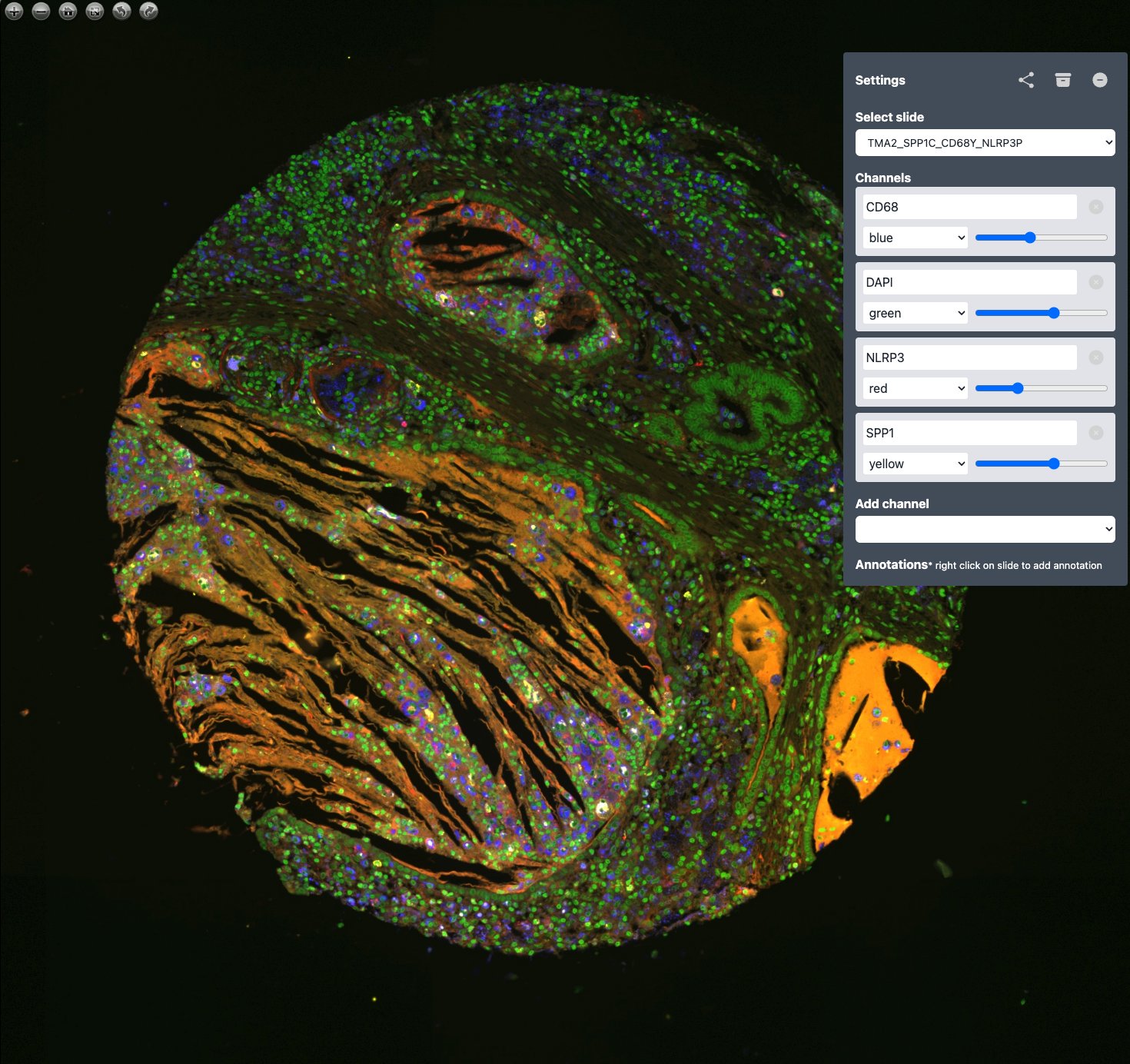
Standalone multi-channel OME-TIFF viewer with a built-in web UI.
Point it at a file or a folder and open your browser.
Contents
- What it is
- Supported formats
- Installation
- Quick start
- Command-line reference
- Environment variables
- Configuration file
- Filename conventions
- Programmatic use
- Troubleshooting
- Development
- Docker migration
- License
- Acknowledgements
What it is
TissueViewer is a zero-config viewer for high-resolution multi-channel microscopy images. It serves deep-zoom tiles over HTTP and ships with a pre-built OpenSeadragon front-end that lets you colourise channels, adjust gains and windowing, and save per-slide settings.
Supported formats
- OME-TIFF (
.ome.tif,.ome.tiff) — any bit depth, any number of channels, with or without a built-in pyramid.
Support for additional formats (plain TIFF, OME-Zarr) is planned as
pluggable handlers; see src/tissueviewer/formats/ for the registry.
Installation
pip install tissueviewer
Or from a source checkout:
git clone https://github.com/davidvi/tissueviewer.git
cd tissueviewer
pip install .
Requires Python 3.10 or later. On macOS / Linux / Windows.
Quick start
Open a single file:
tissueviewer /path/to/slide.ome.tiff
Browse a folder of slides (root folder becomes the public location):
tissueviewer /path/to/slides
Browse a nested tree of folders:
tissueviewer /path/to/slides --recursive --open
Use a config file:
tissueviewer --config config.yaml
Check every file in a directory can be opened, then exit:
tissueviewer /path/to/slides --validate
Command-line reference
usage: tissueviewer [TARGET] [options]

positional:
  TARGET                Path to an .ome.tif(f) file or a directory of them.

options:
  -r, --recursive       Include nested subdirectories.
  -c, --config FILE     YAML configuration file.
  -p, --port N          Listen port (default 8000).
  -H, --host HOST       Bind address (default 127.0.0.1).
  -o, --open            Open the default web browser after start.
  -w, --watch           Rescan TARGET on filesystem changes.
      --validate        Verify every OME-TIFF, then exit.
      --no-save         Disable writing .sample.json sidecars.
      --log-level LEVEL DEBUG | INFO | WARNING | ERROR  (default INFO).
  -V, --version         Show version and exit.
  -h, --help            Show help and exit.
TARGET is optional if either --config is given or TV_SLIDE_DIR is set.
Environment variables
Kept for backward compatibility with the Docker deployment. CLI and config values take precedence.
| Variable | Effect |
|---|---|
TV_SLIDE_DIR |
Default data directory (equivalent to positional TARGET). |
TV_HOST |
Default bind address. |
TV_PORT |
Default listen port. |
TV_SAVE |
false/0/no disables sample.json writes. |
TV_LOG_LEVEL |
Default log level. |
Configuration file
# config.yaml
data_dir: /srv/tissue-viewer/slides
recursive: true
host: 0.0.0.0
port: 8000
save_enabled: false
log_level: INFO
colors:
  - red
  - green
  - blue
tissueviewer --config config.yaml
Precedence (highest wins): CLI flags → environment variables → YAML → built-in defaults.
Filename conventions
All recognized slide files end in .ome.tif or .ome.tiff (case-insensitive).
For a slide named patient42.ome.tiff, two sidecar files may appear next
to it:
| File | Who writes it | Purpose |
|---|---|---|
patient42.sample.json |
the web UI | Per-slide channel colours / gains / annotations. |
patient42.metadata.json |
TissueViewer itself | Cache of OME-XML metadata; regenerated on mtime. |
Delete them freely to reset.
Locations
The web UI groups slides into locations. The mapping:
- Single-file mode → the file lives under the
publiclocation. - Directory mode (no
--recursive) → files at the root →public; every immediate subdirectory → its own location named after the subdirectory. - Directory mode with
--recursive→ files at the root still go topublic; files in nested subdirectories are grouped under a slash-joined location path like2024/batch_A.
Programmatic use
create_app builds a regular FastAPI instance, suitable for any ASGI
server (uvicorn, hypercorn, daphne).
from tissueviewer import Config, create_app

app = create_app(Config(data_dir="/srv/slides", recursive=True))
uvicorn my_module:app --host 0.0.0.0 --port 8000
Troubleshooting
<COMPRESSION.LZW: 5> requires the 'imagecodecs' package(or the same for JPEG) —imagecodecsis missing. Slides open and the.dzimanifest loads, but every tile returns HTTP 500 and the slide renders blank. Other slides in the same library keep working, so this often appears only when the first LZW slide arrives — uncompressed slides are unaffected, and Deflate, PackBits and Zstd are decoded bytifffileitself. Install it withpip install imagecodecs.imagecodecsis a declared dependency, so this normally means the package is being run from a source checkout (e.g. viaPYTHONPATH) that was neverpip installed. The server logs a warning at startup when it is absent, andtissueviewer --validatereports the affected files.- Port already in use —
tissueviewer --port 8001. - Blank tiles / wrong colours — delete the slide's
.sample.jsonto reset settings, then reload. - Apple Silicon wheels —
imagecodecsandopencv-python-headlessship arm64 wheels; no local build required. - Zarr 2 vs 3 — both are supported. The pin is
zarr>=2.15,<4. - OpenCV GUI warning —
tissueviewerdepends onopencv-python-headless; a warning aboutcv2.imshownot being available is normal and harmless.
Development
See CONTRIBUTING.md for local setup, how to rebuild the Vue UI, and how to cut a release.
Docker migration
TissueViewer used to ship as a Docker image with a Java-based
bioformats2raw conversion pipeline. That mode is gone in 0.2; see
MIGRATION.md for guidance.
License
Creative Commons Attribution-NonCommercial 4.0 International — see LICENSE.md.
Acknowledgements
TissueViewer uses OpenSeadragon for high-performance tiled image visualisation.
1 maintainer

Metadata
1 maintainer
Release files for tissueviewer 0.2.3
For a detailed explanation of source distributions (sdists) and built distributions (wheels), please see the package formats documentation.
Source distribution (sdist)
| File | Size | Uploaded | |
|---|---|---|---|
| tissueviewer-0.2.3.tar.gz | 725.0 kB | Details |
Built distribution (wheel)
| File | Interpreter | ABI | Platform | Reset |
|---|---|---|---|---|
| tissueviewer-0.2.3-py3-none-any.whl | Python 3 | none | any | Details |
Total release size: 1.5 MB
Release files / tissueviewer-0.2.3.tar.gz
| Download URL | tissueviewer-0.2.3.tar.gz |
|---|---|
| Size | 725.0 kB |
| Tags | Source |
|
SHA-256 checksum How to use checksums |
ea3793f909465ebd2a5bd49619fdc40a697669ff8182fc6278540d2ff755f3e9
|
|
BLAKE2b-256 checksum How to use checksums |
ebb8477589daffdc53ee47920f95ae99ff63329d1fecc9e3d5beb240de97f0ae
|
| Upload date | |
|
Uploaded using Trusted Publishing? What is trusted publishing? |
Yes |
| Uploaded via |
twine/7.0.0 CPython/3.13.14
|
Provenance
Provenance describes where a file came from. On PyPI, provenance is shared via attestations, which provide a verifiable record of the build or publishing details. View details, limitations and caveats.


PyPI Publish Attestation
PyPI verified that this artifact, at this checksum, originated from the publisher listed below.
Signed by GitHub Actions, verified by PyPI on Aug 2, 2026.
Transparency logRelease files / tissueviewer-0.2.3-py3-none-any.whl
| Download URL | tissueviewer-0.2.3-py3-none-any.whl |
|---|---|
| Size | 733.5 kB |
| Tags | Python 3 |
|
SHA-256 checksum How to use checksums |
97b0c9d2aaf0ba3dad38768abd2598cca9c0fce479126377f4881445b09a6649
|
|
BLAKE2b-256 checksum How to use checksums |
ca0c2cb6a521f1b4108c1869d49778d8b10f5791cbae483ada08c38befcc0b95
|
| Upload date | |
|
Uploaded using Trusted Publishing? What is trusted publishing? |
Yes |
| Uploaded via |
twine/7.0.0 CPython/3.13.14
|
Provenance
Provenance describes where a file came from. On PyPI, provenance is shared via attestations, which provide a verifiable record of the build or publishing details. View details, limitations and caveats.
PyPI Publish Attestation
PyPI verified that this artifact, at this checksum, originated from the publisher listed below.
Signed by GitHub Actions, verified by PyPI on Aug 2, 2026.
Transparency log













