
No project description provided


Project description
tljh-repo2docker

TLJH plugin provides a JupyterHub service to build and use Docker images as user environments. The Docker images can be built locally using repo2docker or via the binderhub service.
Requirements
This plugin requires The Littlest JupyterHub 1.0 or later (running on JupyterHub 4+).
Installation
During the TLJH installation process, use the following post-installation script:
#!/bin/bash

# install Docker
sudo apt update && sudo apt install -y apt-transport-https ca-certificates curl software-properties-common
curl -fsSL https://download.docker.com/linux/ubuntu/gpg | sudo apt-key add -
sudo add-apt-repository -y "deb [arch=amd64] https://download.docker.com/linux/ubuntu bionic stable"
sudo apt update && sudo apt install -y docker-ce

# pull the repo2docker image
sudo docker pull quay.io/jupyterhub/repo2docker:main

# install TLJH 1.0
curl https://tljh.jupyter.org/bootstrap.py
  | sudo python3 - \
    --version 1.0.0 \
    --admin test:test \
    --plugin tljh-repo2docker
Refer to The Littlest JupyterHub documentation for more info on installing TLJH plugins.
Configuration
This Python package is designed for deployment as a service managed by JupyterHub. The service runs its own Tornado server. Requests will be forwarded to it by the JupyterHub internal proxy from the standard URL https://{my-hub-url}/services/my-service/.
The available settings for this service are:
port: Port of the service; defaults to 6789ip: Internal IP of the service; defaults to 127.0.0.1default_memory_limit: Default memory limit of a user server; defaults toNonedefault_cpu_limit: Default CPU limit of a user server; defaults toNonemachine_profiles: Instead of entering directly the CPU and Memory value,tljh-repo2dockercan be configured with pre-defined machine profiles and users can only choose from the available option; defaults to[]binderhub_url: The optional URL of thebinderhubservice. If it is available,tljh-repo2dockerwill use this service to build images.db_url: The connection string of the database.tljh-repo2dockerneeds a database to store the image metadata. By default, it will create asqlitedatabase in the starting directory of the service. To use other databases (PostgreSQLorMySQL), users need to specify the connection string via this config and install the additional drivers (asyncpgoraiomysql).
This service requires the following scopes : read:users, admin:servers and read:roles:users. If binderhub service is used, access:services!service=binderis also needed. Here is an example of registering tljh_repo2docker's service with JupyterHub
# jupyterhub_config.py

from tljh_repo2docker import TLJH_R2D_ADMIN_SCOPE
import sys

c.JupyterHub.services.extend(
    [
        {
            "name": "tljh_repo2docker",
            "url": "http://127.0.0.1:6789", # URL must match the `ip` and `port` config
            "command": [
                sys.executable,
                "-m",
                "tljh_repo2docker",
                "--ip",
                "127.0.0.1",
                "--port",
                "6789"
            ],
            "oauth_no_confirm": True,
        }
    ]
)
# Set required scopes for the service and users
c.JupyterHub.load_roles = [
    {
        "description": "Role for tljh_repo2docker service",
        "name": "tljh-repo2docker-service",
        "scopes": [
            "read:users",
            "read:roles:users",
            "admin:servers",
            "access:services!service=binder",
        ],
        "services": ["tljh_repo2docker"],
    },
    {
        "name": "user",
        "scopes": [
            "self",
            # access to the serve page
            "access:services!service=tljh_repo2docker",
        ],
    },
]
By default, only users with an admin role can access the environment builder page and APIs, by leveraging the RBAC system of JupyterHub, non-admin users can also be granted the access right.
Here is an example of the configuration
# jupyterhub_config.py

from tljh_repo2docker import TLJH_R2D_ADMIN_SCOPE
import sys

c.JupyterHub.services.extend(
    [
        {
            "name": "tljh_repo2docker",
            "url": "http://127.0.0.1:6789",
            "command": [
                sys.executable,
                "-m",
                "tljh_repo2docker",
                "--ip",
                "127.0.0.1",
                "--port",
                "6789"
            ],
            "oauth_no_confirm": True,
            "oauth_client_allowed_scopes": [
                TLJH_R2D_ADMIN_SCOPE, # Allows this service to check if users have its admin scope.
            ],
        }
    ]
)

c.JupyterHub.custom_scopes = {
    TLJH_R2D_ADMIN_SCOPE: {
        "description": "Admin access to tljh_repo2docker",
    },
}

c.JupyterHub.load_roles = [
    ... # Other role settings
    {
        "name": 'tljh-repo2docker-service-admin',
        "users": ["alice"],
        "scopes": [TLJH_R2D_ADMIN_SCOPE],
    },
]
Usage
List the environments
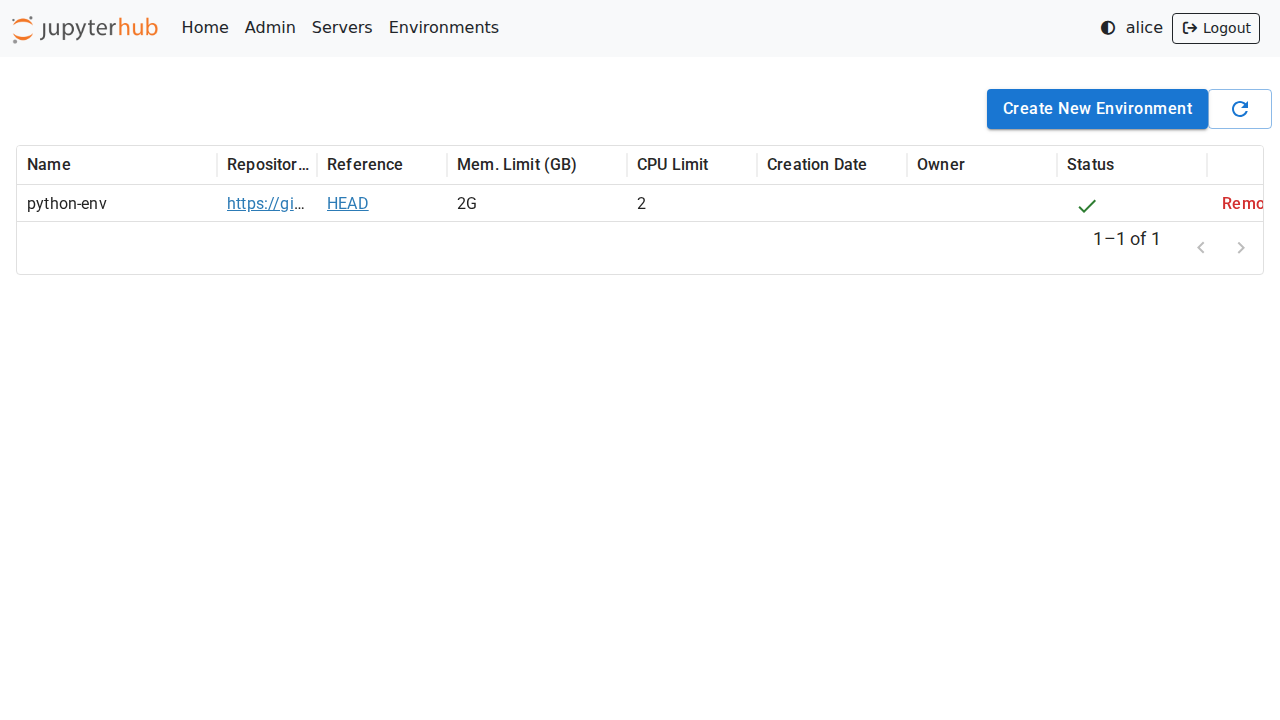
The Environments page shows the list of built environments, as well as the ones currently being built:
Add a new environment
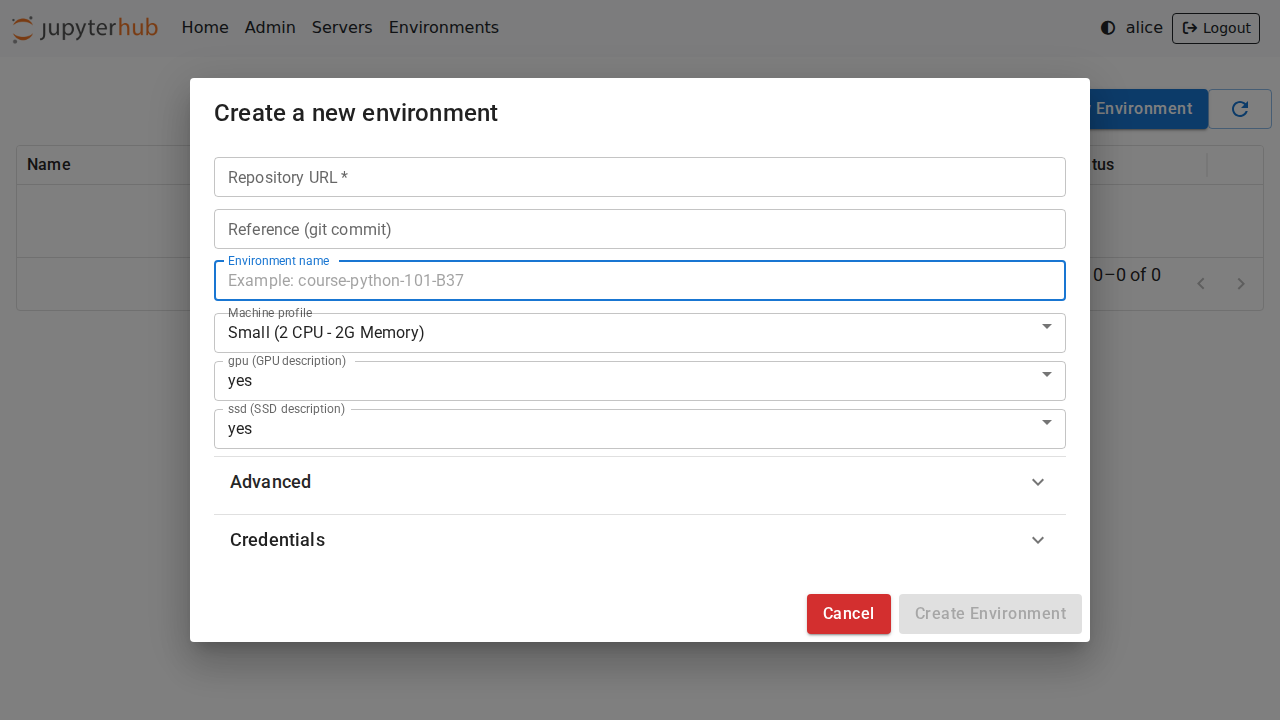
Just like on Binder, new environments can be added by clicking on the Add New button and providing a URL to the repository. Optional names, memory, and CPU limits can also be set for the environment:
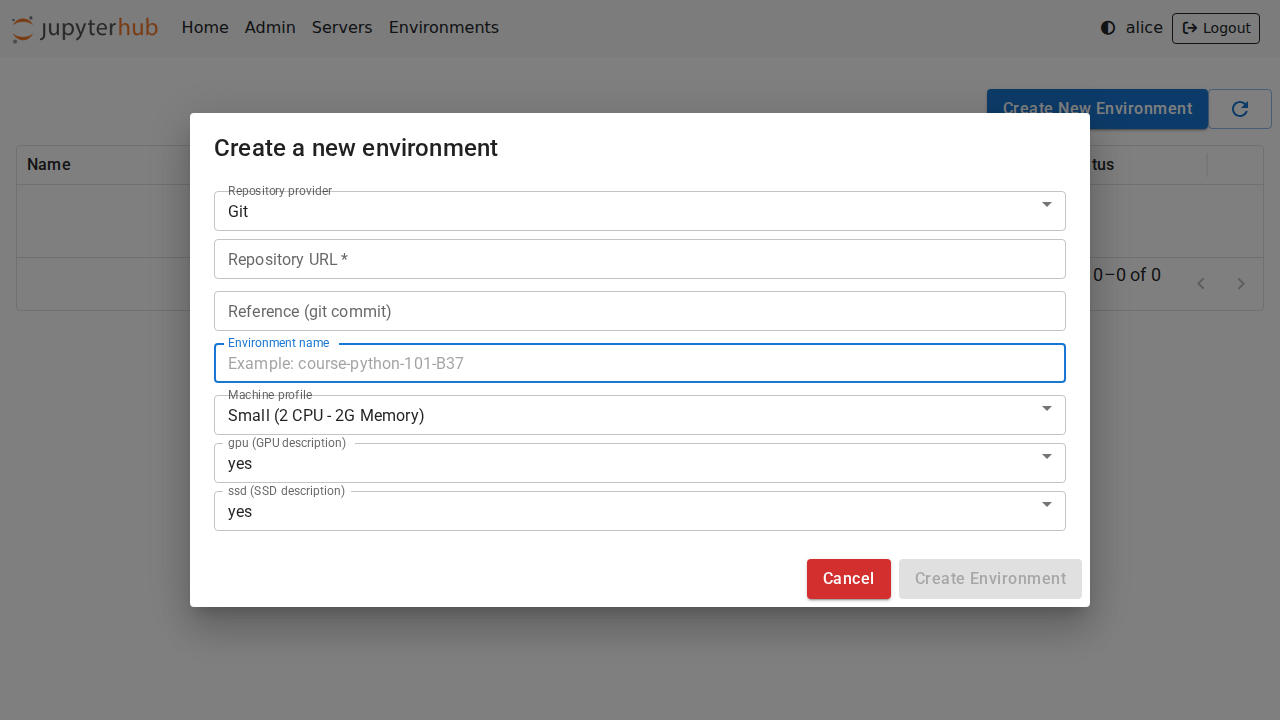
[!NOTE] If the build backend is
binderhubservice, users need to select the repository provider and can not specify the custom build arguments
Follow the build logs
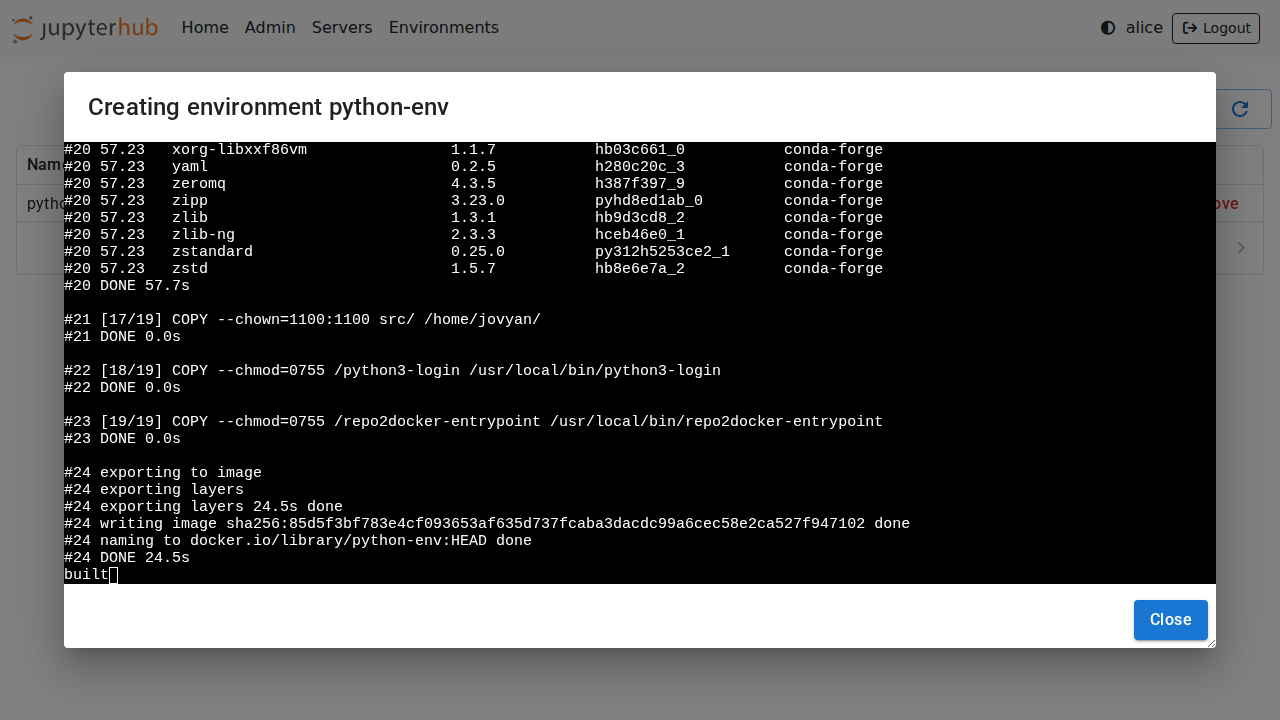
Clicking on the Logs button will open a new dialog with the build logs:
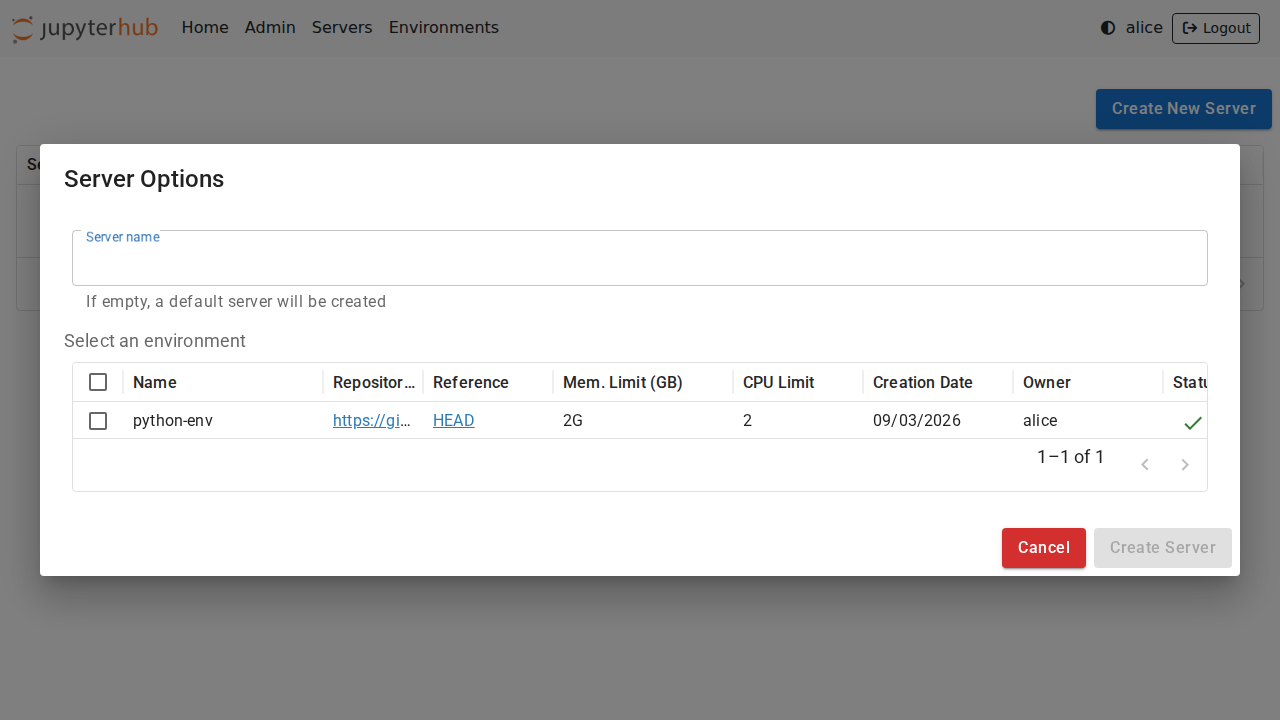
Select an environment
Once ready, the environments can be selected from the JupyterHub spawn page:
Private Repositories
tljh-repo2docker also supports building environments from private repositories.
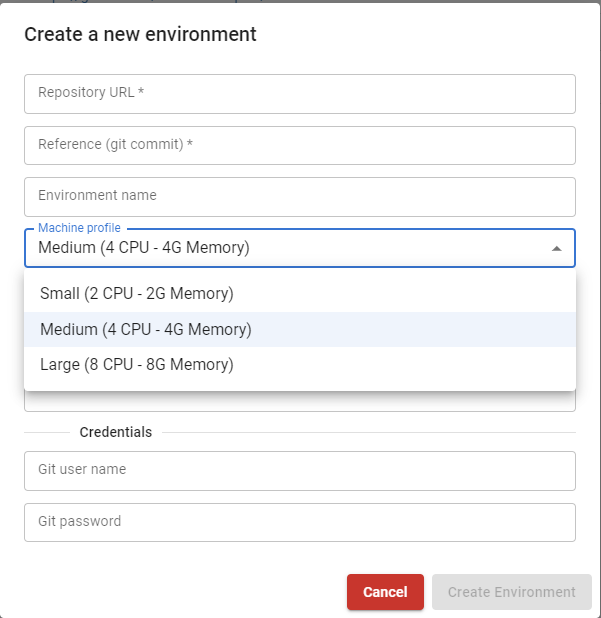
It is possible to provide the username and password in the Credentials section of the form:
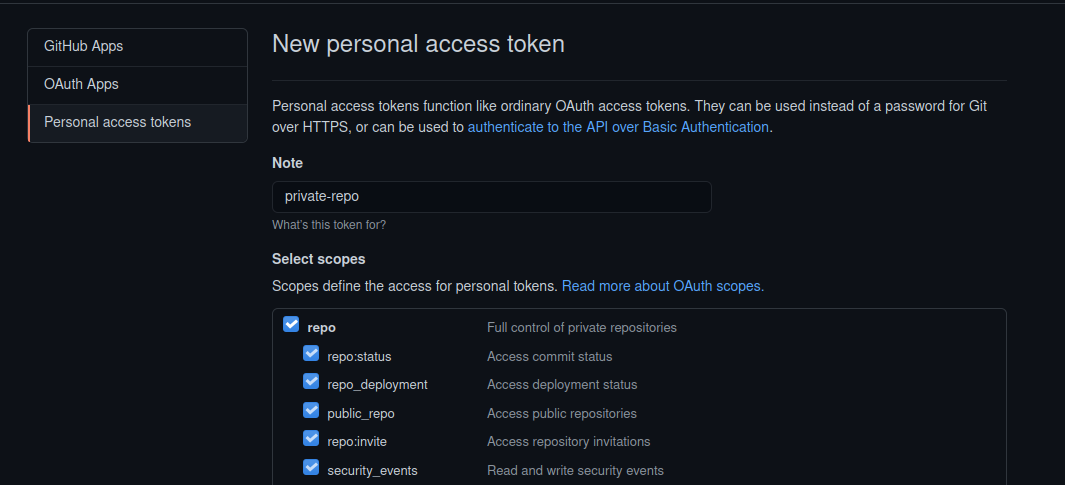
On GitHub and GitLab, a user might have to first create an access token with read access to use as the password:
[!NOTE] The
binderhubbuild backend does not support configuring private repositories credentials from the interface.
Machine profiles
Instead of entering directly the CPU and Memory value, tljh-repo2docker can be configured with pre-defined machine profiles and users can only choose from the available options. The following configuration will add 3 machines with labels Small, Medium and Large to the profile list:
c.JupyterHub.services.extend(
    [
        {
            "name": "tljh_repo2docker",
            "url": "http://127.0.0.1:6789",
            "command": [
                sys.executable,
                "-m",
                "tljh_repo2docker",
                "--ip",
                "127.0.0.1",
                "--port",
                "6789",
                "--machine_profiles",
                '{"label": "Small", "cpu": 2, "memory": 2}',
                "--machine_profiles",
                '{"label": "Medium", "cpu": 4, "memory": 4}',
                "--machine_profiles",
                '{"label": "Large", "cpu": 8, "memory": 8}'

            ],
            "oauth_no_confirm": True,
        }
    ]
)
Extra documentation
tljh-repo2docker is currently developed as part of the Plasma project.
See the Plasma documentation on user environments for more info.
Building JupyterHub-ready images
See: https://repo2docker.readthedocs.io/en/latest/howto/jupyterhub_images.html
Run Locally
Check out the instructions in CONTRIBUTING.md to set up a local environment.
Release history Release notifications | RSS feed


Download files
Download the file for your platform. If you're not sure which to choose, learn more about installing packages.
Source Distribution
Built Distribution
Filter files by name, interpreter, ABI, and platform.
If you're not sure about the file name format, learn more about wheel file names.
Copy a direct link to the current filters
File details
Details for the file tljh_repo2docker-2.0.0a1.tar.gz.
File metadata
- Download URL: tljh_repo2docker-2.0.0a1.tar.gz
- Upload date:
- Size: 2.0 MB
- Tags: Source
- Uploaded using Trusted Publishing? Yes
- Uploaded via: twine/5.0.0 CPython/3.11.9
File hashes
| Algorithm | Hash digest | |
|---|---|---|
| SHA256 |
a9623f8f2656e9f00ad3299d872c4bf39c1401bc365ba785f51f268bac602360
|
|
| MD5 |
22550ee89d905454e39b20194069aca3
|
|
| BLAKE2b-256 |
191dde3a8d5cd3b0a660eea8d52e78f13cfef858fdd416fa4dd9f229508f34cd
|
File details
Details for the file tljh_repo2docker-2.0.0a1-py2.py3-none-any.whl.
File metadata
- Download URL: tljh_repo2docker-2.0.0a1-py2.py3-none-any.whl
- Upload date:
- Size: 1.2 MB
- Tags: Python 2, Python 3
- Uploaded using Trusted Publishing? Yes
- Uploaded via: twine/5.0.0 CPython/3.11.9
File hashes
| Algorithm | Hash digest | |
|---|---|---|
| SHA256 |
a2cd93a1501d389d635ce43be37345fea30717309197ac8d23b37df3048d7599
|
|
| MD5 |
e74e758b50c7ea7e34983defc5d6eb65
|
|
| BLAKE2b-256 |
a3084ac1b104b4a9fcf87103a2695cf38157761de5802cef685c3d7ca08ab4bb
|






