
Introduction
TLKCore is a core service which inside the TMXLAB KIT( TLK / WEB-TLK ), it integrates Python built libraries which developing mmWave( n257 / n258 / n260 / n261 ) beamforming and beam steering applications on BBox 5G Series(mmwave beamformer) and UDBox 5G Series(mmwave Up-down frequency converter) and other standard products developed by TMYTEK. It provides a simple and efficient way to interact with the hardware, allowing developers to focus on building applications without worrying about low-level details.
Installation Troubleshooting
If you encounter any issues during tlkcore installation or usage, please check the following:
Ensure you have the required dependencies installed.
Check the compatibility of your Python version.
Review the documentation for any specific configuration steps.
- If you meet the error message likes: CERTIFICATE_VERIFY_FAILED,
you can try the following steps:
- Update your pip to the latest version:
pip install --upgrade pip
You may need to configure your proxy settings if you are behind a corporate firewall.
- You can also try to disable SSL verification (not recommended for production):
pip install tlkcore --trusted-host pypi.org --trusted-host files.pythonhosted.org
- Or download cacert.pem from https://curl.se/ca/cacert.pem , then set environment variable SSL_CERT_FILE to the path of the downloaded file.
set SSL_CERT_FILE={$your_path}/cacert.pem
Hardware Prerequisites
Architecture:
USB driver for scanning/connect device
Windows
Online-Host with external internet capability - Auto detect a new device and install driver
Offline-Host - Download setup executable driver from FTDI and install it.
Linux
Follow steps to create or extend /etc/udev/rules.d/99-ftdi.rules includes:
SUBSYSTEM=="usb", ATTRS{idVendor}=="0403", ATTRS{idProduct}=="601c", GROUP="plugdev", MODE="0666"Try to reload udev rules or re-plugin USB devices:
sudo udevadm control --reload-rules
sudo udevadm trigger
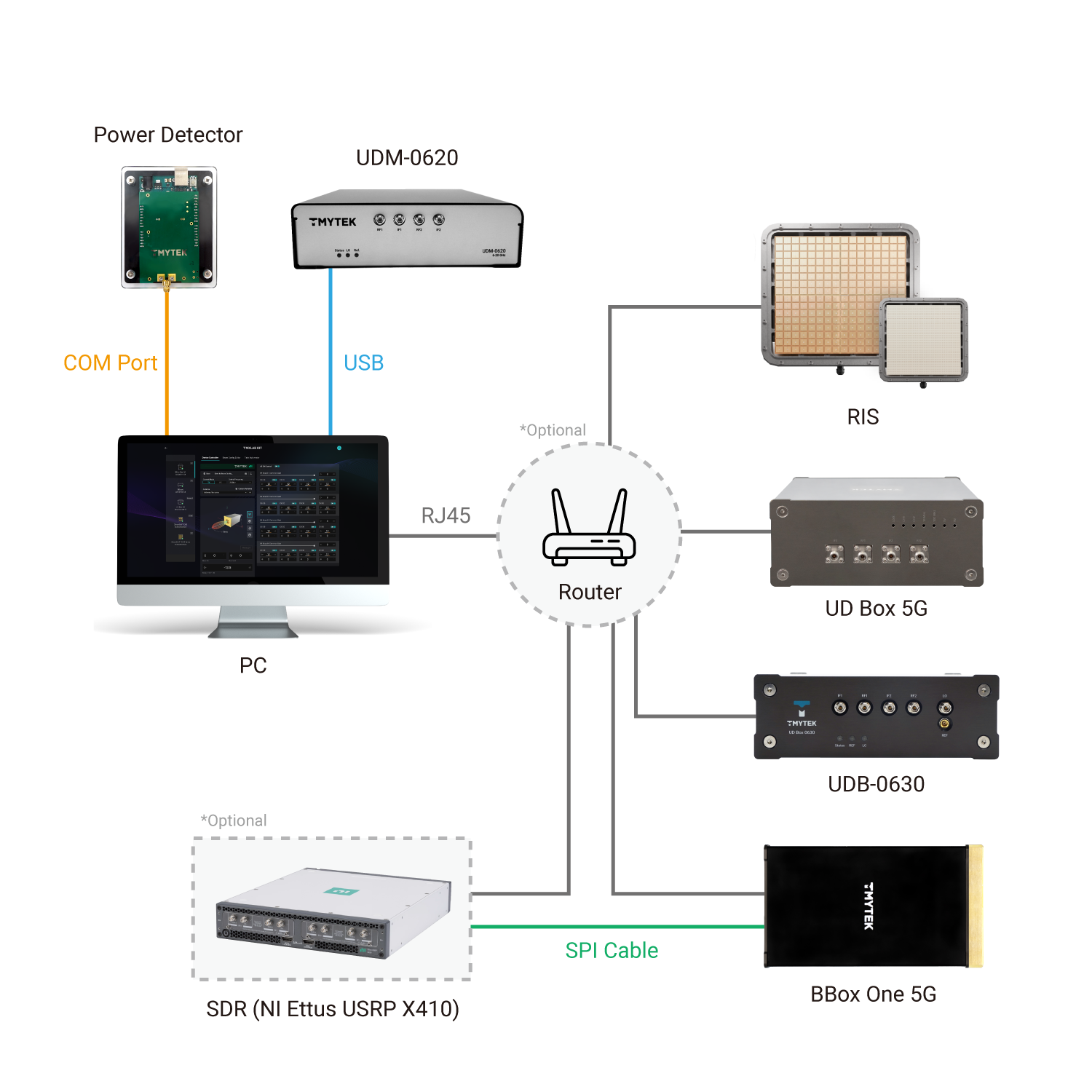
Examples
This represents how to use the tlkcore API. Please refer to the example from github: https://github.com/tmytek/tlkcore-examples for more details.
Initialize & scanDevices
from tlkcore import TLKCoreService
service = TLKCoreService()
ret = service.scanDevices()
print(ret)1 maintainer

Metadata
1 maintainer
Release files for tlkcore 2.5.0
For a detailed explanation of source distributions (sdists) and built distributions (wheels), please see the package formats documentation.
Built distributions (wheels)
Total release size: 145.0 MB
Release files / tlkcore-2.5.0-cp312-none-win_amd64.whl
| Download URL | tlkcore-2.5.0-cp312-none-win_amd64.whl |
|---|---|
| Size | 2.1 MB |
| Tags | CPython 3.12 Windows x86-64 |
|
SHA-256 checksum How to use checksums |
39abe8f52d4e82cf529b65781c48a3138a45f86cc48f97a5cb7397a69d1dbd8a
|
|
BLAKE2b-256 checksum How to use checksums |
9a8671f59a2453fff850841f39b7c673045617fea1934feaedf78946c5f5f173
|
| Upload date | |
|
Uploaded using Trusted Publishing? What is trusted publishing? |
No |
| Uploaded via |
twine/7.0.0 CPython/3.12.10
|
Release files / tlkcore-2.5.0-cp312-none-manylinux2014_x86_64.whl
| Download URL | tlkcore-2.5.0-cp312-none-manylinux2014_x86_64.whl |
|---|---|
| Size | 17.4 MB |
| Tags | CPython 3.12 Linux glibc 2.17+ x86-64 |
|
SHA-256 checksum How to use checksums |
f537d1d11a5163634413c47ebcdd64564bab51a8e20f8eaece4a0991fdda9b86
|
|
BLAKE2b-256 checksum How to use checksums |
fda6a7b14c606de74791ae445a49ed96605f3b45138139d06aa9dbbff4788be2
|
| Upload date | |
|
Uploaded using Trusted Publishing? What is trusted publishing? |
No |
| Uploaded via |
twine/7.0.0 CPython/3.12.14
|
Release files / tlkcore-2.5.0-cp312-none-macosx_11_0_arm64.whl
| Download URL | tlkcore-2.5.0-cp312-none-macosx_11_0_arm64.whl |
|---|---|
| Size | 5.3 MB |
| Tags | CPython 3.12 macOS 11.0+ ARM64 |
|
SHA-256 checksum How to use checksums |
9f1b3600fc2db7de29d20f4047e53f27116b4d26ad53bda670fdea1ab7669e34
|
|
BLAKE2b-256 checksum How to use checksums |
b58c3978c524c727928c2ab0fbcd0cb1a51f9129c744878d28656834af9dc0bd
|
| Upload date | |
|
Uploaded using Trusted Publishing? What is trusted publishing? |
No |
| Uploaded via |
twine/7.0.0 CPython/3.12.10
|
Release files / tlkcore-2.5.0-cp312-none-macosx_10_9_x86_64.whl
| Download URL | tlkcore-2.5.0-cp312-none-macosx_10_9_x86_64.whl |
|---|---|
| Size | 5.3 MB |
| Tags | CPython 3.12 macOS 10.9+ x86-64 |
|
SHA-256 checksum How to use checksums |
f0c7881eca6ba830d8568ba100c3a938a0f5aab26cae2d5d5aafb0cee8a715da
|
|
BLAKE2b-256 checksum How to use checksums |
f901f986a3c422389b3794c5249218df8ab07c8ab4c04803da395c801d7f3656
|
| Upload date | |
|
Uploaded using Trusted Publishing? What is trusted publishing? |
No |
| Uploaded via |
twine/7.0.0 CPython/3.12.10
|
Release files / tlkcore-2.5.0-cp311-none-win_amd64.whl
| Download URL | tlkcore-2.5.0-cp311-none-win_amd64.whl |
|---|---|
| Size | 2.3 MB |
| Tags | CPython 3.11 Windows x86-64 |
|
SHA-256 checksum How to use checksums |
90717d451ce7b62fc589aced9b0e33ed30db746c14414e3944c6ef6085dba6e3
|
|
BLAKE2b-256 checksum How to use checksums |
206cb616952eefa533cf1d2a8c611dbb2758548cec19ceb31e8e1ec2f528a11c
|
| Upload date | |
|
Uploaded using Trusted Publishing? What is trusted publishing? |
No |
| Uploaded via |
twine/7.0.0 CPython/3.11.9
|
Release files / tlkcore-2.5.0-cp311-none-manylinux2014_x86_64.whl
| Download URL | tlkcore-2.5.0-cp311-none-manylinux2014_x86_64.whl |
|---|---|
| Size | 18.1 MB |
| Tags | CPython 3.11 Linux glibc 2.17+ x86-64 |
|
SHA-256 checksum How to use checksums |
666b70d1a3e6ce2bdc708f3f545ae80c5d94210b7ec19fa0d355cb2807af8cce
|
|
BLAKE2b-256 checksum How to use checksums |
a3a183f41e65cc699bf0e95f28cba0eb432d35a8fdcd7dcce596c2a4260c708b
|
| Upload date | |
|
Uploaded using Trusted Publishing? What is trusted publishing? |
No |
| Uploaded via |
twine/7.0.0 CPython/3.11.16
|
Release files / tlkcore-2.5.0-cp311-none-macosx_11_0_arm64.whl
| Download URL | tlkcore-2.5.0-cp311-none-macosx_11_0_arm64.whl |
|---|---|
| Size | 5.3 MB |
| Tags | CPython 3.11 macOS 11.0+ ARM64 |
|
SHA-256 checksum How to use checksums |
13d1d24779d012f43e5ef1d1154ed3bf3a440768943a1c3970a08263a93acef4
|
|
BLAKE2b-256 checksum How to use checksums |
e479a8eef41ef8d4363dfb443876c01193c5cec0f7a411aa4ece0bc9a71cc1f9
|
| Upload date | |
|
Uploaded using Trusted Publishing? What is trusted publishing? |
No |
| Uploaded via |
twine/7.0.0 CPython/3.11.9
|
Release files / tlkcore-2.5.0-cp311-none-macosx_10_9_x86_64.whl
| Download URL | tlkcore-2.5.0-cp311-none-macosx_10_9_x86_64.whl |
|---|---|
| Size | 5.3 MB |
| Tags | CPython 3.11 macOS 10.9+ x86-64 |
|
SHA-256 checksum How to use checksums |
309dbcf61783ce12bb6a6b2f7f2c7cc91b80411e6748b3fa4432ecf7ad233776
|
|
BLAKE2b-256 checksum How to use checksums |
7afba3494dce9105e021301a578d332f33508cf2d091dd1e1cd5f739d5ab1f5d
|
| Upload date | |
|
Uploaded using Trusted Publishing? What is trusted publishing? |
No |
| Uploaded via |
twine/7.0.0 CPython/3.11.9
|
Release files / tlkcore-2.5.0-cp310-none-win_amd64.whl
| Download URL | tlkcore-2.5.0-cp310-none-win_amd64.whl |
|---|---|
| Size | 2.3 MB |
| Tags | CPython 3.10 Windows x86-64 |
|
SHA-256 checksum How to use checksums |
7b3e9ca9ffc8150b8e9ae8e259bd09c251ac536d94d8c869f390060cfba7ef69
|
|
BLAKE2b-256 checksum How to use checksums |
878a2b547f6158fa61e2951a65608b168d2954a323e71b90db8c2cd2066621cb
|
| Upload date | |
|
Uploaded using Trusted Publishing? What is trusted publishing? |
No |
| Uploaded via |
twine/7.0.0 CPython/3.10.11
|
Release files / tlkcore-2.5.0-cp310-none-manylinux2014_x86_64.whl
| Download URL | tlkcore-2.5.0-cp310-none-manylinux2014_x86_64.whl |
|---|---|
| Size | 17.3 MB |
| Tags | CPython 3.10 Linux glibc 2.17+ x86-64 |
|
SHA-256 checksum How to use checksums |
845fdc5c83c65de8624aa6c1bf81b10bbbef62b22c92440c7389fcbd0244c131
|
|
BLAKE2b-256 checksum How to use checksums |
0e89b44a55345014a4b2fe761f2553bd339ca57db9ea3d1a4486d9da1a81d8b7
|
| Upload date | |
|
Uploaded using Trusted Publishing? What is trusted publishing? |
No |
| Uploaded via |
twine/7.0.0 CPython/3.10.21
|
Release files / tlkcore-2.5.0-cp310-none-macosx_11_0_arm64.whl
| Download URL | tlkcore-2.5.0-cp310-none-macosx_11_0_arm64.whl |
|---|---|
| Size | 5.4 MB |
| Tags | CPython 3.10 macOS 11.0+ ARM64 |
|
SHA-256 checksum How to use checksums |
ddd1b1c486498266434c364d20ecbb3a5e180cdbff137f6e9d843a26c6629b55
|
|
BLAKE2b-256 checksum How to use checksums |
e135121d24fd3be7ce4f035df49abbdd26872d19053c47521346fdb4ff5c216d
|
| Upload date | |
|
Uploaded using Trusted Publishing? What is trusted publishing? |
No |
| Uploaded via |
twine/7.0.0 CPython/3.10.11
|
Release files / tlkcore-2.5.0-cp310-none-macosx_10_9_x86_64.whl
| Download URL | tlkcore-2.5.0-cp310-none-macosx_10_9_x86_64.whl |
|---|---|
| Size | 2.8 MB |
| Tags | CPython 3.10 macOS 10.9+ x86-64 |
|
SHA-256 checksum How to use checksums |
b0c52d75753f44be574b45d963ea97094a193e573d5df512f29befe07e568ae8
|
|
BLAKE2b-256 checksum How to use checksums |
53dbc9594a09ee85f860f56348c28bfac0d8c3718e7dd7505ed36b5ae867a1d6
|
| Upload date | |
|
Uploaded using Trusted Publishing? What is trusted publishing? |
No |
| Uploaded via |
twine/7.0.0 CPython/3.10.20
|
Release files / tlkcore-2.5.0-cp39-none-win_amd64.whl
| Download URL | tlkcore-2.5.0-cp39-none-win_amd64.whl |
|---|---|
| Size | 2.8 MB |
| Tags | CPython 3.9 Windows x86-64 |
|
SHA-256 checksum How to use checksums |
75c367cb7df379703e1bdc7343610f465735288d07a03407567924de37ffa221
|
|
BLAKE2b-256 checksum How to use checksums |
84b010c269531f432854cf23a4910d05ab20282a3d3ed29eb8e5cfe0975c830e
|
| Upload date | |
|
Uploaded using Trusted Publishing? What is trusted publishing? |
No |
| Uploaded via |
twine/6.2.0 CPython/3.9.13
|
Release files / tlkcore-2.5.0-cp39-none-manylinux2014_x86_64.whl
| Download URL | tlkcore-2.5.0-cp39-none-manylinux2014_x86_64.whl |
|---|---|
| Size | 17.1 MB |
| Tags | CPython 3.9 Linux glibc 2.17+ x86-64 |
|
SHA-256 checksum How to use checksums |
76dc3b467ef7fe7fb2fb0029ab7689ee370536973cdefb8f3370dea6dc9a3527
|
|
BLAKE2b-256 checksum How to use checksums |
c1dd8a60ac64deed24e1e942a453d5f543303d720365d760ca1d2bf662ff55ce
|
| Upload date | |
|
Uploaded using Trusted Publishing? What is trusted publishing? |
No |
| Uploaded via |
twine/6.2.0 CPython/3.9.25
|
Release files / tlkcore-2.5.0-cp39-none-macosx_11_0_arm64.whl
| Download URL | tlkcore-2.5.0-cp39-none-macosx_11_0_arm64.whl |
|---|---|
| Size | 5.4 MB |
| Tags | CPython 3.9 macOS 11.0+ ARM64 |
|
SHA-256 checksum How to use checksums |
d8718bbb355c37207f1071a71df4c7cf056725a0c021f9e40fe8e24331140e0a
|
|
BLAKE2b-256 checksum How to use checksums |
08282ed7057c8c6b0382e85b60a5955cb166ef29f9a723957a0f73c17d30d6b5
|
| Upload date | |
|
Uploaded using Trusted Publishing? What is trusted publishing? |
No |
| Uploaded via |
twine/6.2.0 CPython/3.9.13
|
Release files / tlkcore-2.5.0-cp39-none-macosx_10_9_x86_64.whl
| Download URL | tlkcore-2.5.0-cp39-none-macosx_10_9_x86_64.whl |
|---|---|
| Size | 2.8 MB |
| Tags | CPython 3.9 macOS 10.9+ x86-64 |
|
SHA-256 checksum How to use checksums |
f7966553991a734457d333dc4cd4aab7a876513a640b6a35d1f5c288834554a3
|
|
BLAKE2b-256 checksum How to use checksums |
030520b9a0ae3e680ec240bcf74cd688f1a969a64eef0a52c265ea1be70f246d
|
| Upload date | |
|
Uploaded using Trusted Publishing? What is trusted publishing? |
No |
| Uploaded via |
twine/6.2.0 CPython/3.9.25
|
Release files / tlkcore-2.5.0-cp38-none-win_amd64.whl
| Download URL | tlkcore-2.5.0-cp38-none-win_amd64.whl |
|---|---|
| Size | 2.6 MB |
| Tags | CPython 3.8 Windows x86-64 |
|
SHA-256 checksum How to use checksums |
c2383beed861a58103cef7822a85b9f3b74a4d8a5a8c8a3609aa0d707f678dd5
|
|
BLAKE2b-256 checksum How to use checksums |
6fcc54e035bf1aaf41a5856c559d2a5a557dc1920a656a30b9f09907a67596bd
|
| Upload date | |
|
Uploaded using Trusted Publishing? What is trusted publishing? |
No |
| Uploaded via |
twine/6.1.0 CPython/3.8.10
|
Release files / tlkcore-2.5.0-cp38-none-manylinux2014_x86_64.whl
| Download URL | tlkcore-2.5.0-cp38-none-manylinux2014_x86_64.whl |
|---|---|
| Size | 17.2 MB |
| Tags | CPython 3.8 Linux glibc 2.17+ x86-64 |
|
SHA-256 checksum How to use checksums |
b7407a4af819de8a64987a3e765c167826441700d7c96edf112314b78957d531
|
|
BLAKE2b-256 checksum How to use checksums |
15a1c4a3cee84a7a846a1c160bed4070b42cc4e3fcae1faaabeba10bc0313570
|
| Upload date | |
|
Uploaded using Trusted Publishing? What is trusted publishing? |
No |
| Uploaded via |
twine/6.1.0 CPython/3.8.18
|
Release files / tlkcore-2.5.0-cp38-none-macosx_11_0_arm64.whl
| Download URL | tlkcore-2.5.0-cp38-none-macosx_11_0_arm64.whl |
|---|---|
| Size | 5.4 MB |
| Tags | CPython 3.8 macOS 11.0+ ARM64 |
|
SHA-256 checksum How to use checksums |
050d7d9ed29be70da674e5b48d5d36964d35291c5a666b86140529c356eb6fa8
|
|
BLAKE2b-256 checksum How to use checksums |
6083d1db1bf86481f7494b2fc09e7ae6f415136748bc8453c3e2993adea7fd7c
|
| Upload date | |
|
Uploaded using Trusted Publishing? What is trusted publishing? |
No |
| Uploaded via |
twine/6.1.0 CPython/3.8.10
|
Release files / tlkcore-2.5.0-cp38-none-macosx_10_9_x86_64.whl
| Download URL | tlkcore-2.5.0-cp38-none-macosx_10_9_x86_64.whl |
|---|---|
| Size | 2.8 MB |
| Tags | CPython 3.8 macOS 10.9+ x86-64 |
|
SHA-256 checksum How to use checksums |
942321ea0a8af9a2e12a9cb393d846f39bbd6d6dd702daaf5ab8a2a4b9830f7d
|
|
BLAKE2b-256 checksum How to use checksums |
4e86151c858b5487de8ac14fb508bc3bba2fedfaab2e622a756034b667620352
|
| Upload date | |
|
Uploaded using Trusted Publishing? What is trusted publishing? |
No |
| Uploaded via |
twine/6.1.0 CPython/3.8.18
|














