
Introduction
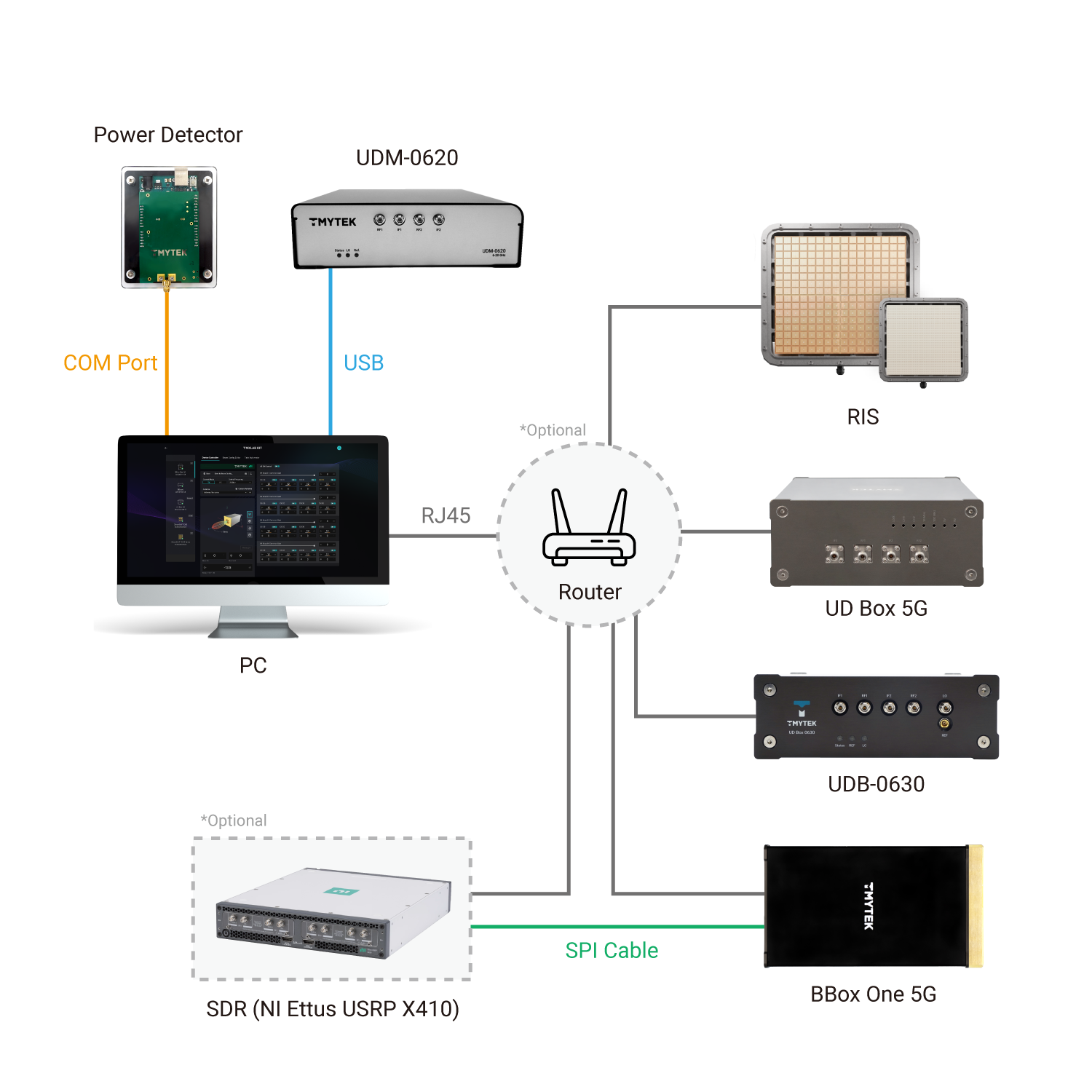
TLKCore is a core service which inside the TMXLAB KIT( TLK / WEB-TLK ), it integrates Python built libraries which developing mmWave( n257 / n258 / n260 / n261 ) beamforming and beam steering applications on BBox 5G Series(mmwave beamformer) and UDBox 5G Series(mmwave Up-down frequency converter) and other standard products developed by TMYTEK. It provides a simple and efficient way to interact with the hardware, allowing developers to focus on building applications without worrying about low-level details.
Installation Troubleshooting
If you encounter any issues during tlkcore installation or usage, please check the following:
Ensure you have the required dependencies installed.
Check the compatibility of your Python version.
Review the documentation for any specific configuration steps.
- If you meet the error message likes: CERTIFICATE_VERIFY_FAILED,
you can try the following steps:
- Update your pip to the latest version:
pip install --upgrade pip
You may need to configure your proxy settings if you are behind a corporate firewall.
- You can also try to disable SSL verification (not recommended for production):
pip install tlkcore --trusted-host pypi.org --trusted-host files.pythonhosted.org
- Or download cacert.pem from https://curl.se/ca/cacert.pem , then set environment variable SSL_CERT_FILE to the path of the downloaded file.
set SSL_CERT_FILE={$your_path}/cacert.pem
Hardware Prerequisites
Architecture:
USB driver for scanning/connect device
Windows
Online-Host with external internet capability - Auto detect a new device and install driver
Offline-Host - Download setup executable driver from FTDI and install it.
Linux
Follow steps to create or extend /etc/udev/rules.d/99-ftdi.rules includes:
SUBSYSTEM=="usb", ATTRS{idVendor}=="0403", ATTRS{idProduct}=="601c", GROUP="plugdev", MODE="0666"Try to reload udev rules or re-plugin USB devices:
sudo udevadm control --reload-rules
sudo udevadm trigger
Examples
This represents how to use the tlkcore API. Please refer to the example from github: https://github.com/tmytek/tlkcore-examples for more details.
Initialize & scanDevices
from tlkcore import TLKCoreService
service = TLKCoreService()
ret = service.scanDevices()
print(ret)1 maintainer

Metadata
1 maintainer
Release files for tlkcore 2.5.1
For a detailed explanation of source distributions (sdists) and built distributions (wheels), please see the package formats documentation.
Built distributions (wheels)
Total release size: 145.1 MB
Release files / tlkcore-2.5.1-cp312-none-win_amd64.whl
| Download URL | tlkcore-2.5.1-cp312-none-win_amd64.whl |
|---|---|
| Size | 2.1 MB |
| Tags | CPython 3.12 Windows x86-64 |
|
SHA-256 checksum How to use checksums |
c89f3c480ee009be8aa5d5e1bbcdb9c663afc58911dfe2ac5a17fe2a4795cc78
|
|
BLAKE2b-256 checksum How to use checksums |
69ece327665d22697fc0727cf4b74797224e3467e660684668bbfaf7a93bc16d
|
| Upload date | |
|
Uploaded using Trusted Publishing? What is trusted publishing? |
No |
| Uploaded via |
twine/7.0.0 CPython/3.12.10
|
Release files / tlkcore-2.5.1-cp312-none-manylinux2014_x86_64.whl
| Download URL | tlkcore-2.5.1-cp312-none-manylinux2014_x86_64.whl |
|---|---|
| Size | 17.4 MB |
| Tags | CPython 3.12 Linux glibc 2.17+ x86-64 |
|
SHA-256 checksum How to use checksums |
d9b22655e46ecfc90115e3cade8882e0a237a54c60a1e175b2a580016314b83d
|
|
BLAKE2b-256 checksum How to use checksums |
cf61667f8c352297e232917b8af25b68f33305a113c497c90ae9929e38c29123
|
| Upload date | |
|
Uploaded using Trusted Publishing? What is trusted publishing? |
No |
| Uploaded via |
twine/7.0.0 CPython/3.12.14
|
Release files / tlkcore-2.5.1-cp312-none-macosx_11_0_arm64.whl
| Download URL | tlkcore-2.5.1-cp312-none-macosx_11_0_arm64.whl |
|---|---|
| Size | 5.3 MB |
| Tags | CPython 3.12 macOS 11.0+ ARM64 |
|
SHA-256 checksum How to use checksums |
b15413b4ecc89017510bb7e2a62d0ef95dbd88acc22325f5dc5b05eae6ed2f92
|
|
BLAKE2b-256 checksum How to use checksums |
f85e7ca7715584d96c1cb432e0d2fc026cf6727cff84d322b71fe9871f164a1e
|
| Upload date | |
|
Uploaded using Trusted Publishing? What is trusted publishing? |
No |
| Uploaded via |
twine/7.0.0 CPython/3.12.10
|
Release files / tlkcore-2.5.1-cp312-none-macosx_10_9_x86_64.whl
| Download URL | tlkcore-2.5.1-cp312-none-macosx_10_9_x86_64.whl |
|---|---|
| Size | 5.3 MB |
| Tags | CPython 3.12 macOS 10.9+ x86-64 |
|
SHA-256 checksum How to use checksums |
ba0fcc24c9ab11495cc6fcda535a26ead1d18292af15cb623787963ed3fd47e7
|
|
BLAKE2b-256 checksum How to use checksums |
4e26dd92c9112dfc3545d1bf9e6fe88ada3b5b2125f16f4427a17ed20103a731
|
| Upload date | |
|
Uploaded using Trusted Publishing? What is trusted publishing? |
No |
| Uploaded via |
twine/7.0.0 CPython/3.12.10
|
Release files / tlkcore-2.5.1-cp311-none-win_amd64.whl
| Download URL | tlkcore-2.5.1-cp311-none-win_amd64.whl |
|---|---|
| Size | 2.3 MB |
| Tags | CPython 3.11 Windows x86-64 |
|
SHA-256 checksum How to use checksums |
78ca4447a23790d4dba7e49c48776ec5bbd4016b486a62a0274d549c16649e5a
|
|
BLAKE2b-256 checksum How to use checksums |
8cddfd166446888d9404a8266418885f8dd709d6c854692d3ae95964993be9e8
|
| Upload date | |
|
Uploaded using Trusted Publishing? What is trusted publishing? |
No |
| Uploaded via |
twine/7.0.0 CPython/3.11.9
|
Release files / tlkcore-2.5.1-cp311-none-manylinux2014_x86_64.whl
| Download URL | tlkcore-2.5.1-cp311-none-manylinux2014_x86_64.whl |
|---|---|
| Size | 18.1 MB |
| Tags | CPython 3.11 Linux glibc 2.17+ x86-64 |
|
SHA-256 checksum How to use checksums |
e3430dc75c9676c8b8d53b3d199aa85e6278a2e02c0e4754881d7b40a1a9484e
|
|
BLAKE2b-256 checksum How to use checksums |
acdf9271f2be95444bd84afa348c9eacc53d4a4640717bdcee842d8dd7b5efc7
|
| Upload date | |
|
Uploaded using Trusted Publishing? What is trusted publishing? |
No |
| Uploaded via |
twine/7.0.0 CPython/3.11.16
|
Release files / tlkcore-2.5.1-cp311-none-macosx_11_0_arm64.whl
| Download URL | tlkcore-2.5.1-cp311-none-macosx_11_0_arm64.whl |
|---|---|
| Size | 5.3 MB |
| Tags | CPython 3.11 macOS 11.0+ ARM64 |
|
SHA-256 checksum How to use checksums |
d97d9005b25543d343ef051dbafc98014aadbbe6858101dfd648bb55b2966fb3
|
|
BLAKE2b-256 checksum How to use checksums |
c7cdccb32ae1c9dbf783e29c10ade6123b5bfd25236c68ca6a3dbfab260eeb5f
|
| Upload date | |
|
Uploaded using Trusted Publishing? What is trusted publishing? |
No |
| Uploaded via |
twine/7.0.0 CPython/3.11.9
|
Release files / tlkcore-2.5.1-cp311-none-macosx_10_9_x86_64.whl
| Download URL | tlkcore-2.5.1-cp311-none-macosx_10_9_x86_64.whl |
|---|---|
| Size | 5.3 MB |
| Tags | CPython 3.11 macOS 10.9+ x86-64 |
|
SHA-256 checksum How to use checksums |
26e92a9f1e0edc27f0ff663d18d5b821622b3f40ff4eb862bed43c862558486c
|
|
BLAKE2b-256 checksum How to use checksums |
e42cfd2dcc1dd472c421d54536ed2c24002033e4b4da8974994872253746edeb
|
| Upload date | |
|
Uploaded using Trusted Publishing? What is trusted publishing? |
No |
| Uploaded via |
twine/7.0.0 CPython/3.11.9
|
Release files / tlkcore-2.5.1-cp310-none-win_amd64.whl
| Download URL | tlkcore-2.5.1-cp310-none-win_amd64.whl |
|---|---|
| Size | 2.3 MB |
| Tags | CPython 3.10 Windows x86-64 |
|
SHA-256 checksum How to use checksums |
bb8899912f535ed07e70831fe137cbaeeadb016b8957698c5d258ec359643b1c
|
|
BLAKE2b-256 checksum How to use checksums |
f204ba3397f2e81d0dd54b90707cb6c665857e69dea31bf95250f762db3d7211
|
| Upload date | |
|
Uploaded using Trusted Publishing? What is trusted publishing? |
No |
| Uploaded via |
twine/7.0.0 CPython/3.10.11
|
Release files / tlkcore-2.5.1-cp310-none-manylinux2014_x86_64.whl
| Download URL | tlkcore-2.5.1-cp310-none-manylinux2014_x86_64.whl |
|---|---|
| Size | 17.3 MB |
| Tags | CPython 3.10 Linux glibc 2.17+ x86-64 |
|
SHA-256 checksum How to use checksums |
b38c8402f67b1da4b535bcb9d1ae30cc4924ed15f7d253a7392f97440cf44150
|
|
BLAKE2b-256 checksum How to use checksums |
706d46cdefad5d9330bfb9359fb5d4ffb0f8a8a208777b17a2384997d611f093
|
| Upload date | |
|
Uploaded using Trusted Publishing? What is trusted publishing? |
No |
| Uploaded via |
twine/7.0.0 CPython/3.10.21
|
Release files / tlkcore-2.5.1-cp310-none-macosx_11_0_arm64.whl
| Download URL | tlkcore-2.5.1-cp310-none-macosx_11_0_arm64.whl |
|---|---|
| Size | 5.4 MB |
| Tags | CPython 3.10 macOS 11.0+ ARM64 |
|
SHA-256 checksum How to use checksums |
34cf2199d8311c24302deaaec4d455c157933cfb8bf3df9de1b3c22d54b0ffb1
|
|
BLAKE2b-256 checksum How to use checksums |
8a9ec48757a085e82aec96b65380ed158698870e76a23ec4f517bba76e2fce84
|
| Upload date | |
|
Uploaded using Trusted Publishing? What is trusted publishing? |
No |
| Uploaded via |
twine/7.0.0 CPython/3.10.11
|
Release files / tlkcore-2.5.1-cp310-none-macosx_10_9_x86_64.whl
| Download URL | tlkcore-2.5.1-cp310-none-macosx_10_9_x86_64.whl |
|---|---|
| Size | 2.8 MB |
| Tags | CPython 3.10 macOS 10.9+ x86-64 |
|
SHA-256 checksum How to use checksums |
d3fbb8b6d130bfaf70b90a131b112b87c2a53c8af18163e61381c29d87faf126
|
|
BLAKE2b-256 checksum How to use checksums |
e1816b177da3adf403c39ca66defae21786de210a9aa460d5979d9e9a28490b3
|
| Upload date | |
|
Uploaded using Trusted Publishing? What is trusted publishing? |
No |
| Uploaded via |
twine/7.0.0 CPython/3.10.20
|
Release files / tlkcore-2.5.1-cp39-none-win_amd64.whl
| Download URL | tlkcore-2.5.1-cp39-none-win_amd64.whl |
|---|---|
| Size | 2.8 MB |
| Tags | CPython 3.9 Windows x86-64 |
|
SHA-256 checksum How to use checksums |
0ee56089c981c65033aa6022558afb3f792fd82f8e08b7caa72bc3d80953e3c4
|
|
BLAKE2b-256 checksum How to use checksums |
c721c5b921234a60f18514f569d3b500e28258f9de354661ba03572b65e9707d
|
| Upload date | |
|
Uploaded using Trusted Publishing? What is trusted publishing? |
No |
| Uploaded via |
twine/6.2.0 CPython/3.9.13
|
Release files / tlkcore-2.5.1-cp39-none-manylinux2014_x86_64.whl
| Download URL | tlkcore-2.5.1-cp39-none-manylinux2014_x86_64.whl |
|---|---|
| Size | 17.2 MB |
| Tags | CPython 3.9 Linux glibc 2.17+ x86-64 |
|
SHA-256 checksum How to use checksums |
8c994c8eb405de42ffdfda6330f766fef776bc2bd347655e0795828e32562d21
|
|
BLAKE2b-256 checksum How to use checksums |
8a894bb8683c6d1fd2c91911bf4083574a1f60d1d5e58b801acfc69a8b26d32e
|
| Upload date | |
|
Uploaded using Trusted Publishing? What is trusted publishing? |
No |
| Uploaded via |
twine/6.2.0 CPython/3.9.25
|
Release files / tlkcore-2.5.1-cp39-none-macosx_11_0_arm64.whl
| Download URL | tlkcore-2.5.1-cp39-none-macosx_11_0_arm64.whl |
|---|---|
| Size | 5.4 MB |
| Tags | CPython 3.9 macOS 11.0+ ARM64 |
|
SHA-256 checksum How to use checksums |
8babf411b263fe9448d21a81aaf3b4b3cc4e6d336ff323ce697638d0f8f2e04b
|
|
BLAKE2b-256 checksum How to use checksums |
bec6ab833bb02484a5e8709e5281e16f7a7cb3ebfac0c93c1ad3f062dc02a77c
|
| Upload date | |
|
Uploaded using Trusted Publishing? What is trusted publishing? |
No |
| Uploaded via |
twine/6.2.0 CPython/3.9.13
|
Release files / tlkcore-2.5.1-cp39-none-macosx_10_9_x86_64.whl
| Download URL | tlkcore-2.5.1-cp39-none-macosx_10_9_x86_64.whl |
|---|---|
| Size | 2.8 MB |
| Tags | CPython 3.9 macOS 10.9+ x86-64 |
|
SHA-256 checksum How to use checksums |
773021d46b7833e37d88b748f89398b72734dfb299d1b6fdafefa2997dc99516
|
|
BLAKE2b-256 checksum How to use checksums |
29df48da93b83dbfc85bccddff6515711f32b110c82fcaa8f496ce3b90787fef
|
| Upload date | |
|
Uploaded using Trusted Publishing? What is trusted publishing? |
No |
| Uploaded via |
twine/6.2.0 CPython/3.9.25
|
Release files / tlkcore-2.5.1-cp38-none-win_amd64.whl
| Download URL | tlkcore-2.5.1-cp38-none-win_amd64.whl |
|---|---|
| Size | 2.6 MB |
| Tags | CPython 3.8 Windows x86-64 |
|
SHA-256 checksum How to use checksums |
e75476e5614e09a58015ba0c18ff529e065f6ebc56f6fd9278f3f433d03d5096
|
|
BLAKE2b-256 checksum How to use checksums |
1c8594a59b52dc7912efdc602c42f83219f5f91e294db8b1df95281b1a1536cc
|
| Upload date | |
|
Uploaded using Trusted Publishing? What is trusted publishing? |
No |
| Uploaded via |
twine/6.1.0 CPython/3.8.10
|
Release files / tlkcore-2.5.1-cp38-none-manylinux2014_x86_64.whl
| Download URL | tlkcore-2.5.1-cp38-none-manylinux2014_x86_64.whl |
|---|---|
| Size | 17.2 MB |
| Tags | CPython 3.8 Linux glibc 2.17+ x86-64 |
|
SHA-256 checksum How to use checksums |
8743a2a733a4eaecbbba3d3a018f371d1271e6781a448689e558b50113e111e5
|
|
BLAKE2b-256 checksum How to use checksums |
c0bc95ea31456ce8d9585b7cb4595890adcb1c84b9065fb1fdd06799bade24a8
|
| Upload date | |
|
Uploaded using Trusted Publishing? What is trusted publishing? |
No |
| Uploaded via |
twine/6.1.0 CPython/3.8.18
|
Release files / tlkcore-2.5.1-cp38-none-macosx_11_0_arm64.whl
| Download URL | tlkcore-2.5.1-cp38-none-macosx_11_0_arm64.whl |
|---|---|
| Size | 5.4 MB |
| Tags | CPython 3.8 macOS 11.0+ ARM64 |
|
SHA-256 checksum How to use checksums |
39d6e93cc162d1c5dfdf56cc30b768c0d8426878b0f1b48a402efe15f7148eb8
|
|
BLAKE2b-256 checksum How to use checksums |
c5056c658c7ceb77f150abbac9f25a2adc464c60239ff4609645e470e84367b5
|
| Upload date | |
|
Uploaded using Trusted Publishing? What is trusted publishing? |
No |
| Uploaded via |
twine/6.1.0 CPython/3.8.10
|
Release files / tlkcore-2.5.1-cp38-none-macosx_10_9_x86_64.whl
| Download URL | tlkcore-2.5.1-cp38-none-macosx_10_9_x86_64.whl |
|---|---|
| Size | 2.8 MB |
| Tags | CPython 3.8 macOS 10.9+ x86-64 |
|
SHA-256 checksum How to use checksums |
5d32eda850ae6554f86d7a395c162b1d105c1914086f55164517d5122aef2e8b
|
|
BLAKE2b-256 checksum How to use checksums |
68915ff1445e42669d032febf62cc9fdc1f987e6f408bbff54e615f43c89c237
|
| Upload date | |
|
Uploaded using Trusted Publishing? What is trusted publishing? |
No |
| Uploaded via |
twine/6.1.0 CPython/3.8.18
|














