
Explainable xAAEnet training and interpretation for binary image classifiers.

Project description
Tell Me Why

What this library does
Tell Me Why helps you:
- Train an explainable xAAEnet on a two-class image task
(
train_xaaenet: adversarial → autoencoder → classifier). - Score images with hand-crafted pixel cues
(
compute_feature_score_table: brightness, color, texture, frequency, …). - Interpret the classifier by comparing those cues to the model’s
PLS decision axis (
run_pls_feature_figures: importance ranking and alignment panels).
You can use the built-in AAE model or attach xAAEnet blocks to
your own encoder (EncoderWithAAEBlocks).
Scope
Binary image classifiers only for now. Multi-class classification, regression, and non-image modalities are not supported yet.
Input images should be at least about 160×160 pixels (reconstruction loss uses MS-SSIM).
Model at a glance
An encoder maps each image to a representation vector z. A decoder reconstructs the image; a discriminator regularizes z; a classifier predicts the label from z.
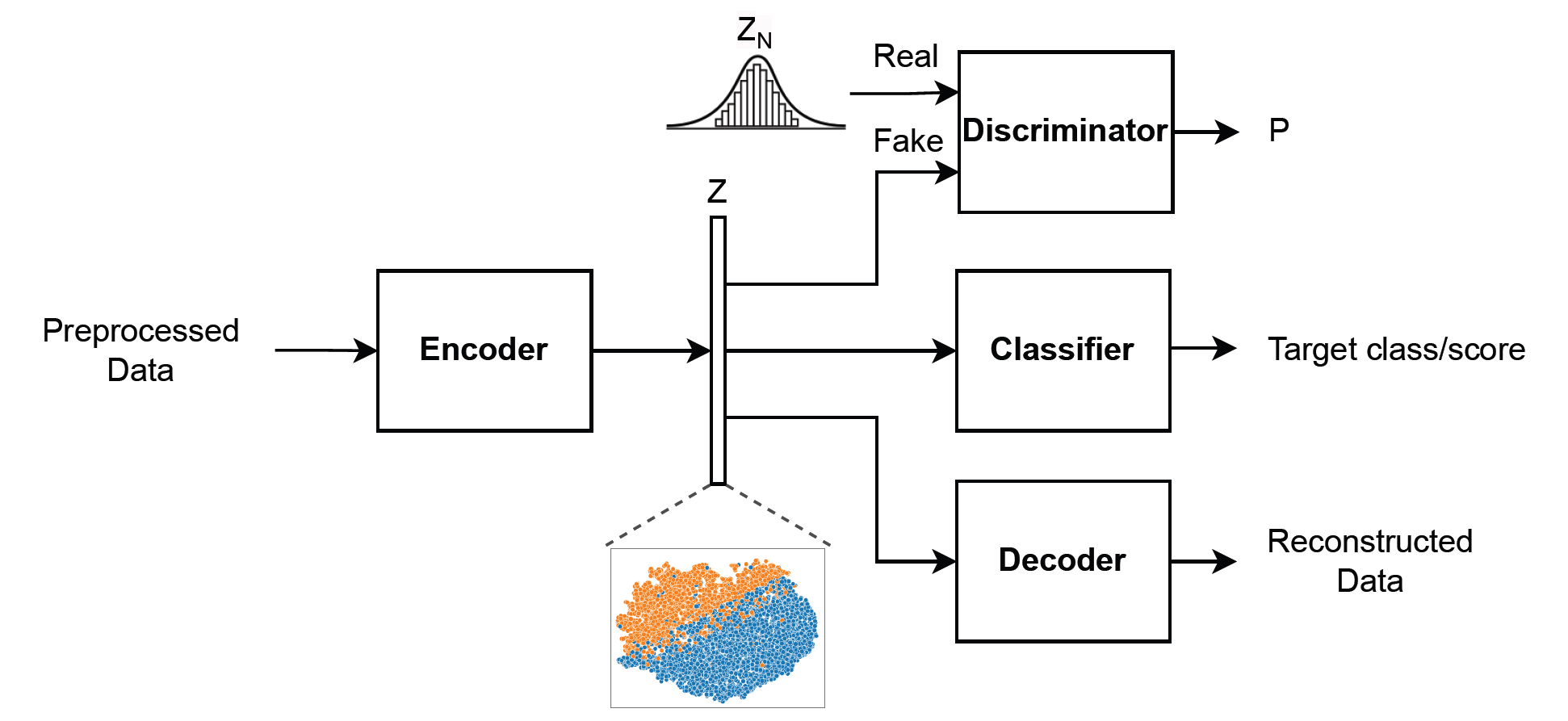
Details: xAAEnet model · Training API: Train an explainable xAAEnet
Interpretation at a glance
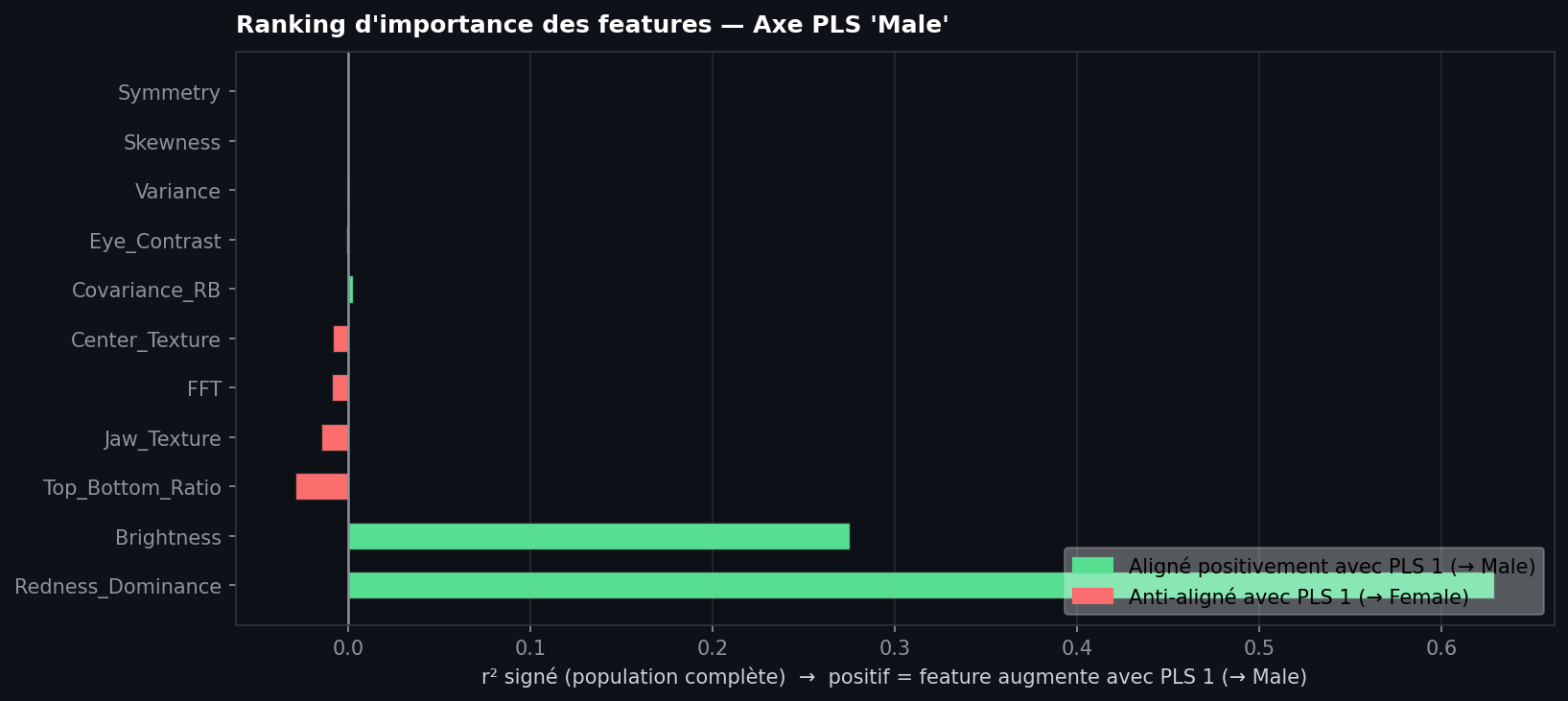
After training, compare validation z and class labels to a table of feature scores.
Importance ranking — which pixel cues align most with the decision axis (start here):
Alignment panels — one scatter per feature (PLS1 vs score); use this to sanity-check the top-ranked cues:
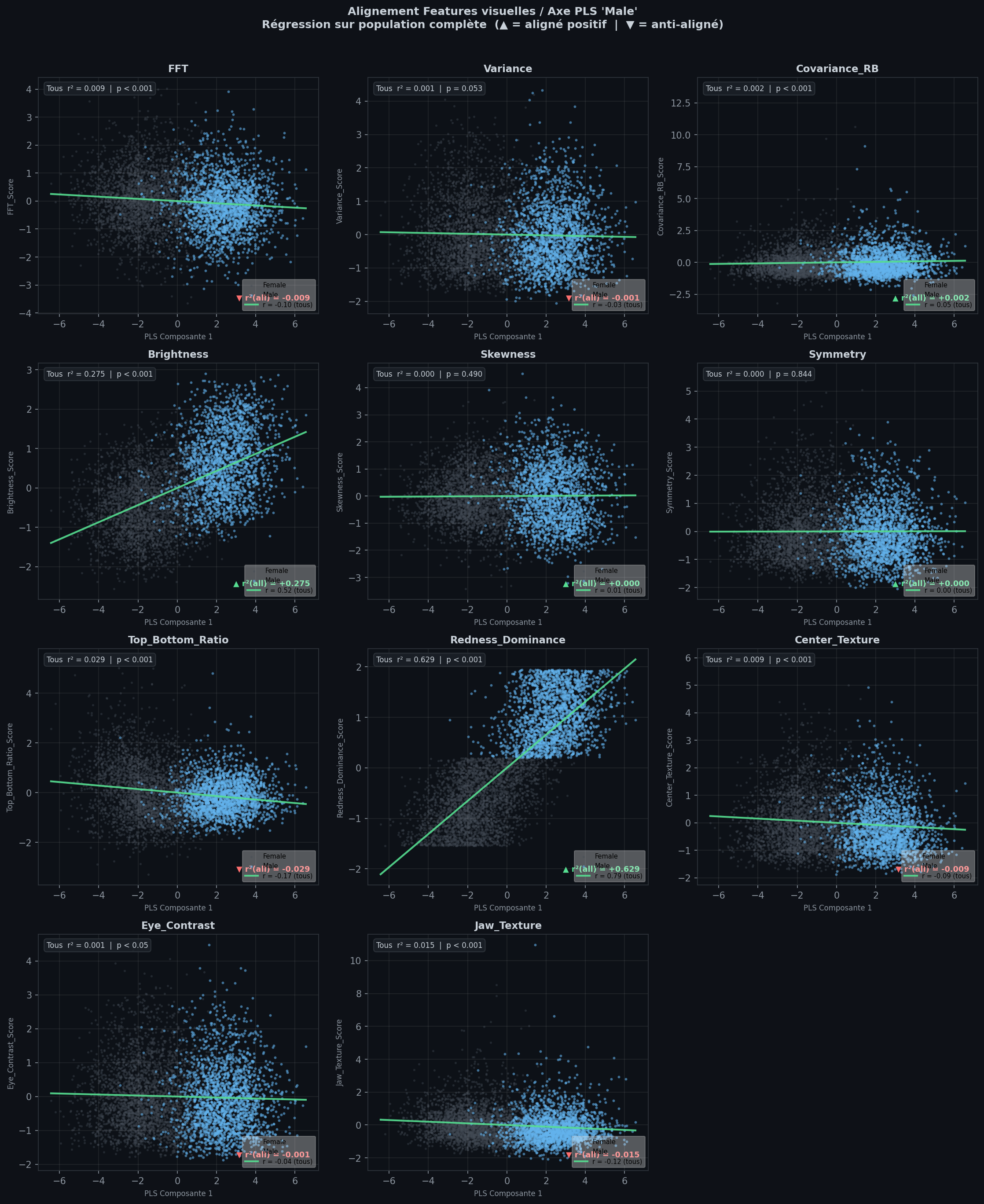
How to read these figures: Classification interpretation
Get started
Install (see also the repository README):
conda env create -f environment.yml
conda activate tell-me-why
pip install -e ".[dev]"
Minimal training call:
from tell_me_why.model_aae import AAE
from tell_me_why.training import train_xaaenet

model = AAE(input_size=160, input_channels=3, encoding_dims=128, classes=2)
learn = train_xaaenet(model, dls)  # fastai DataLoaders: ImageBlock + CategoryBlock
Recommended next step: End-to-end walkthrough (PETS, cat vs dog).
Documentation map
| Page | You will find |
|---|---|
| xAAEnet model | AAE architecture, decoder, losses |
| Feature scores | Pixel scores and PETS example |
| Add xAAEnet blocks to your encoder | EncoderWithAAEBlocks |
| Train an explainable xAAEnet | train_xaaenet, phases, checkpoints |
| Classification interpretation | Reading ranking and alignment figures |
| End-to-end walkthrough | Full pipeline on PETS |
About this site
The library and this documentation were developed with
nbdev (notebooks in nbs/ export to the
tell_me_why/ package). The GitHub
README
is maintained separately for installation and repository overview.
Release history Release notifications | RSS feed


Download files
Download the file for your platform. If you're not sure which to choose, learn more about installing packages.
Source Distribution
Built Distribution
Filter files by name, interpreter, ABI, and platform.
If you're not sure about the file name format, learn more about wheel file names.
Copy a direct link to the current filters
File details
Details for the file tmw_xai-0.0.2.tar.gz.
File metadata
- Download URL: tmw_xai-0.0.2.tar.gz
- Upload date:
- Size: 27.0 kB
- Tags: Source
- Uploaded using Trusted Publishing? No
- Uploaded via: twine/6.2.0 CPython/3.10.20
File hashes
| Algorithm | Hash digest | |
|---|---|---|
| SHA256 |
441c9469cad6dbaa3d648dc9651acc1c88ea8a238bb44598851928a4cd5481f9
|
|
| MD5 |
549ead6483a21938d25efc884eeac22d
|
|
| BLAKE2b-256 |
46740e3e24364a3a47e1e59f92892d4ab3236248cd2cd6d9194ef2c378bb2734
|
File details
Details for the file tmw_xai-0.0.2-py3-none-any.whl.
File metadata
- Download URL: tmw_xai-0.0.2-py3-none-any.whl
- Upload date:
- Size: 27.6 kB
- Tags: Python 3
- Uploaded using Trusted Publishing? No
- Uploaded via: twine/6.2.0 CPython/3.10.20
File hashes
| Algorithm | Hash digest | |
|---|---|---|
| SHA256 |
ab2ddf9f0efe1dbbfe002134f01cc3746cac223f247db65c76f3122e0ff351d9
|
|
| MD5 |
e4bf2e7a3fedc97d5ad8416fccb11c62
|
|
| BLAKE2b-256 |
763d852710434d9be25daee234999edd7e07fee4acfa7ac5192de6576c32d153
|






