
Explainable xAAEnet training and interpretation for binary image classifiers.

Project description
Tell Me Why

Tell Me Why is a Python library for training explainable xAAEnet models on binary image classification tasks, then relating model representations to simple, interpretable pixel-level feature scores.
It is built on fastai and PyTorch. Library code is exported from nbs/*.ipynb with nbdev.
Scope
Binary image classifiers only for now (two classes, image inputs). Multi-class classification, regression, and non-image modalities are not supported yet.
How it works
xAAEnet model
An encoder maps each image to a representation vector z. A decoder reconstructs the image; a discriminator regularizes z; a classifier predicts the binary label from z.
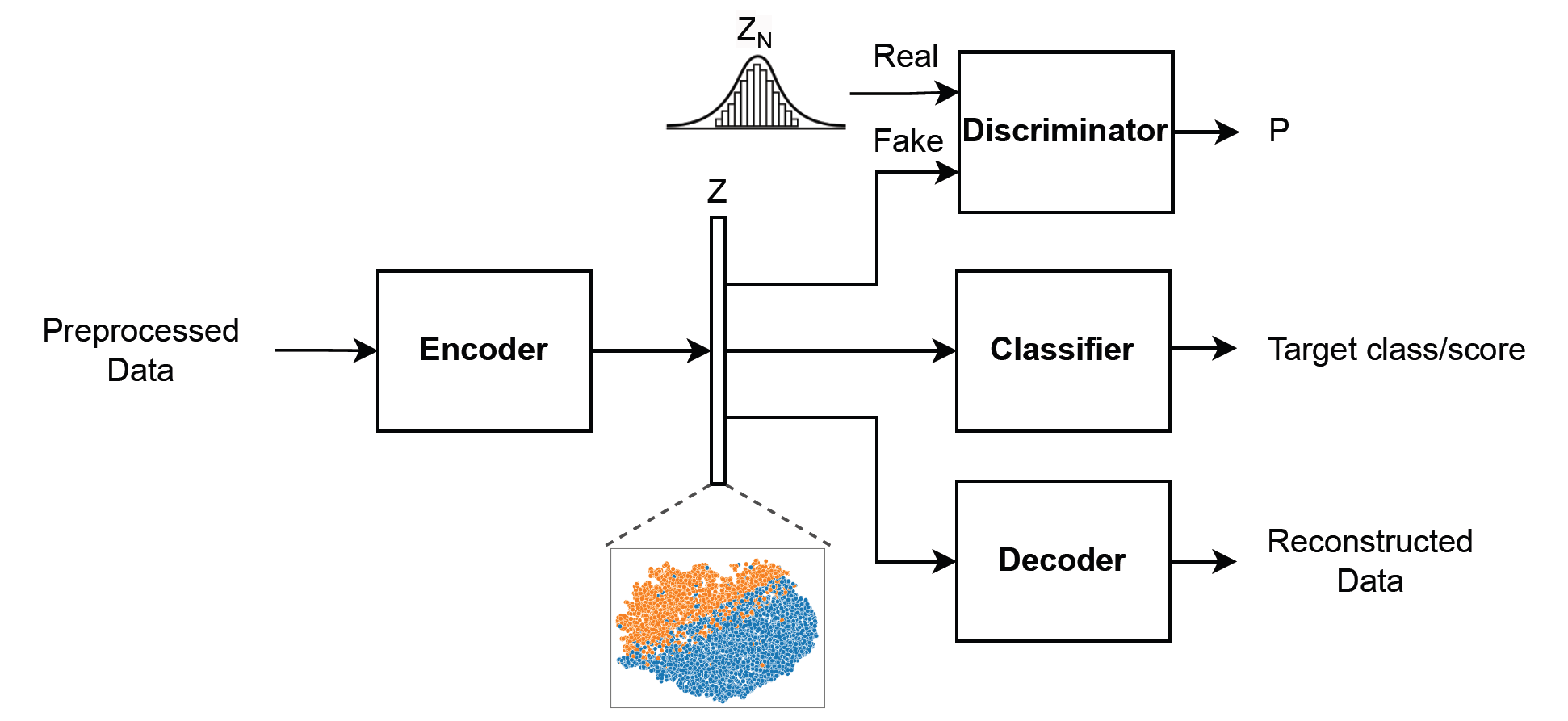
Training runs in three phases: adversarial → autoencoder (denoising reconstruction) → classifier (train_xaaenet).
From representations to pixel cues
After training, you compare the model’s PLS decision axis (derived from validation z and class labels) with hand-crafted scores from compute_feature_score_table (brightness, color, texture, etc.).
run_pls_feature_figures produces two views:
1. Feature importance ranking — which cues align most with the decision axis (start here).
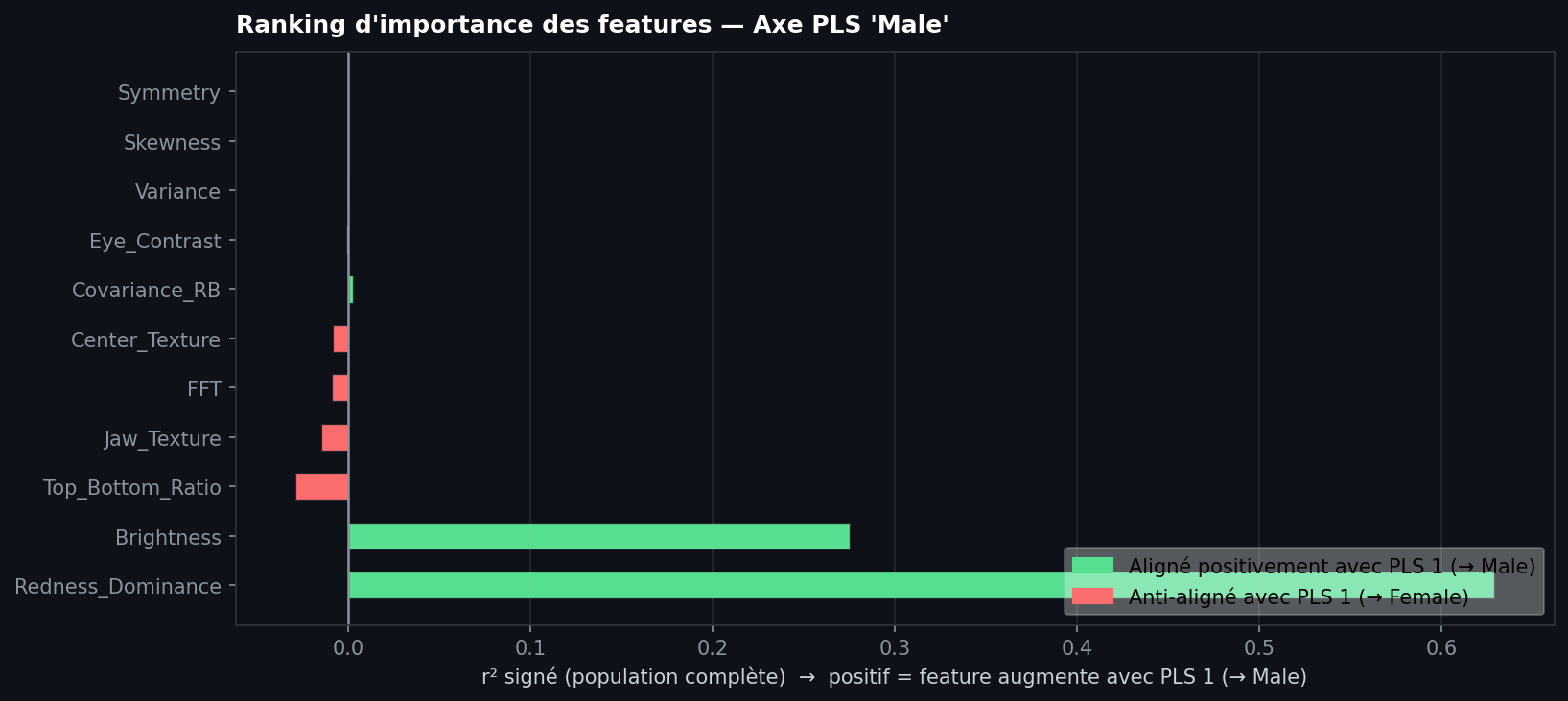
| Read the chart | |
|---|---|
| Long green bar (right) | Feature increases with PLS1 toward class A |
| Long red bar (left) | Feature decreases toward class A (aligned with class B) |
| Short bar | Weak linear link to the decision axis on this sample |
2. Alignment panels — one scatter per feature: PLS1 (horizontal) vs standardized score (vertical).
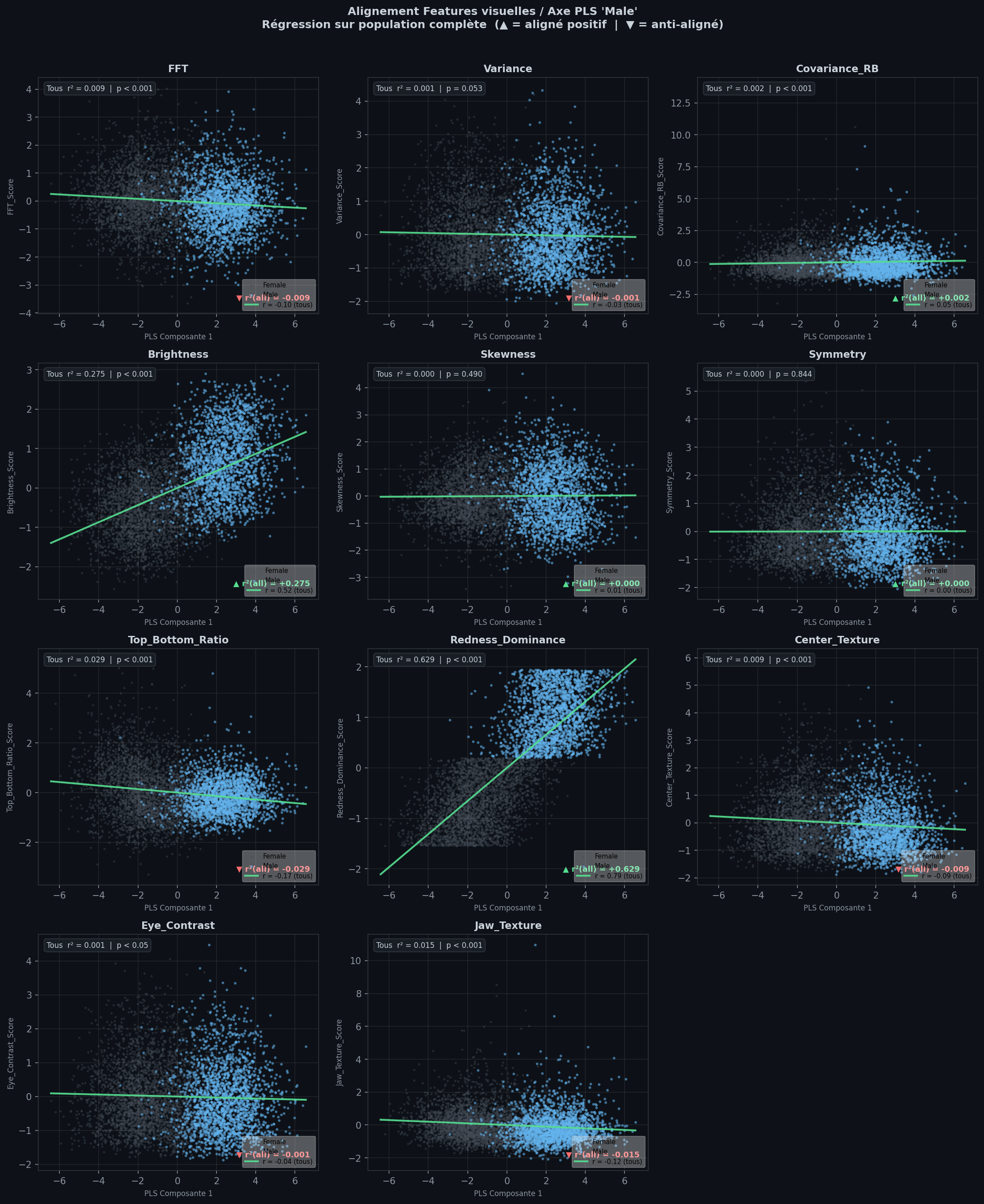
| Read a panel | |
|---|---|
| Diagonal green line, classes separated | Strong co-variation — plausible pixel cue for the task |
| Flat green line, mixed cloud | Weak link — model probably not using this cue much |
| Grey / blue points | Class B / class A |
Use the ranking to shortlist features; use the panels to sanity-check the top ones. These are alignment statistics, not a proof of what the network implements internally.
More detail: Classification interpretation in the docs.
Installation
git clone https://github.com/Tell-Me-Why-xAI/Tell-Me-Why.git
cd Tell-Me-Why
Conda (recommended):
conda env create -f environment.yml
conda activate tell-me-why
pip install -e ".[dev]"
pip only (Python 3.10–3.12):
python -m venv .venv
source .venv/bin/activate
pip install -e ".[dev]"
Images should be at least about 160×160 pixels (MS-SSIM reconstruction loss).
Quick start
from fastai.vision.all import *
from tell_me_why.model_aae import AAE
from tell_me_why.training import train_xaaenet

# dls: fastai DataLoaders (ImageBlock, CategoryBlock) for your binary task

model = AAE(input_size=160, input_channels=3, encoding_dims=128, classes=2)
learn = train_xaaenet(model, dls, epochs_adv=1, epochs_ae=1, epochs_classif=2)
Then extract validation z, build a feature table with compute_feature_score_table, and run run_pls_feature_figures. See the end-to-end walkthrough.
Documentation
- Docs: https://tell-me-why-xai.github.io/Tell-Me-Why
- Figures are stored in
nbs/images/on GitHub; this README usesraw.githubusercontent.comURLs so images render on PyPI.
| Notebook | Topic |
|---|---|
01_model_aae.ipynb |
AAE architecture and losses |
02_feature_scores.ipynb |
Pixel feature scores |
03_user_encoder.ipynb |
Custom encoder + xAAEnet blocks |
04_training.ipynb |
train_xaaenet |
05_visualization.ipynb |
Interpretation figures |
06_walkthrough.ipynb |
End-to-end example (PETS) |
Development
conda activate tell-me-why
nbdev-export
nbdev-test
nbdev-preview
This README is maintained by hand (not generated from index.ipynb). CI runs touch README.md before nbdev-docs so nbdev-readme does not overwrite it.
License
MIT (see pyproject.toml).
Release history Release notifications | RSS feed


Download files
Download the file for your platform. If you're not sure which to choose, learn more about installing packages.
Source Distribution
Built Distribution
Filter files by name, interpreter, ABI, and platform.
If you're not sure about the file name format, learn more about wheel file names.
Copy a direct link to the current filters
File details
Details for the file tmw_xai-0.0.1.tar.gz.
File metadata
- Download URL: tmw_xai-0.0.1.tar.gz
- Upload date:
- Size: 27.4 kB
- Tags: Source
- Uploaded using Trusted Publishing? No
- Uploaded via: twine/6.2.0 CPython/3.10.20
File hashes
| Algorithm | Hash digest | |
|---|---|---|
| SHA256 |
9eefde57853ed96f7de13e3c055d7960cfdbbe677ef865706b17e91737480c6a
|
|
| MD5 |
f0b377270bdf314c105f7f5984499458
|
|
| BLAKE2b-256 |
ecdef9e34da56043b5fb9e90f50c53521fbd9b775bea512aafd5bb3ae9bab8c3
|
File details
Details for the file tmw_xai-0.0.1-py3-none-any.whl.
File metadata
- Download URL: tmw_xai-0.0.1-py3-none-any.whl
- Upload date:
- Size: 27.6 kB
- Tags: Python 3
- Uploaded using Trusted Publishing? No
- Uploaded via: twine/6.2.0 CPython/3.10.20
File hashes
| Algorithm | Hash digest | |
|---|---|---|
| SHA256 |
14ed0e0bc02afcf17e094513793c9ebbebf828dfb5a8d259526ee2c6c72b0b8f
|
|
| MD5 |
d1d0ea2e95611e15d6806ae04782d5ad
|
|
| BLAKE2b-256 |
2e9332d611fc3a4a3a9630ce0bca7de80ff7e7209fc4c8292def14d6d96e9af1
|






