
Local token & cost dashboard for AI coding tools
Verified details
These details have been verified by PyPIProject links
GitHub Statistics
Maintainers

Project description
Tokdash
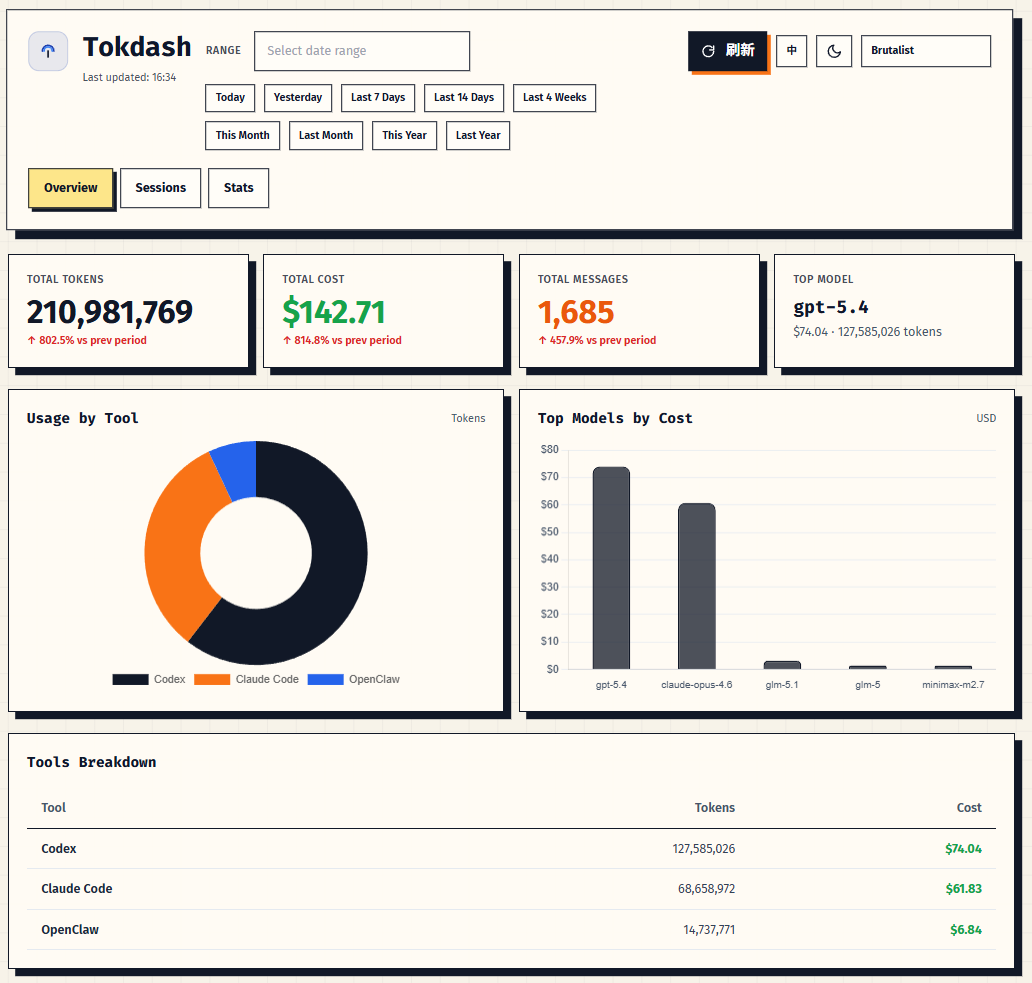
Local token & cost dashboard for AI coding tools (Codex, OpenCode, Claude Code, Gemini CLI, OpenClaw, etc.).



Features
- Hierarchical breakdown: app → model with full token precision
- Multiple data sources: local session files + optional
tokscalefallback - Exact token counts: Input/Output/Cache token breakdowns
- Flexible ranges: today / week / month / N days
- Contribution calendar: 2D heatmap + 3D isometric view
Supported clients (explicit token fields)
✅ Supported:
- OpenCode:
~/.local/share/opencode/ - Codex:
~/.codex/sessions/ - Claude Code:
~/.claude/projects/ - Gemini CLI:
~/.gemini/tmp/*/chats/session-*.json - OpenClaw:
~/.openclaw/agents/*/sessions/ - Kimi CLI:
~/.kimi/sessions/*/*/wire.jsonl
Platform support
- Linux (including WSL2): supported
- macOS: experimental
Quick start
Prerequisites
- Python 3.10+
- One or more supported clients installed (above)
Install (pip)
From PyPI (after the first public release):
pip install tokdash
tokdash serve
Open: http://localhost:55423
Run (from source)
pip install -e .

# Option A: run directly
python3 main.py

# Option B: CLI wrapper (same server)
./tokdash serve
Open: http://localhost:55423
If port conflicts:
python3 main.py --port <port>./tokdash serve --port <port>
If you want to access Tokdash from another device (recommended):
- Tailscale Serve (private to your tailnet):
tailscale serve 55423 - SSH port-forward:
ssh -L 55423:127.0.0.1:55423 <user>@<host>
Binding to 0.0.0.0 is possible, but not recommended: it listens on all interfaces and can expose the dashboard beyond your LAN (VPN/Wi‑Fi/etc.). Only do this if you understand the risk and have firewall/auth in place.
Run in background
See docs/agents/systemd/BACKGROUND_RUN.md for:
- Linux systemd (user service) template
- macOS launchd (LaunchAgent) template
For Humans
Copy and paste this prompt to your LLM agent (Claude Code, AmpCode, Cursor, etc.):
Install and configure Tokdash to run in the background by following the instructions here:
https://raw.githubusercontent.com/JingbiaoMei/Tokdash/main/docs/agents/systemd/AGENTS.md

Or read the Background Run guide, but seriously, let an agent do it.
For LLM Agents
Fetch the installation guide and follow it:
curl -s https://raw.githubusercontent.com/JingbiaoMei/Tokdash/main/docs/agents/systemd/AGENTS.md
Updating Tokdash
If you installed Tokdash with pip and are running it via systemd:
# 1. Upgrade the package
pip install --upgrade tokdash

# 2. Restart the systemd service to pick up changes
systemctl --user daemon-reload
systemctl --user restart tokdash

# 3. Verify the new version
pip show tokdash | grep Version
systemctl --user status tokdash --no-pager

# 4. Test the API is responding
curl 'http://127.0.0.1:55423/api/usage?period=today'
View logs if needed:
journalctl --user -u tokdash -f
OpenClaw digest (scheduled reports)
Tokdash can power daily/weekly/monthly OpenClaw usage reports by querying the local API on a schedule.
For Humans
Copy and paste this prompt to your LLM agent (Claude Code, AmpCode, Cursor, etc.):
Install and configure scheduled Tokdash usage reports for OpenClaw by following the instructions here:
https://raw.githubusercontent.com/JingbiaoMei/Tokdash/main/docs/agents/openclaw_reporting/AGENTS.md

Or read the guide yourself, but seriously, let an agent do it.
For LLM Agents
Fetch the installation guide and follow it:
curl -s https://raw.githubusercontent.com/JingbiaoMei/Tokdash/main/docs/agents/openclaw_reporting/AGENTS.md
Configuration
Tokdash is localhost-only by default.
TOKDASH_HOST(default:127.0.0.1)TOKDASH_PORT(default:55423)TOKDASH_CACHE_TTL(default:120seconds)TOKDASH_ALLOW_ORIGINS(comma-separated, default: empty)TOKDASH_ALLOW_ORIGIN_REGEX(default allows only localhost/127.0.0.1)
Example (remote access via Tailscale Serve; recommended):
tokdash serve --bind 127.0.0.1 --port 55423
tailscale serve --bg 55423
Privacy & security
- No telemetry: Tokdash does not intentionally send your data anywhere.
- Local parsing: usage is computed from local session files (see “Supported clients” paths above).
- Server exposure: Tokdash binds to
127.0.0.1by default. Prefer Tailscale Serve or SSH tunneling for remote access; avoid--bind 0.0.0.0unless you understand it listens on all interfaces and have firewall/auth in place.
API (local)
Tokdash is a local HTTP server. Common endpoints:
GET /api/usage?period=today|week|month|NGET /api/tools?period=...(coding tools only)GET /api/openclaw?period=...(OpenClaw only)
Example:
curl 'http://127.0.0.1:55423/api/usage?period=today'
Cost Accuracy Note
Token counts depend on what each client logs locally. Costs are computed from src/tokdash/pricing_db.json and may lag real provider pricing — use as an estimate and verify against your billing source if it matters.
Roadmap
See docs/ROADMAP.md.
Contributing / security
- Contributing guide:
docs/CONTRIBUTING.md - Security policy:
docs/SECURITY.md
Project structure
tokdash/
├── main.py                 # Source entrypoint (python3 main.py)
├── tokdash                 # Source CLI wrapper (./tokdash serve)
├── src/
│   └── tokdash/
│       ├── cli.py
│       ├── api.py                # FastAPI routes/app
│       ├── compute.py            # Aggregation/merging logic
│       ├── pricing.py            # PricingDatabase wrapper
│       ├── model_normalization.py
│       ├── pricing_db.json
│       ├── sources/
│       │   ├── openclaw.py       # OpenClaw session log parser
│       │   └── coding_tools.py   # Local coding tools parsers
│       └── static/
│           └── index.html
└── docs/                   # Roadmap + background-run docs + agent prompts
License
MIT License - see LICENSE.
Project details
Verified details
These details have been verified by PyPIProject links
GitHub Statistics
Maintainers
Release history Release notifications | RSS feed


Download files
Download the file for your platform. If you're not sure which to choose, learn more about installing packages.
Source Distribution
Built Distribution
Filter files by name, interpreter, ABI, and platform.
If you're not sure about the file name format, learn more about wheel file names.
Copy a direct link to the current filters
File details
Details for the file tokdash-0.1.0.tar.gz.
File metadata
- Download URL: tokdash-0.1.0.tar.gz
- Upload date:
- Size: 73.5 kB
- Tags: Source
- Uploaded using Trusted Publishing? Yes
- Uploaded via: twine/6.1.0 CPython/3.13.7
File hashes
| Algorithm | Hash digest | |
|---|---|---|
| SHA256 |
c2f626725b2aac1bbbababf8701caf906c889c1c2f6eda0d634272cf92a78138
|
|
| MD5 |
6f9a20dfbbcb2a467f21cc0a11554426
|
|
| BLAKE2b-256 |
ac3536465b8e8c7822a7d82351b795647fe066a4bfefecef42629520ede1a42a
|
Provenance
The following attestation bundles were made for tokdash-0.1.0.tar.gz:
Publisher:
publish-pypi.yml on JingbiaoMei/Tokdash
-
Statement:
-
Statement type:
https://in-toto.io/Statement/v1 -
Predicate type:
https://docs.pypi.org/attestations/publish/v1 -
Subject name:
tokdash-0.1.0.tar.gz -
Subject digest:
c2f626725b2aac1bbbababf8701caf906c889c1c2f6eda0d634272cf92a78138 - Sigstore transparency entry: 1203493945
- Sigstore integration time:
-
Permalink:
JingbiaoMei/Tokdash@c003a77e7c2746329255ab4e26b3d96ee2b19daa -
Branch / Tag:
refs/tags/v0.1.0 - Owner: https://github.com/JingbiaoMei
-
Access:
public
-
Token Issuer:
https://token.actions.githubusercontent.com -
Runner Environment:
github-hosted -
Publication workflow:
publish-pypi.yml@c003a77e7c2746329255ab4e26b3d96ee2b19daa -
Trigger Event:
push
-
Statement type:
File details
Details for the file tokdash-0.1.0-py3-none-any.whl.
File metadata
- Download URL: tokdash-0.1.0-py3-none-any.whl
- Upload date:
- Size: 70.8 kB
- Tags: Python 3
- Uploaded using Trusted Publishing? Yes
- Uploaded via: twine/6.1.0 CPython/3.13.7
File hashes
| Algorithm | Hash digest | |
|---|---|---|
| SHA256 |
07f8fbc373c2f0a2bb799050ce4b65292473dadb38d2e40485719d54997f5176
|
|
| MD5 |
baf9fc5aa5f6bcdcb9a6c1bfe59ca84c
|
|
| BLAKE2b-256 |
9a6a71d612885a23b3ba838a569108a17a39e8d50d734a41c9476450f4f85903
|
Provenance
The following attestation bundles were made for tokdash-0.1.0-py3-none-any.whl:
Publisher:
publish-pypi.yml on JingbiaoMei/Tokdash
-
Statement:
-
Statement type:
https://in-toto.io/Statement/v1 -
Predicate type:
https://docs.pypi.org/attestations/publish/v1 -
Subject name:
tokdash-0.1.0-py3-none-any.whl -
Subject digest:
07f8fbc373c2f0a2bb799050ce4b65292473dadb38d2e40485719d54997f5176 - Sigstore transparency entry: 1203493947
- Sigstore integration time:
-
Permalink:
JingbiaoMei/Tokdash@c003a77e7c2746329255ab4e26b3d96ee2b19daa -
Branch / Tag:
refs/tags/v0.1.0 - Owner: https://github.com/JingbiaoMei
-
Access:
public
-
Token Issuer:
https://token.actions.githubusercontent.com -
Runner Environment:
github-hosted -
Publication workflow:
publish-pypi.yml@c003a77e7c2746329255ab4e26b3d96ee2b19daa -
Trigger Event:
push
-
Statement type:






