
English | 中文 | 日本語 | 한국어 | Español | Português
Local token & cost dashboard for AI coding tools












Try it without installing → tokdash.github.io/demo
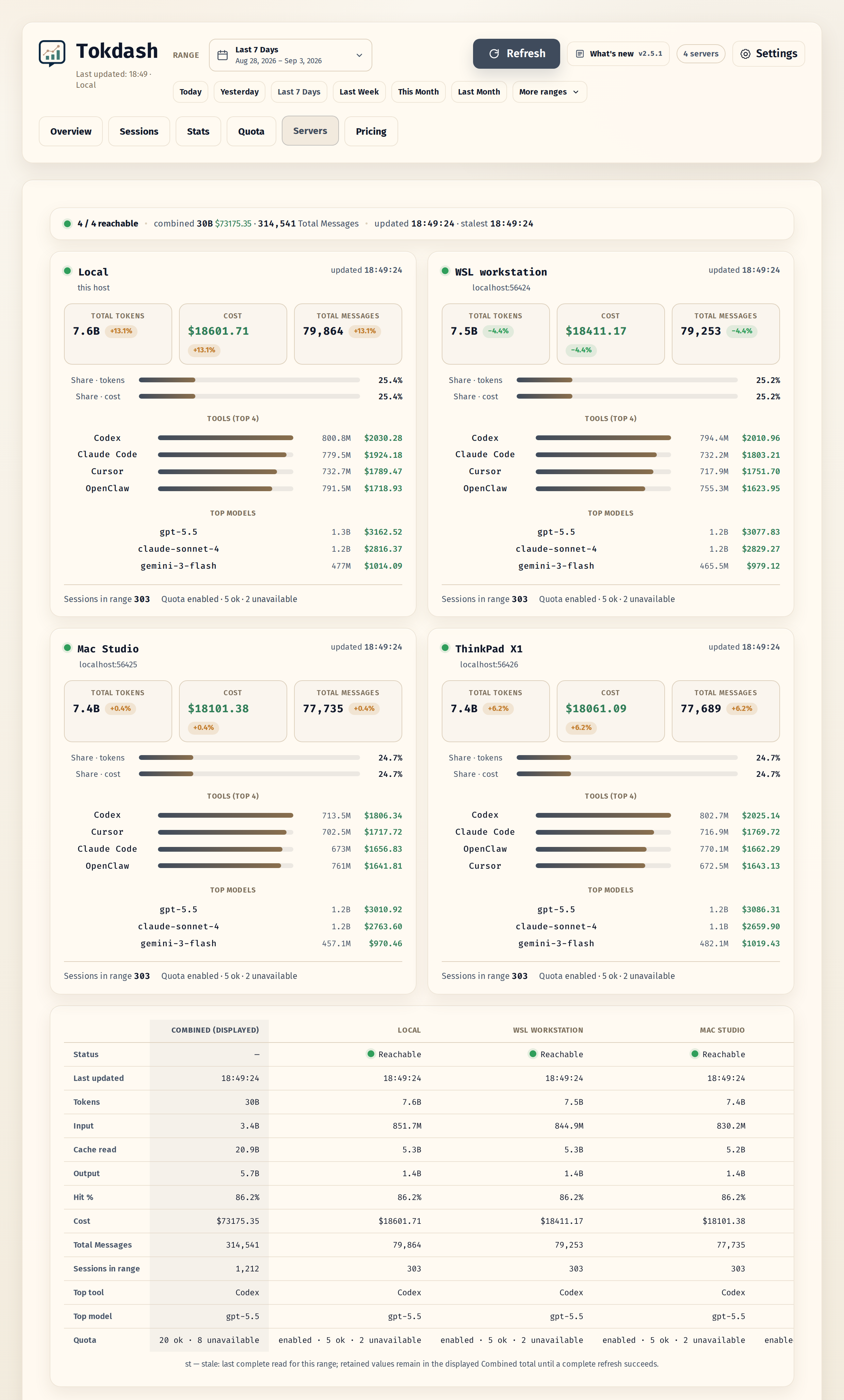
[!NOTE] Multiple machines, one dashboard. Add the Tokdash instances running on WSL, a Mac, or any other box in Settings: Overview, Sessions and Stats combine whatever you select, the Servers tab compares the machines side by side, and the Quota tab keeps each provider's window bars and reset countdowns grouped per machine. Remote access → · quota tracking →
Also from the same author: Cosyncing. Synchronize and control your agents — from CLI to GUI, from desktop to phone. Pick up right where you left off, anywhere. Cosyncing keeps your coding agents in sync across your own network.
[!TIP] Tokdash Companion is now on the Microsoft Store. See today's spend and subscription quota from the Windows notification area or the macOS menu bar, without keeping the dashboard open. Get it from the Microsoft Store · screenshots, downloads, and setup →
Table of Contents
- Features
- Supported clients
- Tokdash Companion Status Bar App
- Quick start
- Configuration
- Privacy & security
- API (local)
- Cost Accuracy Note
- History retention
- Roadmap
- Contributing / security
- Documentation
- Project structure
- License
Features
- Exact token counts: Input/Output/Cache token breakdowns
- Statusline integration [new]: drop a live token-usage indicator into Claude Code's statusline (or any agent that can hit a local HTTP endpoint) — see Statusline integration
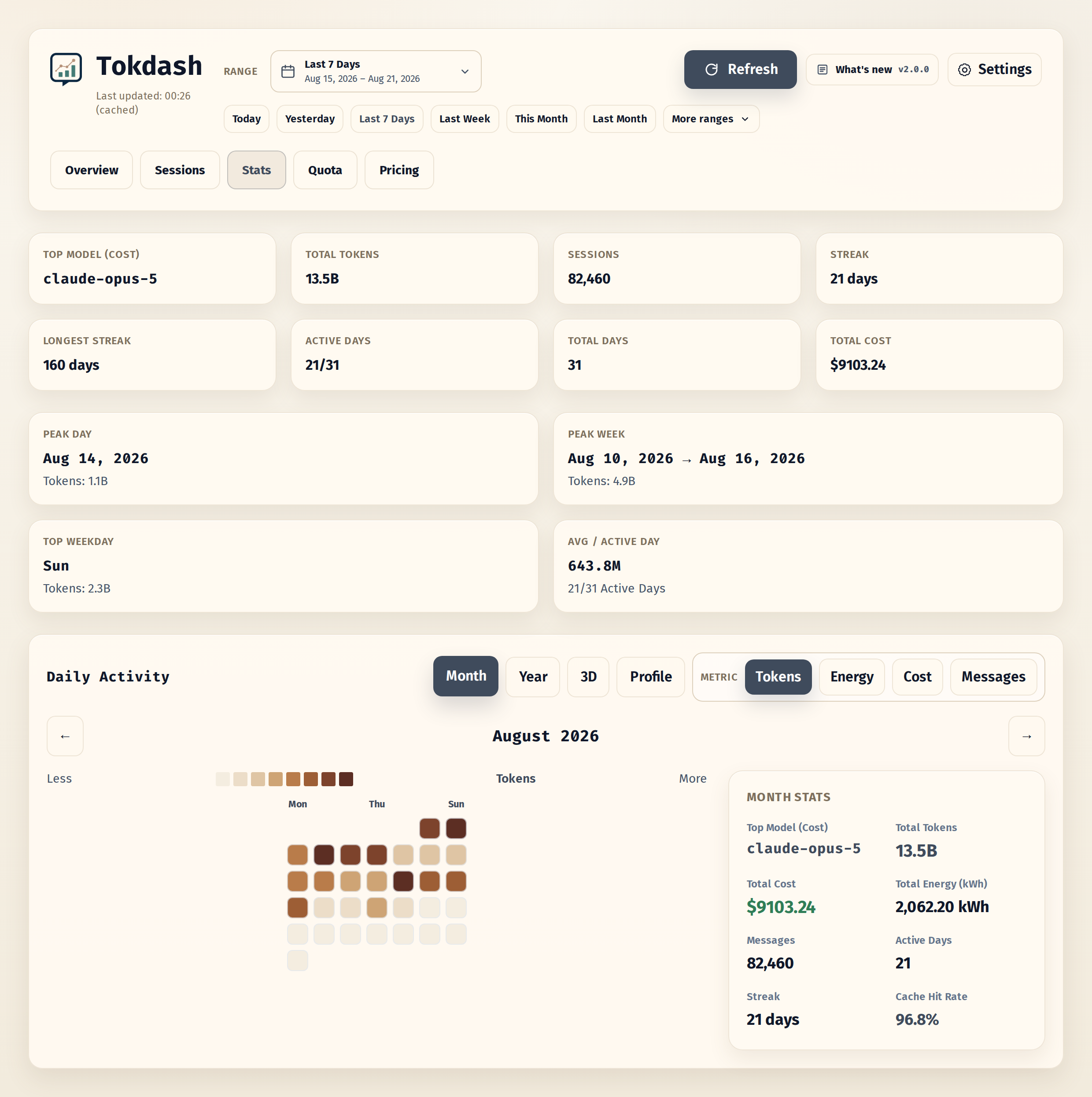
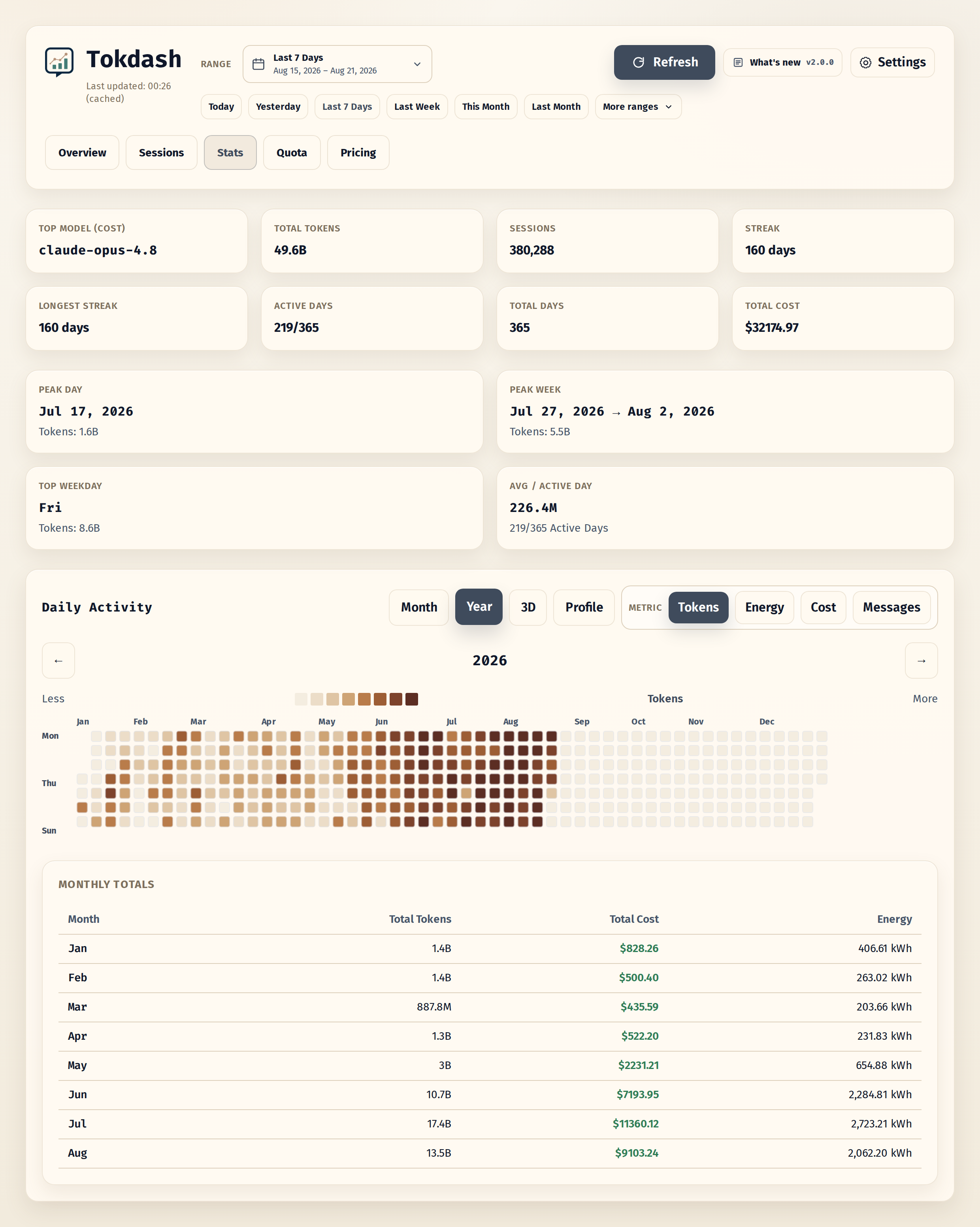
- Contribution calendar: 2D heatmap + 3D isometric view with Tokens/Cost/Messages metrics
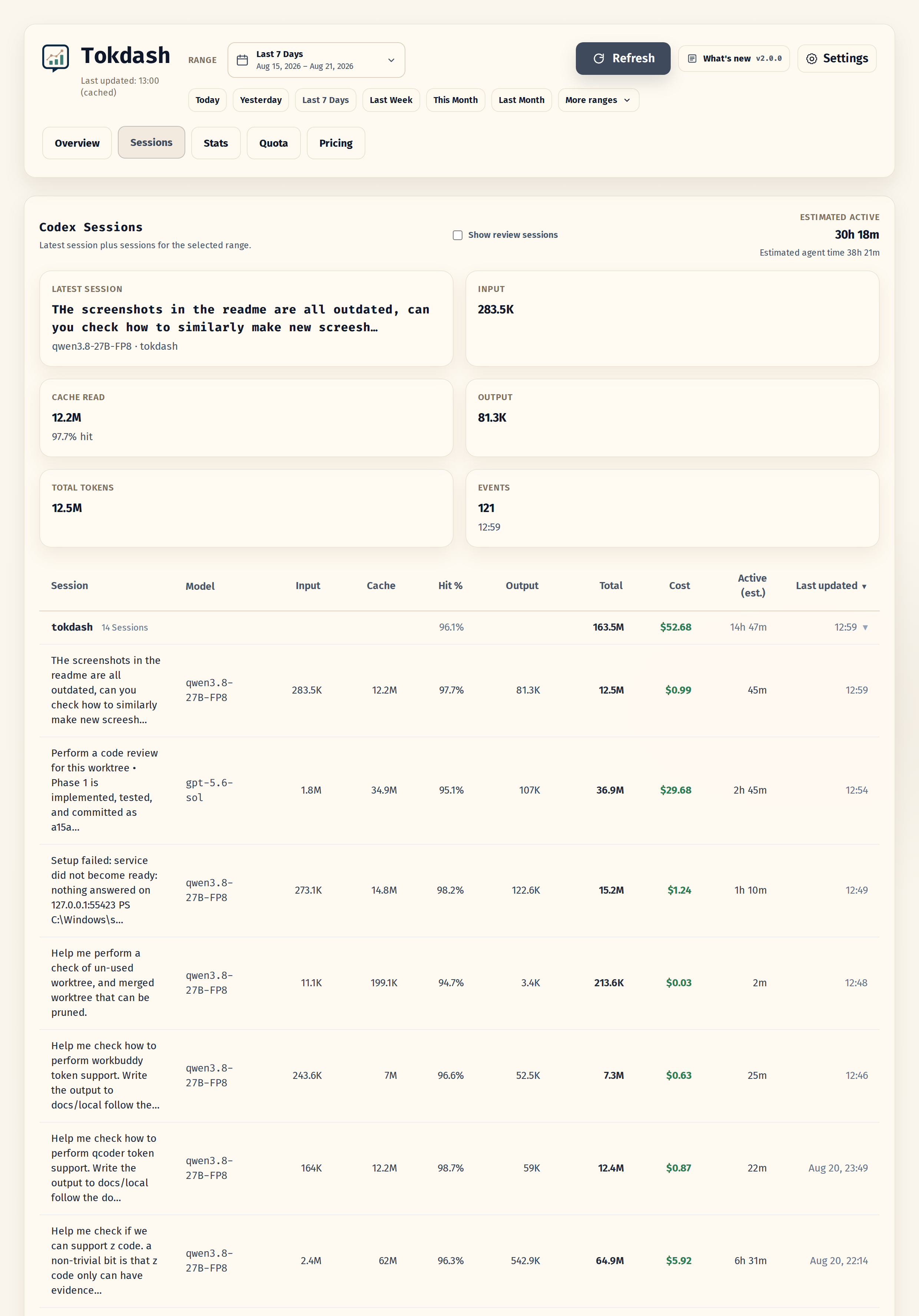
- Session explorer: per-session drill-down
- Report tab [new]: a week / month / year-to-date report of your own agent activity, with a shareable card for each tier of detail. Every export writes a light and a dark PNG
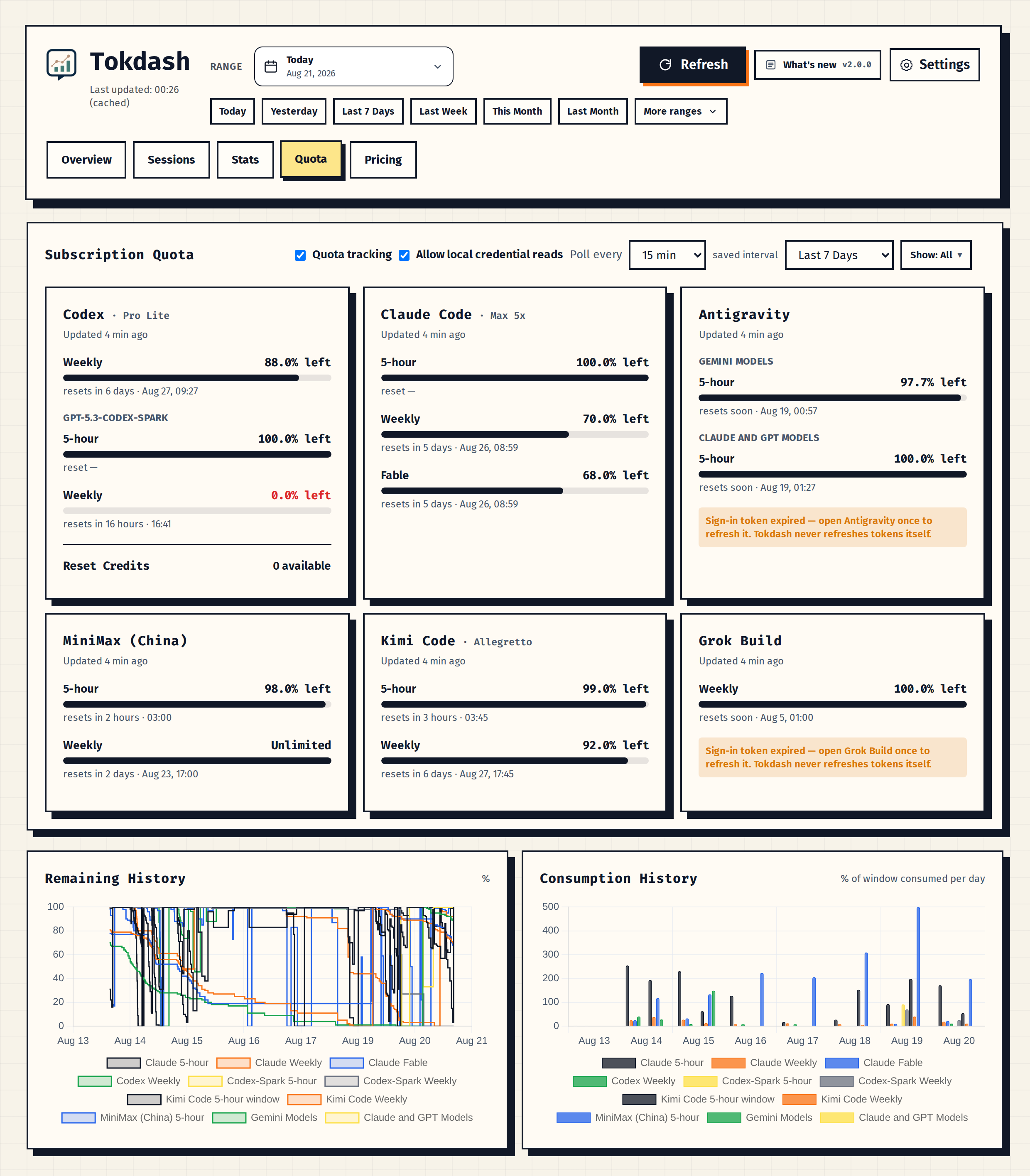
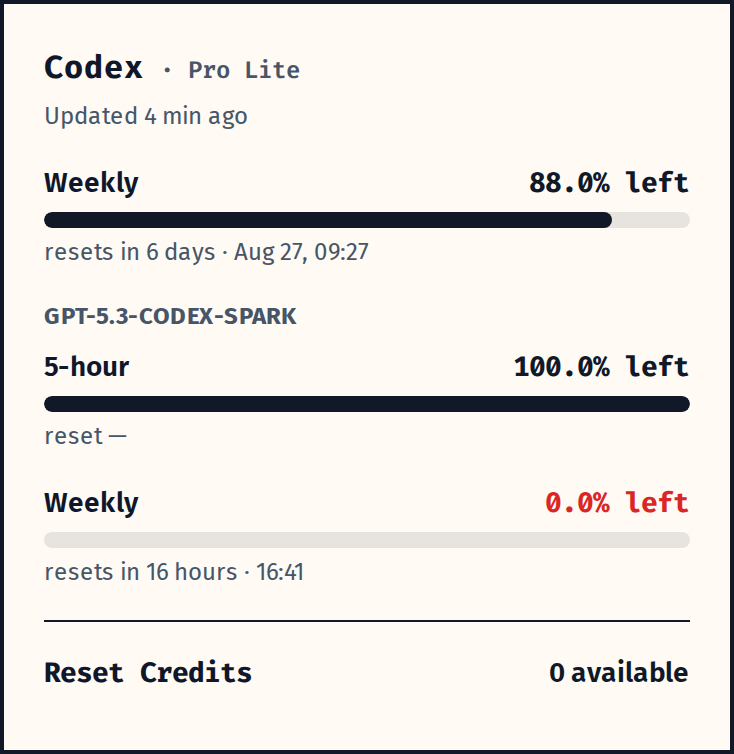
- Quota tab [new]: subscription window bars with reset countdowns for Codex, Claude Code, and Antigravity. Codex windows work out of the box from local logs; Codex reset credits, metered features, and all Claude/Antigravity quota need opt-in live polling
- Companion Status Bar App [new]: view spend and subscription quota from the macOS menu bar or Windows notification area — on the Microsoft Store for Windows — screenshots and downloads
- Multi-server views: add WSL, macOS, and other Tokdash servers in Settings; combine usage across any selection while keeping quota grouped by machine. See remote access.
- Themes and app polish: 17 style themes, light/dark mode, and PWA install support, UI in six languages (English / 中文 / 日本語 / 한국어 / Español / Português)
Client support matrix
| Client | Usage & cost | Session Explorer |
|---|---|---|
| OpenCode | ✅ | ✅ |
| Codex | ✅ | ✅ |
| Claude Code | ✅ | ✅ |
| Gemini CLI | ✅ | — |
| Antigravity CLI | ✅ | ✅ |
| OpenClaw | ✅ | — |
| Kimi Code / Kimi CLI | ✅ | ✅ |
| MiMo Code | ✅ | ✅ |
| Grok Build | ✅ | ✅ |
| Pi | ✅ | ✅ |
| omp | ✅ | ✅ |
| Kilo Code | ✅ | ✅ |
| Cline | ✅ | ✅ |
| GitHub Copilot CLI | ✅ | — |
| Hermes | ✅ | ✅ |
| DeepSeek Harness | ✅ | ✅ |
| Reasonix | ✅ | ✅ |
| ZCode | ✅ | ✅ |
| WorkBuddy | ✅ | ✅ |
| Qoder IDE | ✅ | ✅ |
| Qoder CLI | ✅ | — |
| Zed | ✅ | — |
| Qwen Code | ✅ | — |
| Crush | ✅ | — |
See Supported clients for local data paths, overrides, and source-specific accounting notes.
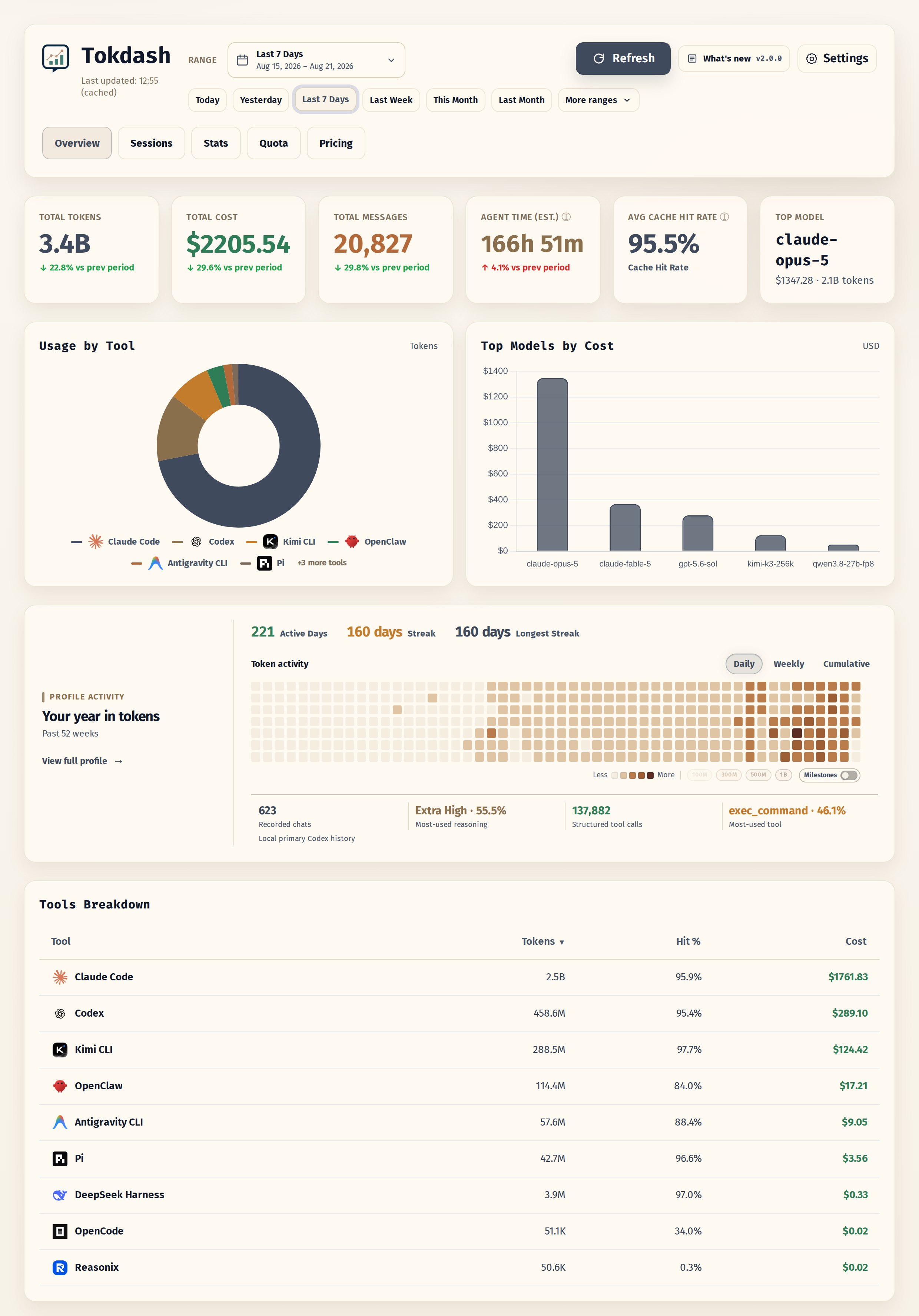
Overview
Sessions
Monthly usage heatmap
Yearly usage heatmap
Quota tracking
Codex quota and reset credits
Multiple servers, one total
Tokdash Companion Status Bar App
The Tokdash Companion Status Bar App is an optional native menu-bar app for macOS and notification-area app for Windows. It provides a compact, read-only view of the Tokdash service without keeping the full dashboard open.


macOS menu bar Windows notification area
- Today's cost, tokens, messages, and month-to-date usage
- Combined totals and server-grouped quota from multiple Tokdash endpoints
- Codex, Claude, Kimi, MiniMax, Antigravity, Grok, and Z.ai quota windows
- Relative reset times and optional low-quota notifications
- Optional launch at login
- System language detection plus English, Simplified Chinese, Japanese, Korean, Spanish, and Portuguese
- No telemetry, credential discovery, port scanning, or direct log parsing
Download
Windows — Microsoft Store (recommended)

Signed by Microsoft and updated through the Store. Requires Windows 11.
Direct download — Tokdash Companion 1.0.0:
| Platform | Download | Requirements |
|---|---|---|
| macOS | Universal DMG (arm64 + x86_64) |
macOS 14 or newer |
| Windows | Self-contained portable ZIP (x64) |
Windows 11; Windows on Arm can use x64 emulation |
[!WARNING] The GitHub Releases binaries are unsigned. macOS Gatekeeper and Windows SmartScreen will show an unknown-publisher warning. Download only from this repository, verify the included
SHA256SUMS, and continue only if you trust the release. The Microsoft Store build is signed by Microsoft and is not affected; macOS signing and notarization are planned for a later release.
Set up
- Install and start Tokdash 1.5.2 or newer using the Quick start.
- Install the companion. On Windows, use the Microsoft Store link above. For a
direct download, get the asset for your platform and verify it against
SHA256SUMS. - From a direct download: on macOS, open the DMG and drag
TokdashCompanionto Applications; on Windows, extract the ZIP to a stable directory and runTokdashCompanion.exe. - The companion connects to
http://127.0.0.1:55423by default. Open its settings to add, test, name, enable, or remove explicit Tokdash endpoints, including private Tailscale Serve URLs.
The companion only contacts the Tokdash endpoints you configure. Low-quota notifications and launch at login are both opt-in and disabled by default. See the companion release guide for checksum, update, and removal instructions.
Quick start
Platform support
- Linux (including WSL2): supported
- macOS: supported
- Windows (native): experimental
Prerequisites
- Python 3.10+
- One or more supported clients installed
Install
Recommended isolated install:
pipx install tokdash
If you do not use pipx:
python3 -m pip install --user tokdash
First run
Run the onboarding wizard:
tokdash setup
The wizard configures a reversible user-level background service when the platform supports
one, then prints the dashboard URL (default: http://127.0.0.1:55423). If no supported
service manager is available, it records setup state and prints foreground run guidance. It
uses localhost-first defaults, does not require sudo for the local service, and keeps your
usage history unless you later uninstall with --purge.
To expose the dashboard explicitly on all network interfaces with writes disabled, run
tokdash setup --bind 0.0.0.0; review the remote-access guide first.
For a non-interactive setup from an agent, script, or bundle:
tokdash setup --auto --json
To preview what setup would change:
tokdash setup --dry-run
Verify
tokdash doctor
doctor checks the runtime, background service, configured port, data paths, and update-check
status. Use tokdash doctor --json for automation.
Update or remove
tokdash update       # upgrade the managed runtime and restart the service when possible
tokdash uninstall    # reverse exactly what setup created; keeps usage history by default
update only drives install methods Tokdash can safely manage. If your runtime was installed
by a package manager Tokdash does not own, it prints the exact manual guidance instead of
mutating that environment. For managed runtimes, update reports the Tokdash version before
and after the upgrade; if the version is unchanged, it says Tokdash is already at that version
instead of implying a new package was installed.
Existing installs: migration from before v1.0
If you installed Tokdash before the onboarding flow, upgrade first:
pipx upgrade tokdash
# or: python3 -m pip install --user -U tokdash
Then run tokdash doctor and tokdash setup when you want Tokdash to manage the background
service. If you already have a hand-written systemd or launchd service, setup does not
silently replace it: it refuses unmarked tokdash.service / plist files by default. Keep
managing that service yourself, remove it before setup, or run tokdash setup --force after
checking tokdash setup --dry-run. --force also handles pre-1.0 services that already
occupy port 55423 but do not expose the new /health fingerprint: it rewrites and restarts
the existing tokdash.service. Use tokdash setup --no-service to skip service creation.
If your current setup uses a conda/system/user-pip interpreter and you want tokdash update
to manage future upgrades, migrate the service to Tokdash's setup-owned venv:
# Upgrade the tokdash command you are about to run, for example:
python3 -m pip install --user -U tokdash
# or, for a conda base install:
conda run -n base python -m pip install -U tokdash
tokdash setup --runtime venv --force
tokdash doctor
This keeps your usage history under ~/.tokdash, rewrites the user service to run
~/.tokdash/runtime/python-venv/bin/python -m tokdash, and lets future tokdash update
upgrade that managed venv and restart the service. If you installed with pipx, you can
instead keep the pipx runtime and upgrade with tokdash update or pipx upgrade tokdash.
Remote access
Tokdash stays loopback-bound by default. Interactive tokdash setup can configure Tailscale
Serve after explicit confirmation, providing private HTTPS read access from Windows or another
tailnet device. Use SSH forwarding when you need authenticated write access. An explicit
--bind 0.0.0.0 provides read-only network access but exposes the unauthenticated dashboard on
every reachable interface.
See docs/guides/REMOTE_ACCESS.md for setup commands, WSL2 guidance,
access URLs, write behavior, and security trade-offs.
Foreground fallback
If you only want a one-off foreground process:
tokdash serve
Open http://127.0.0.1:55423. Use tokdash serve --port <port> if the default port is busy.
For full onboarding details, including runtime choices, WSL/systemd behavior, macOS launchd,
Tailscale, bundling, update checks, and safe uninstall semantics, see
docs/guides/ONBOARDING.md.
OpenClaw digest (scheduled reports)
Tokdash can power daily/weekly/monthly OpenClaw usage reports by querying the local API on a schedule.
For Humans
Copy and paste this prompt to your LLM agent (Claude Code, AmpCode, Cursor, etc.):
Install and configure scheduled Tokdash usage reports for OpenClaw by following the instructions here:
https://raw.githubusercontent.com/JingbiaoMei/Tokdash/main/docs/guides/agents/openclaw_reporting/AGENTS.md

Or read the guide yourself, but seriously, let an agent do it.
For LLM Agents
Fetch the installation guide and follow it:
curl -s https://raw.githubusercontent.com/JingbiaoMei/Tokdash/main/docs/guides/agents/openclaw_reporting/AGENTS.md
Statusline integration
The local API can power a statusline item in your coding agent (Claude Code, etc.) showing live token/cost stats.
Ready-made templates live in docs/guides/statusline/ — copy one into ~/.claude/scripts/ and add the statusLine block to ~/.claude/settings.json:
statusline-minimal.sh→ one line:[Claude Sonnet 4.6] 📁 myproject | 📊 12.3M ($4.56) todaystatusline-full.sh→ a four-row dashboard with today + week totals and a top-3 per-tool breakdownstatusline.ps1→ the same one-line output as the minimal template, for Claude Code running natively on Windows (PowerShell, nocurl/jqneeded)
All are read-only, localhost-only, and fail silently if Tokdash isn't running. See the folder README for install/config and docs/reference/API.md for the endpoint reference.
Prefer to roll your own? Hand your agent this prompt and point it at docs/reference/API.md:
"I would like to add a statusline item from the tokdash endpoint's API; it should show the total tokens used today."

Configuration
Tokdash is localhost-only by default.
TOKDASH_HOST(default:127.0.0.1)TOKDASH_PORT(default:55423)TOKDASH_CACHE_TTL(default:600seconds)TOKDASH_CACHE_MAX_ENTRIES(default:256) — bound cached API responses and their idle per-key locksTOKDASH_COMPUTE_CONCURRENCY(default:2) — cap on simultaneous heavy history reparses; excess cold requests return a fast503instead of saturating the server under loadTOKDASH_STARTUP_WARM_JOIN_SECONDS(default:30seconds) — how long the first request for a key still being warmed at startup waits for that fill instead of returning503; at most one request per key waitsTOKDASH_LIMIT_CONCURRENCY(default:64) — uvicorn connection cap (backpressure)TOKDASH_KEEPALIVE(default:5seconds) — uvicorn keep-alive timeoutTOKDASH_ALLOW_ORIGINS(comma-separated, default: empty)TOKDASH_ALLOW_ORIGIN_REGEX(default CORS policy allows localhost/127.0.0.1 and same-tailnet Tailscale Serve reads; setting either CORS option replaces that default policy)TOKDASH_NO_RETENTION_NOTICE(set to1to silence the history-retention reminder printed ontokdash serve)TOKDASH_SETUP_NO_OPEN(set to1to skip the optional browser open at the end oftokdash setup)
Session active time (estimated):
Every session reports active_ms alongside span_ms. Span is first-to-last event; active time subtracts idle by counting each gap between consecutive token events only up to an idle cap, so a session left open overnight no longer reads as a 14-hour session.
It is an estimate, and the API says so: summary.active_time_estimated is true and summary.active_time_method is capped-inter-event-gap. The limits follow from the method — a short pause between events is indistinguishable from work, a single operation longer than the cap is truncated to it, and a session with one token event measures zero because nothing precedes it.
Concurrent work is counted two ways. active_ms is clock time, with overlap counted once; active_ms_sum adds the overlap up, i.e. agent time. Both appear per session and per tool in summary. Kimi agents and Claude subagents run alongside the main agent, and each is timed as its own stream: a subagent working one minute in parallel adds a minute of agent time and none of clock time.
TOKDASH_ACTIVE_GAP_CAP_SECONDS(default:300) — idle cap in seconds; gaps longer than this contribute only the cap. Clamped to 1s–6h.
Persistent usage DB (default on):
Tokdash maintains a local SQLite index at ~/.tokdash/usage.sqlite3 by default. It stores parsed token rows and Codex/Claude/Kimi/DeepSeek Harness/Reasonix session summaries so repeated dashboard and API reads can use indexed SQL instead of reparsing every source log. Source logs remain the source of truth; the DB is a local performance index, and Tokdash falls back to live parsing if it is disabled or unavailable.
Cached session rows are price-neutral: they hold each turn's billing inputs (model, fresh input, cache reads and writes, output), and cost is calculated when they are read, with whatever pricing that process has loaded. Editing a rate therefore reprices instantly instead of rereading gigabytes of logs, and two Tokdash versions sharing one database do not invalidate each other's rows over pricing. Sharing is only safe while both builds support the same database schema, though: schema migrations run forward only, so once the newer build migrates the file the older one refuses to open it until it is upgraded, and every cached read fails until the versions match. tokdash doctor reports the schema on disk alongside the one the running build supports. Parser and source-file changes still reparse normally. Rows written before this (including any kept by TOKDASH_USAGE_DB_DURABLE after their log is gone) reprice from their stored totals, which reproduces the same figure but cannot separate a Claude or Kimi cache write from fresh input; only a reparse of those logs can restore that distinction. Codex bills under provider/model and stores the bare name, so its older rows are reparsed once instead of reused.
Run a checkout against its own data directory so it never migrates the installed service's database:
TOKDASH_DATA_DIR=output/dev-data PYTHONPATH=src python3 main.py
TOKDASH_USAGE_DB(default:1) — set to0,false,no, oroffto disable the persistent usage DBTOKDASH_DATA_DIR(default:~/.tokdash) — base directory for Tokdash local stateTOKDASH_USAGE_DB_PATH(default:$TOKDASH_DATA_DIR/usage.sqlite3) — explicit SQLite file pathTOKDASH_USAGE_DB_DURABLE(default:1) — keep already indexed rows if a source file temporarily disappears or a parser returns no rows; set to0for strict source replacementTOKDASH_USAGE_DB_WATCH(default:0) — set to1to run a background sync loop insidetokdash serveTOKDASH_USAGE_DB_WATCH_INTERVAL(default:30seconds) — sync interval fortokdash db watchand the serve-time watch loop
DB maintenance commands:
tokdash db status --pretty
tokdash db sync --pretty
tokdash db verify --verify-period today --pretty
tokdash db repair --dry-run --pretty
tokdash db resync --pretty
tokdash db watch --pretty
For remote access through Tailscale Serve, SSH forwarding, or an explicit network bind, see
docs/guides/REMOTE_ACCESS.md. Interactive tokdash setup can configure and
record the Tailscale Serve rule after you opt in.
By default tokdash serve opens the dashboard in your browser once on startup. Pass --no-open to disable this (it is also skipped automatically in headless/SSH environments and in the background service templates).
Privacy & security
- No telemetry: Tokdash does not intentionally send your data anywhere.
- Local parsing: usage is computed from local session files (see supported clients).
- Optional quota polling: the Quota tab is local-only by default. Per-provider API polling can be enabled from the tab or with
tokdash quota consent; it uses your local CLI credentials only to call that provider's own quota endpoint, and stores responses in the local usage SQLite DB. - Server exposure: Tokdash binds to
127.0.0.1by default. Tailscale Serve provides private read-only access, SSH forwarding provides authenticated write access, and--bind 0.0.0.0explicitly exposes unauthenticated reads on every interface. See the remote-access guide.
Quota tracking (optional)
The Quota tab shows subscription utilization windows and reset timers, from two data sources. Local logs (no network): Codex records its own quota in session files, so the Codex 5-hour/weekly windows work out of the box — but they update only when you use Codex, and the logs never contain reset credits or metered-feature windows. Treat session-log Codex consumption as an estimate that can be materially wrong: each session caches its quota snapshot at its last fetch and replays it unchanged on every later message, so the numbers can be stale, and reset-boundary noise can occasionally distort a window further — the Quota tab labels these charts as estimated. Live polling (off by default, per-provider consent): Tokdash calls the provider's own quota endpoint with the sign-in your CLI already has. It is fresher, adds Codex reset credits and metered features, is required for accurate Codex consumption, and is the only quota source for Claude Code, Antigravity, MiniMax, Kimi Code, SuperGrok/Grok Build, and the Z.ai Coding Plan:
tokdash quota consent --codex-api on --claude-api on --antigravity-api on
tokdash quota consent --minimax-api on --kimi-api on --grok-api on --zai-api on
tokdash quota consent --credential-scan on   # allow the disclosed local credential readers
tokdash quota consent --poll-interval 30      # background poll cadence: 15, 30, 60 or 120 min
tokdash quota consent --enabled off           # master switch: turn ALL quota tracking off
tokdash quota poll
tokdash quota show
Master switch. quota.enabled (default on) turns all quota work on or off — session scanning, network polling, and snapshot writes. Toggle it from the Quota tab or with tokdash quota consent --enabled on|off. When it is off (or the TOKDASH_QUOTA_POLL=0 kill switch is set), the background poller idles completely, GET /api/quota/refresh returns a "quota tracking disabled" error, and the tab shows an enable quota tracking card instead of data. Per-provider consent keys keep their narrower network-only meaning.
Poll interval. The background poller snapshots every 30 minutes by default. Choose 15/30/60/120 minutes from the Quota tab, during tokdash setup, or with tokdash quota consent --poll-interval N; it is saved as quota.poll_interval_minutes in config.json. The TOKDASH_QUOTA_POLL_INTERVAL env var (seconds, floor 300) overrides the saved value, and the tab shows which source is active. Interval changes apply on the next poll cycle without restarting the server. Codex session ingestion is incremental — after a one-time backfill of your history, each cycle only tail-reads session files that grew, so a steady-state poll costs single-digit milliseconds.
For fixed-reset quota windows, the poller also samples near the reset boundary so history captures the pre-reset high and post-reset baseline. Boundary sampling is enabled by default, calls only the provider whose window triggered it, coalesces nearby provider boundaries, and keeps at least 300 seconds between daemon poll cycles. Set TOKDASH_QUOTA_BOUNDARY_POLL=0 to disable it, TOKDASH_QUOTA_BOUNDARY_POST=0 to disable only post-reset samples, or adjust the default 120-second leads with TOKDASH_QUOTA_BOUNDARY_PRE_SECONDS and TOKDASH_QUOTA_BOUNDARY_POST_SECONDS.
Multiple Claude Code installs. Claude Code keeps one subscription per config directory, so a second sign-in you run as CLAUDE_CONFIG_DIR=~/.claude-academic claude is a second subscription with its own windows. With credential scanning consented, Tokdash reads $CLAUDE_CONFIG_DIR plus every ~/.claude* directory that has its own .credentials.json, polls each one separately, and groups them inside the Claude Code card under the profile name the directory was set up with (academic). History keeps them apart too: Claude-academic 5-hour is its own series beside Claude 5-hour. An install with an expired sign-in shows its own notice instead of hiding a working install's numbers, and two directories holding the same sign-in count once. Set TOKDASH_CLAUDE_PROFILES to a path-separated list of directories for installs that live outside your home directory. Usage totals needed nothing: session logs under every ~/.claude* install have been counted for some time.
Live polling requires two separate decisions: quota.credential_scan permits read-only access to the disclosed local credential stores, then each <provider>_api key permits that provider's network request. Tokdash reads native CLI auth/config files, OpenCode's auth.json plus global provider config, active Claude settings, and CC Switch's providers table through a read-only SQLite connection. It never scans provider logs, shell profiles, or arbitrary {file:...} references. MiniMax accepts an mmx sign-in or Token Plan Subscription Key (MINIMAX_TOKEN_PLAN_GLOBAL_KEY / MINIMAX_TOKEN_PLAN_CN_KEY); a normal pay-as-you-go key is not guaranteed to have Token Plan quota. Kimi accepts a Kimi Code sign-in/key (KIMI_API_KEY), not a Moonshot Open Platform pay-as-you-go key. SuperGrok/Grok Build quota requires the xAI OAuth sign-in in $GROK_HOME/auth.json; a normal xAI API key cannot access consumer billing. Z.ai accepts a Coding Plan key from $ZCODE_HOME/v2/config.json, a supported tool configuration, ZAI_API_KEY, or Z_AI_API_KEY, and queries the plan's 5-hour/weekly credit windows plus legacy MCP limits. On macOS, Claude Code may require a one-time read-only Keychain approval. Tokdash never refreshes or writes provider credentials. TOKDASH_QUOTA_POLL=0 is a hard kill switch for all quota tracking. tokdash export excludes quota data by default; use --include-quota only when you intentionally want it in the JSON.
Grok Build token usage is also parsed locally from $GROK_HOME/logs/unified.jsonl. Its inference records expose prompt, cached-prompt, completion, and reasoning tokens; Tokdash attributes them using the model events from the same CLI process and calculates cost from the normal pricing database. Records without a model event are skipped rather than assigned a guessed price.
DeepSeek Harness (dsh) usage and sessions are read locally from $DSH_HOME/sessions/*/*/session.jsonl.zstd (or the uncompressed session.jsonl), with DSH_HOME defaulting to ~/.dsh. Each log is a sequence of concatenated zstd frames; Tokdash decodes all frames, folds each step's early usage chunk into its finalized message instead of double-counting it, and skips the inherited prefix of forked sessions so parent and child never bill the same tokens twice.
Reasonix usage and sessions are read locally from $REASONIX_HOME (default ~/.reasonix): per-request tokens from the daily stats/YYYY-MM-DD.jsonl logs, and session structure from projects/*/sessions/*.jsonl. Reasonix talks to whatever providers its config.toml names, so the provider/model pair in each row is attributed and priced through the normal pricing database; self-hosted models with no published rate count tokens at zero cost. Reasonix records usage per request and never stamps a session id on it, so Session Explorer rows show turns, project and timing without token counts — Overview and Stats carry the full totals.
ZCode usage is read locally from $ZCODE_HOME/cli/db/db.sqlite (default ~/.zcode/cli/db/db.sqlite; ZCODE_HOME follows ZCode's own setting). Each model_usage row is one model request, retries included, and the row's model_id is priced through the normal pricing database while provider_id (e.g. builtin:zai-start-plan) is kept as a label. ZCode's input_tokens counts cached and uncached prompt tokens together, so the cached share is split into its own bucket and billed at the cache rate, and reasoning tokens are displayed disjoint from output while still billing at the output rate. ZCode also appears in the Sessions tab: turns are read from the same database, billed per (turn, model) with the same rules, top-level sessions only, and a turn that produced no billable tokens still credits its measured time to the tool's active time. Coding Plan quota is remote account data and is available through the separately consented Z.ai live poller.
WorkBuddy usage is read locally from ~/.workbuddy-ai/projects/*/*.jsonl transcripts (WORKBUDDY_DATA_DIR takes a comma-separated list of roots to point Tokdash at other stores, e.g. a Windows data dir from WSL). Each assistant message row is one model call; the cached share inside prompt_tokens is split into its own bucket and billed at the cache rate, and reasoning tokens are displayed disjoint from output while billing at the output rate. The model id is kept verbatim: explicit ids (e.g. gpt-5.5) price through the normal pricing database, while the Auto router alias (default-model) is absent from the pricing DB and costs 0.00. The per-turn credit value is stored as metadata only and does not affect cost. The Sessions tab reads the same transcript rows (one turn per billed assistant row) from the same roots.
Qoder usage is read locally from two places: the IDE's SQLite database (SharedClientCache/cache/db/local.db under the IDE data directory; the QoderCN build is preferred over the international one on Windows and WSL) and the CLI JSONL logs (~/.qoder and ~/.qoder-cn, plus QODER_CONFIG_DIR and a comma-separated QODER_CLI_HOME). On the IDE side every chat_message row counts, all roles: the cached share is split out of the prompt tokens into its own bucket and the model comes from model_key (auto when the router name is absent). On the CLI side each request's transcript billing record is merged with its segment token record across all roots: rows carrying provider credits keep the provider-reported cost as authoritative, converted at an estimated $0.01 per credit (QODER_USD_PER_CREDIT overrides the estimate) and never repriced, while token-only rows price through the normal pricing database. A record with no input tokens recovers them from context_usage_ratio against the known context window — auto at 180,000 by default, every model once QODER_CLI_CONTEXT_WINDOW is set explicitly. Qoder IDE appears in the Sessions tab: the same chat_message rows (every role, one turn per parseable row) are read from a temp-dir snapshot of the same DB.
Zed usage is read locally from threads/threads.db under Zed's per-OS data directory (Linux: $XDG_DATA_HOME/zed or ~/.local/share/zed, with FLATPAK_XDG_DATA_HOME honored; macOS: ~/Library/Application Support/Zed; Windows: %LOCALAPPDATA%\Zed). Each agent thread is one row whose zstd-compressed blob (legacy rows are plain JSON) carries a cumulative_token_usage accumulated by the thread's own completion stream with a per-field high-water mark — cache-exclusive (input + cacheRead = full prompt), so the buckets map straight through — and subagent threads are separate rows whose usage never folds into the parent, so every non-zero thread counts exactly once. A thread prices at its current model (a model-switched thread at its last one); self-hosted ids absent from the pricing DB cost 0.00. Zed has no env-var data-dir override, so the --user-data-dir launch flag is the documented blind spot. Zed does not appear in the Sessions tab.
Qwen Code usage is read locally from <base>/projects/*/chats/*.jsonl (plus the pre-rename <base>/tmp/*/chats/*.jsonl), where base resolves $QWEN_RUNTIME_DIR, then $QWEN_HOME, then ~/.qwen — the settings-level runtime_base_dir override is not reachable from Tokdash and is a documented blind spot. The files are append-only, one per session, and each assistant record carries the provider's usageMetadata verbatim: promptTokenCount is cache-inclusive, so the cached share is split into its own bucket and billed at the cache rate, and thoughtsTokenCount is displayed as reasoning. Each record's uuid is a stable source-global key: /branch copies the parent's records (same uuids) into the fork's file, so the usage store owns each key by earliest occurrence and promotes a surviving copy when the canonical file is deleted. Subagent records share the session file and count automatically. Cost is priced from the pricing DB; records without a model count tokens as unknown at 0.00. Qwen Code does not appear in the Sessions tab.
Crush usage is read locally from $CRUSH_DATA_DIR (a comma-separated list of data dirs, each containing crush.db) — required, because Crush's default data dir is a per-project .crush beside the working directory and there is no global root to scan. The database is WAL-mode, so Tokdash reads it through the same copy-and-snapshot path as ZCode. Every session with non-zero tokens contributes one entry from its prompt_tokens/completion_tokens, sub-agent sessions included: Crush folds only cost into a parent session and never tokens, so the top-level-only convention of its own stats queries (parent_session_id IS NULL) would drop sub-agent usage outright. Each entry is attributed to its session's last non-summary assistant message — a mixed-model session prices at its last model. Three caveats are documented next to the source: the counters are assigned per step rather than accumulated, so they hold the last request's context size and the last turn's output and read low on multi-step sessions (verified against Crush v0.91.2); tokens can be character-count estimates when the provider reports zero usage (no flag in the DB); and the cache/reasoning split is not persisted. Timestamps are seconds; rows bucket by updated_at (last touched), and a session's whole lifetime total lands on one day. sessions.cost is ignored; cost comes from the pricing DB only. Crush does not appear in the Sessions tab.
tokdash setup offers an optional quota step (per-provider network consent, default No, plus the poll interval), and tokdash doctor reports the quota state: master switch, per-provider consent, kill switch, effective interval and its source, last poll time, and the stored snapshot count.
Quota snapshots and their history live in the local usage database (usage.sqlite3, enabled by default) and are kept indefinitely by default — set TOKDASH_QUOTA_RETENTION_DAYS to a positive number of days to prune older snapshots. If you opt out of local persistence with TOKDASH_USAGE_DB=0, the Quota tab loses its main data path: no snapshot history is kept, the background poller does not run, and the tab only shows in-memory results from a manual Refresh (network providers with consent) for the lifetime of the current server process. Keep the usage DB enabled (the default) for normal quota tracking.
API (local)
Tokdash is a local HTTP server. Common endpoints:
GET /api/usage?period=today|week|month|NGET /api/usage?date_from=YYYY-MM-DD&date_to=YYYY-MM-DDGET /api/tools?period=...(coding tools only)GET /api/openclaw?period=...(OpenClaw only)GET /api/sessions?tool=codex|claude|opencode|pi_agent|omp|mimo|kimi|dsh|reasonix|zcode|kilocode|grok|hermes|antigravity_cli|cline&period=...(append&include_review_sessions=trueto include Codex review/permission sessions, hidden by default)GET /api/active-time?period=...(active time across every session tool, plus a per-tool breakdown)GET /api/quotaandGET /api/quota/history(subscription quota snapshots; network refresh is write-gated and opt-in)GET /api/stats(contribution calendar & statistics)
Example:
curl 'http://127.0.0.1:55423/api/usage?period=today'
Full API reference: docs/reference/API.md — schema, parameters, and response shapes for every endpoint.
Cost Accuracy Note
Token counts depend on what each client logs locally. Costs are computed from the bundled pricing database (src/tokdash/pricing_db.json) by default, or from your saved dashboard pricing override at <data_dir>/pricing_db.json when present (the Pricing tab writes there and it fully replaces the bundled rates). Either way they may lag real provider pricing — use as an estimate and verify against your billing source if it matters.
History retention
[!IMPORTANT] Keep your history. Claude Code and Gemini CLI delete local sessions older than ~30 days by default, so Tokdash's earlier months can silently shrink.
Tokdash reads each client's local session logs and also keeps a local SQLite performance index. The index can keep rows Tokdash has already seen, but it cannot recover logs that were deleted before they were indexed, and it is not a replacement for keeping the original client history. If a client deletes old logs before Tokdash syncs them, a past month can still read lower than when you first recorded it. Only two supported clients do this by default, and both are a one-line fix:
- Claude Code deletes sessions older than
cleanupPeriodDays(default 30 days) at startup. Add this to your existing~/.claude/settings.json(and any alternateCLAUDE_CONFIG_DIR):{ "cleanupPeriodDays": 3650 }
- Gemini CLI deletes sessions older than 30 days. Disable it in
~/.gemini/settings.json; if a project has.gemini/settings.json, make the same change there because workspace settings override user settings:{ "general": { "sessionRetention": { "enabled": false } } }
Every other supported client keeps history indefinitely by default. For the full per-client survey, fix details, and what the local SQLite index does and does not preserve, see docs/reference/HISTORY_RETENTION.md.
Roadmap
See docs/development/ROADMAP.md.
Contributing / security
- Contributing guide:
docs/CONTRIBUTING.md - Security policy:
docs/SECURITY.md
Documentation
Full documentation lives in docs/ (start at the index), grouped into:
- guides/ — task-oriented setup: onboarding, remote access, statusline, background service.
- reference/ — lookup material: API reference, supported clients, history retention.
- development/ — changelog, releasing, roadmap, and public
technical-notes/.
Project structure
tokdash/
├── main.py                 # Source entrypoint (python3 main.py)
├── tokdash                 # Source CLI wrapper (./tokdash serve)
├── src/
│   └── tokdash/
│       ├── cli.py
│       ├── api.py                # FastAPI routes/app
│       ├── compute.py            # Aggregation/merging logic
│       ├── dateutil.py           # Shared date-range parsing
│       ├── sessions.py           # Session explorer logic
│       ├── pricing.py            # PricingDatabase wrapper
│       ├── assets.py             # Static asset management
│       ├── model_normalization.py
│       ├── pricing_db.json
│       ├── sources/
│       │   ├── openclaw.py       # OpenClaw session log parser
│       │   └── coding_tools.py   # Local coding tools parsers
│       └── static/
│           ├── index.html        # Single-page dashboard
│           ├── theme-config.js   # Theme palettes & heatmap colors
│           └── themes.css        # Per-theme CSS overrides
└── docs/                   # Documentation — see docs/README.md for the index
    ├── guides/             # Onboarding, remote access, statusline, background service
    ├── reference/          # API reference, supported clients, history retention
    └── development/        # Changelog, releasing, roadmap, technical-notes/
License
MIT License - see LICENSE.
1 maintainer

Download files
Download the file for your platform. If you're not sure which to choose, learn more about installing packages.
Source Distribution
Built Distribution
Filter files by name, interpreter, ABI, and platform.
If you're not sure about the file name format, learn more about wheel file names.
Copy a direct link to the current filters
File details
Details for the file tokdash-2.5.4.tar.gz.
File metadata
- Download URL: tokdash-2.5.4.tar.gz
- Upload date:
- Size: 1.4 MB
- Tags: Source
- Uploaded using Trusted Publishing? Yes
- Uploaded via:
twine/7.0.0 CPython/3.13.14
File hashes
| Algorithm | Hash digest | |
|---|---|---|
| SHA256 |
91a25dd644696a1983e6e055189f635ce0fba64e4c4b253df4f9d9664dcea2eb
|
|
| MD5 |
f0f5afda383de6dc14689f96f490ac46
|
|
| BLAKE2b-256 |
991a7c0e5de56b07c9ac6a19054574760a408203b3e48b06bf6a4b8fd14d89ba
|
Provenance
The following attestation bundles were made for tokdash-2.5.4.tar.gz:
Publisher:
publish-pypi.yml on JingbiaoMei/Tokdash
-
Statement:
-
Statement type:
https://in-toto.io/Statement/v1 -
Predicate type:
https://docs.pypi.org/attestations/publish/v1 -
Subject name:
tokdash-2.5.4.tar.gz -
Subject digest:
91a25dd644696a1983e6e055189f635ce0fba64e4c4b253df4f9d9664dcea2eb - Sigstore transparency entry: 2757477016
- Sigstore integration time:
-
Permalink:
JingbiaoMei/Tokdash@2787121ecba4252d4dd9610e35fedeed7e31bb3c -
Branch / Tag:
refs/tags/v2.5.4 - Owner: https://github.com/JingbiaoMei
-
Access:
public
-
Token Issuer:
https://token.actions.githubusercontent.com -
Runner Environment:
github-hosted -
Publication workflow:
publish-pypi.yml@2787121ecba4252d4dd9610e35fedeed7e31bb3c -
Trigger Event:
push
-
Statement type:
File details
Details for the file tokdash-2.5.4-py3-none-any.whl.
File metadata
- Download URL: tokdash-2.5.4-py3-none-any.whl
- Upload date:
- Size: 979.1 kB
- Tags: Python 3
- Uploaded using Trusted Publishing? Yes
- Uploaded via:
twine/7.0.0 CPython/3.13.14
File hashes
| Algorithm | Hash digest | |
|---|---|---|
| SHA256 |
5f9a92a0a92752495d105c8f5a963da3c938a56ce4ac1992b4a60594875095db
|
|
| MD5 |
412592f2a99830941a803c06d38e7043
|
|
| BLAKE2b-256 |
55adf3c5db7c04dfa50d19c8a3a4ea785a8876fb7a75dae81631b09ffc2ba3ea
|
Provenance
The following attestation bundles were made for tokdash-2.5.4-py3-none-any.whl:
Publisher:
publish-pypi.yml on JingbiaoMei/Tokdash
-
Statement:
-
Statement type:
https://in-toto.io/Statement/v1 -
Predicate type:
https://docs.pypi.org/attestations/publish/v1 -
Subject name:
tokdash-2.5.4-py3-none-any.whl -
Subject digest:
5f9a92a0a92752495d105c8f5a963da3c938a56ce4ac1992b4a60594875095db - Sigstore transparency entry: 2757477499
- Sigstore integration time:
-
Permalink:
JingbiaoMei/Tokdash@2787121ecba4252d4dd9610e35fedeed7e31bb3c -
Branch / Tag:
refs/tags/v2.5.4 - Owner: https://github.com/JingbiaoMei
-
Access:
public
-
Token Issuer:
https://token.actions.githubusercontent.com -
Runner Environment:
github-hosted -
Publication workflow:
publish-pypi.yml@2787121ecba4252d4dd9610e35fedeed7e31bb3c -
Trigger Event:
push
-
Statement type:














