
Local token & cost dashboard for AI coding tools
Verified details
These details have been verified by PyPIProject links
GitHub Statistics
Maintainers

Project description
Tokdash
Local token & cost dashboard for AI coding tools (Codex, OpenCode, Claude Code, Gemini CLI, OpenClaw, Kimi CLI, pi-agent, GitHub Copilot CLI, Hermes, etc.).




Try it without installing → tokdash.github.io Click through the full UI (themes, date ranges, sessions, heatmap) backed by in-browser synthetic data. Nothing is uploaded.
Table of Contents
- Live demo
- Features
- Supported clients
- Platform support
- Quick start
- Configuration
- Privacy & security
- API (local)
- Cost Accuracy Note
- Roadmap
- Contributing / security
- Project structure
- License
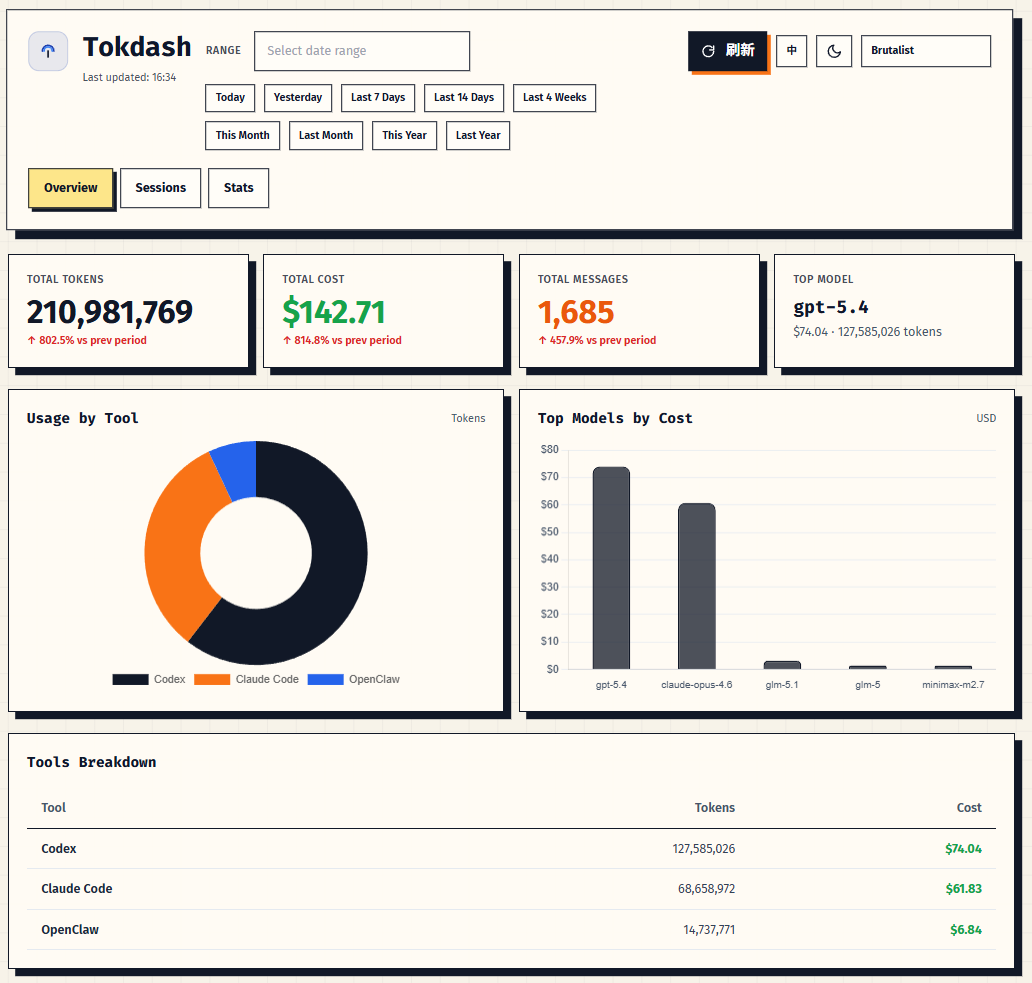
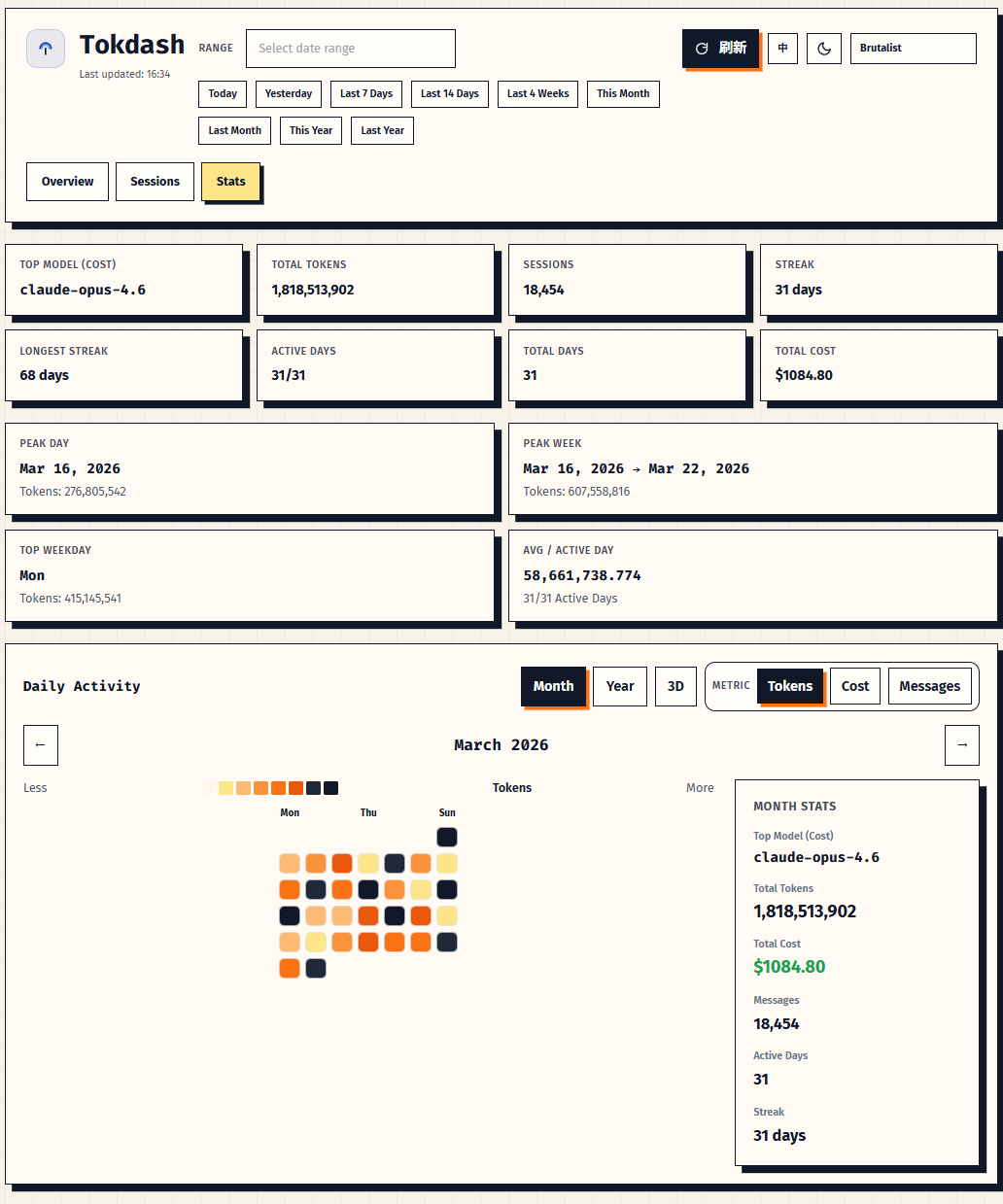
Features
- Exact token counts: Input/Output/Cache token breakdowns
- Statusline integration [new]: drop a live token-usage indicator into Claude Code's statusline (or any agent that can hit a local HTTP endpoint) — see Quick start
- Custom date ranges: Flatpickr date picker + quick range buttons (Today, Last 7 Days, This Month, etc.)
- Contribution calendar: 2D heatmap + 3D isometric view with Tokens/Cost/Messages metrics
- Session explorer: per-session drill-down for Codex, Claude Code, and OpenCode
- 10 style themes: Elevated, Classic, Vibrant, Midnight, Paper, Liquid, Terminal, Brutalist, Arcade, Studio
- Light & dark mode: auto-detects system preference, manual toggle
- PWA support: installable as a progressive web app
Live demo
A static demo of the current dashboard is hosted at tokdash.github.io — no install required.
The demo runs the unmodified Tokdash frontend against an in-browser shim that returns deterministic, fully synthetic data. You can:
- switch between Overview / Sessions / Stats / Pricing tabs,
- pick any date range (or the Today / 7-day / 30-day shortcuts),
- toggle light/dark and all 10 style themes,
- drill into a synthetic Codex / Claude Code / OpenCode session,
- browse the read-only pricing database.
Source for the demo lives at tokdash/tokdash.github.io. Nothing is uploaded; nothing is read from your machine.
Supported clients
- OpenCode:
~/.local/share/opencode/ - Codex:
~/.codex/sessions/ - Claude Code:
~/.claude/projects/ - Gemini CLI:
~/.gemini/tmp/*/chats/session-*.jsonandsession-*.jsonl - OpenClaw:
~/.openclaw/agents/*/sessions/ - Kimi CLI:
~/.kimi/sessions/*/*/wire.jsonl - pi-agent:
~/.pi/agent/sessions/(override viaPI_AGENT_DIRenv var, comma-separated list of dirs) - GitHub Copilot CLI:
~/.copilot/otel/(full input/cache/cost data — setCOPILOT_OTEL_FILE_EXPORTER_PATHto enable OTel export) and~/.copilot/session-state/*/events.jsonl(output-only fallback when OTel is not enabled) - Hermes:
~/.hermes/state.db(override viaHERMES_HOMEenv var, comma-separated list of dirs)
Platform support
- Linux (including WSL2): supported
- macOS: experimental
Quick start
Prerequisites
- Python 3.10+
- One or more supported clients installed (above)
Install (pip)
pip install tokdash
tokdash serve
Open: http://localhost:55423
Run (from source)
pip install -e .

# Option A: run directly
python3 main.py

# Option B: CLI wrapper (same server)
./tokdash serve
Open: http://localhost:55423
If port conflicts:
python3 main.py --port <port>./tokdash serve --port <port>
If you want to access Tokdash from another device (recommended):
- Tailscale Serve (private to your tailnet):
tailscale serve 55423 - SSH port-forward:
ssh -L 55423:127.0.0.1:55423 <user>@<host>
Binding to 0.0.0.0 is possible, but not recommended: it listens on all interfaces and can expose the dashboard beyond your LAN (VPN/Wi-Fi/etc.). Only do this if you understand the risk and have firewall/auth in place.
Run in background
See docs/agents/systemd/BACKGROUND_RUN.md for:
- Linux systemd (user service) template
- macOS launchd (LaunchAgent) template
For Humans
Copy and paste this prompt to your LLM agent (Claude Code, AmpCode, Cursor, etc.):
Install and configure Tokdash to run in the background by following the instructions here:
https://raw.githubusercontent.com/JingbiaoMei/Tokdash/main/docs/agents/systemd/AGENTS.md

Or read the Background Run guide, but seriously, let an agent do it.
For LLM Agents
Fetch the installation guide and follow it:
curl -s https://raw.githubusercontent.com/JingbiaoMei/Tokdash/main/docs/agents/systemd/AGENTS.md
Updating Tokdash
If you installed Tokdash with pip and are running it via systemd:
# 1. Upgrade the package
pip install --upgrade tokdash

# 2. Restart the systemd service to pick up changes
systemctl --user daemon-reload
systemctl --user restart tokdash

# 3. Verify the new version
pip show tokdash | grep Version
systemctl --user status tokdash --no-pager

# 4. Test the API is responding
curl 'http://127.0.0.1:55423/api/usage?period=today'
View logs if needed:
journalctl --user -u tokdash -f
OpenClaw digest (scheduled reports)
Tokdash can power daily/weekly/monthly OpenClaw usage reports by querying the local API on a schedule.
For Humans
Copy and paste this prompt to your LLM agent (Claude Code, AmpCode, Cursor, etc.):
Install and configure scheduled Tokdash usage reports for OpenClaw by following the instructions here:
https://raw.githubusercontent.com/JingbiaoMei/Tokdash/main/docs/agents/openclaw_reporting/AGENTS.md

Or read the guide yourself, but seriously, let an agent do it.
For LLM Agents
Fetch the installation guide and follow it:
curl -s https://raw.githubusercontent.com/JingbiaoMei/Tokdash/main/docs/agents/openclaw_reporting/AGENTS.md
Statusline integration
The local API can power a statusline item in your coding agent (Claude Code, etc.) showing live token/cost stats. Hand your agent this prompt:
"I would like to add a statusline item from the tokdash endpoint's API; it should show the total tokens used today."
Point it at docs/API.md for endpoint details and let it wire the rest.

Configuration
Tokdash is localhost-only by default.
TOKDASH_HOST(default:127.0.0.1)TOKDASH_PORT(default:55423)TOKDASH_CACHE_TTL(default:120seconds)TOKDASH_ALLOW_ORIGINS(comma-separated, default: empty)TOKDASH_ALLOW_ORIGIN_REGEX(default allows only localhost/127.0.0.1)
Example (remote access via Tailscale Serve; recommended):
tokdash serve --bind 127.0.0.1 --port 55423
tailscale serve --bg 55423
Privacy & security
- No telemetry: Tokdash does not intentionally send your data anywhere.
- Local parsing: usage is computed from local session files (see "Supported clients" paths above).
- Server exposure: Tokdash binds to
127.0.0.1by default. Prefer Tailscale Serve or SSH tunneling for remote access; avoid--bind 0.0.0.0unless you understand it listens on all interfaces and have firewall/auth in place.
API (local)
Tokdash is a local HTTP server. Common endpoints:
GET /api/usage?period=today|week|month|NGET /api/usage?date_from=YYYY-MM-DD&date_to=YYYY-MM-DDGET /api/tools?period=...(coding tools only)GET /api/openclaw?period=...(OpenClaw only)GET /api/sessions?tool=codex|claude|opencode&period=...GET /api/stats(contribution calendar & statistics)
Example:
curl 'http://127.0.0.1:55423/api/usage?period=today'
Full API reference: docs/API.md — schema, parameters, and response shapes for every endpoint.
Cost Accuracy Note
Token counts depend on what each client logs locally. Costs are computed from src/tokdash/pricing_db.json and may lag real provider pricing — use as an estimate and verify against your billing source if it matters.
Roadmap
See docs/ROADMAP.md.
Contributing / security
- Contributing guide:
docs/CONTRIBUTING.md - Security policy:
docs/SECURITY.md
Project structure
tokdash/
├── main.py                 # Source entrypoint (python3 main.py)
├── tokdash                 # Source CLI wrapper (./tokdash serve)
├── src/
│   └── tokdash/
│       ├── cli.py
│       ├── api.py                # FastAPI routes/app
│       ├── compute.py            # Aggregation/merging logic
│       ├── dateutil.py           # Shared date-range parsing
│       ├── sessions.py           # Session explorer logic
│       ├── pricing.py            # PricingDatabase wrapper
│       ├── assets.py             # Static asset management
│       ├── model_normalization.py
│       ├── pricing_db.json
│       ├── sources/
│       │   ├── openclaw.py       # OpenClaw session log parser
│       │   └── coding_tools.py   # Local coding tools parsers
│       └── static/
│           ├── index.html        # Single-page dashboard
│           ├── theme-config.js   # Theme palettes & heatmap colors
│           └── themes.css        # Per-theme CSS overrides
└── docs/                   # Roadmap + background-run docs + agent prompts
License
MIT License - see LICENSE.
Project details
Verified details
These details have been verified by PyPIProject links
GitHub Statistics
Maintainers
Release history Release notifications | RSS feed


Download files
Download the file for your platform. If you're not sure which to choose, learn more about installing packages.
Source Distribution
Built Distribution
Filter files by name, interpreter, ABI, and platform.
If you're not sure about the file name format, learn more about wheel file names.
Copy a direct link to the current filters
File details
Details for the file tokdash-0.3.0.tar.gz.
File metadata
- Download URL: tokdash-0.3.0.tar.gz
- Upload date:
- Size: 346.4 kB
- Tags: Source
- Uploaded using Trusted Publishing? Yes
- Uploaded via: twine/6.1.0 CPython/3.13.12
File hashes
| Algorithm | Hash digest | |
|---|---|---|
| SHA256 |
af19f5d7c7bea078aac2d2bdc6ae73353e6d8c2256a50b17c0385dfb049d7764
|
|
| MD5 |
7b1186b8c710da459eec53f48251b969
|
|
| BLAKE2b-256 |
c3602731013db57dbc68a859387113eace856f7a067d87f578c4fa69e463f3e6
|
Provenance
The following attestation bundles were made for tokdash-0.3.0.tar.gz:
Publisher:
publish-pypi.yml on JingbiaoMei/Tokdash
-
Statement:
-
Statement type:
https://in-toto.io/Statement/v1 -
Predicate type:
https://docs.pypi.org/attestations/publish/v1 -
Subject name:
tokdash-0.3.0.tar.gz -
Subject digest:
af19f5d7c7bea078aac2d2bdc6ae73353e6d8c2256a50b17c0385dfb049d7764 - Sigstore transparency entry: 1594986009
- Sigstore integration time:
-
Permalink:
JingbiaoMei/Tokdash@00560a8ac852411b7e4f3923ed3effc4c283bd9d -
Branch / Tag:
refs/tags/v0.3.0 - Owner: https://github.com/JingbiaoMei
-
Access:
public
-
Token Issuer:
https://token.actions.githubusercontent.com -
Runner Environment:
github-hosted -
Publication workflow:
publish-pypi.yml@00560a8ac852411b7e4f3923ed3effc4c283bd9d -
Trigger Event:
push
-
Statement type:
File details
Details for the file tokdash-0.3.0-py3-none-any.whl.
File metadata
- Download URL: tokdash-0.3.0-py3-none-any.whl
- Upload date:
- Size: 332.8 kB
- Tags: Python 3
- Uploaded using Trusted Publishing? Yes
- Uploaded via: twine/6.1.0 CPython/3.13.12
File hashes
| Algorithm | Hash digest | |
|---|---|---|
| SHA256 |
e8c850cf77fd9aeb4aa7228298f6c899b2276760e8c69f169e964f7b6ba25f96
|
|
| MD5 |
0bbe21092adcbacafd692a5e3711b80a
|
|
| BLAKE2b-256 |
7b39c148c9d41e3c4b19f3e82415f7a1aae0af6b21fdb13000ed780365d1cc90
|
Provenance
The following attestation bundles were made for tokdash-0.3.0-py3-none-any.whl:
Publisher:
publish-pypi.yml on JingbiaoMei/Tokdash
-
Statement:
-
Statement type:
https://in-toto.io/Statement/v1 -
Predicate type:
https://docs.pypi.org/attestations/publish/v1 -
Subject name:
tokdash-0.3.0-py3-none-any.whl -
Subject digest:
e8c850cf77fd9aeb4aa7228298f6c899b2276760e8c69f169e964f7b6ba25f96 - Sigstore transparency entry: 1594986127
- Sigstore integration time:
-
Permalink:
JingbiaoMei/Tokdash@00560a8ac852411b7e4f3923ed3effc4c283bd9d -
Branch / Tag:
refs/tags/v0.3.0 - Owner: https://github.com/JingbiaoMei
-
Access:
public
-
Token Issuer:
https://token.actions.githubusercontent.com -
Runner Environment:
github-hosted -
Publication workflow:
publish-pypi.yml@00560a8ac852411b7e4f3923ed3effc4c283bd9d -
Trigger Event:
push
-
Statement type:






