
Local-first, read-only AI coding agent token and usage inspector.

Project description
TokenCat
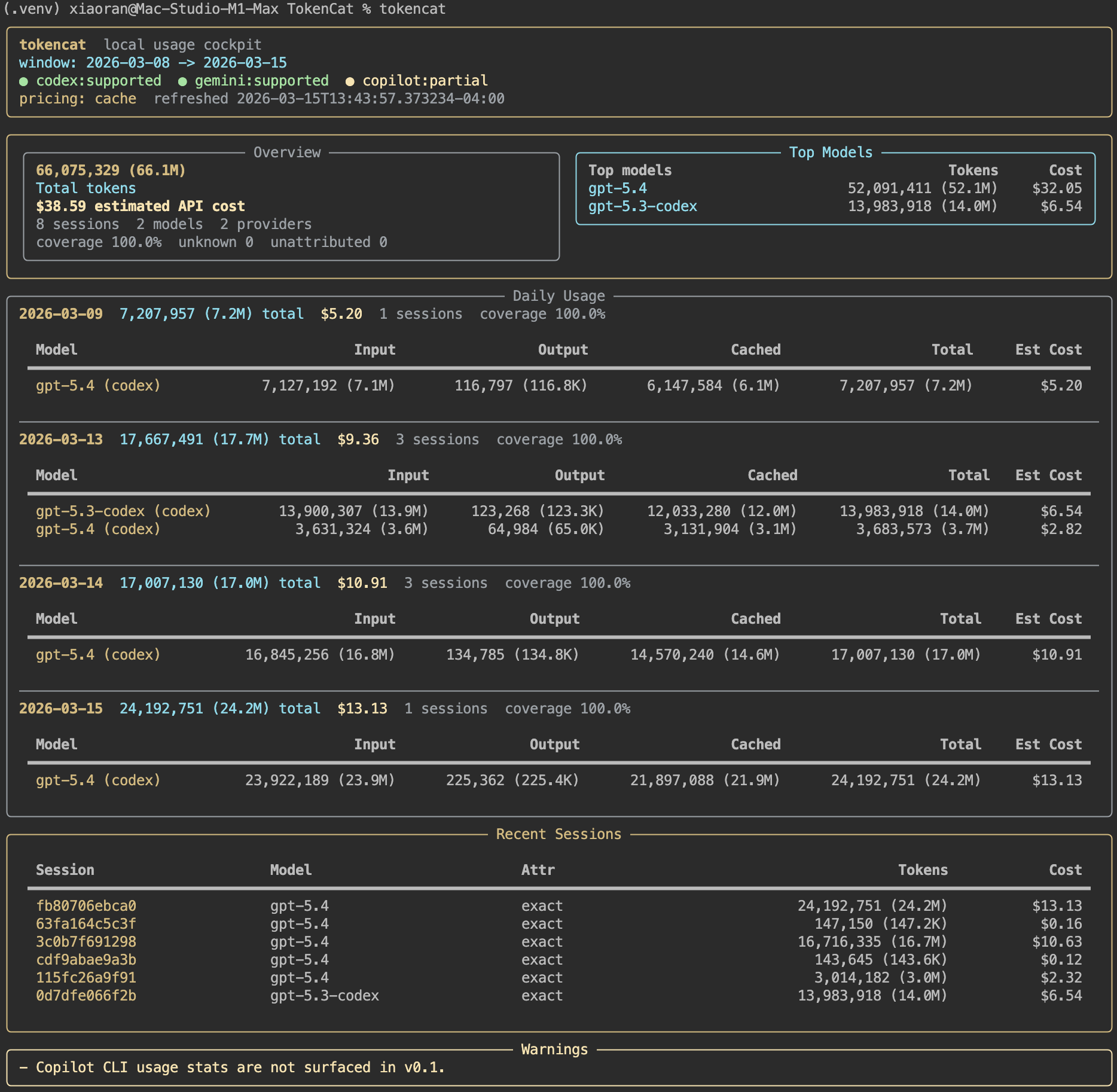
TokenCat is a local-first, read-only CLI for understanding how AI coding agents are being used on your machine.
It scans local Codex and Gemini CLI logs, summarizes tokens, sessions, and models in one place, and can optionally estimate API-equivalent cost without touching your prompts, responses, auth credentials, or network endpoints.
Why TokenCat
- One dashboard for Codex, Gemini CLI, and Copilot CLI detection
- Read-only by design: no proxying, no request interception, no endpoint rewrites
- Local-first privacy defaults: no raw prompt/response output, no OAuth/session token access
- Useful in both human and script workflows: terminal dashboard by default, JSON when needed
Features
- Default 0-argument dashboard:
tokencat - Session-level and model-level usage views
- Daily usage breakdown with concrete model rows
- Local pricing catalog with optional refresh for cost estimation
- Stable anonymous session IDs by default
- Explicit diagnostics for unsupported or missing providers
Install
Python 3.11+ is required.
Install with pipx:
pipx install tokencat
Upgrade later with:
pipx upgrade tokencat
If you want to run from a local checkout instead:
pipx install .
For maintainers preparing a release from a local checkout:
make install-release
make release-check
Quick Start
Open the default dashboard:
tokencat
Inspect a longer time window:
tokencat --since 30d
Focus on one provider:
tokencat dashboard --provider codex
List recent sessions:
tokencat sessions --provider codex --limit 20
See model totals:
tokencat models --provider gemini
Check local provider detection:
tokencat doctor
Inspect pricing coverage:
tokencat pricing show
Refresh the local pricing cache:
tokencat pricing refresh
Commands
tokencat
tokencat dashboard --provider codex
tokencat summary --json
tokencat sessions --provider gemini --limit 20
tokencat models --since 30d
tokencat doctor
tokencat pricing show
tokencat pricing refresh
Common flags:
--provider codex|gemini|copilot--since/--untilwith values like7d,24h, or ISO dates--json--no-price
Extra session flags:
--limit--model--show-title--show-path
Supported Providers
| Provider | Status | Notes |
|---|---|---|
| Codex | Supported | Reads ~/.codex/sessions/**/*.jsonl and ~/.codex/archived_sessions/*.jsonl, then falls back to ~/.codex/state_*.sqlite when needed. |
| Gemini CLI | Supported | Reads ~/.gemini/tmp/**/chats/session-*.json and non-sensitive settings metadata. |
| GitHub Copilot CLI | Detection only | Reports partial, unsupported, or not_found; does not treat editor plugin state as CLI usage telemetry. |
Privacy
TokenCat is intentionally conservative.
- It only reads local files that already exist on your machine.
- It does not proxy traffic or intercept requests.
- It does not modify provider endpoints or sessions.
- It does not read OAuth credentials for reporting.
- It never outputs raw prompt or response bodies.
- It redacts sensitive local metadata by default.
By default, output does not include session titles, cwd paths, or raw session IDs. If you want more local detail in session listings:
tokencat sessions --show-title --show-path
Pricing
TokenCat can estimate API-equivalent cost for models with a known pricing entry.
- Pricing works offline by default using a bundled catalog shipped in the package.
- On first pricing use, TokenCat silently tries to refresh its own local cache under
~/.tokencat/pricing/; if that fails, it quietly falls back to the bundled catalog. tokencat pricing refreshupdates TokenCat's own local cache at~/.tokencat/pricing/catalog.json.- Package builds refresh the bundled pricing catalog before creating the wheel/sdist, so new releases ship with current pricing data.
- Unknown or old model names are shown as
unknowninstead of being guessed. - Coverage is always shown so you can see how much usage was actually priceable.
Current pricing references:
JSON Output
All JSON commands keep a stable top-level shape:
generated_atfiltersproviderssummaryoritemswarnings
This makes TokenCat easy to use in scripts and local automation.
Scope and Limitations
- v0.1 is macOS-first.
- Linux path hooks are intentionally easy to extend, but Linux is not yet a polished support target.
- Windows is not yet supported.
- Copilot support is currently detection-only, not full usage accounting.
- Cost is an estimate, not your actual bill.
License
TokenCat is licensed under GNU GPLv3. See LICENSE.
Release history Release notifications | RSS feed


Download files
Download the file for your platform. If you're not sure which to choose, learn more about installing packages.
Source Distribution
Built Distribution
Filter files by name, interpreter, ABI, and platform.
If you're not sure about the file name format, learn more about wheel file names.
Copy a direct link to the current filters
File details
Details for the file tokencat-0.1.1.tar.gz.
File metadata
- Download URL: tokencat-0.1.1.tar.gz
- Upload date:
- Size: 47.1 kB
- Tags: Source
- Uploaded using Trusted Publishing? No
- Uploaded via: twine/6.2.0 CPython/3.14.3
File hashes
| Algorithm | Hash digest | |
|---|---|---|
| SHA256 |
bc3d849e7121b9be8ec9363fbf76a4f42537cd1f8ae4e1d227865fd7cc3aaf33
|
|
| MD5 |
fe7ac233588104827f694bbee8ca132c
|
|
| BLAKE2b-256 |
b84d30b932d95abb281ec2112e9be11664f5a58b990892cbc954f229c07d588c
|
File details
Details for the file tokencat-0.1.1-py3-none-any.whl.
File metadata
- Download URL: tokencat-0.1.1-py3-none-any.whl
- Upload date:
- Size: 44.7 kB
- Tags: Python 3
- Uploaded using Trusted Publishing? No
- Uploaded via: twine/6.2.0 CPython/3.14.3
File hashes
| Algorithm | Hash digest | |
|---|---|---|
| SHA256 |
c9f88734666cba9f47157ef8373d950a128267d41e5630fed2313b74be041566
|
|
| MD5 |
d3452f9e2c4a28bd692cb1702cdf06ae
|
|
| BLAKE2b-256 |
2b7b5a686be31782356784e66018d6d2645a54ef9e0839c35161ab56f3882a14
|






