
Local-first, read-only AI coding agent token and usage inspector.

Project description
TokenCat





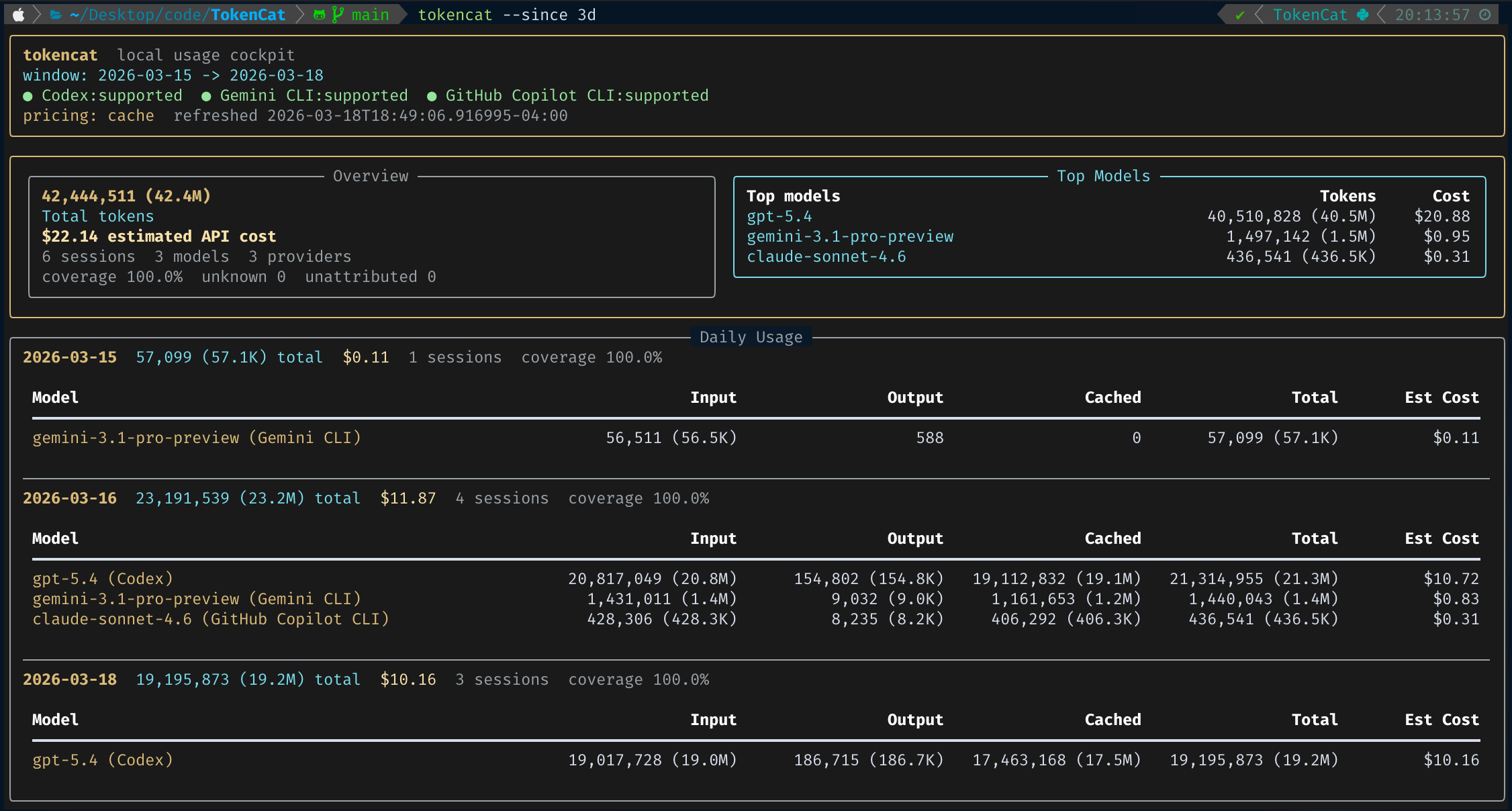
TokenCat is a local-first, read-only CLI for understanding how AI coding agents are being used on your machine.
If you jump between Codex, Claude Code, Gemini CLI, and Copilot CLI, TokenCat gives you one terminal-native view for sessions, models, tokens, and API-equivalent cost estimates without proxying traffic, rewriting endpoints, or touching your prompts and responses.
Why TokenCat
- One place to inspect Codex, Claude Code, Gemini CLI, VS Code Copilot Chat/Agent usage, and Copilot CLI session-state totals
- A default 0-argument dashboard: just run
tokencat - Read-only by design: no proxying, no interception, no auth-token handling
- Local pricing estimates with clear coverage for unknown or unattributed usage
- JSON output for scripts and terminal output for humans
Install
Python 3.9+ is required.
pipx install tokencat
Upgrade later with:
pipx upgrade tokencat
If you want to try the repo directly:
pipx install .
Quick Start
Open the dashboard:
tokencat
Force a specific dashboard theme:
tokencat --theme light
tokencat dashboard --theme dark
Look at a longer window:
tokencat --since 30d
Focus on one tool:
tokencat dashboard --provider codex
List recent sessions:
tokencat sessions --provider codex --limit 20
Inspect model totals:
tokencat models --provider gemini
Inspect daily totals:
tokencat daily --provider claude
Check local detection and health:
tokencat doctor
Inspect or refresh pricing data:
tokencat pricing show
tokencat pricing refresh
What You Get
- A dense terminal dashboard with provider health, token totals, pricing coverage, daily usage, and recent sessions
- Compact dashboard token counts such as
2Mand837Kon narrow terminals - Dashboard theme switching with
--theme auto|dark|light - Session-level views with anonymous IDs by default
- Model-level aggregation across supported tools
- Daily time-series aggregation across supported tools
- A bundled pricing catalog, plus a local cache that can refresh itself on first use
- Stable JSON envelopes for scripting and automation
Supported Tools
| Tool | Status | Notes |
|---|---|---|
| Codex | Supported | Reads ~/.codex/sessions/**/*.jsonl and ~/.codex/archived_sessions/*.jsonl, then falls back to ~/.codex/state_*.sqlite when needed. |
| Claude Code | Supported | Reads projects/**/*.jsonl under CLAUDE_CONFIG_DIR when set, otherwise scans both ~/.config/claude and legacy ~/.claude. Preserves exact observed model names, including redirected non-Anthropic models and subagent sessions. |
| Gemini CLI | Supported | Reads ~/.gemini/tmp/**/chats/session-*.json and non-sensitive settings metadata. |
| GitHub Copilot | Supported | Reads VS Code `workspaceStorage//chatSessions/.json |
Pricing
TokenCat can estimate API-equivalent cost for models with known pricing data.
- Pricing works offline by default using the bundled catalog shipped with the package.
- On first pricing use, TokenCat silently tries to refresh its own cache under
~/.tokencat/pricing/. - If that refresh fails, it quietly falls back to the bundled catalog.
tokencat pricing refreshmanually refreshes the local cache.- The terminal dashboard also does a silent PyPI update check and only shows a notice when a newer TokenCat release exists.
- Pricing resolution is source-aware: direct source price first, then official API price, then OpenRouter as the marketplace fallback.
- JSON output includes
pricing_sourceso you can see whether a session or model was priced from the direct source, an official vendor catalog, or OpenRouter. - Metadata-only rows in the upstream dataset are ignored; TokenCat only treats entries with explicit price fields as priced.
- Unknown or historically renamed models are shown clearly instead of being guessed.
Maintainers can refresh the bundled package catalog explicitly before building:
make refresh-bundled-pricing
make build
Current pricing references:
- OpenAI API pricing
- OpenAI Codex pricing
- Gemini API pricing
- Anthropic models and pricing
- xAI models
- OpenRouter pricing
- GitHub Copilot plans
Privacy
TokenCat is intentionally conservative.
- It only reads local files that already exist on your machine.
- It does not proxy traffic or intercept requests.
- It does not rewrite provider endpoints or mutate provider sessions.
- It does not read OAuth credentials for reporting.
- It never prints raw prompt or response bodies.
- It redacts sensitive local metadata by default.
To reveal more local metadata in session listings:
tokencat sessions --show-title --show-path
JSON Output
All JSON commands keep a stable top-level shape:
generated_atfiltersproviderssummaryoritemswarnings
That makes TokenCat easy to pipe into scripts, local dashboards, or personal automation.
Common Flags
--provider codex|gemini|copilot--provider codex|claude|gemini|copilot--since/--untilwith values like7d,24h, or ISO dates--theme auto|dark|lightfor dashboard rendering--json--no-price
--theme auto uses COLORFGBG when available to detect a light terminal background, and falls back to the dark palette when it cannot tell.
Dashboard token counts automatically switch to compact notation on terminals 120 columns wide or narrower.
Session listings also support:
--limit--model--show-title--show-path
Limits
- TokenCat is macOS-first today.
- Linux path hooks are present, but Linux is not yet a polished target.
- Windows is not yet supported.
- Copilot support covers VS Code Chat/Agent sessions plus standalone CLI shutdown summaries under
~/.copilot/session-state/. Active CLI sessions without a shutdown summary are detected but not yet counted. - Cost is an estimate, not your actual bill.
License
TokenCat is licensed under GNU GPLv3. See LICENSE.
Release history Release notifications | RSS feed


Download files
Download the file for your platform. If you're not sure which to choose, learn more about installing packages.
Source Distribution
Built Distribution
Filter files by name, interpreter, ABI, and platform.
If you're not sure about the file name format, learn more about wheel file names.
Copy a direct link to the current filters
File details
Details for the file tokencat-0.6.2.tar.gz.
File metadata
- Download URL: tokencat-0.6.2.tar.gz
- Upload date:
- Size: 114.4 kB
- Tags: Source
- Uploaded using Trusted Publishing? No
- Uploaded via: twine/6.2.0 CPython/3.14.4
File hashes
| Algorithm | Hash digest | |
|---|---|---|
| SHA256 |
f5eaee756a170639d3a0b43168c0d34fab9028081c45eec59bdd98265792c8ca
|
|
| MD5 |
bec5aca5e958def56e7037d237e0b151
|
|
| BLAKE2b-256 |
b96fb9c37f46871fdffc617f12c6c76e488f340714987317d52f56ffa8927a3a
|
File details
Details for the file tokencat-0.6.2-py3-none-any.whl.
File metadata
- Download URL: tokencat-0.6.2-py3-none-any.whl
- Upload date:
- Size: 103.5 kB
- Tags: Python 3
- Uploaded using Trusted Publishing? No
- Uploaded via: twine/6.2.0 CPython/3.14.4
File hashes
| Algorithm | Hash digest | |
|---|---|---|
| SHA256 |
21fd583bf1e558b246b8b9178fa2d8e37ac98feb44e9828fbc62130325f15e12
|
|
| MD5 |
ac42d9dc69d6b55ddb3026b0cf653db1
|
|
| BLAKE2b-256 |
c81f6dc5f67e2f0e4159849dcfae4abea5442d02f237ebd83184de508973d041
|






