
TokenMon
A fast, zero-dependency command-line monitor for local AI coding agents.
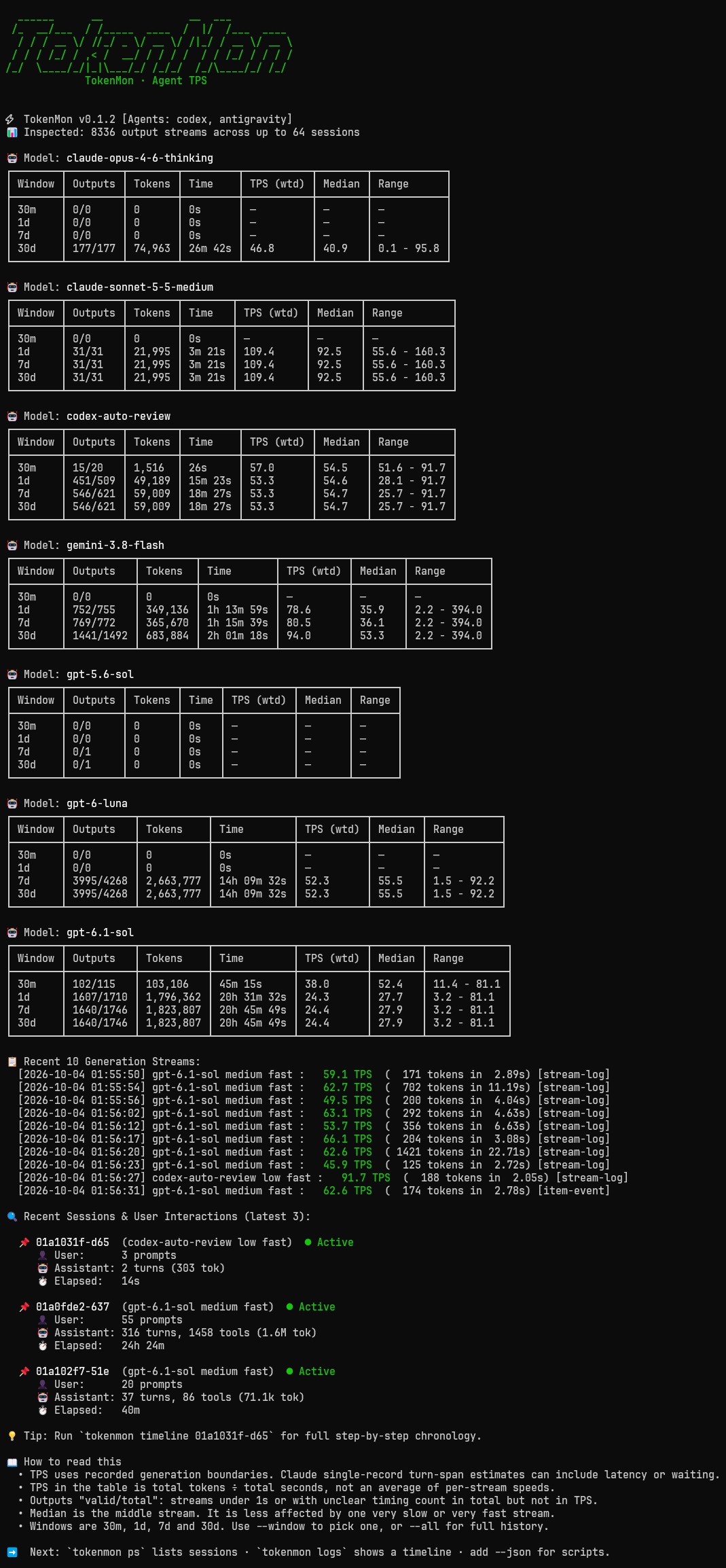
It measures how fast models actually generate tokens (Tokens Per Second, TPS) by tracking pure generation time—separating thinking and output from tool runs, file edits, and idle waiting.
Screenshots
Expand a screenshot below. Click the image to view it at full size.
stats — generation speed and token throughput
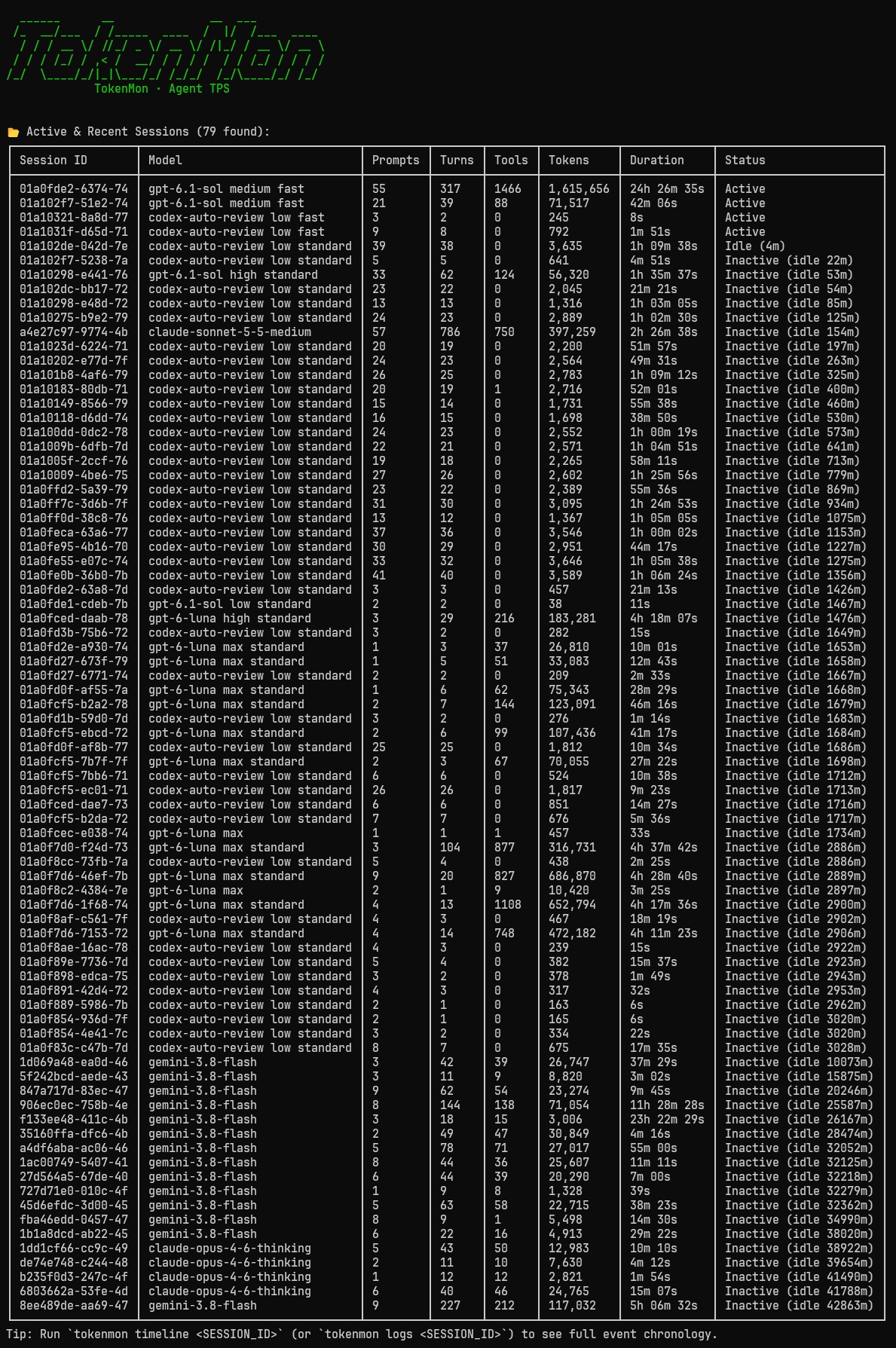
ps — sessions, activity, and token usage
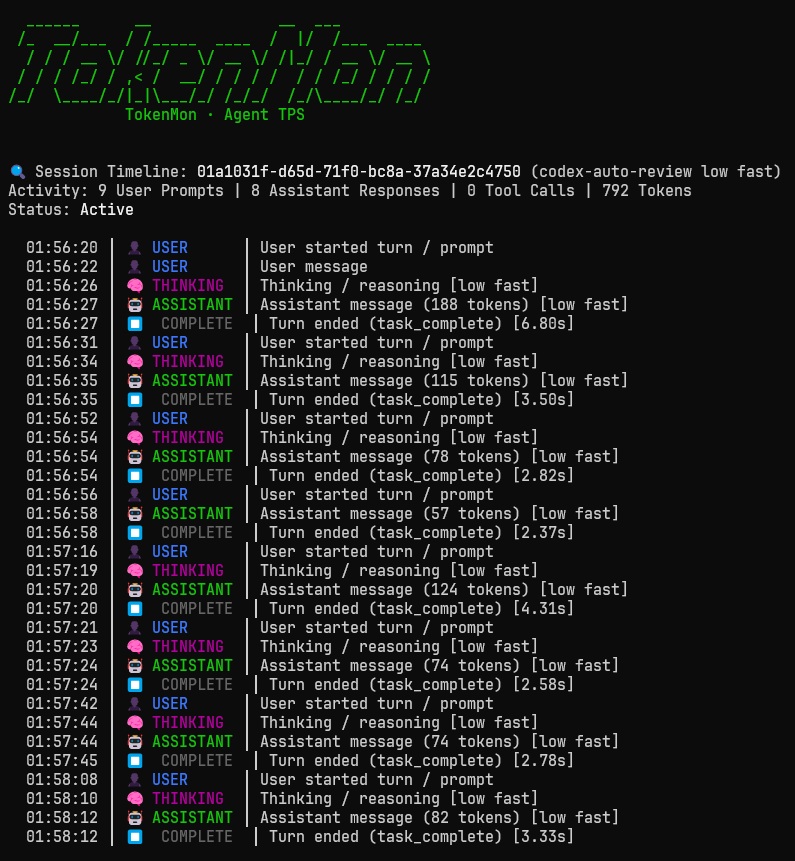
logs — chronological session timeline
Features
- Real Output Speed: Measures actual streaming speed (TPS), ignoring tool execution and network idle pauses.
- Zero Extra Dependencies: Runs on standard Python 3.10+ without installing third-party packages.
- Strictly Read-Only: Safely opens local files and SQLite databases in read-only mode (
?mode=ro). Never locks or changes your logs. - Meaningful Averages: Calculates true weighted speed ($\frac{\text{total tokens}}{\text{total time}}$), median speed, and min/max ranges over rolling time windows (
30m,1d,7d,30d,all). - Supports Popular Agents: Auto-detects Codex (
~/.codex), Claude Code (~/.claude/projects/), and Antigravity (~/.gemini/antigravity-cli). - Session Timelines: Step-by-step history of user prompts, thinking, assistant responses, and tool calls.
- JSON Ready: Add
--jsonto pipe clean data intojqor external dashboards.
Installation
Requires Python 3.10+.
# Clone the repository
git clone https://github.com/quanhua92/tokenmon.git
cd tokenmon

# Run directly with uv
uv run tokenmon

# Or run tests
uv run python -m unittest discover -s tests
Usage
TokenMon uses simple Docker-style subcommands: stats (default), ps (sessions), logs (timelines), and interactive (shell).
Running tokenmon by itself defaults directly to stats.
Generation Speed & Metrics (stats, top, default)
View token throughput (TPS), rolling averages, and recent generation outputs:
# Auto-detect local agents and show stats (default)
uv run tokenmon
# or explicitly
uv run tokenmon stats

# Filter to a specific time window (30m, 1d, 7d, 30d, all)
uv run tokenmon stats --window 1d

# Include full history beyond the default 30-day cutoff
uv run tokenmon stats --all

# Target a specific agent or custom folder
uv run tokenmon stats codex
uv run tokenmon stats claude --home ~/.claude

# Compact layout for narrow panes or wide full-detail table
uv run tokenmon stats --compact
uv run tokenmon stats --wide
Active & Recent Sessions (sessions, ps, ls)
See all recent sessions, message counts, tool runs, and idle status:
# List recent sessions
uv run tokenmon ps

# Filter sessions within a time window
uv run tokenmon ps --window 1d

# Filter to a specific agent
uv run tokenmon ps codex
Event Timelines (timeline, logs, log)
See the chronological step-by-step history of prompts, model thoughts, responses, and tool calls:
# View timeline of the latest session
uv run tokenmon logs

# View timeline of a specific session ID or prefix
uv run tokenmon logs 01a10275

# Export all session timelines from today in JSON format
uv run tokenmon timeline --window 1d --json
Interactive Shell (interactive, repl, shell, -i)
Open an interactive terminal shell with live auto-refresh and tab completion:
uv run tokenmon interactive
# or
uv run tokenmon -i
Available commands inside the shell:
(tokenmon) summary 30m        # view 30m throughput table
(tokenmon) sessions           # list active & inactive sessions
(tokenmon) timeline latest    # view step-by-step event timeline
(tokenmon) recent 15          # view latest generation speeds
(tokenmon) watch 2.0 1d       # live auto-refresh dashboard (Ctrl+C to stop)
(tokenmon) help               # list all commands
Machine-Readable JSON Output
Every command supports --json for easy scripting:
uv run tokenmon stats --json | jq .
uv run tokenmon ps --json | jq .
uv run tokenmon logs 01a10275 --json | jq .
uv run tokenmon timeline --window 1d --json | jq .
Adding New Adapters
TokenMon uses a base class in src/tokenmon/adapters/base.py:
class BaseAdapter(ABC):
    @property
    @abstractmethod
    def name(self) -> str: ...

    @abstractmethod
    def detect(self) -> bool: ...

    @abstractmethod
    def collect(self, max_sessions: int = 64, min_timestamp: float | None = None) -> list[GenerationSpan]: ...

    @abstractmethod
    def collect_sessions(self, max_sessions: int = 32, min_timestamp: float | None = None) -> list[SessionTimeline]: ...
To add support for a new agent (e.g. OpenCode):
- Create
src/tokenmon/adapters/opencode.pysubclassingBaseAdapter. - Implement discovery (
detect()), stream parsing (collect()), and timelines (collect_sessions()). - Register it in
src/tokenmon/adapters/__init__.py.
CI and PyPI Releases
The CI workflow runs on pull requests and pushes to main. It tests Python
3.10–3.14 on Linux and 3.13 on macOS, builds a wheel and source distribution, checks
package metadata and README rendering, and checks the installed CLI. Jobs use hosted
runners, read-only permissions, and actions pinned to full commit SHAs.
The Publish to PyPI workflow is manual and only runs from main. It validates the
requested version, runs tests, builds and checks distributions, then passes them to
a separate publishing job. Only the publishing job has OIDC permissions. It uses
PyPI trusted publishing
without a stored API token.
Before the first release:
- Rename the GitHub repository to
tokenmonin Settings → General to match the repository and screenshot URLs, then update your local remote:git remote set-url origin git@github.com:quanhua92/tokenmon.git. - In GitHub repository Settings → Environments, create
pypi. Allow deployments frommainonly and configure a required reviewer for release approval. - On PyPI, add a GitHub trusted publisher with owner
quanhua92, repositorytokenmon, workflow filenamerelease.yml, and environmentpypi. For a new project, register a pending publisher with project nametokenmon; for an existing project, use its Publishing settings.
To release:
- Commit the desired version in both
pyproject.tomlandsrc/tokenmon/__init__.py, refreshuv.lockwithuv lock, and merge tomainafter CI passes. The workflow checks versions; it does not change them. - Open Actions → Publish to PyPI → Run workflow, select
main, and enter the exact version, such as0.1.0. - Review the built distributions in the workflow artifact, then approve the
pypideployment. PyPI rejects uploading an already published distribution again.
Validate workflow edits locally with actionlint. Packaging tools are pinned in
.github/requirements-build.txt; they are separate from application dependencies.
License
MIT
1 maintainer

Metadata
1 maintainer
Release files for tokenmon 0.1.0
For a detailed explanation of source distributions (sdists) and built distributions (wheels), please see the package formats documentation.
Source distribution (sdist)
| File | Size | Uploaded | |
|---|---|---|---|
| tokenmon-0.1.0.tar.gz | 2.0 MB | Details |
Built distribution (wheel)
| File | Interpreter | ABI | Platform | Reset |
|---|---|---|---|---|
| tokenmon-0.1.0-py3-none-any.whl | Python 3 | none | any | Details |
Total release size: 2.0 MB
Release files / tokenmon-0.1.0.tar.gz
| Download URL | tokenmon-0.1.0.tar.gz |
|---|---|
| Size | 2.0 MB |
| Tags | Source |
|
SHA-256 checksum How to use checksums |
c7a11df930c5199d9ccf03a07c410132c3e1d403f15f8d5160ffaa500690065e
|
|
BLAKE2b-256 checksum How to use checksums |
af13f8c571362acc55c206be143d59b950ea7d5162e7aee93cf2a02b444bd862
|
| Upload date | |
|
Uploaded using Trusted Publishing? What is trusted publishing? |
Yes |
| Uploaded via |
twine/7.0.0 CPython/3.13.14
|
Provenance
Provenance describes where a file came from. On PyPI, provenance is shared via attestations, which provide a verifiable record of the build or publishing details. View details, limitations and caveats.


PyPI Publish Attestation
PyPI verified that this artifact, at this checksum, originated from the publisher listed below.
Signed by GitHub Actions, verified by PyPI on Oct 3, 2026.
Transparency logRelease files / tokenmon-0.1.0-py3-none-any.whl
| Download URL | tokenmon-0.1.0-py3-none-any.whl |
|---|---|
| Size | 33.2 kB |
| Tags | Python 3 |
|
SHA-256 checksum How to use checksums |
c014983d0782c435b734e43e3213ea942e1d9b8e48b177290c556ff6d4139e82
|
|
BLAKE2b-256 checksum How to use checksums |
89715739140d1e4996a30f196a2aa3d5f9fb7781154ba7a78d1b37ed0b40ad87
|
| Upload date | |
|
Uploaded using Trusted Publishing? What is trusted publishing? |
Yes |
| Uploaded via |
twine/7.0.0 CPython/3.13.14
|
Provenance
Provenance describes where a file came from. On PyPI, provenance is shared via attestations, which provide a verifiable record of the build or publishing details. View details, limitations and caveats.
PyPI Publish Attestation
PyPI verified that this artifact, at this checksum, originated from the publisher listed below.
Signed by GitHub Actions, verified by PyPI on Oct 3, 2026.
Transparency log













