
TokenMon
A fast, zero-dependency command-line monitor for local AI coding agents.
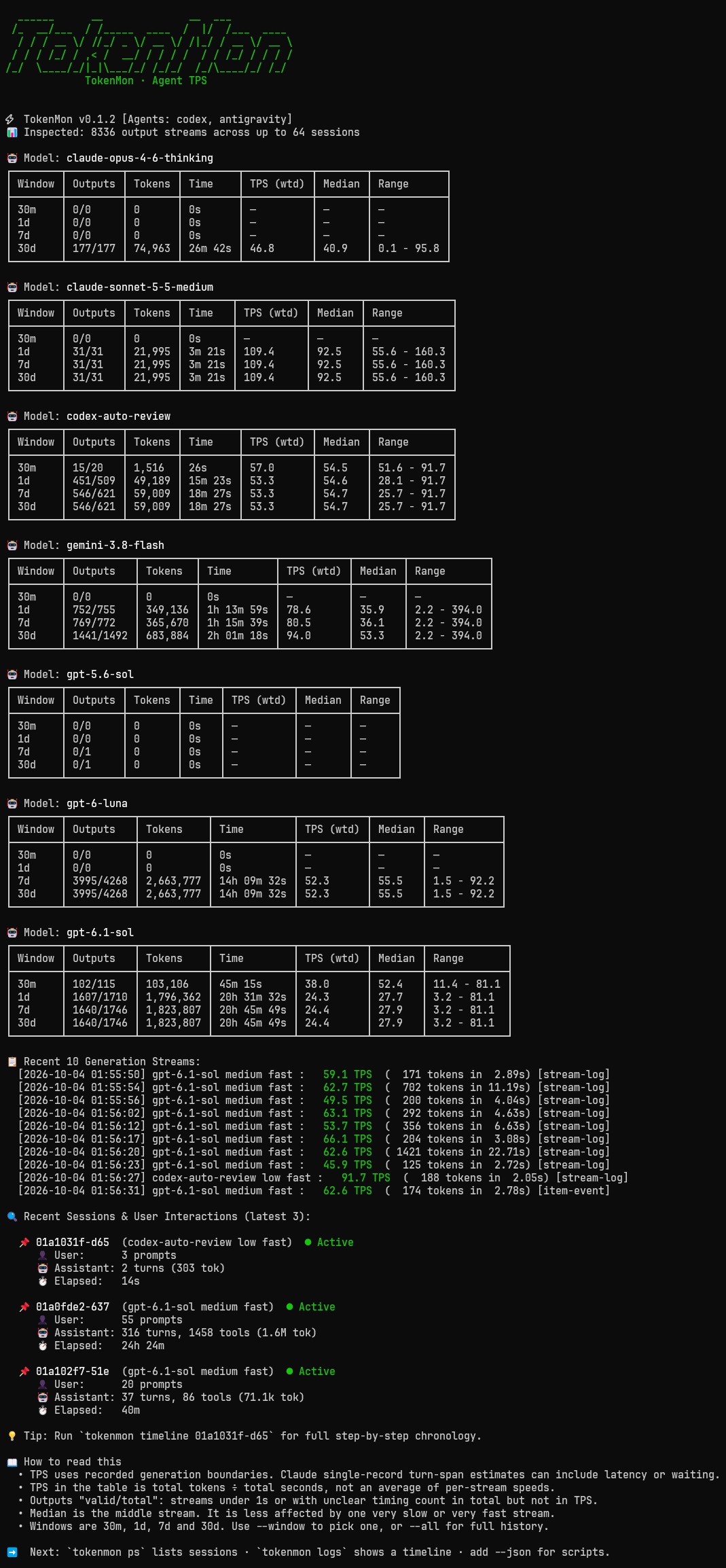
It measures how fast models actually generate tokens (Tokens Per Second, TPS) by tracking pure generation time—separating thinking and output from tool runs, file edits, and idle waiting.
Screenshots
Expand a screenshot below. Click the image to view it at full size.
stats — generation speed and token throughput
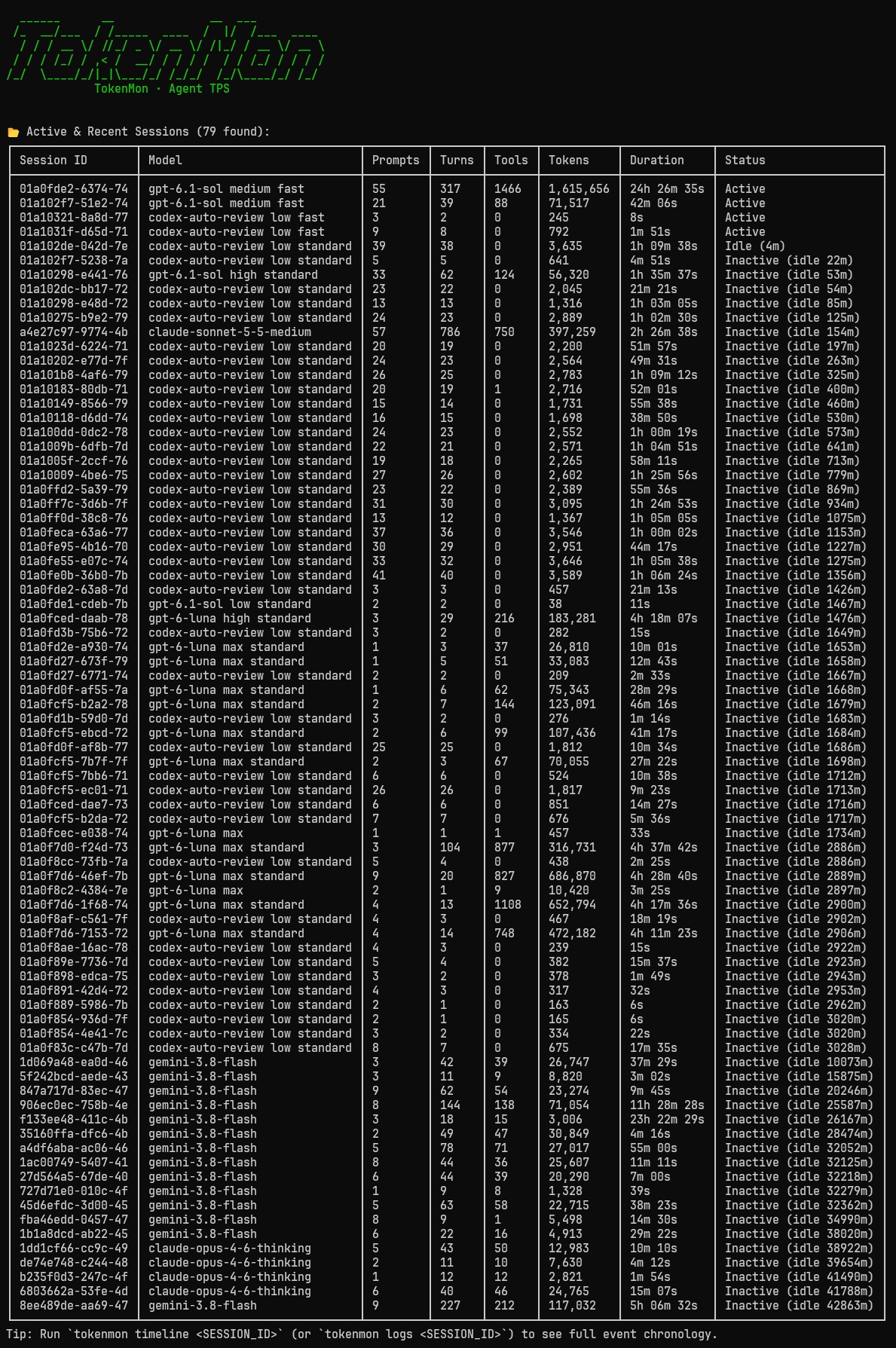
ps — sessions, activity, and token usage
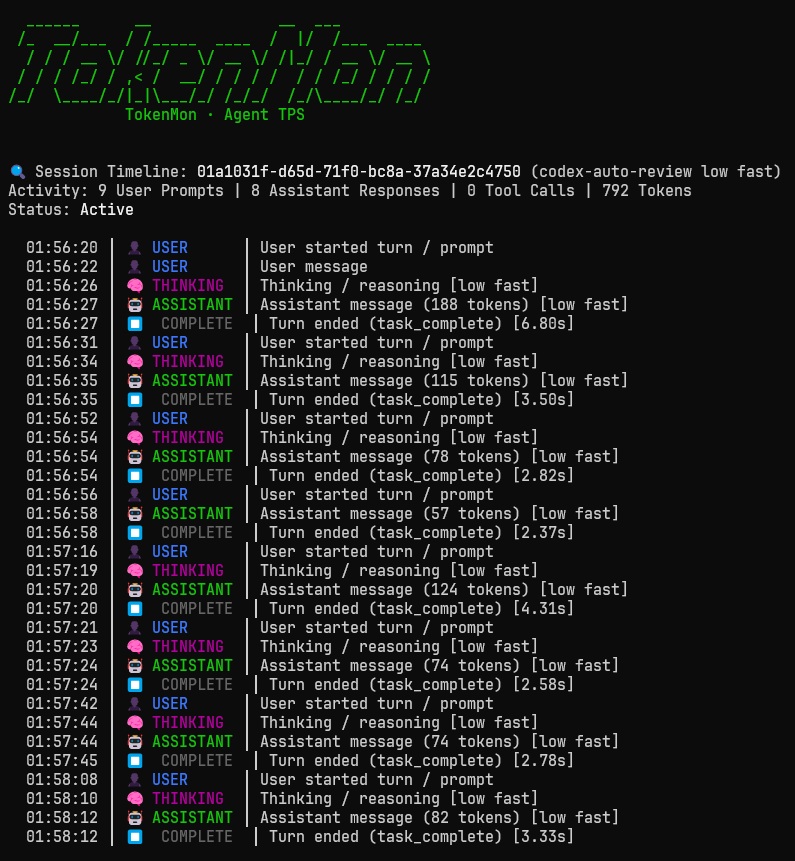
logs — chronological session timeline
Features
- Generation Speed: Measures TPS from recorded output boundaries and labels timing fallbacks, including Claude prompt-to-response estimates.
- Zero Extra Dependencies: Runs on standard Python 3.10+ without installing third-party packages.
- Strictly Read-Only: Safely opens local files and SQLite databases in read-only mode (
?mode=ro). Never locks or changes your logs. - Meaningful Averages: Calculates true weighted speed ($\frac{\text{total tokens}}{\text{total time}}$), median speed, and min/max ranges over rolling time windows (
30m,1d,7d,30d,all). - Supports Popular Agents: Auto-detects Codex (
~/.codex), Claude Code (~/.claude/projects/), and Antigravity (~/.gemini/antigravity-cli). - Session Timelines: Step-by-step history of user prompts, thinking, assistant responses, and tool calls.
- JSON Ready: Add
--jsonto pipe clean data intojqor external dashboards.
Installation
Requires Python 3.10+.
Try it immediately with uv:
uvx tokenmon
uvx tokenmon ps
uvx tokenmon logs
For regular use, install it as an isolated tool:
uv tool install tokenmon
tokenmon
If tokenmon is not on your PATH, run uv tool update-shell and restart your shell.
Upgrade with uv tool upgrade tokenmon.
Or install with pip in your Python environment:
pip install tokenmon
tokenmon
Usage
TokenMon uses simple Docker-style subcommands: stats (default), ps (sessions), logs (timelines), and interactive (shell).
Running tokenmon by itself defaults directly to stats.
The examples below use the installed command; with uvx, use uvx tokenmon in its place.
Generation Speed & Metrics (stats, top, default)
View token throughput (TPS), rolling averages, and recent generation outputs:
# Auto-detect local agents and show stats (default)
tokenmon
# or explicitly
tokenmon stats

# Filter to a specific time window (30m, 1d, 7d, 30d, all)
tokenmon stats --window 1d

# Refresh the full dashboard every 2 seconds (Ctrl+C to stop)
tokenmon stats --watch
tokenmon stats -w
tokenmon stats --watch --window 1d

# Customize the refresh interval
tokenmon stats --watch --window 1d --interval 5

# Include full history beyond the default 30-day cutoff
tokenmon stats --all

# Target a specific agent or custom folder
tokenmon stats codex
tokenmon stats claude --home ~/.claude

# Compact layout for narrow panes or wide full-detail table
tokenmon stats --compact
tokenmon stats --wide
Watch mode refreshes throughput metrics, recent generation streams, and recent
session cards together. It redraws the screen in a terminal; redirected output
appends complete snapshots. Agent selection, --home, --tasks, --recent,
--compact, and --wide also work with --watch.
-w is a shortcut for --watch on stats. Time filtering uses the explicit
--window option across commands; replace the former -w 1d syntax with
--window 1d in existing commands and scripts. Combine them as
tokenmon stats -w --window 1d.
The wide stats table formats total generation time as hours, minutes, and seconds
(for example, 13h 53m 46s). This sums durations across streams and sessions, so
overlapping sessions can produce a total longer than the window's wall-clock time.
JSON retains numeric duration values in seconds.
Recent streams, session lists/cards, and timelines show explicit reasoning effort and speed metadata when available:
gpt-6.1-sol medium fast : 45.9 TPS (937 tokens in 20.43s) [stream-log]
Codex reads effort from turn context and settings, and tier from recorded thread
settings or response usage. Recorded priority/fast tiers display as fast,
following the OpenAI fast-mode tier names.
Settings describe the recorded request mode; they do not independently confirm the
server's delivered tier. Claude reads explicit effort/configuration and usage
tier/speed fields. Antigravity reads explicit named settings in generation
metadata when present; current logs may not record them. Missing metadata is
omitted in human output and becomes null in JSON's reasoning_effort,
service_tier, speed, and normalized speed_mode fields. Model names and measured TPS never determine
effort or fast mode.
Range is the minimum and maximum individual valid stream TPS, rather than an
interval around the weighted average. A rate above 200 TPS can be valid when its
tokens and timing agree. Streams shorter than one second, above 400 TPS, or with
unconfirmed boundaries are excluded. Codex repeated cumulative usage snapshots
are ignored so old tokens cannot inflate a later reasoning item's rate. Claude's
single-record turn-span fallback includes prompt-to-response latency and should
be treated as an estimate, not pure streaming speed.
All JSON views include the same optional fields: stats recent_streams and
recent_sessions, ps entries, timeline session objects, and individual events
(including window exports). Session fields describe the latest recorded settings;
events preserve their own settings. Each stats summary and model window includes
configurations, the distinct settings of valid streams in that window. Its
singular metadata fields are populated only when all configurations agree on that
field; mixed or missing values are null.
For example:
{
  "model": "gpt-6.1-sol",
  "reasoning_effort": "medium",
  "service_tier": "priority",
  "speed": null,
  "speed_mode": "fast"
}
Active & Recent Sessions (sessions, ps, ls)
See all recent sessions, message counts, tool runs, and idle status:
# List recent sessions
tokenmon ps

# Filter sessions within a time window
tokenmon ps --window 1d

# Filter to a specific agent
tokenmon ps codex
Event Timelines (timeline, logs, log)
See the chronological step-by-step history of prompts, model thoughts, responses, and tool calls:
# View timeline of the latest session
tokenmon logs

# View timeline of a specific session ID or prefix
tokenmon logs 01a10275

# Follow only new events from the session that is latest at startup
tokenmon logs -f

# Follow a specific session ID/prefix, or an agent's latest session
tokenmon logs 01a10275 --follow
tokenmon logs codex -f

# Customize the polling interval (default: 2 seconds)
tokenmon logs -f --interval 1

# Export all session timelines from today in JSON format
tokenmon timeline --window 1d --json
Follow mode starts at the current end: it prints a short session header, then only newly observed timeline events. It keeps the initially selected session even when another session becomes newer, and appends output without clearing the screen or replaying history. Updates to an existing event's usage or timestamp do not print that event again. Press Ctrl+C to stop.
-f and --follow work with logs, log, and timeline. Follow selects one
session, so it cannot be combined with the batch export option --window; use
--all to select a session older than the default 30-day cutoff. The interval must
be a positive, finite number. Polling reads the selected session again rather than
following raw file bytes, which also supports SQLite-backed Antigravity sessions.
Interactive Shell (interactive, repl, shell, -i)
Open an interactive terminal shell with live auto-refresh and tab completion:
tokenmon interactive
# or
tokenmon -i
Available commands inside the shell:
(tokenmon) summary 30m        # view 30m throughput table
(tokenmon) sessions           # list active & inactive sessions
(tokenmon) timeline latest    # view step-by-step event timeline
(tokenmon) recent 15          # view latest generation speeds
(tokenmon) watch 2.0 1d       # metrics, recent streams, and session cards (Ctrl+C to stop)
(tokenmon) help               # list all commands
Machine-Readable JSON Output
Stats, sessions, and historical timelines support --json for easy scripting.
Live --watch and --follow modes require human output and reject --json:
tokenmon stats --json | jq .
tokenmon ps --json | jq .
tokenmon logs 01a10275 --json | jq .
tokenmon timeline --window 1d --json | jq .
Development
Clone the repository to work on TokenMon:
git clone https://github.com/quanhua92/tokenmon.git
cd tokenmon
uv run tokenmon
uv run python -m unittest discover -s tests
Adding New Adapters
TokenMon uses a base class in src/tokenmon/adapters/base.py:
class BaseAdapter(ABC):
    @property
    @abstractmethod
    def name(self) -> str: ...

    @abstractmethod
    def detect(self) -> bool: ...

    @abstractmethod
    def collect(self, max_sessions: int = 64, min_timestamp: float | None = None) -> list[GenerationSpan]: ...

    @abstractmethod
    def collect_sessions(self, max_sessions: int = 32, min_timestamp: float | None = None) -> list[SessionTimeline]: ...
To add support for a new agent (e.g. OpenCode):
- Create
src/tokenmon/adapters/opencode.pysubclassingBaseAdapter. - Implement discovery (
detect()), stream parsing (collect()), and timelines (collect_sessions()). - Register it in
src/tokenmon/adapters/__init__.py.
License
MIT
1 maintainer

Metadata
1 maintainer
Release files for tokenmon 0.1.3
For a detailed explanation of source distributions (sdists) and built distributions (wheels), please see the package formats documentation.
Source distribution (sdist)
| File | Size | Uploaded | |
|---|---|---|---|
| tokenmon-0.1.3.tar.gz | 1.8 MB | Details |
Built distribution (wheel)
| File | Interpreter | ABI | Platform | Reset |
|---|---|---|---|---|
| tokenmon-0.1.3-py3-none-any.whl | Python 3 | none | any | Details |
Total release size: 1.8 MB
Release files / tokenmon-0.1.3.tar.gz
| Download URL | tokenmon-0.1.3.tar.gz |
|---|---|
| Size | 1.8 MB |
| Tags | Source |
|
SHA-256 checksum How to use checksums |
ca1f75b14c11f5959bbbd26eb78c590b55e76b9a99a2a2135efe4e801c2cdc7c
|
|
BLAKE2b-256 checksum How to use checksums |
fe9581c012b17110570d817eeac5d13557ab63313dcad9fd86b2a1c90457deab
|
| Upload date | |
|
Uploaded using Trusted Publishing? What is trusted publishing? |
Yes |
| Uploaded via |
twine/7.0.0 CPython/3.13.14
|
Provenance
Provenance describes where a file came from. On PyPI, provenance is shared via attestations, which provide a verifiable record of the build or publishing details. View details, limitations and caveats.


PyPI Publish Attestation
PyPI verified that this artifact, at this checksum, originated from the publisher listed below.
Signed by GitHub Actions, verified by PyPI on Oct 3, 2026.
Transparency logRelease files / tokenmon-0.1.3-py3-none-any.whl
| Download URL | tokenmon-0.1.3-py3-none-any.whl |
|---|---|
| Size | 39.7 kB |
| Tags | Python 3 |
|
SHA-256 checksum How to use checksums |
e95030174a8d8460126419f9a979a2fa41926b8d791280d10debee0856d91a4c
|
|
BLAKE2b-256 checksum How to use checksums |
608d66ca78719e7c29964272d60bb84e82af1bc26845564f567b4e6d396e59f2
|
| Upload date | |
|
Uploaded using Trusted Publishing? What is trusted publishing? |
Yes |
| Uploaded via |
twine/7.0.0 CPython/3.13.14
|
Provenance
Provenance describes where a file came from. On PyPI, provenance is shared via attestations, which provide a verifiable record of the build or publishing details. View details, limitations and caveats.
PyPI Publish Attestation
PyPI verified that this artifact, at this checksum, originated from the publisher listed below.
Signed by GitHub Actions, verified by PyPI on Oct 3, 2026.
Transparency log













