
Local-first, zero-infra observability for AI agents. The pip-installable Helicone replacement.
Verified details
These details have been verified by PyPIProject links
GitHub Statistics
Maintainers

Project description
TokenSight
Local-first, zero-infra observability for AI agents. pip install, add one
decorator, and see every LLM call's cost, latency, and tokens in a local
dashboard. No cloud account, no Docker, no signup — your prompts never leave
your machine.
Why TokenSight?
Developers running LLM agents have zero visibility into cost, latency, and failure points — until the bill arrives. The existing tools all have friction:
- LangSmith / Langfuse / Datadog / Arize require cloud accounts, per-seat pricing, or heavy infra (ClickHouse, Docker Compose).
- Helicone — the one lightweight option — went into maintenance mode after its 2026 acquisition.
TokenSight fills that gap: local-first, zero-infra. A single pip install,
SQLite for storage, and one local FastAPI process is the entire backend. It
works fully offline (except your own LLM calls), sends no telemetry, and stores
nothing outside ~/.tokensight/.
Install
pip install tokensight
For the LangChain callback handler, install the optional extra:
pip install "tokensight[langchain]"
The OpenAI and Anthropic auto-instrumentation works with whatever provider SDK
you already have installed — no extra is required. (Convenience extras
tokensight[openai] and tokensight[anthropic] exist if you want pip to install
them for you.)
Quickstart
1. The @trace decorator
Wrap any function and it becomes one traced run. Every LLM call inside it is logged automatically.
from tokensight import trace


@trace
def run_agent():
    # ... your agent logic ...
    return "done"


run_agent()
You can also name the run and attach metadata:
@trace(name="nightly_summary", metadata={"env": "prod"})
def run_agent():
    ...
@trace works on both sync and async functions. If the TokenSight server is not
running, your function still executes normally — tracing simply no-ops.
2. auto_instrument() with OpenAI
Call auto_instrument() once at startup to monkey-patch the OpenAI (and
Anthropic) SDKs. Every client.chat.completions.create(...) is then traced with
zero code changes.
from tokensight import auto_instrument, trace
from openai import OpenAI

auto_instrument()  # patches installed provider SDKs (safe if some are missing)


@trace(name="openai_test")
def run():
    client = OpenAI()
    response = client.chat.completions.create(
        model="gpt-4o-mini",
        messages=[{"role": "user", "content": "say hi in 3 words"}],
    )
    return response.choices[0].message.content


print(run())
The dashboard now shows an openai_test run with one call: model
gpt-4o-mini, token counts, cost, and input/output previews.
3. TokenSightCallbackHandler with LangChain
For LangChain, pass the callback handler in your invocation config — no changes to your chain logic.
from tokensight import TokenSightCallbackHandler

handler = TokenSightCallbackHandler(run_name="my_chain")
chain.invoke(input, config={"callbacks": [handler]})
TokenSightCallbackHandler is imported lazily, so import tokensight never
requires langchain-core. Instantiating it without the langchain extra raises
a clear ImportError telling you to pip install tokensight[langchain].
See it in the dashboard
tokensight start
This opens http://localhost:4242 in your browser with your runs, a cost chart, and a per-run call timeline.
CLI Commands
| Command | What it does |
|---|---|
tokensight start |
Start the local server and open the dashboard at localhost:4242. |
tokensight stats |
Print a cost/latency/token summary table plus the top 5 most expensive runs. |
tokensight export |
Dump all runs and calls to a JSON file (-o/--output to choose the path). |
tokensight clear |
Delete all trace data (prompts for confirmation; -y/--yes to skip). |
Dashboard
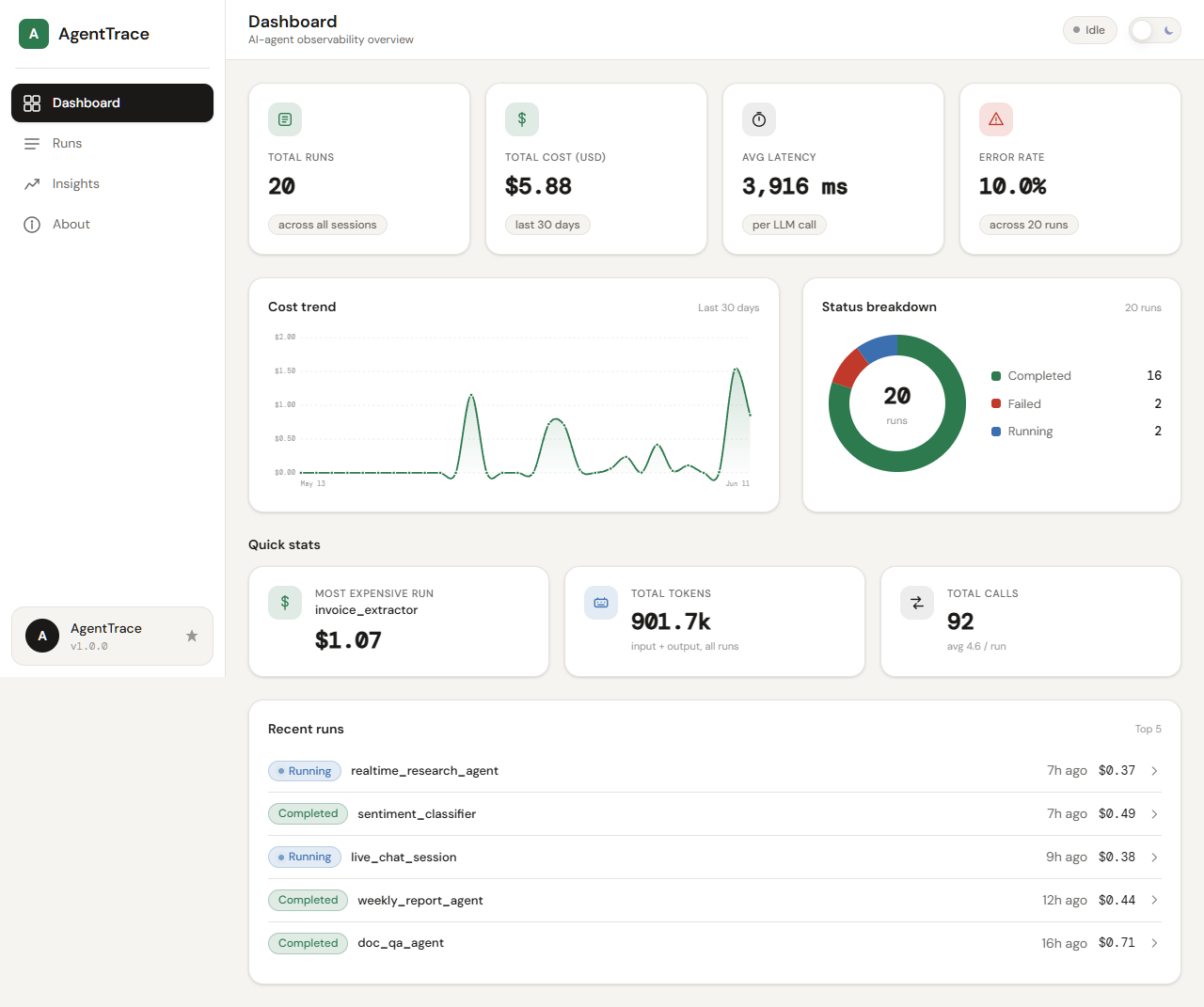
tokensight start serves a single-page dashboard: a stats bar (total runs, cost,
tokens, average latency, error rate), a 30-day cost chart, a paginated runs
list, and a per-run timeline showing each LLM call's model, latency, tokens,
cost, and truncated input/output previews.
Configuration
All configuration is via environment variables:
| Variable | Default | Purpose |
|---|---|---|
TOKENSIGHT_DB_PATH |
~/.tokensight/runs.db |
SQLite database file location. |
TOKENSIGHT_PORT |
4242 |
Port the server listens on. |
TOKENSIGHT_BUDGET_USD |
unset | Per-run budget; prints a terminal warning if a run's cost exceeds it. |
TOKENSIGHT_SERVER_URL |
http://127.0.0.1:4242 |
SDK target URL — override if the server runs on a different port/host. |
TOKENSIGHT_DISABLED |
unset | Set to 1 to make the SDK a complete no-op (for CI/tests). |
How it works
Your agent (@trace / auto_instrument / LangChain handler)
        │  synchronous, short-timeout HTTP POST (never crashes or slows your agent)
        ▼
Local FastAPI server  (127.0.0.1:4242)
        │
        ▼
SQLite  (~/.tokensight/runs.db)
        ▲
        │  read directly (no HTTP)
Dashboard  +  CLI (stats / export / clear)
- Resilient SDK. The SDK sends trace data to the local server over a
synchronous, short-timeout HTTP call wrapped in
try/except, with a circuit breaker that skips tracing instantly when the server is unreachable. If the server is down or anything goes wrong, your agent's result (or exception) is returned unchanged — TokenSight never crashes or meaningfully slows your code. - One local process. FastAPI serves both the JSON API and the bundled static dashboard from a single port. SQLite handles all persistence in one file.
- Privacy by design. Input and output previews are truncated to 500 characters — full prompts and completions are never stored. This is a deliberate privacy feature: nothing sensitive is persisted in bulk.
- Fully local, no telemetry. TokenSight makes no outbound network calls of its own. Your data stays on your machine.
License
MIT
Project details
Verified details
These details have been verified by PyPIProject links
GitHub Statistics
Maintainers
Release history Release notifications | RSS feed


Download files
Download the file for your platform. If you're not sure which to choose, learn more about installing packages.
Source Distribution
Built Distribution
Filter files by name, interpreter, ABI, and platform.
If you're not sure about the file name format, learn more about wheel file names.
Copy a direct link to the current filters
File details
Details for the file tokensight-1.0.0.tar.gz.
File metadata
- Download URL: tokensight-1.0.0.tar.gz
- Upload date:
- Size: 302.4 kB
- Tags: Source
- Uploaded using Trusted Publishing? Yes
- Uploaded via: twine/6.1.0 CPython/3.13.12
File hashes
| Algorithm | Hash digest | |
|---|---|---|
| SHA256 |
1220aa185e43a963cb4ec86dda06181d17f12b5e87080bd0c0e7db133ff898bf
|
|
| MD5 |
6c83aea8578125b520a9f0656583425f
|
|
| BLAKE2b-256 |
07c728286db133f0b77ae0497c3c54f14908599762f15b51b3eeb8dd4c91129e
|
Provenance
The following attestation bundles were made for tokensight-1.0.0.tar.gz:
Publisher:
publish.yml on Karannnnn614/TokenSight
-
Statement:
-
Statement type:
https://in-toto.io/Statement/v1 -
Predicate type:
https://docs.pypi.org/attestations/publish/v1 -
Subject name:
tokensight-1.0.0.tar.gz -
Subject digest:
1220aa185e43a963cb4ec86dda06181d17f12b5e87080bd0c0e7db133ff898bf - Sigstore transparency entry: 1789654705
- Sigstore integration time:
-
Permalink:
Karannnnn614/TokenSight@6e71936adfb732c6b8057f7472bacadb58f3836c -
Branch / Tag:
refs/tags/v1.0.0 - Owner: https://github.com/Karannnnn614
-
Access:
public
-
Token Issuer:
https://token.actions.githubusercontent.com -
Runner Environment:
github-hosted -
Publication workflow:
publish.yml@6e71936adfb732c6b8057f7472bacadb58f3836c -
Trigger Event:
release
-
Statement type:
File details
Details for the file tokensight-1.0.0-py3-none-any.whl.
File metadata
- Download URL: tokensight-1.0.0-py3-none-any.whl
- Upload date:
- Size: 170.8 kB
- Tags: Python 3
- Uploaded using Trusted Publishing? Yes
- Uploaded via: twine/6.1.0 CPython/3.13.12
File hashes
| Algorithm | Hash digest | |
|---|---|---|
| SHA256 |
6b73e1d8f2af7c99823992509657eaea5e030042940a8f25cfb7535e0bf64498
|
|
| MD5 |
6884d21a9f1aeb045a0b424ad52cac24
|
|
| BLAKE2b-256 |
b3cc268b82d0e61c1b96518908c2178cac39852c7ea47ba53c313bc800b1560a
|
Provenance
The following attestation bundles were made for tokensight-1.0.0-py3-none-any.whl:
Publisher:
publish.yml on Karannnnn614/TokenSight
-
Statement:
-
Statement type:
https://in-toto.io/Statement/v1 -
Predicate type:
https://docs.pypi.org/attestations/publish/v1 -
Subject name:
tokensight-1.0.0-py3-none-any.whl -
Subject digest:
6b73e1d8f2af7c99823992509657eaea5e030042940a8f25cfb7535e0bf64498 - Sigstore transparency entry: 1789654760
- Sigstore integration time:
-
Permalink:
Karannnnn614/TokenSight@6e71936adfb732c6b8057f7472bacadb58f3836c -
Branch / Tag:
refs/tags/v1.0.0 - Owner: https://github.com/Karannnnn614
-
Access:
public
-
Token Issuer:
https://token.actions.githubusercontent.com -
Runner Environment:
github-hosted -
Publication workflow:
publish.yml@6e71936adfb732c6b8057f7472bacadb58f3836c -
Trigger Event:
release
-
Statement type:






