









[!NOTE] Credits. tokentray is a from-scratch Python reimplementation derived from haomingkoo/claude-codex-monitor (MIT), originally a SwiftBar plugin and a PowerShell tray script. It follows that project's quota endpoints, pace and burn-out formulas and colour tiers, and brings them to Windows, macOS and Linux with one shared interface.
Features
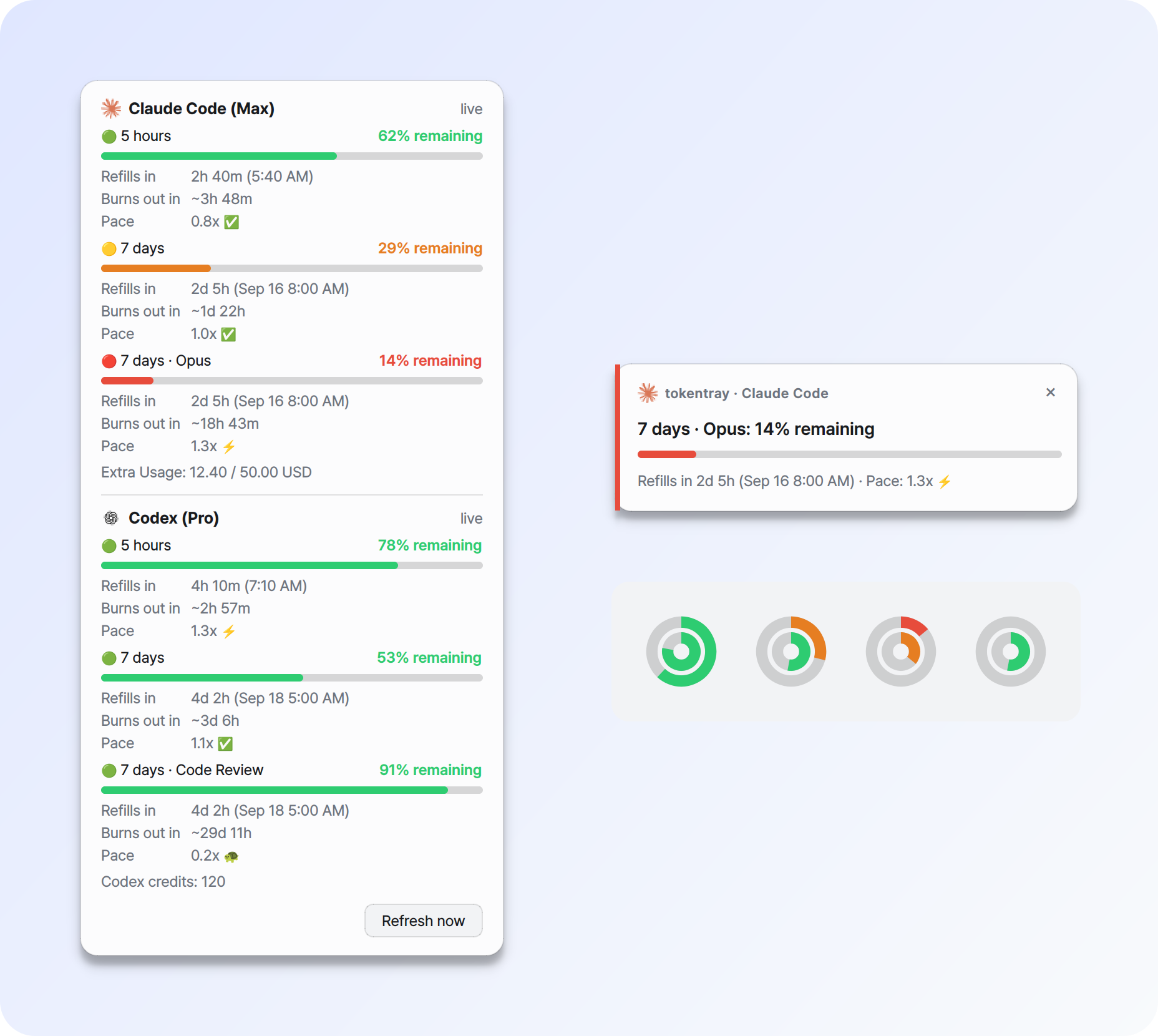
- 🟢 Tray rings at a glance - Claude on the outside, Codex inside. Green above 50% left, amber down to 21%, red at 20% or below, grey without data.
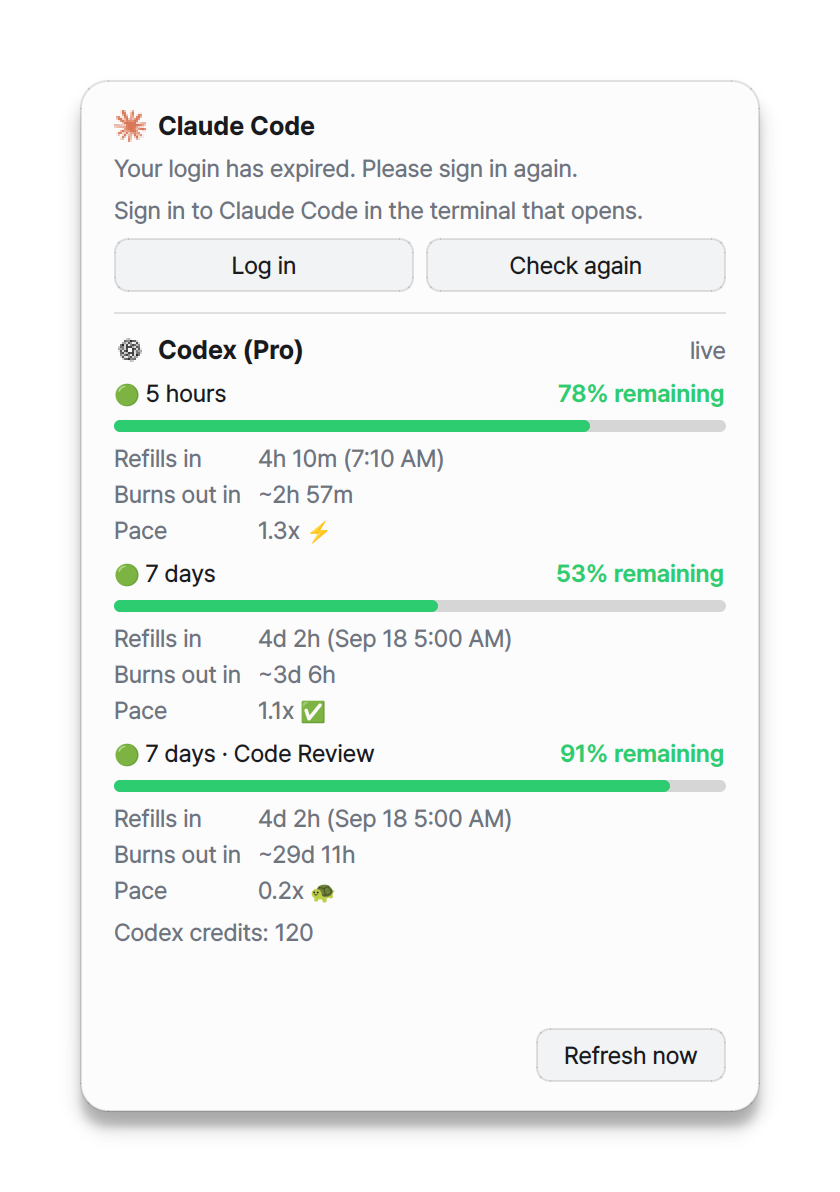
- 📊 Detail panel - remaining %, time to reset, burn-out estimate and pace for every limit, including Opus/Sonnet and Codex model limits.
- 🔔 Alerts before you run out - at 50, 25 and 10% remaining, plus reminders before a reset.
- 🔑 One-click login recovery - opens a terminal with
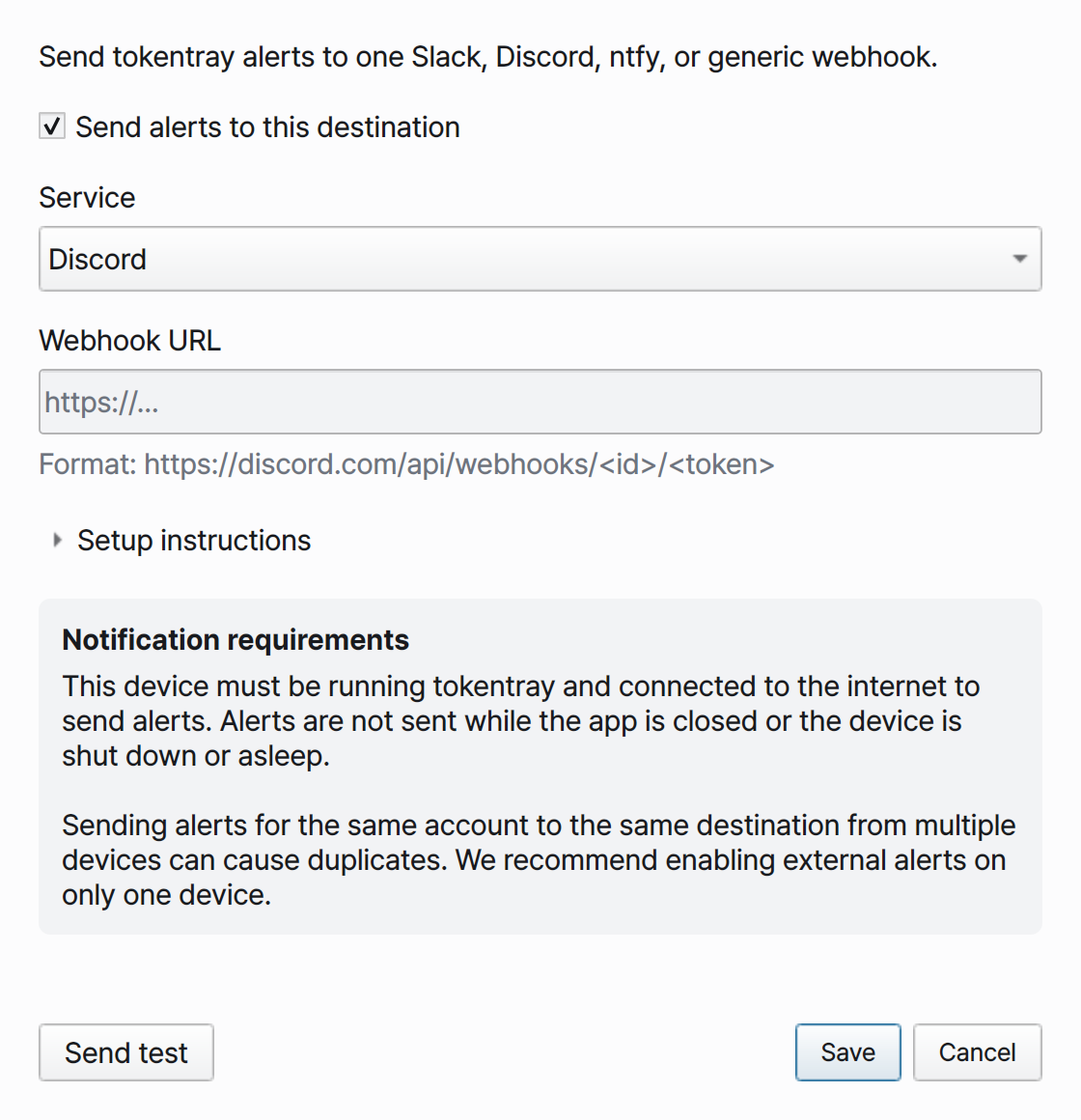
claude auth loginorcodex loginwhen a login expires. - 🌐 Webhooks - forward alerts to Slack, Discord, ntfy or any HTTP endpoint.
- 🖥️ Windows, macOS and Linux, in English or Korean.
A pace of 1.0x means you will hit the limit exactly at reset if you keep going at your average rate so far.
Install
[!TIP] uv is the recommended way. It downloads a matching Python for you and keeps tokentray in its own environment, so nothing else on your system changes.

Install uv once:
# macOS / Linux
curl -LsSf https://astral.sh/uv/install.sh | sh
# Windows (PowerShell)
powershell -ExecutionPolicy ByPass -c "irm https://astral.sh/uv/install.ps1 | iex"
brew install uv and winget install --id=astral-sh.uv -e work too. Then:
uv tool install tokentray
If the shell cannot find tokentray afterwards, run uv tool update-shell and
open a new terminal.
pipx
pipx install tokentray
pip
Needs Python 3.11-3.13. Install into a virtual environment:
python -m venv .venv
source .venv/bin/activate        # Windows: .venv\Scripts\activate
python -m pip install tokentray
Standalone builds (no Python needed)
| Platform | Download | Then |
|---|---|---|
 |
tokentray-windows-x86_64.zip |
Unzip, run tokentray\tokentray-gui.exe |
 |
tokentray-macos-arm64.zip |
Move tokentray.app to Applications |
 |
tokentray-linux-x86_64.tar.gz |
Unpack, run ./install.sh |
[!IMPORTANT] Standalone builds are not code-signed, so Windows SmartScreen and macOS Gatekeeper warn on first launch. See Platform notes.
Quick start
Sign in to Claude Code or Codex first - one of them is enough.
tokentray setup              # choose a language, check logins, offer start-at-login
tokentray                    # start the tray app
With a standalone build, the tokentray CLI sits next to the app (inside
tokentray.app/Contents/MacOS on macOS).
Alerts and polling
| Setting | Default | What it does |
|---|---|---|
poll_interval |
120 |
Seconds between usage checks (minimum 30) |
thresholds |
50,25,10 |
Remaining % that raises an alert |
remind_before |
60,30,10 |
Minutes before a reset to remind you |
popup.duration |
8 |
Seconds an alert card stays up |
popup.position |
auto |
bottom-right, top-right, or auto (top on macOS, bottom elsewhere) |
native_notifications |
Windows false, others true |
Also send OS notifications |
tokentray config set poll_interval 300    # check every 5 minutes
tokentray config set thresholds 50,20,5   # alert at 50%, 20% and 5% left
tokentray config set remind_before 30,10  # remind 30 and 10 minutes before reset
tokentray config get thresholds
Changes reach the running app straight away, except poll_interval and
language, which apply after a restart. tokentray config path shows where the
config file lives.
[!TIP] Need some quiet? Choose Pause alerts for 1 hour in the tray menu. Test notification previews the alert cards with fresh data.
More settings and webhooks
| Setting | Default | What it does |
|---|---|---|
language |
from locale | en or ko |
webhook.enabled / webhook.kind |
false / ntfy |
External alerts via slack, discord, ntfy or generic |
codex.refresh |
false |
Let tokentray refresh the Codex token |
linux.force_xwayland |
true |
See Platform notes |
Choose Notification integrations… in the tray menu to set up one webhook, validate the URL and send a test, or use the terminal:
tokentray webhook setup --service slack
tokentray webhook test
The URL is kept in the OS keyring. Alerts are only sent while tokentray runs on
a device that is online; if several devices watch the same account, enable
webhooks on just one to avoid duplicates. For Slack, set
packaging/resources/tokentray-512.png as the app icon; Discord lets you set
the webhook avatar in the channel settings.
All commands
| Command | Description |
|---|---|
tokentray |
Start the tray app |
tokentray setup |
Interactive first-run configuration |
tokentray status |
Print current quota (asks the running app first) |
tokentray open / refresh / stop |
Control a running instance |
tokentray doctor |
Check credentials, keyring, tray and notification delivery |
tokentray config get/set/path |
Read and write settings |
tokentray state reset --welcome/--alerts/--all |
Re-arm the first-run notice or the alert memory |
tokentray webhook setup/test |
Configure and test a webhook |
tokentray autostart enable/disable/status |
Manage start-at-login |
Platform notes
- A new tray icon may land among the hidden icons. The welcome card links to the
taskbar setting, where the entry's name starts with
tokentray. - On the SmartScreen prompt for a standalone build, choose More info then Run anyway.
- Installed with uv or pip, the background process shows in Task Manager as
pythonw.exe.
-
Builds are ad-hoc signed, not notarised. If Gatekeeper blocks the app:
xattr -dr com.apple.quarantine /Applications/tokentray.app
-
Apple silicon only. The app lives in the menu bar, so there is no Dock icon.
-
The CLI is at
/Applications/tokentray.app/Contents/MacOS/tokentray; symlink it onto yourPATHto typetokentray. -
Reading Claude Code credentials from the login keychain may show an access prompt the first time.
-
Notification Center delivery from a tray app is unreliable, so tokentray's own alert cards are the main channel.
tokentray doctorshows what your build can do.
-
x86_64 tarball only.
./install.shadds a launcher entry and icon for your user;./install.sh --uninstallremoves them. -
Qt needs a few system libraries that minimal installs, including stock Ubuntu 24.04, may lack:
sudo apt install libxcb-cursor0 libxkbcommon0 libegl1 libgl1 libdbus-1-3 libfontconfig1 libglib2.0-0
-
GNOME needs the AppIndicator extension to show a tray icon; KDE works out of the box.
-
On Wayland, tokentray runs through XWayland so alert cards can sit next to the tray. With
linux.force_xwayland = falseit runs natively, but the compositor decides where cards appear. -
Without a keyring service such as SecretService, secrets fall back to an owner-only local file, and setup tells you so.
More details
Login credentials
tokentray reads the credentials Claude Code and Codex already saved:
| Service | Location |
|---|---|
| Claude Code | ~/.claude/.credentials.json (or $CLAUDE_CONFIG_DIR), then the macOS login keychain |
| Codex | ~/.codex/auth.json (or $CODEX_HOME) |
- Log in in the panel or an alert opens a terminal running the login command and watches for new credentials for up to five minutes. If no terminal can be opened, copy the command shown.
- Claude token refresh is left to Claude Code. Codex refresh is opt-in
(
codex.refresh) and re-readsauth.jsonbefore writing, so it never overwrites the Codex CLI. - A token pasted during
setupis stored in the OS keyring. A pasted Claude token cannot be renewed when it expires. doctorreportingno token in filedoes not always mean you are logged out: the file may hold plan metadata while sign-in is handled elsewhere.
How alerts are delivered
- Windows shows tokentray's own cards. Set
native_notifications = truefor Windows banners instead; if a banner cannot be submitted, the card is shown. Welcome and login-recovery alerts always use cards so their buttons work. - macOS and Linux show cards and also send an OS notification.
- Test notification fetches fresh usage and shows one card per service. It does not touch alert history or send webhooks.
- Every OS notification attempt is logged; open the log from the tray menu.
Privacy
[!NOTE] No telemetry. Claude and Codex tokens are sent only to
api.anthropic.com,chatgpt.comandauth.openai.comover HTTPS. Webhooks receive alert text, never tokens.
Caches and the fallback secret file are owner-only (0600) on macOS and Linux;
on Windows they inherit your user profile's permissions.
Contributing
Bug reports, ideas and pull requests are welcome, in English or Korean.
- 🐛 Found a bug? Open a bug report
with
tokentray --versionandtokentray doctoroutput. - 💡 Have an idea? Open a feature request.
- 🔒 Security issue? Report it privately - see SECURITY.md.
- 🛠️ Want to send code? Start with CONTRIBUTING.md.
License
MIT - see LICENSE, which also keeps the MIT notice of haomingkoo/claude-codex-monitor. Standalone builds bundle Qt through PySide6 (LGPLv3) as dynamically linked libraries.
1 maintainer

Metadata
1 maintainer
Release files for tokentray 0.1.0
For a detailed explanation of source distributions (sdists) and built distributions (wheels), please see the package formats documentation.
Source distribution (sdist)
| File | Size | Uploaded | |
|---|---|---|---|
| tokentray-0.1.0.tar.gz | 6.0 MB | Details |
Built distribution (wheel)
| File | Interpreter | ABI | Platform | Reset |
|---|---|---|---|---|
| tokentray-0.1.0-py3-none-any.whl | Python 3 | none | any | Details |
Total release size: 9.3 MB
Release files / tokentray-0.1.0.tar.gz
| Download URL | tokentray-0.1.0.tar.gz |
|---|---|
| Size | 6.0 MB |
| Tags | Source |
|
SHA-256 checksum How to use checksums |
ab3b03aab81405ddaae188c40ac86d095d0af400e03a918bd83c4d5a5457cac7
|
|
BLAKE2b-256 checksum How to use checksums |
79a97faaee979d2b26f7727b5b3f98cdd656a10bb54c7e09a1f95d22c01faefa
|
| Upload date | |
|
Uploaded using Trusted Publishing? What is trusted publishing? |
Yes |
| Uploaded via |
uv/0.12.13 {"installer":{"name":"uv","version":"0.12.13","subcommand":["publish"]},"python":null,"implementation":{"name":null,"version":null},"distro":{"name":"Ubuntu","version":"24.04","id":"noble","libc":null},"system":{"name":null,"release":null},"cpu":null,"openssl_version":null,"setuptools_version":null,"rustc_version":null,"ci":true}
|
Release files / tokentray-0.1.0-py3-none-any.whl
| Download URL | tokentray-0.1.0-py3-none-any.whl |
|---|---|
| Size | 3.3 MB |
| Tags | Python 3 |
|
SHA-256 checksum How to use checksums |
771c1ee3cf30a9c9c7844e757284a65989743b419463e2e0b0ec81f6842c09dd
|
|
BLAKE2b-256 checksum How to use checksums |
9c4ac652f51493f3adf70f54ddcf612d5f92c8d2cf75dcc9f3239ed9ea28a4cb
|
| Upload date | |
|
Uploaded using Trusted Publishing? What is trusted publishing? |
Yes |
| Uploaded via |
uv/0.12.13 {"installer":{"name":"uv","version":"0.12.13","subcommand":["publish"]},"python":null,"implementation":{"name":null,"version":null},"distro":{"name":"Ubuntu","version":"24.04","id":"noble","libc":null},"system":{"name":null,"release":null},"cpu":null,"openssl_version":null,"setuptools_version":null,"rustc_version":null,"ci":true}
|














